
iOS 10 Battery Life Draining Too Fast? Check These 9 Helpful Tips
Is your battery draining faster with iOS 10? It shouldn’t be, but some people have felt that updating to iOS 10 has reduced the battery life on their iPhone, iPad, or iPod touch. If you suspect that updating to iOS 10 has changed your battery life for the worse, read on to learn some potential reasons for this, as well as some reasonable solutions.
0: Wait! Are you using it more?
iOS 10 brings a lot of improvements and changes to the iPhone, iPad, and iPod touch experience, a side effect of that is people tend to use their devices a lot more right after updating to a new iOS release. Well, when you use your device more, the battery drains faster.
This is a very common occurrence with new iOS updates as people explore the new features on their iPhones and iPads, so consider this if you feel the device is draining faster than usual… maybe you’re just using the device more than you realize?
Fortunately it’s really easy to check how long you’ve been using your iPhone or iPad since it was last charged, which should give you an idea of battery life and your usage. Go to “Settings” and then to “Battery” and scroll down to see “Time Since Last Full Charge” to see the usage and standby times, which gives you an idea of how well the battery is performing.
1: Plug it in overnight
This might sound like odd advice, but one of the best things to do after updating to iOS 10 is to plug in your iPhone, iPad, or iPod touch, let the screen turn off, and do nothing for an extended period of time. Letting it sit plugged in overnight while you sleep is perfect for this.
This can help because iOS 10 does a lot of indexing and scanning of your pictures and data in the background, for features ranging from Spotlight to new Siri abilities to the Photos sorting and searching functions. While you can certainly use your iPhone or iPad while those background tasks are taking place, the device might appear slower or might seem to have a rapidly draining battery, when in fact it’s just iOS 10 doing what it needs to do to be entirely usable. For large devices that are nearly full of photos and other stuff, the indexing and maintenance processes can take many hours, sometimes extending beyond even 12 hours. So wait a day or two and make sure it has been plugged in and not in use for a notable amount of that time.
2: Restart
A common trick that may help battery life is to restart the iPhone, iPad, or iPod touch. You can do the typical restart of turning the device off and then back on again, or force reboot. Sometimes a simple device reboot does the trick.
3: Follow the Battery Life Advice in Battery Settings
New to iOS 10 is the ability for the device to specifically recommend battery saving suggestions to prolong battery life. Typically this means making adjustments to usage like reducing the devices screen brightness.
- Go to Settings > Battery > look for “Battery Life Suggestions”
You’ll see what is offered for your device, then follow that advice. And yes, it’s good advice.
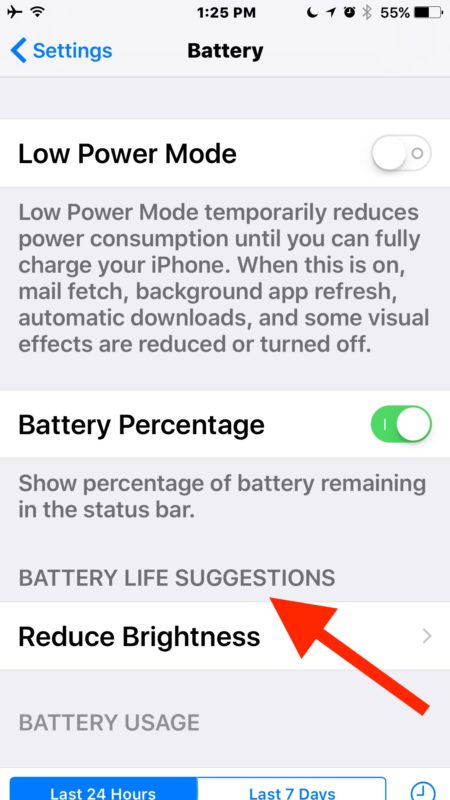
You can then tap on each item to jump directly to it in Settings. And yes really, reducing your screen brightness will have a big impact on battery life.
4: Disable Background App Refresh
Background App Refresh is a nice feature but in practice it tends to consume more battery life by allowing apps to do more activity in the background. Thus, disabling Background App Refresh tends to increase battery life, and many users don’t even notice the difference from turning it off.
- Open Settings and go to to “General”, choose “Background App Refresh” and turn the top switch to the OFF position to disable the feature
5: Use Reduce Motion
Reducing the amount of visual effects in iOS may offer a minor improvement to battery life:
- Go to Settings > Accessibility > Reduce Motion > ON
Note doing this will cause iMessage effects to not work so only adjust Motion if you don’t care about the fancy message lasers, slams, and confetti type effects.
6: Disable Location Services You Don’t Need or Use
Location services and GPS usage can hit the battery particularly hard if they are used extensively, so disabling some of the location features can help your battery last longer.
- Open Settings > Privacy > Location Services
- Adjust settings appropriate for your usage, setting to “Never” or “While Using” as needed per app and feature
This is universally good advice for prolonging battery life and doesn’t apply just to iOS 10.
7: Backup and Restore
If your device is really struggling with battery life draining rapidly with iOS 10, you might want to try backing it up and restoring it. This is a common troubleshooting technique and it’s likely what Apple will walk you through if you contact their support line.
You’ll want to backup your device to iTunes or iCloud, then restore the device to that newly made backup. This entire process can take a while, but it can sometimes help.
8: Fed up? Consider a downgrade
If you’ve tried everything, you’ve let the iPhone or iPad sit plugged in for 48 hours unused, none of the recommendations work, and you’re just entirely fed up, you could always downgrade back to the prior iOS version. This is only available for a limited time as Apple continues to sign the older iOS 9.3.5 builds, and to be done properly it requires access to a backup made from iOS 9 as well. If you’re interested in this rather dramatic approach, you can learn how to downgrade iOS 10 to iOS 9.3.5 here.
–
How is your battery life with iOS 10? No difference? Is it better or worse? Did the above tips help? Let us know in the comments below.






I want my iPhone 5s to stop draining
Ever since I allowed the iPhone upgrade to 10, my phone’s battery continues to drain more quickly than before. My battery used to last 3-4 days on a single charge. Now, it drains completely in less than 24 hours. The most draining happening at night when I’m asleep. Does anyone know if the upgrade allows access to Your phone by Apple or other third party apps at night? ARE THEY DATA MINIG YOUR PHONE?
Ever since I allowed the iPhone upgrade to 10, my phone’s battery continues to drain more quickly than before. My battery used to last 3-4 days on a single charge. Now, it drains completely in less than 24 hours. The most draining happening at night when I’m asleep. Does anyone know if the upgrade allows access to Your phone by Apple or other third party apps at night? ARE THEY DATA MINING YOUR PHONE?
About the time I installed my last suggested update, my battery on my IPad Air will not hold charge. I usually used it all day with one charge…now I charge it several times a day! Not happy and I have done all suggestions you have posted.
I have a 6 plus I updated IOS only cause of the annoying pop ups and now after 3 hrs it was close to dying on me! The worst part is that it wont even charge anymore if its not the original $30 apple charger!!!
I use to go all day without charging my phone! I never thought I would say this but Apple sucks!!
2 year old Iphone 6. Hardly ever used except for an concessional phone call a couple times a week and one or two text messages a day. Always put it in the charger over night. Normally at the end of the day I have had 90% battery left. All of a sudden a few weeks ago I started noticed a rapid drain on battery. After unplugging the phone from the charger and logging in the battery shows 10% drain in the first couple of minutes. Lay it flat and walk off, come back an hour later and it is down to 80%. No change in apps or usage from the past couple of years. Did all of the recommendations in the article, but has not helped. The battery usage shows very little apps using the battery, just mail and messages. I moved the mail to manual update only. No change in drain rate. It sits on low power mode now until I can buy a battery back up. My ipad works better than my iphone6 as far a battery usage and it is over 6 years old. I can watch movies, youtube videos , read mail and my text messages and my ipad is still above 50% at the end of the day. Very sad that something updated my iphone6 to become worthless unless you carry around an alternate power source. From all of the reading I have done searching on the internet, this is a growing problem. I don’t think Apple is going to do anything until there is a large online group consumer action complaint filed. With as many people as I have seen recently with the same problem, it would seem there should be enough for a class action suit or complaint. Is there a place online to sign a petition for this problem?
Apple spends a lot of money advertising their products to consumer to buy their products. That money in advertising can easily be counteracted by a large free social network voice of consolidated and focused consumers angered about the same consumer problem. If the voice is loud enough with a large amount of angered consumers, it will start to affect sales and they will be forced to do a recall and fix the problem. Having a single place to sign a petition and have the media take notice would be the first place to get Apple to choose not to ignore the problem.
There is an implied warranty of service with a mobile device and Apple devices should be able to deliver a similar quality of product life as other similar brand devices used in a similar manner.
I am very mad that my old flip phone worked better than my fancy iphone that I finally upgraded to. Worse, unlike most devices where you can open the case and buy a new battery, it seems like you have to go to Apple and be without your phone for a few days/weeks if they don’t have a battery instock and they charge you for the service. Meanwhile you have no phone for that time frame.
If there is an online petition for this consumer complaint, I would sign it .
Agree with a lot of posts I don’t use my phone all that much just FB in the AM before work to catch up on things again at lunch I thought the same thing it’s a 6 I typically put it on charger all night and thought time to replace battery replaced it my self the only way I can nearly make it through the day now is to put it in low battery mode early in AM if I’m lucky it will make it through the Sftw. Is 10.3.3 really pissed of pretty loyal I phone user but this battery crap has me pissed off.
I have iphone 6 and having the same battery issues as everyone on here. The phone will show it has 60% battery and then shut off. When I hit the power button it will show the power cord indicating it is out of juice. I plug it in and it turns back on and says it has 45% power. There is no consistency with it at all. I have to take a power cord everywhere I go. When at lunch I watch the power drain as I read email. This seems silly when taking into consideration how much i spent on this thing. IOS 10.3 is what I am currently running
Stumbled on here as I can’t find any reason why this expensive iPhone 6s Plus now drains so fast.
If I heed all the suggestions given, turning off features, deleting data, etc I’ve ended up with a phone that really is no better than the old Phone this iPhone replaced.
What I find disturbing is the number of complaints published which is typically a fractional percentage of actual occurrences, and the complete disregard by one of the wealthiest companies in the world to address or even accept responsibility for their actions.
It is as if Apple has no regard for you, their consumer.
I know what my next solution will be. Hello moto.
Yep. Same problem happening with my iPad. It was working fine for the last two years and now, suddenly, I can go to bed with it 100% charged and when I wake up in the morning it’s completely dead. All apps are turned off. My new iPhone 7 isn’t as bad but I feel like I’m constantly fighting to keep it charged. So frustrating to spend soooooo much money on products that don’t deliver…😕
Using iphone 6s – dramatic battery life reduction from this upgrade last week. C’mon Apple – you can do better. Fix this!
After upgrading to 10.3.1 my iphone 6 dies every night. Last night I had it at 84% before I went to my bed, got up 7 hours later and it was completely dead. Absolute shambles. Going to have to go and get an alarm clock as I can’t rely on my phone lasting long enough to wake me up in the morning.
I charged my 6s to full 100% then turned it off at night.. When I switch it on in the afternoon, the battery is fully drained already. I tried replacing the battery but the problem is still the same.. Sigh.. Hope Apple will give us solution..
My 6plus is having serious battery issues since upgrading….even in low power mode it will die from taking one photo from about 19% which is so annoying. I always plug my phone in over night and it always lasts until the next night easily but since this upgrade I’m barely making it to the next afternoon!! So annoyed!
iPhone 5s is losing 10% battery per hour, in airplane mode, even after fresh reset and install.
Ridiculous.
Does anyone:
– recognise symptoms like this?
– have a working solution?
I’ve observed this battery pattern for weeks and the handset just can’t hold battery, even while it is as idle as j can make it.
What the hell! My iPhone 6s is overheating too! After uploading to iOS 10 my phone gives me about 4 hours of use and then it’s back to charging. My phone in the past would never overheat and I would get a least 12 to 15 hours of use doing the exact same functions. If this phone blows up in my pocket you will be hearing it on the 5 o’clock news.
Well I take back that 5 minutes per %. While using my phone and keeping an eye on my battery, I just dropped 6% in under 5 minutes of use… I guess that is why apple support tells you not to look at the battery %. This is laughable. I’m using a 6s with a 128GB ssd.
I’ve had battery issues since iOS 9.3.5. Took it in to the Apple Store had my phone completely reset. It didn’t solve the issue. I’ve turned almost everything off but still my phone will drain pretty rapidly, more rapid than it ever did when it was new before these updates. Specifically starting with 9.3.5. At least now it’s more stable. I’m running 10.2.1. Battery drains about 11% overnight. I get about 5 minutes per %, hardly using the phone.
Iphone 6s IOS 9.3.1. Should i upgrade?
Best Buy replaced phone as defective
But let’s be honest here, everyone’s iphone (all various models) didn’t suddenly become defective overnight. This is an Apple iOS problem. My 5s is only a year old and I have a friend who bought one the same time I got mine. They were both fine until the iOS 10 update showed up. All at once (overnight) both of our batteries started to loose huge amounts in no time. I always close out my background apps and keep extra stuff turned off that I don’t use. There is no other cause than Apple’s iOS 10 update.
I’ve done everything from resetting the phone to a complete factory wipe and re-install. I can charge it to 100% around 6:00pm, leave it with no apps running and by the next morning at 4:30am, I’m lucky if there is 5% battery left. I even tried powering the phone off overnight and it still lost battery. My friend has the exact same symptoms.
Maybe it’s time for a class action if Apple doesn’t fix this. And I can guarantee you, this is the last Apple device I will buy (coming from a 22 year Apple user)
Any ideas what portable chargers work with the iOS 10? I was looking for one on Amazon, and one of the reviewers noted that a well-rated JackeryBar charger didn’t work with iOS 10. Is this true? Don’t want to invest in a charger that doesn’t work with iOS 10. And downgrading isn’t an option for me (company phone).
I fully charged my phone and went to bed and it went from 100% to 57% The phone is an I phone 7 less than a month old. Could it be the new IOS? Trying some tips from this site and hopefully it fixes this issue. Other than the IOS I only have three game Apps and a kindle. I hardly every play them and never had an issues when I had my I phone 5. Really don’t need this aggravation. I agree with Atticus
Long time iPhone user (from the very first model)! I have a 6 which is about 2 yrs old. Until iOS 10 I’ve been able to use battery for nearly 2 days. I am a moderate user. No energy sucking apps, background refresh has always been off and hardly any location services on etc.
I’ve noticed my phone often gets very hot nowadays. And in checking battery usage it’s my Calendar that uses most! How can that be? What is calendar doing in the background and can I turn that off (whatever it does?). I would appreciate help with that.
Apple might actually lose me ultimately. I find this hugely annoying. I love my phone but if this continues it’s going to be the last iPhone I will have….
I have an IPhone 5 SE, it’s less than a year old but even when not in use overnight though not on charge the battery can go from 80% to dead within 8 hours. Any help appreciated.
My phone drains in less than half a day now with no useable at all, hopeless and I see no advantage in 10.02 or whatever it is. My next phone will not be an apple
I have a 6s that has gotten much worse since the upgrade. It’s the phone my dad is using and it drains horribly. He couldn’t figure out why it changed so drastically over the past week and the only thing different is the upgrade. Bad Apple, bad!!!
OMG – it SUCKS!! Makes me want to throw my phone out the window of my moving car. Absolutely HATE battery performance since upgrading.
since 10.2 on 6s noticed battery gets to 33% and the phone dies. As soon as plug in power the phone comes back to life immediately and shows 34%
Bad news – get your act together Apple!!!
My battery all of a sudden has become really bad. Even with the phone powered off I lose battery life. I’m not understanding this at all😏😏
I always update my IPhone 6S as there is a new update available. I have never had battery issues until I updated to IOS 10.2.
After that my IPhone barely lasts 10 hours without any calls and only an occasional check of e-mail. This is absolutely a new problem for me.
Since the release of iOS 10 iPhone 5S significant decrease battery and frustrating. We have two iPhone 5S and both approx 1 hour 15% battery. Of course, perhaps we tried it all, everything went off – the same loss of battery. I now have one iOS 10.2 b7, no change.
It seems there’s still a big problem with iPhone6s’ battery measurement(actually the percentage down quicker than the actual battery cost) after upgrade to ios10.2(Final).
The battery drain issue messed me up almost one month! so this time I decide to bring my iPhone6s to apple store in China Shanghai and ask them just change to a new battery(I really do not think it’s a hardware problem), but to register a repair appointment in this country’s apple store is a big big fail!
So I have to bring back iPhone to my office,
connect to iTunes,
and restore to ios 10.2(Release) by enter in recovery mode. Then I charge the phone to 100% power,
disconnect the lighting port,
and turn on “Never Auto-lock”(just keep screen lightup)
after that I just open the camera app and let the phone eat battery very quickly, lol,
after almost 5 hours, the battery down to 0%,
then I recharge it to 100%,
disconnect the lighting port,
and after 8 hours testing……………….
I think this time the iPhone6s goes very stable! battery drain issue seems fixed! Finally!
Now anyone can approve my fixing way is really work? :)
Hi
Did you ever get any solution for your battery drain?
Like you, I’m losing power when my handset is idle. Actually 10% / hour in airplane mode.
I’d be ashamed to say I worked for Apple.
Updated my iPhone 5C and IPad Air to 10.1.1 on the same day. iPad gets hot while browsing with Safari and will last less then half a day before needing to be changed. iPhone seems the same after the update. I’m typing this on my iPhone as my iPad is charging. iPhone is a year older than the iPad, so can’t blame battery age. Both are rarely powered off.
Brutally bad. Full charge to full discharge in under 2 hours, post update. Location services off, lower power mode bluetooth off, background updates off etc. Any suggestions?
try ios 10.2 beta 6, improve the battery life a lot i think
no, it’s not stable ….
so do not try my steps on November 29 post.
but it’s wired I got better and longer battery life for my iPhone 5s after upgraded to ios 10 ………hah…lucky iPhone 5s
got insane battery drain problem after upgraded to 10.1.1 for my iPhone6s, sadly can’t back to ios 9.3.5.
now seems back to normal (standby one morning and no 1% battery lose).
here’s what I do:
1. backup everything before you upgrade
2. goto beta.apple.com download beta profile
3. update ios system to ios 10.2 Public Beta 4
2. reset all when done upgrading
3. disable unnecessary location service
4. disable unnecessary iCloud using
5. turn on “Reduce Motion”
6. finally turn on “Low Power Mode” (important)
it’s just a temporary solution I think (personally don’t like “Low Power Mode manually turned on”). Hope Apple will fix battery drain issue ASAP.
Upgraded to 10.1.1 Battery has been draining like mad since the 10. Upgrade. Infuriating!! 100% in the morning, 3 hours later it’s down to 65% having hardly used my phone.
I also updated my iPhone 6s to iOS 10.1.1 and my battery drains dramatically! It is infuriating. Please Apple send out a fix for us!
I also updated my iPhone 6s to iOS 10.1.1 and my battery drains dramatically! It is infuriating. Please Apple send out a fix for us!
My battery drains faster. Go from 60% some to 40% some like all of a sudden. I hate the upgrade. Need to fix it. Never had this problem until the upgrades. I have done all the suggestions
Long story short – MAJOR battery issues a few weeks ago when iOS 10 was first installed. Hours on the phone with Apple (they said there isn’t an issue with iOS10 and the iPhone 6s). Finally I was with a deep techie and he suggested the nuclear option. I did it, and the problem was improved, but still not good.
Then iOS 10.1.1 came, and the problem returned and was worse than before. More hours on the phone with Apple support, and they finally sent me to the store for a new battery – another 4 hours spent one week ago.
There was a slight improvement, then the problem returned. I made an appointment with the store (three days later was the first opening) and waited – carrying a charger with me all the time.
The day before the appointment, much to my surprise, the phone returned to what I consider “normal” – charging it every other night. I cancelled the appointment as the time approached because I had not put it on a charger for 41 hours and I still had 61% of the battery!
Big mistake – I should have gone into the store (not knowing what they would suggest). I’m back to losing 10% of the battery per hour while is in sitting in the case unused. I took it off the charger at 8:30 last night with the battery showing 100%. At 6:00 this morning it was totally dead. I charged it this morning and took it off the charger 4 hours ago – I’m sitting at 43%.
Does anyone have this problem with a Windows or Android phone? Maybe it’s time to change.
I don’t c the battery life suggestions either for god sake my iPhone 5 and ios10 don’t seem to mix
I’ve been having the same thing with my iPhone 6 (Battery draining too fast) last Saturday I when out I had 50% life left so I decided to turn my phone completely off. 3hours later I turned it back on an it had only 5% battery life left. Why if the phone was completely off.😖😓
Hi:
My iPhone also experienced DRAMATIC battery issues once I updated to 10.1.1.
Where before the update, I could go for at least two days off one overnight charge, I can go for ONE HOUR! ONE HOUR!
I can see the battery life disappearing as I am checking email from 56% to one second later 25% then to automatic shut off another second later.
This is a SERIOUS issue and if a multitude of people are expressing the same concern, even after we have tried the suggestions (thank you above for your solution attempts) Apple needs to fix it.
It’s not that all of a sudden everyone started using their iPhones that much more that batteries that once lasted days, now last one hour.
It’s not even possible to use that much energy on your phone after a full charge.
Apple – please fix the issue.
I think i found the culprit. I have posted a particular section that keeps looping under a second and possibly why its draining all the battery.
The update has some service that keeps looping here’s the log ;
Nov 8 13:44:28 Monarsingh-Dallo-Rihmos-iPhone apsd(PersistentConnection)[81] : 2016-11-08 13:44:28 +0530 apsd[81]: Looking up connection on peer: 275210 found
Nov 8 13:44:28 Monarsingh-Dallo-Rihmos-iPhone syncdefaultsd[115] : marked “com.me.keyvalueservice” topic as “enabled” on
Nov 8 13:44:28 Monarsingh-Dallo-Rihmos-iPhone apsd(PersistentConnection)[81] : 2016-11-08 13:44:28 +0530 apsd[81]: peer(115) received XPC_ERROR_CONNECTION_INVALID
Nov 8 13:44:28 Monarsingh-Dallo-Rihmos-iPhone awdd[80] : conn:#I Got xpc error connection invalid on connection 0x0x12fd27d10
Nov 8 13:44:28 Monarsingh-Dallo-Rihmos-iPhone UserEventAgent(PersistentConnection)[22] : 2016-11-08 13:44:28 +0530 UserEventAgent[22] BTA-com.apple.timed: Invalidating simple timer
Nov 8 13:44:28 Monarsingh-Dallo-Rihmos-iPhone UserEventAgent(PersistentConnection)[22] : 2016-11-08 13:44:28 +0530 UserEventAgent[22]: is invalidated
Callstack (
0 PersistentConnection 0x00000001851c557c + 116
1 PersistentConnection 0x00000001851c2f68 + 292
2 com.apple.BackgroundTaskAgentPlugin 0x0000000100757b34 com.apple.BackgroundTaskAgentPlugin + 15156
3 com.apple.BackgroundTaskAgentPlugin 0x0000000100756d8c com.apple.BackgroundTaskAgentPlugin + 11660
4 com.apple.BackgroundTaskAgentPlugin 0x0000000100756978 com.apple.BackgroundTaskAgentPlugin + 10616
5 libdispatch.dylib 0x00000001812b91c0 + 16
6 libdispatch.dylib 0x00000001812c6008 + 576
7 libdispatch.dylib 0x00000001812d2648 + 204
8 libdispatch.dylib 0x00000001812bb164 + 820
9 libdispatch.dylib 0x00000001812c7278 + 468
10 libdispatch.dylib 0x00000001812bc9a8 <redacte
Nov 8 13:44:28 Monarsingh-Dallo-Rihmos-iPhone UserEventAgent(PersistentConnection)[22] : 2016-11-08 13:44:28 +0530 UserEventAgent[22]: dealloced
Nov 8 13:44:28 Monarsingh-Dallo-Rihmos-iPhone UserEventAgent(PersistentConnection)[22] : 2016-11-08 13:44:28 +0530 UserEventAgent[22]: is invalidated
Callstack (
0 PersistentConnection 0x00000001851c557c + 116
1 PersistentConnection 0x00000001851c2f84 + 320
2 com.apple.BackgroundTaskAgentPlugin 0x0000000100757b34 com.apple.BackgroundTaskAgentPlugin + 15156
3 com.apple.BackgroundTaskAgentPlugin 0x0000000100756d8c com.apple.BackgroundTaskAgentPlugin + 11660
4 com.apple.BackgroundTaskAgentPlugin 0x0000000100756978 com.apple.BackgroundTaskAgentPlugin + 10616
5 libdispatch.dylib 0x00000001812b91c0 + 16
6 libdispatch.dylib 0x00000001812c6008 + 576
7 libdispatch.dylib 0x00000001812d2648 + 204
8 libdispatch.dylib 0x00000001812bb164 + 820
9 libdispatch.dylib 0x00000001812c7278 + 468
10 libdispatch.dylib 0x00000001812bc9a8 <redacte
Nov 8 13:44:28 Monarsingh-Dallo-Rihmos-iPhone UserEventAgent(PersistentConnection)[22] : 2016-11-08 13:44:28 +0530 UserEventAgent[22]: dealloced
Nov 8 13:44:28 Monarsingh-Dallo-Rihmos-iPhone UserEventAgent(PersistentConnection)[22] : 2016-11-08 13:44:28 +0530 UserEventAgent[22] BTA-com.apple.timed: Started simple timer with fire date [2016-11-08 13:48:55 +0530]
Nov 8 13:44:28 Monarsingh-Dallo-Rihmos-iPhone UserEventAgent(PersistentConnection)[22] : 2016-11-08 13:44:28 +0530 UserEventAgent[22]: initialized with target selector _preventSleepFired timerSource
I have been battling this battery issue since I bought the 5s.. got it replaced in within a month of buying it due to serious battery and heat problems. With a lot of effort that too, still had the same problem. Then apple released an update that seem to fix it. I was so glad my phone would last 9 hours with moderate usage.
Model : iphone 5s
Connection : 3g
Display : 50%
Low Power mode : always on
After the ios 10.1.1 update, I am back to square one. The phone can barely last 2 hours. Yesterday there was heating issues. Had it fixed after removing some apps and power cycling the heating issue reduced. However battery drains just as fast. I was out for work at 10:24 am reached office at 10:57 am.. guees the battery drain .. from 100% it was down to 54%.. Now that’s massive.. whats a “mobile” phone you have to always plug in to a socket ? :-\
All this with low power mode. I am pretty aware how to save on battery since I have had major issues with battery.. adjusting the background refresh and switching off anything that uses mobile internet… battery usage.. it doesn’t help. the phone is meant to do all that.. doesn’t make sense switching off everything and rendering the phone useless.. I mean you feel like you’re using an old black and white phone then..
Apple really has to ensure they are hiring the best software geeks if they don’t do a quality check or debugging on their software updates. Cost cutting by replacing units seem cheaper but it doesn’t really solve any issue. Releasing for end users to try and test is frustrating for us now.
Having exact the same problem with my iPhone 7 Plus, I noticed that my apple watch has something to do with that problem…
Okay, so here’s something I have observed. The GPS under privacy has a setting that allows the phone to display a small arrow when the GPS is in use. I kept it on to check how often the GPS is being accessed because even if I put the phone in flight mode and low power the battery would still drain.
Things I have tried:
1. Removed all apps – no good so don’t try.
2. Checked by putting in flight mode – no good either and definitely it means no problem with network.
3. Power cycled and reset all settings – No good.
4. Discharged the phone completely and recharged – no good – waste of time.
I haven’t tried rolling back to ios 9 – Don’t want to try either. I don’t want to mess about too much. Also there are chances it may just brick my phone. So not going there.
Will keep updating. Please submit things you guys tried as well.
Forgot to mention. After the update sometimes the power drains even when it is charging. I figured you need to restart the device to fix such problem. Apple is really failing their standards now.
I cant believe how poor the battery is now..
I use to be able to go for a 4 hour bike ride with gps and prime music on.. now it dies before i get 2 hours in.. unacceptable. I WILL be going back to my droid when this contract is up!!!
Yes, 2x iPhone 5S. battery decreases of about 15% per hour, the phone warms. This condition has lasted since the 10th edition of iOS phones I re-install a clean install, no backups, off or limited services – nothing helps. horribly.
I have an iPhone 6. and since the update to iOS 10, my battery life is bad. I have used my phone so little today, from about noon to 2:15 pm, and my battery is at 70%. Apple needs to correct this problem. And yes I have checked my settings.
Much worse battery performance since updating. Also couldn’t get voicemail with 10.0 until I updated to 10.0.2, after which the battery performance completely tanked. Don’t have a Mac that works, so the only option is over-the-air update despite Apple’s recommendation to go hardwire. I also noticed that the nighttime screen setting seems much brighter than before the update.
Just made a couple of settings changes and hope they help.
About to give up on Apple. I have an iPhone 6, that is 22 months old. I charge my phone overnight for about 8 or more hours each night and unplug it at 100% at 7:30am. Without use other than to check weather for 10 seconds and maybe download email once, it goes down 40% an hour. If it’s under 50%, it shuts off (usually at 46%). I used to get 16 hours out of it and still have 30% or so at the end of the day. Now I’m afraid to use it at all and only get 2 hours per charge before it shuts off. I charge it about 5-6 times/day now (since last week-was fine before that), charge about 8 hours overnight, charge every time I’m driving in the car, and still can’t even use it. I’ve tried all of the “fixes” to no avail. Just took an hour nap and it fell from 84% to turned off with no background apps running. I usually don’t even take it with me when I leave the house anymore because it only lasts 1-2 hours on standby. Why do I have a phone again? And $700 to replace something that they program not to run anymore in 1-2 years isn’t an option for me. Before the iOS 10 update, I couldn’t store anymore than 10 photos without it telling me I didn’t have enough memory to take a photo. Update, and magically that was fixed but now taking a photo without it plugged in costs my entire battery life.
I’m done with Apple. Once upon a time I wouldn’t have dreamed of leaving them but for anyone to say this upgrade didn’t destroy the life of the battery either got incredibly lucky, never touches their phone or is lying. I now have to walk around w an external battery-even just when walking my dog as the battery drops from 40% to dead in the blink of an eye even with reduced battery power on and ap refresh off. Fix it Apple or I’m buying a google phone. And by the way, in my household alone we have Apple TV, 2 macs, 1 iPad, 2 iPad minis and an iPad Air. My daughter has an iPhone 5S and I have 2 iPhone 6’s. Fix it or we’re gone.
Since ios 10 update, I charge my phone overnight, put it in my holster for the day, and by 9PM it’s totally dead. I’ve disabled background app refresh and just about everything else to make it use less power. Basically it’s a brick. Very unpleased with apple. Also having problems with apps dropping on my wife’s iphone 7 and nothing apple tech walking thru the problem will help. Totally delete apps from phone and itunes on my computer and clean swipe and reset phone. Re-install app and it drops again when we try to open. Apple has some major problems here. What this new 7 phone costs this headache should not be happening…..
Update to IOS 10 caused no battery problems, BUT the follow-up update not that long after that, supposedly to correct bugs, seriously compromised my battery. I use my phone regularly, but not overly, and the battery is usually down to 50% by the end of the day. With the new security update to 10.1, my battery was down to 18% on the first day. I changed to low battery mode, which is what I had to do when I went to Europe for a few weeks, and we shall see if that works. I agree that it should be the default mode, or at least that you could set it that way permanently if you wish.
I’m using a 6 and having the same issues. My battery will drop up to 50% overnight with no apps running. For awhile, it would still drain battery even when connected to power unless I used a certain cord. 3 trips to the Genius Bar later they decided to send it in to get it looked it only to get it back 4 days later and say they “couldn’t replicate the problem.” They reset the phone, which seemed to fix the charging issue, but the rapid draining persist. I want to say it’s just OS10, but when they sent in my phone, they gave me a loaner 6 so I wouldn’t be without a phone for 4 days. The loaner ran OS10 perfectly fine. No issues with battery drain at all.
Iphone 6s.
Same battery drain issues as others.
Phone has become pretty much useless, from 100% to 0 in 12 hours.
Turned off everything, tried all tips but still no change.
Will try re-install, to see if it fix the problem.
. I’ve done all of those things, never run apps, no locations, plug it in to the car charger when I’m using maps, and STILL I’m lucky if I get 3 hours usage. AND when it shows 20-40% batt available, it will unilaterally shut down!
Ever since i’ve updated my iPhone 6 to ios 10 the battery life spam went from very good to extremely Poor. Tried all fixes suggested online i.g turned off all unnecessary features, set the battery on low power mode, not even using the phone (just keeping it idle for sometimes or over the night ) u can see the battery percentage goes from 100 to 60-70 within 10-15 mints. when the battery reaches 48-49% just below 50% the phone shuts down by itself and does not come on unless i plug it on Power. i had to by a external power charger and keep my iphone plugged in to it just to keep it on while on the go. i’ m very frustrated with this bummer update. wish did not do it.
Privacy > Location Services > System Services
Turn off everything except Emergency SOS and Find My iPhone.
Hi sorry guys but no doubt about it ios10 defo kills battery life no change in my usage but battery life down by at least 2 hour per day just managing to keep it alive with all the recommends
So glad I finally found an article with people having the same problem. Apple forums are a joke, and I’m becoming quite disappointed with their latest updates and how much doesn’t ‘just work’ anymore.
I’ve got a 6s and experienced rapid battery drain – at worst it would lose about 1% every 20 seconds or so… you could count it down!
I also had the phone shutting down when the battery said 40+% and only coming back after repeatedly pressing the power button or plugging in. It seems to lose a good 20% charge overnight.
The only thing showing in the battery status was the Mail app taking tons of background battery… this is despite only having emails set to fetch on an hourly basis. Anyway, deleting my gmail account entirely seems to have improved this.
I also tried resetting my network settings and the battery seems better now.
It’s hard to tell if iOS 10 is killing the battery or just reporting it wrong – the phone will seem to go for ages on 1%. It also got very warm charging to start with having just got the update.
Will try the Bluetooth tip mentioned above, and perhaps the 10.1 beta.
Hopeless upgrade though, it’s ridiculous to have to turn off features on a flagship, premium smartphone.
Also, My Iphone’s battery drains even when i’m not using it? I have an Iphone 5 with IOS10.
I have an Iphone 5G and the battery drains so fast. In 2 minutes the battery would go 1% less. I have IOS10 because I accidentally update it, it was the worst decision ever. Apple should manage to resolve this problem because I know I’m not the only one who suffers with Battery Life. I already restore my phone even as a new Iphone and not restore from Icloud because they told me it was better to set as a new iphone.
A question, is it better to have Low Power Mode on all day?
My battery life on a 6 is not as drastic as some have stated but it is worse. I have done a clean install and then restored my apps from a backup. So far so good. If this doesn’t work I’ll do another clean install and start as new. Manually installing one app at a time.
Since I upgraded my 6s to IOS 10, I see my battery as low as 50% i about 5 hours, which never happened before upgrade. Before upgrade it would go 12 hours and never go below 80%.
Since I upgraded my 6s to IOS 10, I see my battery as low as 50%, which never happened before upgrade.
OK the Messages apps and stickers use tons of battery. If your battery is bad, delete the stickers that come from people in Messages, and don’t send them or gifs. They eat battery like crazy.
Installed iOS 10.0.2 last night on my 6+ before bed and my phone was at 97%. Did not charge or use my phone while sleeping (11pm – 6am) and my phone was at 3% in the morning. It was also hot. Tried the reboot to no avail. Phone won’t hold a charge and have been unable to get a full charge all morning. My location services are off. App refresh off. Brightness low. Only have cellular data for my needed apps. very frustrated. I usually only charge my phone a little while in the morning and it lasts me all day.
I have iPhone 6 and since upgrading to ios 10 my battery life is not lasting 6hrs tried all the solutions and not improving any other suggestions
Severe battery drain since update
Same here. My phone doesn’t last through the day and I even put it on the charger at my desk at work during the day. My iPad has been the same way, I just don’t use it as much most days. I’m checking to see my options.
Same issue here…the phone (6) gets hot now and battery life plummets. 8:37am and it’s down to 53% from an hour ago. Standard use of checking some morning emails and news feed. Turned off everything not needed.
Calendar also won’t load properly.
Reset the phone, charged it over night, etc. considering a restore now.
And the iPad (Pro) battery has been draining faster as well; no change to use latter either. 🙈🔫
I don’t see “Battery Life Suggestions” on my iPhone 5!
My iPhone 6 has the same problem: Battery drains very fast and phone get’s very hot. The phone was working well until I upgraded to iOS 10.
Thanks for all the comments. Very helpful to know that it’s not just my phone; it’s happening to many of us…
I’m going to do as the article says to do and it charge over night to see what happens. But I’m thinking I will probably have to downgrade back to 9.3.
iPad mini 2 battery drained 1st day of iOS 10. It normally lasts 2-3 days and today was a light usage day. Battery said 46% used in Home and Lock screen. The only change I’d made was setting the Bedtime feature of the clock. Turned that off, will charge overnight and see what happens tomorrow.
10 sucks the life from my 6s battery in no time…wtf?
Have an Ipad Mini 2. Without doubt the battery is expiring significantly more quickly after IOS10 was installed. Previous could go for days without a recharge, now at least once a day. Plus charging time seems v slow.
Soon after I started reading this post, my battery at first was 70 % and now it is 28% , the worst upgrade ever, moreover being a die hard fan of iPhone is making me to rethink twice on should I be using iPhone on…these guys are asking to lower ur brightness for better life, are these guys kidding using this phone from one year and never lowered brightness for the sake of battery
iPhone 6s and battery drops by the 10s from texting. I don’t have push / automatic fetch or background app refresh on any of my apps. I use my phone for texting and talking at work. I have never had problems making it through a day. Today a little after lunch I had no battery and no charger being that I’ve never had issues. Bad update
You have to love those who respond that their battery life is just fine. But, if that were the case, why then are they posting in an article talking about bad battery life? Curious. They are either Apple plants trying some PR tactics that will never work or they are trolls just trying to be that one Internet bully who feels safe behind anonymity.
I too am having the battery life issue with my iPad Mini 4. I’m actually watching the battery life drop 1% every few minutes while not even touching it. I own an android phone so I know what features to turn off and all about the brightness and other battery draining components.
I never use location, never have Bluetooth on unless I use it at the moment, screen brightness is low, manually check email, turned notifications off and background app refresh on most all my apps, and turn off wifi when there’s no wifi around. There is no reason my battery should be dropping so quickly after upgrading to ios 10 from 9.3.5, which was far better.
I don’t even use iMessage or any of the new features so I don’t know why my battery life is dropping so much. This is yet another Apple failure by an inept CEO that is nothing like Steve Jobs and knows nothing about the business. Ever since Jobs died Apple has done so many stupid things and has come out with one failure after another.
Case in point, the removal of the headphone jack. It’s been proven that the sound via lightning jack is not any better, but Apple had an agenda to push their 160 dollar airport earphones. Also,their new iPhone 7 has design flaws that cause the units to blow up, just like Samsung Note 7, and also the phone makes buzzing clicking noises among other issues.
All in all, Apple might be a good product but the CEO needs to have the same determination that Jobs had when it comes to Apple devices. No one enjoys spending nearly a 1000 dollars on a new phone just to have nothing but problems, including battery life. Even if you buy the phone under Verizon’s monthly program. There should not be this many issues.
My opinion: Such an expensive (in fact overprized) phone must work flawlessly with ALL the features switched ON. It’s a bad joke that we have to strip down a “top smart phone” to a year 2000 brick phone to save battery power. Pathetic.
Iphone 6+ here. I was able to use the phone the whole day. Now I need to charge it 2x a day. Background app refresh is enabled BUT I cant disable it. Please help.
I have 6plus. Battery draining like crazy without even using the phone much. It even shuts down at a medium batter % level….like 64% battery, shuts down automatically saying 0% battery. When I plug it again, it reboots and come back to 64%. If I immediately off plug again, it again goes back to 0 and shut off…Any help??
6s, and yes the battery drains faster. My hope was that the 10.1 beta will solve it. NOT: it’s even worse. Beware…
Update: as a user mentioned twice: network reset + iOS 10.1 beta helps. At least me. No unusual battery draining anymore, no unusual heat. Back to normal here.
My iPhone battery life went down 50% in 2 hours!!! And the phone turn it off @ 20%!! What is going on!!
on my iphone 6, battery life went from lasting more or less 48h to 6-8h after ios 10. Time to downgrade or buy a Samsung.
My battery life is way worse with iOS 10. I’ve never had a battery die this freaking fast. Never! I’m not doing anything different than before. It’ll be 100% & not even an half an hour later it’s down to 20%. & now it dies when it’s in between 10% & 20%. It’s doesn’t even wait to get to 0% to die anymore. Ugh this sucks. If they don’t fix this ASAP, I won’t be able to handle it much longer.
Hi there, why is that i cant find “battery suggestions” on the battery settings?. 6s here and its already IOS 10.
I have a iPhone 7 plus well this is my replacement phone because the battery was horrible. Well I got the replacement yesterday afternoon and so far in the past 22 hour have had to charge the phone 3 times. This battery sucks.
Just updated to iOS 10 and it’s the first time I have ever instantly regretted my decision to upgrade. I have a 6S and up until this morning, could easily hold a charge all day with lots of use. My phone was at 98%, updated and within 20 minutes it was down to 66%. I’ve turned off all background apps, location apps, brightness down and anything else I can find to reduce battery. Message app is earing 48% of my battery and I can’t find a way to reduce that. The battery is literally draining in sleep mode. I’ve had iPhones 3, 4, 5 and now 6 without problems. If I had known this morning what I know now, I would have NEVER updated. Am going to try and downgrade.
For me, it’s a combo of the phone plus iOS 10.0.2. The iPhone 7 was heating up during the restore process uncomfortably without the case on. When it charges idly, it is warm too. I played music in the car and ran Waze and it heats through the case within 15 minutes. I replicated the restore and charging process on my 6, and it remained cool throughout the processes. I rebooted a few times too. I ran a sleep tracking app and the 7 was drained by 31%, while the 6 was drained by 23% in 5 hrs 23 mins on same iOS and backup files.
I reset network settings and deleted all my apps (a lot and all non-native apps!). Rebooted. Same thing when I redownloaded each app individually When it comes to heat. While on airplane mode for 8 hrs 23 mins with the sleep tracking app on, the iPhone 6 was drained by 23% while the 7 was drained by 40%.
I’ve since reset the iPhone 7 and set it up as a new phone so I am not running from a backup in case ther is any corrupt file carrying over from any of the apps previously. Turned off background app refresh for over 90% of my apps, turned off auto brightness, turned off many notifications and location services for most apps that asked for access. Turned off Siri spotlight search completely. I redowbloaded all the apps to test the phone out. When it downloaded the apps, 85 became warm but half as bad as initially from the restored backup. However, charging is still warm which I didn’t experienced on all previous iPhones I’ve owned/own. Here’s a log I’ve typed up too.
After all apps Downloaded today:
Battery still eating up fast
Setting up 1 bedtime alarm
1 regular alarm
1 weekday alarm
Battery changed from 75% to 74%
Craigslist search for 2 items, tapped to view 3 items, 75% to 72%
Typed battery notes in this portion and it went from 72% to 71%. Crazy. I’m typing this out and it went from 71% to 66% lol. Disappointing.
I truly haven’t seen any change in battery life with my update. I periodically go through every section of my settings to make sure they are how I want them–turning off background app refresh and location services, etc. I do all I can to save battery life without removing the fun from my phone.
After upgrading to iOS10, My phone “6S” model battery is getting down fast, Is there Any way to improve the battery life???,
Help me.
You expect short battery life after installing a new iOS as it sorts itself out in the background but after a while battery life is still awful with my iPhone6S
Battery is definitely worse. I upgraded to iOS 10 today and haven’t even used my phone for hours and was shocked to see the battery at 10%. Normally my battery doesn’t drain hardly at all when not in use, iOS 10 has really screwed something up.
iPhone 6s purchased in April. I have experienced significant decrease in battery power. I lost over 60% over my workday and I barely use it considering I am a teacher. And just opening this window and scrolling through alone, I have used 3% of my battery. messaging is taking 37% my battery today and I’ve only sent five text.
i have an iphone 6, i used to get home after 12 hours of listening to music ALL DAY with around 50-70% battery left, the day after i update to 10 my phone was on 20% by dinnertime, i put it on airplane mode and lost 10% in 45 mins without using it at all, theres most definately something wrong, i think they do it on purpose to get u to buy a new phone
Horrible battery life with ios10 on my iPhone 6S. One thing I’ve noticed is that it’s constantly waking up on its own from sleep mode. Don’t know if that’s because of the lift to wake or something else.
Using a 6 Plus and battery drains faster with iOS 10 than before. Same usage time, same apps. Used to be proud I never had to recharge until night but now I have to. Really disappointing :(
Battery life is noticeably less on Iphone 6, by about 1-2 hours. I’m trying all the tricks to cut down on battery use, but it’s still not as good as before 10.0.1.
Fully charged this morning from being plugged in overnight, got my kids ready for school and within a half hour my battery went from 100% to 73% just by sitting on my night stand and unplugged. Didn’t even pick it up or turn on the screen! Not very user friendly ios 10! Using a iPhone 6
Back again. My battery is now good. Go to your Bluetooth devices and remove them ” forget this device” and then reinstall your devices. Let me know how you go
On an se the battery is getting exhausted by 4 in the arve. Before it lasted all day with about 30 % left at night
I never ran out of battery before the upgrade. Now I am having to recharge during the day and barely making the rest of the night. Charging overnight still. I’m going to try the recommendations above but am not
Pleased at all with the battery life!
I am also having battery life issues and heat issues ever since the morning after my update to 10.0.2. My 6s had been working just fine under 10.0.1, but now my phone goes from 100% charge to under 80% with no actual usage… just on my drive to work. The phone is noticeably warm to the touch. I could typically go for close to 2 days without charging if I had to. Now, the phone is dead in about 5 hours with only moderate usage. This is really an embarrassing update from Apple. I have been a very happy iDevice’s user since the very first iPod and have never experienced an update that was this poorly vetted prior to release. I certainly hope that they release a patch quickly.
Thank you for the tips–I tried them all…but to no avail on my 5 :-(
And thank you to all who took the time/effort to write about their woes…at least I now know that it’s not an isolated issue with my ‘iBaby’! Just reading all of these comments took my battery down 10%..& it was already on ‘low power mode’…unbelievable!!
My husband’s 6 took the upgrade without any changes to his battery so hopefully Apple will figure out another upgrade for those of us w/ the older models–soon! Thank goodness for external batteries!!
Iphone5s and recently updated to iOS 10.0.2 and for the first few days noticed a slight increase in battery drainage but nothin too out there. Plugged in my phone to charge for 2 HOURS (starting from 63%) and reached an decent charge of 92%. Unplugged it and in 20 minutes, I kid you not, battery went from 92% to 68%. For five of those minutes I was on the google app. WTF. Apple please fix this ASAP!!!!
Apple needs to fix this battery draining issue! It is totally ridiculous! Was this on purpose to make us buy new batteries or make us get the new i7
Battery runs down in front of my eyes even if I am not using it. Iphone 6 gets super hot, too. Phone doesn’t last the morning anymore after charging all night. This all started with the upgrade I did a few days ago.
Apple products with the latest OS should be banned from the market.
My new iPad Mini 4 (1.5 months) usually worked up to two days of moderate use or 10 hours on one battery charge.
After iOS 10 battery doesn’t charge over 75%, drops fast to 15% and sometimes turns off by itself.
Tried all imaginable optimization steps for no avail.
Ridiculous.
My departure from Apple is secured now.
Their stupid obsession with corporate bottom line will kill the company.
My iPhone 6s battery drains much faster. I’ve done everything in the recommendations. After the new patch, it’s not as bad. After two hours this morning down from 100% to 41%. before it went to 20% in 2 hours. Maybe this is a ploy to get me to buy a new phone.
My iPhone is fine. Didn’t use my iPad at all after upgrade but it totally drained battery and it’s now taking a looong time to recharge
I noticed the battery drain right away and no my habits haven’t changed in One day. it makes me upset ppl give advice like turn off app refresh and lower the screen brightness…. how come I have to do that now??? I didn’t have to do that before. the issue is the software. Bottomline it’s worse. my phone even gets hot to the touch with Bluetooth on. I hope this gets fixed soon.
Apple has a bad habit of turning bluetooth “on” after many updates, for no apparent reason (10 included).
Check that?
iPhone 7plus with iOS 10.2 and the battery is draining like anything even when I’m not using it- and the phone becomes red hot – come me on apple sort it out!
Unbelievable how bad this is. I have a 6- Fully -charged this a.m. and by 12 noon by create text, checking emails, phone calls-battery is nearly dead. Yes, I’m using it but no more than normal. I should’ve waited until I got my 7 but it’s taking so dang long to get it. I wanted at less something new. I don’t know that there is a fix.
Hi again. Updated to 10.0.2 and I totally disabled my background app refresh (item 4) and it seems to be working. 100% to 86% today but if u use it looks like it is draining fast so I will turn down brightness and see how it goes. Will update in a day or so
Just did the upgrade to 10.0.3 and my battery is draining before my eyes!!! The original 10.0 was fine. Today’s update has done something to my phone and in the time it took to type this it has gone down 9 %
I went looking for articles after my iPhone 6 has been losing battery crazy fast after upgrading to 10. Frighteningly fast. And, no, I haven’t even using it anymore than usual, I haven’t played with any upgrades. Haven’t used messaging anymore than usual.
Battery life has shortened since update to IOS 10 on my iPhone 6. Fully charged in the morning, 12 hours at work with a little useage during 30 minute lunch, by the end of the shift lower power mode warning is coming on. Wasn’t this way before the update.
if you updated your iphone to iOS 10 .0.2say goodbye to your battery life
After updating 10.0.2 battery drain fast 9.3.5 is too good
Apple just released a new upgrade to 10 lets see if that works. I hardly us the phone an charge would last 2 to 3 days now it is about 12 hours.
APPLE wants you to upgrade your 6, software knows your on 6=drain battery
Both of our 5S phones have noticeable worse battery life. Mine is maybe 1 + year old and my GFs is only 6 months or so. I go to bed and my phone is 1t 100% and wake up to it at 60-70%. Before the upgrade it would only be down to maybe 97% overnight. I can start at 100% and play some games and it is under 50% in 20 minutes or so when before the upgrade it would only go down to maybe 65-75%. Same thing with my GFs newer 5S.
Try going to setting, general and click on background app update and turn it off.
My 5s downloaded the update without my authorization on Sunday night. On Monday the battery drained very fast. This issue has continued all week. Also, all of the sudden I received dozens of new FacebookFriends that I never requested. Now going through blocking them. I received no benefit from the “upgrade” and want to downgrade to prior iOS. Not happy.
my 6plus is eating battery since the update to 10 and it sucks
MUCH worse battery life. I’ve been keeping only a few programs running at any time, turned off GPS for the majority of apps. Will try some of the other apps but as an example, I start the day at 100%, having the phone plugged in all night, then have listened to Audible for 15 minutes, looked at Facebook about 10 minutes total, looked at the weather, looked at 4 texts (none with animation) and played three games of Words with Friends. My battery is currently at 46%. I started using the phone at 6pm and it’s currently 1:30pm. Ummmmm yeah… no bueno.
Battry life getting worst after i updated IOS10 in my I6… pls suggest how do i save my battery life… when the battry comes to 15% my ph gets off … it is very irritating.. can i expect any good version update from Apple for increasing battry life ????
Since iOS 10 install battery % drops even when iPhone 6 is in standby and phone now also quickly gets hot during browsing. Long time iPhone user, I’ve disabled all unnecessary features but why have a smartphone if most of it is disabled so battery will last the day?
New IPhone 7. Fully charged at bedtime. Down to 75% by 6 am! Battery won’t last all day. I had no problems with ios9 and IPhone 6 s. Will try tips I read about.
My battery is draining mostly in standby mode ive had it on me fir half an hour and its already down 5 %
Any tips?
24 year Mac user so don’t give me a lot basic advice… I know what I’m doing… iOS 10 update to iPhone 6splus had been a disaster battery wise and the damn thing is hot all the time as well … started dat at 100% and barely turned it on on —!itvshut down at 8 pm
I’ve definitely noticed issues. Rebooting temporarily helps. This morning, I was at 54% after browsing facebook and playing a couple games for a few minutes each. I plugged the phone in, made sure it showed “charging”, turned the screen off. I came back about an hour and a half later, phone still “charging” but now the battery was at 10%. Before upgrading to iOS 10, I used the phone in exactly the same way, but I could even leave my most power-hungry app open and the screen turned on, and the phone would still charge and stay at 100% until I unplugged it. The battery life dropping that fast *while it is charging* is a serious issue.
Hi, found airdrop was now turned on and never use it so turned that off. A few other apps I had installed recently were set to update in background with no need so turned them off. It seemed to drain quicker and normally get a day decent use and re-charge at night.
My iPhone 5, after last update to IOS 10, just switch off @ 63% of battery. It didn’t happen the day before the update. The battery is not flat, just the phone switches off. I connect the charger and it restarts with 63%. Strange
Using and sending messages with all those crazy GIFs gobbles battery like mad. Go ahead and send them, but then delete those messages (as fun as they are to look at). Tell your friends the same.
Thanks for the advise. I deleted all of my messages and see it it improves my battery life…
Hi there, I cant find “battery suggestions” when I go to the menu as described there is nothing suggested.
I hany 5S with ios10.
I noticed that for my phone, too – I imagine it’s because there are no suggestions available
Also do not find any “battery suggestions”. And both my iPhone 5C and iPad suck up battery use like Nestle sucks up water.
I have a 5s- have noticed dramatic draining of battery life- no change in use and have deleted or disabled majority of apps. I can watch the battery drain by the minute and need to have external charger at all times. Sucks cause the new features are cool!
I found this article after searching to see if others had the same battery issue I’m having since the update. My phone was left sitting – I was elsewhere and the battery dropped like lead. I’ll be trying these tips for sure!
Iphone 6s here, i performed a clean ios 10 install. Battery life is worse for me in comparison to ios 9.3.5. The only way battery is now decent is not touching the phone, if i start usingt it opening safari drops battery 1%, each single action feels like is gonna drop 1% more…
Battery life noticeably less on my 5S with iOS10 but not earthshakingly so. What concerns me more is that ever since I loaded the iOS 10 Public Beta and now the general release, the phone runs noticeably warmer and sometimes feels almost hot, indoors with air conditioning. I presume this is all the new processor load iOS10 puts on the older processor?
I have been observing the behaviour of battery usage for last couple of days on iOS 10 and found out Messages App is eating up battery and long background activity(can’t be stopped as no option for default apps) especially when using all new features like digital touch, hand writing and gifs. Messages App taking up-to 70% of all background activity so eating battery like a cake. Apple need to fix it asap.
Yes ! it’s exactly the same for me, message app is taking over 65% of battery use, mostly in background! amazing!
Is there a way to disable the “improvements” on Message App ?
Battery life has much decreased since the update… Please Apple, fix it asap !
Overall battery life is much better with my iPhone 5 under IOS 10, EXCEPT when I listen to music through Bluetooth in my car.
The iPhone then gets notably warm in a matter of minutes.
The heat dissipation itself explains the battery drain.
But why does my iPhone overheat with Music playing through Bluetooth ?
I must add that I had noticed such heat problems starting with IOS 9.3.4 or so.
iPad seem to drain quickly; avoiding upgrading my phone.
I wish there was an off switch for all the gratuitous effects (yes, motion reduction helps, but no it just reduces the effects)
Not using any iOS 10 effects or fancy stuff, location services and background refresh off, all the usual – just watching the battery life tick away (100% down to 74%) in 45 minutes. Won’t get through the day at this rate. Have been avoiding the upgrade, not sure what i tapped to agree the upgrade – didn’t see anything that I absolutely had to have. On wifi typing this, down to 71%.
You don’t say which model phone you have, there is no question some of the older models 4s and early 5s are starting to have battery problems but I think that is just age, I know I’m slowing down a bit at 78.
If it is an older model consider a) replacing battery b) adding a battery pack or c) upgrade to new phone, with all the goodies in iOS 10 now and in the future this could be the best option.
If none of the above applies I hope you can fix the problem, some of the suggestions offered here are good but nobody knows your phone like you do so have a dig around and decide if everything on there (2000 pics 1500 emails?) are absolutely necessary, I have this conversation with my wife regularly as she refuses to delete anything including many videos of grandchildren which I explain can be stored elsewhere.
I have a 6S+ and mine is doing exactly the same thing. Seriously, you’re suggesting removing emails? Crazy. I’m probably going to switch back. Today it literally went from 100% at 1pm to 6% at 3:30. All apps closed and removed all “background refresh”. This is silly.
Hi,
My iPhone 6 just keeps losing battery so fast without any apps or background tasks running at all.
I can’t seem to find a REAL solution which is caused by Apple in their latest 10.x release.
It’s time to move on from Apple….
Completely agree, I just replaced the battery on my 6 plus thinking that may be the issue and it helped 0%, still have the same issues with battery drain which coincided with 10.x.
Big time draining now. I went from 45%, then used a maps app for less than 15 minutes and I had 1% left when I got the place I needed to be. VERY FRUSTRATED. I’ve also tried everything under the sun to fix this problem, including adding more space so that I can free that up. Nothing. I really can’t afford to upgrade, but can’t afford for it not to work! I’m tired of carrying a charger around with me at all times!!! I had 100% when I left for work at 8:30. It’s 9:30 now and it’s already drained 10%. When I leave I will be lucky to have 20% left.
At least your phone is actually charging!! Mine wont even do that!!
I see no difference in battery life.
My iphone’s 5 battery lasts much longer. Good update!!
Using phone very lightly and battery life goes fromm 100% to 63% in about 15-20 minutes. Have been using an external battery to make it theough each day. I used to be able to moderately use my iphone 6 for about 15 hours.
Same issue — the battery has been going down drastically and quickly. It seems really bad if Facebook or bluetooth are activated. I’m hunting down suggestions on sites like these to see what can be down. It seems to have started about 4-6 weeks ago (late Feb/early March 2017. . . )
The battery life on my iPad Air has been dramatically worse. I used to be able get 1.5 days of heavy use on one charge, now it’s down to six hours. I’ve tried many of the suggestion above, which were also suggested by Apple support via Twitter, to no avail.
Same here with my iPad Air and iPhone 5s. I thought that this coincided with a failed attempt to switch over to Century Link WIFI (they managed to screw everything else up so I was predisposed to believing that they somehow managed to break iOS too) but I am back on Comcast and am having the same problem.
You may have residual information from the previous iOS that is not shutting down when iPad is locked – check battery usage and standby information. Recommend backup and restore, then restore backup again, if issue persists, restore iPad and setup as a new device, then choose what items to re-sync. A clean install and resync is guaranteed to help improve battery life over a restore of backup.
Same here. Really bad battery life. Maybe 6 hours if I am lucky.
iOS 10 battery seems good to me. I think people use their phones a lot and then it drains. Everyone is messing with the iMessage gifs etc
No battery issues here, in fact battery life is noticeably improved over iOS 9.3.5 on my 6S.
I can’t help but suspect that Rob is not being honest. In fact, I suspect he’s a plant, from Apple. No one’s battery life has been improved by the iOS 10 update.
No one.
Agree fully that battery life for my iPhone is seriously comprised after iOS software upgrade, i.e. Really BAD.
I use my iPhone basically for phone calls and taking photos – hardly ever. Most of my location sites are disabled. But to no avail.
My iPad is the main device used as I carry it everywhere. Also have iMac as base file storage
Noticed that for new Mail after OSi 10.0.2, I can’t delete as group all existing emails on iPhone. Bummer. I have 3 Apple devices listing emails – iMac, iPad & iPhone. The Mail list not useful is iPhone -and I want to delete the daily barrage in bulk at once. No more.
Hate the new start page. Pain to get to my normal menu app page.
Really feel like a fool installing latest SW – but Apple harasses you regularly to do the new installs.
Do you know how to delete the new start page?
You can turn off the widgets on lock screen here https://osxdaily.com/2016/09/25/disable-widgets-lock-screen-today-view-ios/
I am neither a plant nor an Apple plant. iOS had no noticeable affect on my iPhone 6 and I am finding that battery charge on my new iPhone 7 Plus is better than the 6. I use (and used) low power mode (wish Apple would make that the default setting). Everyone who is having battery problems should try it.
You’re not convincing people by calling yourself Rob then Ken ;)
Low Power Mode shouldn’t be an almost mandatory setting to have your phone run on one charge for just a single day.
I agree, and I think I’ve figured out what apple is really doing, it’s not something new, companies have been doing it for years …it’s called “planned or built-in” obsolescence! By designing their software upgrades to artificially induce greater battery useage, which then causes shorten battery life. I’m guessing apple is trying to make or force consumers to purchase a newer iPad or iPhone. All I can say is, it didn’t work in the past for other companies, and won’t work this time for apple! It might actually come back to bite them!