Get Video Wallpapers on Mac & Add Your Own Videos to Screen Savers with Phosphene

Oct 15, 2026 - 2 Comments
Get live video wallpapers and custom video screensavers on Mac with Phosphene

If you’ve ever wanted live video wallpapers on your Mac, the Phosphene app will bring your MacOS desktop to life. But that’s not all, Phosphene is also able to add your own videos to the native wallpaper and screen saver pipeline on the Mac, letting MacOS play your own videos on both your desktop, and … Read More

How to Change Spotlight Search to Ask ChatGPT on MacOS 27

Oct 13, 2026 - Leave a Comment
ChatGPT response in Spotlight on Mac instead of Siri

The all new Siri AI and Spotlight search experience in MacOS 27 is significantly more powerful and capable than prior versions of Siri and Spotlight, but Spotlight Search has a neat trick up its sleeve where you can change it to ask ChatGPT instead, directly from Spotlight search on the Mac. And you don’t even … Read More

How to Install & Use the Homebrew GUI App on Mac

Oct 12, 2026 - 1 Comment
Homebrew Package Manager for Mac GUI app

Homebrew now has an official MacOS GUI app for visual package management, offering a graphical alternative to the popular command line tool. The Homebrew GUI app makes it easy to install new packages, update existing packages and casks, manage packages, and find new Homebrew packages, and is a worthwhile addition for Mac users who use … Read More

Fix rpcsvchost Process Using Excess RAM & CPU on MacOS

Oct 10, 2026 - 2 Comments
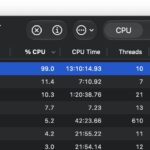
rpcsvchost can use high CPU and excess RAM sometimes

A somewhat rare reason that MacOS can feel excessively slow is due to a runaway process in the background, in this particular case; rpcsvchost. You might find this in Activity Monitor or another resource monitor, consuming an unusually large amount of RAM and/or CPU, in which case you’re probably wondering what this process is, and … Read More

How to Update MacOS Sequoia Without Installing MacOS 27 Golden Gate

Oct 9, 2026 - 1 Comment
Where to update MacOS

If you’re still running MacOS Sequoia on your Mac, it’s probably for good reason. Whether that’s due to specific app compatibility, workflow, preference, or whatever else, if you have chosen not to install MacOS 27 Golden Gate let alone MacOS Tahoe 26, you’ll likely want to continue to stay on MacOS Sequoia. But Apple’s Software … Read More

Got an Older Mac? Use a Modern Web Browser with Momiji (Supports 10.7-10.14)

Oct 8, 2026 - 5 Comments
Momiji web browser

If you have an older Mac that’s still perfectly usable, as most older Macs still are, then you might be interested in running a modern web browser on that Mac, and that’s what Momiji is for. Momiji is based on Firefox, so it includes up to date security patches, and support for modern web browsing … Read More

Remove Apple Intelligence from MacOS 27 Golden Gate with RemoveMacAI

Oct 6, 2026 - 2 Comments
RemoveMacAI is a third party tool that lets you disable Apple Intelligence on MacOS 27

If you don’t use Apple Intelligence and Siri AI capabilities on your Mac, and you’re comfortable with Terminal-based third party removal tools, you might be interested in disabling and removing Apple Intelligence, Siri AI, Siri, and all related tools from your Mac with a newly popular utility. A third party open source tool called RemoveMacAI … Read More

How to Use “Write with Siri” on Mac, iPhone, & iPad with OS 27

Oct 6, 2026 - Leave a Comment
Write wit Siri on MacOS 27, iOS 27, and iPadOS 27

The all new “Write with Siri” feature in MacOS 27 Golden Gate for Mac, iOS 27 for iPhone, and iPadOS 27 for iPad, allows you to easily compose, rewrite, and proofread text by using Apple Intelligence, and it works basically anywhere that you can type. Write with Siri works by analyzing your prompt or query … Read More

3rd Beta of iOS 27.2, MacOS 27.2, & iPadOS 27.2 Available for Testing

Oct 5, 2026 - 1 Comment
betas

Apple has released the third beta versions of iOS 27.2, MacOS 27.2 Golden Gate, and iPadOS 27.2, to users who are enrolled in beta testing Apple system software. The betas are for iOS 27.2, iPadOS 27.2, and MacOS 27.2, and not iOS 27.1 or MacOS 27.1, but that doesn’t mean that OS 27.1 is being … Read More

How to Disable “Write with Siri” Floating Button on MacOS 27 Golden Gate

Oct 5, 2026 - 5 Comments
How to disable the Write with Siri AI floating button on MacOS 27 Golden Gate

If you’re a Mac user who has updated to MacOS 27 Golden Gate, you might have quickly noticed the new “Write with Siri” Siri AI floating button tool that appears alongside basically every text entry point, whether you’re in an email app, Notes, Pages, Safari, or just about anywhere else. This is part of the … Read More

Mac Performance Monitor Helps You Watch & Diagnose Resource Usage

Oct 1, 2026 - Leave a Comment
Mac Performance Monitor Dashboard

If you’re the type of Mac user who likes to keep track of your system performance and system resource usage and management, an intriguing and full-featured app called Mac Performance Monitor might be for you. As you might have guessed from the name, Mac Performance Monitor lets you see a dashboard, history, and breakdown of … Read More

Buggy & Laggy Mission Control, Spaces, & Stage Manager in MacOS 27 Golden Gate? Try These Tips

Sep 30, 2026 - 6 Comments
Fix Mission Control and Stage Manager issues in macOS 27 Golden Gate

Some Mac users who have recently installed MacOS 27 Golden Gate have noticed an unusually laggy and buggy experience with Mission Control, full screen apps, and Stage Manager. Impacted users complain of a slow lag, delay, or stutter before entering Mission Control and/or Stage Manager, or swiping between spaces or full screen apps, flickering thumbnails, … Read More

MacOS Tahoe 26.7.1 & MacOS Sequoia 15.8.1 Security Updates Released

Sep 29, 2026 - Leave a Comment
MacOS Tahoe 26 update

Apple has released MacOS Tahoe 26.7.1 and MacOS Sequoia 15.8.1 as security updates for Mac users who are still running those operating systems. MacOS Tahoe 26.7.1 and MacOS Sequoia 15.8.1 include security updates only and no other changes. Separately, Apple also released MacOS 27.0.1 Golden Gate, iOS 27.0.1, iPadOS 27.0.1, iPadOS 26.7.1, and iOS 26.7.1.

iOS 26.7.1 & iPadOS 26.7.1 Security Updates Released

Sep 29, 2026 - 1 Comment
iOS 26.7.1 update

Apple has released iOS 26.7.1 for iPhone and iPadOS 26.7.1 for iPad as security software updates for users who still running the OS 26 series of operating systems and who are not yet interested in jumping into OS 27. Separately, Apple has also released iOS 27.0.1, iPadOS 27.0.1 as minor bug fix updates, along with … Read More

MacOS Golden Gate 27.0.1 Update with Bug Fixes Available to Download

Sep 28, 2026 - Leave a Comment
MacOS 27.0.1 update for Golden Gate

Apple has released macOS 27.0.1 Golden Gate, the first software update to the new Golden Gate operating system. The update arrives as build 26A434 and includes unspecified bug fixes, and is available to download now. Because the release notes do not mention any particular bugs or issues, it’s a bit of a guessing game as … Read More

How to Always Show Menu Bar on iPad with iPadOS 27

Sep 23, 2026 - 1 Comment
iPad Menu Bar Can Be Set to Always Visible in iPadOS 27.0 or later

One of the more useful new small features available to iPad users in iPadOS 27 is the ability to always show the menu bar when using iPad. With this new setting toggled on, the menu bar will always be visible at the top of the screen on the iPad, much like the MacOS default. You … Read More

Is Battery Life Worse in MacOS 27 Golden Gate? Try These Tips

Sep 22, 2026 - 6 Comments
Battery life in MacOS 27 Golden Gate can be better or worse with some users reporting bad battery life after the update

While MacOS 27 Golden Gate is overall a great system software release, that’s not to say it’s perfect and without user complaints. One issue that is cropping up for some MacOS 27 users, myself included, is poor battery performance. Battery life issues and complaints are fairly common to crop up during the initial release period … Read More

Check Out Compositor for Mac, a Free Lightweight Photoshop Alternative

Sep 21, 2026 - 10 Comments
Compositor for Mac is a free Photoshop alternative

A long time ago in a galaxy far, far away… Adobe Photoshop used to be a lightweight image editor and available without an annoying subscription fee, but not anymore. With Adobe Photoshop now a comically bloated sluggish and expensive mess, one rebel spaceship carrying an enterprising developer took it upon himself to challenge the ADOBE … Read More

Subscribe to OSXDaily

Subscribe to RSS Subscribe to Twitter Feed Follow on Facebook Subscribe to eMail Updates

Tips & Tricks

News

iPhone / iPad

Mac

Troubleshooting

Shop on Amazon to help support this site