Subscribe to OSXDaily

Subscribe to RSS Subscribe to Twitter Feed Follow on Facebook Subscribe to eMail Updates

OSXDaily on Facebook

OSXDaily on Google+

Shop at Amazon

Ad

Shared on Facebook

Search networksetup

networksetup

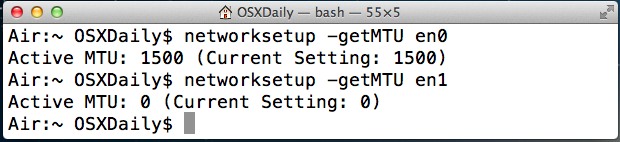
Set MTU Size from the Command Line of Mac OS X

Jan 14, 2013 - 10 Comments

MTU stands for Maximum Transmission Unit, and a larger MTU size generally increases efficiency of a network connection because each packet carries more data, but sometimes the default MTU sizes (often 1500) will cause issues with some networks and needs adjusting. Changing the MTU size has been a solution to some dropping wi-fi connections in … Read More

Get DNS Server IP Addresses from the Command Line in Mac OS X

Jun 3, 2011 - 3 Comments

You can quickly retrieve active DNS server IP addresses on any Mac by using the networksetup utility. Launch the Terminal and type the following: Mac OS X 10.7 Lion: networksetup -getdnsservers Wi-Fi Mac OS X 10.6 Snow Leopard and before: networksetup -getdnsservers airport Note that I’m specifying ‘airport’ because I primarily use a wireless connection, … Read More

Enable and Disable AirPort Wireless from the Command Line in Mac OS X

May 31, 2011 - 10 Comments

Sometimes the easiest fix when troubleshooting an AirPort wireless connection problem is to just turn AirPort on and off. Instead of using the menu item or System Preferences, we can enable and disable AirPort very quickly directly from the Mac OS X Terminal. Turn Airport Off via Command Line networksetup -setairportpower airport off Turn Airport … Read More

Connect to a Wireless Network from the Command Line

Apr 12, 2011 - 11 Comments

Using the powerful ‘networksetup’ utility, we can connect to wireless networks directly from the command line. The syntax you’ll want to use is as follows: networksetup -setairportnetwork Airport [router SSID] [password] For example, if I’m connecting to a wireless router with an SSID of “OutsideWorld” and the password is “68broncos” this would be the syntax: … Read More

Connect to an AirPort Network via the Command Line in Mac OS X

May 27, 2010 - Leave a Comment

You can connect to any wireless network from the command line by using the networksetup command as follows: sudo networksetup -setairportnetwork en1 SSID PASSWORD So in a practical example, let’s say we are connecting to a network named ‘Wireless’ and the password is set to ‘macsrule’ as so: sudo networksetup -setairportnetwork en1 Wireless macsrule As … Read More