Tips & Tricks

Tips and tricks for all things Apple! Whether you want to learn tips for a Mac, iPhone, iPad, Apple Watch, or much more, you will find many tricks, tips, tutorials, and excellent walkthroughs for Apple devices and software here.

Search Tips & Tricks

Sleep to Music with an iPhone or iPod touch

Dec 29, 2010 - 6 Comments

Using a Sleep Timer feature, you can set your iPhone or iPod touch to automatically stop playing music after a given amount of time passes, this allows you to fall asleep to music without your music playing all night. This sleep Music feature is built directly in iOS and you don’t need to download any … Read More

Rotate Mac Screen Orientation

Dec 28, 2010 - 59 Comments

A little known trick allows users to rotate the Mac screen, thereby allowing a display to run in a vertical 90 degree orientation, or even in a flipped mode. Display rotation is possible on any monitor connected to any Mac, whether that’s an external display or even on the the primary built-in screens of a … Read More

Save credentials when printing with Active Directory from a Mac

Dec 24, 2010 - Leave a Comment

Setting your Mac up to print to a Windows print server with Active Directory is pretty straight forward, but it’s really annoying that your network credentials aren’t stored which causes the login popup screen to display. Looking for a solution to this, I came across a post at TheAppleBlog, and the author had the exact … Read More

Make a Song Play Louder in iTunes

Dec 20, 2010 - 2 Comments

Sometimes you will run into a song that plays notably more quiet than other music in iTunes. Rather than turning up your speakers for just one song, or getting frustrated at a particular songs audio level, you can manually adjust a songs volume level directly in iTunes. This is by far the easiest way to … Read More

How to Set a Static IP Address on a Mac

Dec 17, 2010 - 8 Comments

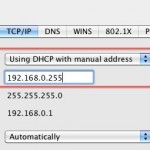
If you want to set your Mac to always have the same IP address (also known as a static IP address), you can easily configure this to be set in the Network settings of OS X. This can be valid for both wi-fi networks and wired ethernet networks, and it can also be set under … Read More

How to Take a Screen Shot on iPhone with a Home Button

Dec 16, 2010 - 11 Comments

If you want to take a screenshot of an iPhone that has a Home button, then you’ll find the process to be super simple. In fact, taking a screenshot using an iPhone, iPod touch, or iPad is really easy, and the process is the same on all devices regardless of which model it is as … Read More

Save and Dial Phone Extensions Automatically on iPhone

Dec 16, 2010 - 4 Comments

You can save phone numbers that automatically dial extensions with your iPhone. Essentially this allows you to add the extension number to a contact number, and when that contact is dialed, the extension will automatically dial after the call is answered by the automated phone system. There are so many uses for this as you … Read More

How to Use Smart Folders in Mac OS X

Dec 15, 2010 - 6 Comments

One of the underused and certainly under appreciated features of Mac OS X are Smart Folders. If you aren’t familiar with Smart Folders, they essentially let you create a virtual folder that uses search operators from Spotlight to let that virtual folder contain any and all files that match the search requirements. Sound confusing? It’s … Read More

Replicate TRIM with a Mac SSD

Dec 15, 2010 - 25 Comments

If you have an SSD on your Mac, listen up. You can replicate TRIM SSD functionality in Mac OS X by using this great tip from one of our readers, here’s Curt explaining: “I just got a MacBook Air and like many others I was surprised to learn Mac OS X doesn’t support TRIM. I … Read More

Open .7z files on a Mac

Dec 13, 2010 - 19 Comments

So you’ve come across a .7z file and you’re on a Mac, what is it and how do you use it? First off, a .7z file is an archive format that stands for 7-zip, you can think of it like any other archive file. By default, Mac OS X does not know how to handle … Read More

Zoom Into Images from Quick Look Preview Windows of Mac OS X

Dec 12, 2010 - 4 Comments

You can zoom in and out into any image within Quick Look, the instant image viewer built into the OS X Finder, simply by holding down the “Option” key and then using either a scroll wheel on a mouse, or a two finger up or down swipe gesture on a multi-touch track pad. Scrolling up … Read More

Hide and Show the Dock in Mac OS X

Dec 10, 2010 - 12 Comments

The Dock is one of those staple features of Mac OS X, containing all running apps and also serving as a quick launch bar for opening applications and managing multitasking. The Dock is popular and intuitive enough for it to be a core user interface element beyond the Mac, included as a major component in … Read More

Forgot a Wireless Password? Here’s How to Recover Wi-Fi Router Passwords on Mac

Dec 10, 2010 - 41 Comments

If you have ever forgotten a wireless router password, whether it’s your own network or another, you certainly aren’t alone. Typically you just have to enter the password once, save it to your keychain, and you can forget about it, right? Well that’s only true until you actually do need the password again, whether it’s … Read More

IPSW File Location for Mac and Windows

Dec 8, 2010 - 12 Comments

Anytime you update your iPhone, iPod touch, or iPad, via a Mac or PC and using Finder or iTunes, you will get a new IPSW file that is downloaded to an iOS or iPadOS updates folder. Knowing where these IPSW firmware files are located can be helpful when troubleshooting, and when accessing an IPSW for … Read More

Command Line MP3 Player in Mac OS X

Dec 7, 2010 - 9 Comments

You don’t need to use iTunes to play music on your Mac, particularly if you just want to play an audio document. Mac OS X comes with an included command line audio player that you can use to play most audio files with. In this example we’re going to use an MP3 file as the … Read More

iPad DFU Mode Instructions for iPads with Home Button

Dec 4, 2010 - 39 Comments

If you need to place an iPad into DFU mode, you can do so with the instructions detailed on this page. These instructions will work to put any iPad model with a Home button into DFU mode. DFU stands for Device Firmware Update, entering DFU Mode is how you adjust the firmware on your iPad … Read More

Fine Tune Archive Behavior with the Secret Archives Preference Pane

Dec 3, 2010 - 2 Comments

You can fine tune how Mac OS X handles archives with a secret preference pane. There’s quite a few features tucked away in the Archives preference pane, including the ability to delete the archive after it’s expanded, reveal the expanded items in the Finder, and of course the same features for compressing files too. These … Read More

How to Make Any Printer AirPrint Compatible

Dec 1, 2010 - 38 Comments

AirPrint is definitely one of the more convenient features of iOS and thanks to a new tool you can turn any printer connected to your Mac or Windows PC into an AirPrint compatible printer. The utility is called AirPrint Hacktivator and it’s very easy to use. Read on to learn how you can make any … Read More

Subscribe to OSXDaily

Subscribe to RSS Subscribe to Twitter Feed Follow on Facebook Subscribe to eMail Updates

Tips & Tricks

News

iPhone / iPad

Mac

Troubleshooting

Shop on Amazon to help support this site