
Change the Number of Apps in the iOS Dock to Get Minimal
Sep 1, 2014 - 7 Comments
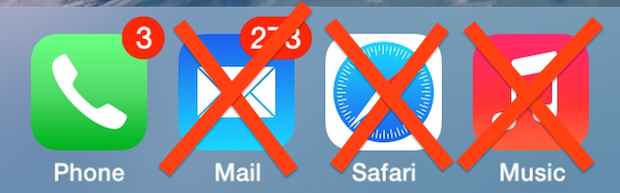
The iOS Dock sits at the bottom of our iPhone, ipod touch, and iPad home screen, intended to hold the most commonly used apps for quicker launching. While it’s well known that you can customize the apps that are contained within the Dock, what’s lesser known is that you can actually reduce the number of apps visible from the 4 default, down to 3, 2, 1, and, if you really want to, 0 apps.
By Paul Horowitz - iPad, iPhone, Tips & Tricks - 7 Comments


 Typically Mac users will retrieve the screen resolution of connected displays through the Displays system preference panel in OS X. There’s certainly nothing wrong with that approach, it’s easy and quick, but because it uses the graphical interface of OS X it’s not necessary helpful for scripting purposes or remote management through




 Safari Bookmarks default to saving their names as the title of a webpage or website. That means if a site has a long title, the bookmark name will be equally as long. For accessing bookmarks through the Bookmarks menu that isn’t too big of a deal, but when you’re using the Safari Favorites Bar, long names become truncated and often meaningless, thus renaming them can be a good idea.
 Apple will unveil it’s new “wearable” device



 Modern versions of iOS changed how Safari looks when a web page is loaded, particularly on the iPhone, iPad, and iPod touch. To save screen space on these devices, all of the Safari navigation buttons disappear automatically once you start scrolling through a web page, hiding your standard back and forward features and other buttons. While this helps to reduce onscreen buttons and also aids in emphasizing the web page you are viewing on the smaller displays, it’s also rather confusing for some users to find the back/forward navigation, sharing, bookmarks, and tabs buttons to disappear, particularly if they aren’t familiar with how this feature works in Safari for iOS.



