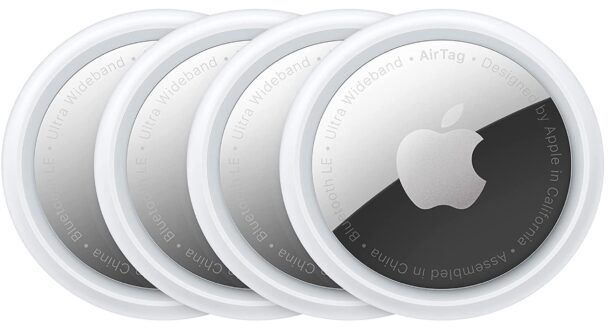
Amazon is at it again with even more great deals on some popular Apple products, including the iPad Air in both 13″ and 11″ display sizes, great deals on Apple Watch Series 10, and an ongoing great deal on the 4-pack of AirTags. Why pay full price when you don’t have to? Check out the deals!
Applite is a powerful free and open source MacOS application for streamlining the installation, updating, and management of third party apps using the Homebrew cask feature, without ever having to use the Terminal. Presented in an easy to use simple graphical interface, Applite is sort of like a third-party App Store that makes using Homebrew casks easy even for the non-technical user.
Amazon continues to offer amazing deals on great Apple products, taking big discounts from the Apple retail prices of everything from the latest iPad mini 7, big discounts on the MacBook Air M2 and M3 models, AirPods, AirTags, Apple Watch Series 10, and more. If you’re in the market for some new Apple gear, don’t pay full price if you don’t have to!
The popular AirTags trackers can be shared with others, and if someone has shared an AirTag with you then you’ll likely want to accept the invitation to track that object, belonging, pets, luggage, package, or whatever else is being tracked.
While you will receive a notification about a shared AirTag, you might have dismissed it or not seen it, in which case you’ll need to manually accept the invitation and add the AirTag to your Find My app on iPhone, iPad, or Mac. This is super easy, as we’ll walk you through.
The Photos app on iPhone received a significant layout redesign in iOS 18 that has left many iPhone users annoyed or frustrated as the new Photos design is not necessarily intuitive or easy to use for everyone. Things have been moved around, albums or features they were using might be missing or harder to access, the order of which photos show up in your camera roll may be different, and it can even be more difficult to locate particular categories of media with new layout too.
If you’re unhappy with the Photos app layout in iOS 18 on iPhone, read along and we’ll help you to improve the Photos layout so that it behaves more similarly to that you were accustomed to before.
Amazon is offering the latest model AirPods 4 for just $99, taking 22% off the $129 retail price. Whether you want to treat yourself, or you’re looking for a gift for a loved one, friend, or colleague, AirPods might just fit the bill.
AirPods 4 are the most popular wireless headphones and for good reason, beyond the stylish and iconic design, they include excellent features like gesture support, Spatial Audio, voice isolation, water resistance, sweat resistance, Siri commands, USB-C charging case, and great battery life. What’s not to love, especially at a discount?
But if you want even fancier AirPods with more features….
AirPods Pro 2 – $169 (down from $249)
AirPods Pro 2 have even more advanced features including hearing aid functionality, high fidelity sound, Active Noice Cancellation, Spatial Audio, water and sweat resistance, customizable fit, transparency mode for hearing ambient sounds while the AirPods are in, ear detection, Siri commands, great battery life, and a USB-C charging case.
AirTag personal trackers continue to be offered at a nice discount at Amazon, perfect for tracking your stuff whether it’s your belongings, backpack, briefcase, purse, luggage, your dog, a bike, scooter, even a car, or whatever else you might want to track. Why pay full price when you don’t have to?
FTC: OSXDaily is an affiliate partner with Amazon, meaning if you click a link and make a purchase, we may receive a small payment which goes towards keeping the site running.
Don’t use Apple Intelligence? Don’t care to have Apple Intelligence write your emails for you or instantly create a business plan or any of the handy writing and summary tools? Whether you’re on an iPhone, iPad, or Mac, if you recently updated to the latest versions of system software, then you’ll find that Apple Intelligence is enabled by default. That might be great for people who use the Apple Intelligence features, but if you don’t, or don’t care for the AI tools, you might care less for the potential and more for some additional storage on your device.
If you’re not an Apple Intelligence user, you can recover 7GB of storage on iPhone, iPad, or Mac by simply disabling the feature.
Many Mac, iPhone, and iPad users are discovering that installing the latest available system software updates of MacOS Sequoia 15.3.1, iOS 18.3.1, and iPadOS 18.3.1 will automatically enable Apple Intelligence, even if the feature has been disabled before.
While this doesn’t happen to everyone, some Mac, iPhone, and iPad users are seeing an Apple Intelligence welcome / setup assistant screen display on their device after they install the latest system software updates, which then enables the AI feature.
Amazon is back with some more great deals on Apple products, with one of the best deals being the M2 MacBook Air 13″ model for just $799 in the 16GB / 256GB configuration, taking $200 off the retail price.
And if the M2 MacBook Air isn’t what you’re looking for, the M3 models remain at discount, as well as great deals on iPad mini 7, AirPods, and more.
macOS Sonoma 14.7.4 and MacOS Ventura 13.7.4 are available as small software updates for Mac users running the Sonoma and Ventura operating systems. The updates focus on security enhancements, making them recommended for all Mac users running those operating systems, and they appear to include same security updates available in the just released MacOS Sequoia 15.3.1 update for Sequoia users.
Amazon is back with some great Apple deals this week, including the newest iPad mini 7 for $100 off, Apple Watch Series 10 for 18% off, AirPods starting at $99, a pack of AirTags for $70, $200 off MacBook Air models, and more.
Apple is opening a new retail store in Miami, which might interest you if you live in Florida, and to celebrate the occasion they have released a nice tropical floral wallpaper for iPhone, Mac, and iPad. Of course you don’t have to live in Florida or Miami to appreciate the wallpapers, so grab the appropriate size for the particular device you want to use it on, and enjoy.
Amazon consistently offers some of the best deals on Apple products, and this week is no exception. Check out some fantastic deals on the all new AirPods 4, AirPods Pro 2, Apple Watch Series 10, MacBook Air in 13″ and 15″ screen sizes, and a 4-pack of AirTags.
Using AirTags to keep track of a dog can offer some additional peace of mind, especially if you’re worried about your fuzzy companion wandering off. Whether your dog has a penchant to escape out of your yard, has a tendency to bolt, or simply likes to run off at any opportunity, AirTags can provide a helpful way of locating them quickly, especially if you’re in a neighborhood, urban, or suburban environment where the Find My network is most useful as all other nearby Apple devices will help to track the location of that AirTag equipped dog.
With an AirTags 4-pack being available for just $70, now is a particularly compelling time to equip your furry best friend with one of the personal trackers and an AirTag holder for their dog collar, so that you can improve your odds of being able to locate your dog should they ever get lost or separated from you.
Sometimes you might start downloading an app onto an iPhone or iPad but then decide you either don’t need the app, don’t want the app, or perhaps just don’t want to download the app right now, whether due to bandwidth or connectivity issues, or any other reason. If you need to cancel an app download on iPhone or iPad, it’s a very easy process to accomplish.