
iPhone 4 Availability and Pricing
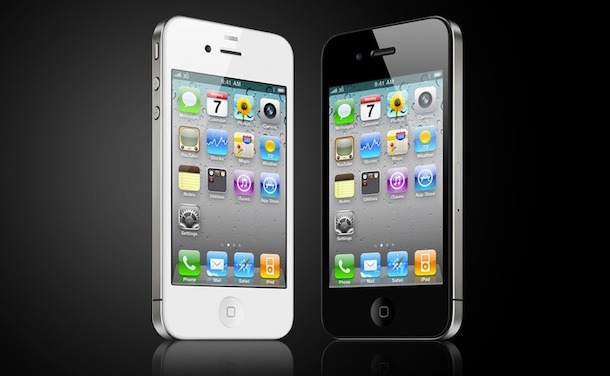
In case you missed it, iPhone 4 is a big deal. Running iOS 4, it’s packed with amazing features that blow any other smartphone out of the water. A powerful processor, high density screen resolution and display, video chat, HD video recording and editing, camera with flash, it’s all there.
iPhone 4 Availability
Supply is still struggling to keep up with demand, stores continue to sell out quickly. We’ll keep you updated on the latest availability information.
The following list applies to the USA demonstrating current iPhone 4 availability at stores:
- Apple Store: continues to sell strongly. Available at approximately 80% of Apple Stores, call to verify stock
- Apple Store Online: available for delivery 3 weeks after placing order
- AT&T: available in very limited quantities at AT&T stores, call your local store to verify current stock on hand, sells out quickly
- Best Buy: usually SOLD OUT
- Wal Mart: usually SOLD OUT
- RadioShack: usually SOLD OUT
iPhone 4 supplies will be replenished periodically at most Apple Stores and resellers throughout the summer months. Reports indicate that while additional shipments of iPhone 4 will be arriving, they too are expected to sell out.
iPhone 4 Availability Update on 9/17/2010:
Apple continues to cope with strong demand for iPhone 4 as the device remains a hot commodity, here’s the latest we know on availability :
- iPhone 4 continues to sell out at many Apple Stores, most Apple Stores have them in stock on a semi-regular basis now. Call or stop by a local store to find out for sure.
- iPhone 4 is often available at most AT&T stores
- All other resellers of iPhone 4 are sold out of existing stock
- You can still order iPhone 4 online from Apple or AT&T but the current estimated ship date is 3 weeks from the date of order
- White iPhone 4 has been delayed twice due to production challenges, there is no definitive release date for the white model
- Analysts predict Apple will not be able to keep up with continued summer demand for iPhone 4, supply constraints are actually limiting sales of iPhone 4 at this point and Apple is working with suppliers to meet demand
- Apple announced that over 1.7 million iPhone 4’s were sold in the first three days alone
For the USA, France, Germany, United Kingdom, and Japan, iPhone 4 became available on the release date of June 24, all of the release date phones were quickly sold out. Pre-orders for iPhone 4 started June 15th and quickly sold out. Due to the immense pre-order demand, AT&T did not start selling iPhone 4 in stores until June 29.
Availability of White iPhone 4
Apple has again delayed the release of the White iPhone 4, due to challenging production constraints. Apple has confirmed that the white iPhone 4 will not be available until late July, due to production difficulties. Historically, the Black iPhone has sold out faster and been more popular than the white iPhone. Here is the press release from Apple, issued June 24, 2010:
White models of Apple’s new iPhone® 4 have proven more challenging to manufacture than expected, and as a result they will not be available until the second half of July. The availability of the more popular iPhone 4 black models is not affected.
The newest press release, issued on July 23, 2010 regarding the delay of the white model specifies a date of ‘later this year’:
White models of Apple’s new iPhone® 4 have continued to be more challenging to manufacture than we originally expected, and as a result they will not be available until later this year. The availability of the more popular iPhone 4 black models is not affected.
iPhone 4 Availability by Country
- UK – SOLD OUT
- Japan – SOLD OUT
The 4th generation iPhone is being released at different dates throughout the year around the world. Here are the expected release months and accompanying countries.
June: USA, France, Germany, United Kingdom, Japan
July: Australia, Canada, Austria, Belgium, Denmark, Finland, Hong Kong, Ireland, Italy, Luxembourg, Netherlands, Norway, New Zealand, Singapore, South Korea, Spain, Sweden, Switzerland
September: Additional countries are expected to have iPhone 4 available by the end of September. Apple says 88 countries are planned to carry the device.
Stores Selling iPhone 4
Here are the current US resellers of iPhone 4. Not all resellers took pre-orders:
- Apple Store – iPhone 4 available to purchase at any official Apple Store, as well as the online store
- AT&T Store – stores are carrying the device, they began selling at a delayed release of June 29
- Best Buy – one of the few retailers who will sell iPhone 4
- Walmart – Walmart will sell iPhone 4 but did not take pre-orders
- RadioShack – the only other electronic reseller to have iPhone 4
iPhone 4 Pricing
iPhone 4 is is offered in two models and the pricing depends on the storage capacity.
* iPhone 4 16GB: $199 (requires renewing AT&T contract in USA)
* iPhone 4 32GB: $299 (requires new 2yr AT&T contract)
Both iPhone 4 models are available in black and white at the same price. You can get more information about iPhone 4 price structures, including data plans, upgrade prices, the price of iPhone 4 without a contract (it’s not cheap!), and more, at our iPhone 4 price guide.
I already own an iPhone in contract, how do I get iPhone 4?
If you already have an iPhone in contract and you want the newest model there are very reasonable options for you too. Check your iPhone 4 upgrade eligibility with AT&T and you likely won’t have to wait until your old contract expires. In most cases, you’ll be able to renew your contract and buy the new iPhone with a minimal (if any) fee, and this fee is usually waived for anyone whose contract expires in 2010.
Upgrading to iPhone 4 is easy and expected. Initial sales figures say that 77% of the initial wave of iPhone 4 purchases are upgrades from existing iPhone customers, Apple and AT&T are aware of this and intend to make upgrading to the new device a simple process.
What’s the difference between iPhone 4 and iPhone 4G?
We’ve had several emails asking us what the difference is between iPhone 4 and iPhone 4G – there is no difference. iPhone 4 is the proper name, but because it’s the 4th generation iPhone some people are referring to it as iPhone 4G, which is technically incorrect and is not the name of the product. Regardless of the naming convention, the device continues to run on the 3G network.
What store is most likely to carry iPhone 4?
This is another question we get asked frequently. While supply of iPhone 4 continues to be limited, your best bet at getting your hands on the device is either to order online and wait until it ships, or to go to Apple and AT&T stores, since they are the official manufacturer and carriers. When demand eases, you should be able to visit any of the other resellers and pick up the device, but this could take weeks or even months.
Is there a central iPhone 4 availability checker?
No, there is no central database of iPhone 4 availability that is in the public hands, only Apple holds this data. That said, we do our best to update this page based on information we receive from users and our own inquiries. The only way to check if iPhone 4 is available at any particular store is to call to verify existing stock.
 In the midst of all the exciting news about
 Apple has renamed iPhone OS to iOS, which is appropriate considering the operating system runs on more devices than just the iPhone. iOS 4 encompasses the iPhone, iPad, the iPod Touch, and there are rumors that it will run on future versions of the Apple TV. With over 100 new features in iOS 4, it’s an exciting free software update.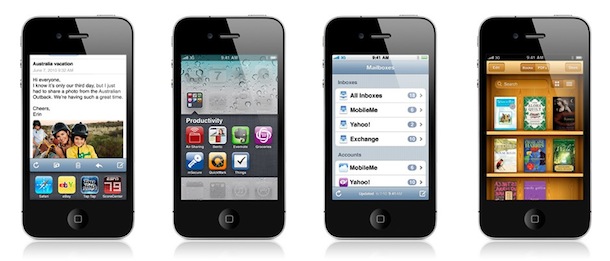
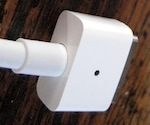 Did you know that you can use a MacBook 13″ MagSafe power adapter on the 13″ MacBook Pro? Or a MBP 15″ adapter on the 13″ models? And the 11″ MacBook Air adapter with a 13″ MacBook Pro, and so forth? In most cases you can interchange power adapters, this also means the older white MagSafe adapters work just fine on the new 2010 MacBook Pro 13″ model, and vice versa. In other words, if you just upgraded to a new MacBook, don’t toss the old MagSafe adapters!
 You may not know it, but OS X’s Mail.app has the ability to utilize plugins. Installing a plugin is not an overly difficult task. After the first install, the subsequent plugins become easier to get running. A lot of the plugins you download claim that installation is as easy as double clicking on the .mailbundle file, but my experience shows that it just wasn’t that simple! Thankfully, the work-around is simple and straightforward.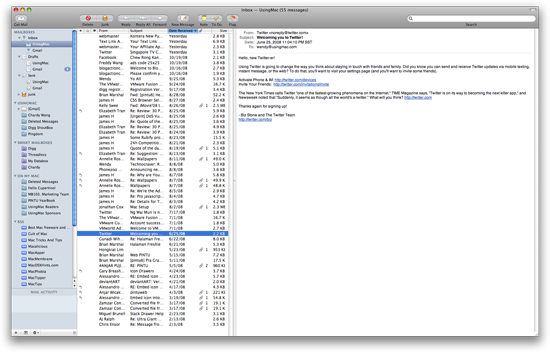


 Earlier today apple unveiled its HTML 5
  So you just downloaded the awesome
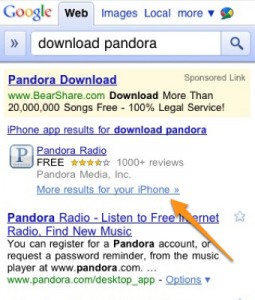 One the gripes I’ve had with the Apple “App” store is that it can be hard to search such a large index of applications to find what you’re looking for. Looks like it’s Google to the rescue as they seem to be adding (it’s still not perfect!) the ability to search the iPhone/iPad store as well as the Android store. Great news for both platforms. Not only does this addition benefit the consumer, this will make life easier for developers as well. Now there is a bit of method to the madness and the chances are higher of connecting developers and consumers together in app purchasing harmony!
 Whether you are a new Apple developer or an experienced Cocoa engineer with roots in NeXTStep, you will understand the need to back up your hard work. Integrating Xcode with subversion not only allows you to back up your code, but it also enables you to keep a history of changes that you can revert back to or compare your code against. This is called version control. This article assumes that you already have your own subversion repository that you have read and write access to. If you want to setup a subversion server of your own, I suggest consulting the almighty google for a wide range of articles on how to accomplish this task. Read on for screenshots, details and lots of fun.
 As the release of iPhone OS 4 nears I thought it would be an opportune time to talk about why I’m personally excited for iPhone OS 4. As an amateur (up and coming!) developer and an avid user of the platform, I am more than ready for the unveiling of the latest incarnation of iPhone/iPad platform. Unfortunately iPad users will have to wait until this Fall before they can leverage a lot of the enhancements. It sounds like the wait will be well worth it!



