You can easily stop the “Sent from my iPhone” text from appearing on your outbound iPhone emails, or change it to be something else. Removing or customizing the signature applies to emails that are sent as replies or as new messages from the iPhone, and you can set it to whatever you want, or to absolutely nothing, by modifying the iOS signature settings. It only takes a moment, and here is exactly how to do that on an iPhone or iPad.
Pre-orders for iPhone 4 start today at qualified iPhone sales locations!
Basically if you pre-order the iPhone you’ll be able to come back in two weeks on June 24th to the same store and pick up the device without waiting in the giant sales lines (in some cases the iPhone will be mailed to you).
The Apple Store will also ship the iPhone directly to your house.
If you’re having Synergy ‘cannot read configuration’ error problems, try the following:
* Get the latest version of Synergy KM from SourceForge
* Be sure the clients have the latest version of Synergy installed too (it’s pretty old for Windows clients, but works)
* Create a new ‘Location’ and re-add your server, screens, clients, in the order you desire.
* Pay attention to special characters and spaces, don’t use them in the synergy screen names. “ScreenName” is better than “Screen Name”
* Launch Synergy server and connect with clients
Now here’s the full explanation if you’re interested…
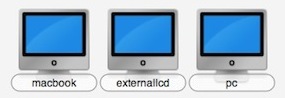
I recently added an external display on my Mac and as a result I had to adjust Synergy’s server configuration to know where to place my Mac, the new external screen, and my PC. (For those that don’t know, Synergy is a great utility that allows you to share a single mouse and keyboard across multiple machines, regardless of their platform. Mac OS, Windows, and Linux are supported). This sounds simple enough, so I just added a new screen name for my new LCD in the Synergy control panel, and clicked “Apply” – unfortunately that didn’t work, I got several errors and Synergy wouldn’t start:
I deleted those, and then got the first error again. Hmm, ok then. So what to do? I’ll just recreate the configuration, right?
I installed the newest Synergy KM, you can get the latest version of Synergy KM from SourceForge. I installed that and then entered into the “Server Configuration” tab in the Synergy KM panel. Created a “New Location” and added all my screens again, then started the synergy server. The server launched OK but was now throwing different configuration errors and wouldn’t let clients connect. Odd. So I re-added the screens again but just on a hunch I removed a space that I had in a screen name from “External Monitor” to “ExternalMonitor”, started the server again, and guess what? Everything worked. I thought this was really strange, but I’m guessing that for some reason the space in the screen name was causing Synergy to have difficulty in reading the configuration file. Dashes (-) seem to work fine, but spaces were problematic. I don’t have a ton of explanation for this because I’ve used spaces many times in names, but nonetheless that seemed to do the trick.
So does the response from Steve allay the fears of the Mac community? I’m going to go ahead with the assumption that the Mac will be around for a while, but who knows what the future holds? We just have to wait and see the actions (and inactions) of Apple.
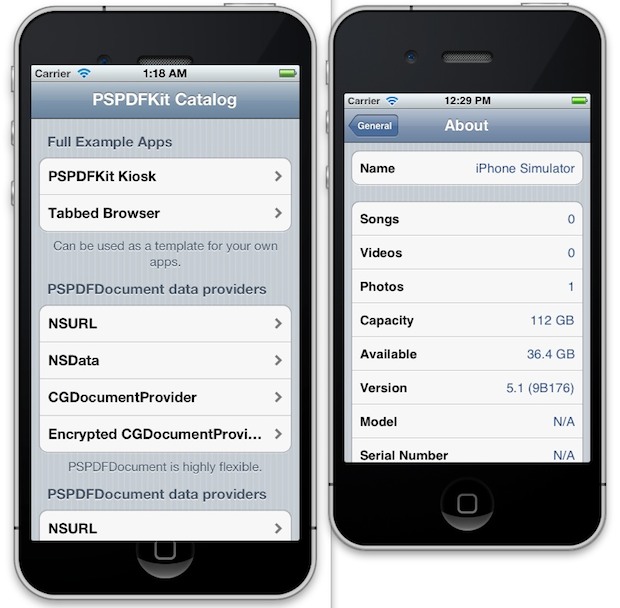
The iPhone Simulator, now called iOS Simulator, will emulate an iPhone or iPad. Newer versions of Xcode want you to launch the app through Xcode first, but that’s not entirely necessary. You can access the simulators directly through the Finder as well, here’s where to look for each version of Xcode:
The 27″ iMac is a beautiful machine, this picture amuses me because it shows just how large the screen really is, dwarfing the older iMac and the 23″ Acer LCD next to it!
One of the Mac Mail apps many talents is the ability to automatically detect when a flight number is present in an email, and then give you the option to view the flights status by using the flight tracking Dashboard widget in OS X.
Yes seriously, the Mac eMail app can track flights! This doesn’t even require a plug-in, it’s all built into Mail for Mac, which passes the appropriate data onto the Flight Tracker tool to then gather more details and display the flight on a map.
iPhone 4 is here, it’s awesome, and everyone wants one. But what’s it going to set you back? What is the price of the phone and what’s the cost of the new AT&T data plans? How much is it to upgrade from an existing iPhone? Can you buy one without a contract? You know that iPhone 4 availability began on June 24, and now you’ll know how much it’s actually going to cost to get in your hands. This is the ultimate iPhone 4 pricing guide, read on.
iPhone 4 pricing
The all new iPhone 4 is available in two colors, white and black, and each has two different storage capacity options that effect the price of the phone.
iPhone 4 16GB: $199
iPhone 4 32GB: $299
Keep in mind that in the USA, to get iPhone 4 at these prices you will have to renew or sign up for a 2 year contract with AT&T.
iPhone 4 price without contract
You’ll be able to buy iPhone 4 outside of an AT&T contract for an unsubsidized price, but it’s not cheap:
iPhone 4 16GB without contract: $599
iPhone 4 32GB without contract: $699
The reason for the high price is because the phone is no longer subsidized by the AT&T 2-year commitment. Suddenly that contract is looking appealing huh? But be sure to get the right data plan for your use.
iPhone 4 Wireless Data Plans pricing
If you’re a new AT&T customer you’ll have three data plans and pricing options to choose from:
Data Plus – 200MB of data for $15/month
DataPro – 2GB of data for $25/month, additional 1GB of data for $10
Tethering – Requires DataPro Plan, plus an additional $20/month for tethering support
It’s really important to know how much data you use, so if you’re an existing customer be sure to check your AT&T iPhone data usage before going into a new plan.
What about Unlimited Data?Unlimited Data is no longer offered, but if you are a current AT&T customer and you are still under an iPhone unlimited data contract, you can keep the unlimited data plan for $30/month as long as you do not let the contract or plan lapse. If you let it lapse or do not renew the unlimited data contract, you will not be able to get unlimited data again on AT&T. Again, once you lose unlimited data you will not get it again!
Cost of upgrading to iPhone 4 from an iPhone 3G or 3GS
You’ll be able to upgrade to iPhone 4 if you already are in contract with an iPhone 3G or 3GS, but you’ll need to:
Sign a new 2 year contract with AT&T
Pay an $18 contract renewal fee
Buy iPhone 4, starting at $199, see above
Note the $18 fee is waived for many people who’s contract expires anytime in 2010. You can check your AT&T iPhone upgrade eligibility to find out your contract eligibility and if the fee applies to you. The above applies to those iPhone 3G and 3GS subscribers who upgrade in 2010, after 2010 the price of the new iPhone goes up to $399 and $499, so if you’re thinking about upgrading you’ll want to do it in 2010.
Rebates and Credits for recent iPhone 3GS purchasers?
According to MacRumors, AT&T will be offering both rebates and credits to recent purchasers of iPhone 3GS.
AT&T will be offering bill credit rebates for users who purchased an iPhone 3GS between May 7th and June 7th, with customers set to receive $50 (16 GB) or $100 (32 GB) if they file a request with the company. The offer is good for 30 days from the date of purchase, with those in the early portion of the purchase window (May 7th through May 14th) having until June 14th to file their requests.
The same story reports that AT&T may be offering iPhone 3GS users the option to upgrade to iPhone 4 if they pay the price difference between the phones:
iPhone 3GS customers who purchased handsets between May 7th and June 7th the option to upgrade to iPhone 4, only paying applicable price differences. Customers who purchased a “closeout” iPhone 3GS after June 7th are not eligible for these offers.
This information has not been confirmed and is based on some documents obtained by a third party. It’s entirely possible the rebates and credits won’t hold true.
The new iPhone is already selling like absolute hotcakes and is continuously sold out. Apple has done it again!
As many loyal Safari users already know, the dedicated “refresh” button was removed from the browser’s toolbar starting with the release of Safari 4. It seems that Apple decided it would be better placed at the end of the location bar. The “new” format also includes a much smaller button which quite frankly is much harder to get to and easier to miss.
Now that Safari 5 has the ability to use Extensions, you can bring back the classic look and feel by enabling the the “Safari Reload Button” Extension.
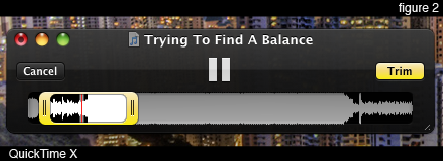
We have discussed in the past, some of QuickTime X’s hidden talents. Using a yellow slider control (iPhone Movie Editing anyone?), you can trim audio files from directly inside of QuickTime Player. The next time you need to MacGuyver yourself a ringtone, try this simple process:
Open an audio file in Quicktime X (X just means version 10).
Open an Audio file using QuickTime Player.
Select the Edit Menu -> Trim…
Adjust the yellow trim area as desired.
Click on the yellow “trim” button in the upper right hand corner of the window.
Done.
These convenient and simple features are always a welcomed addition to any media player. When that media player is part of the Operating System, it’s even better!
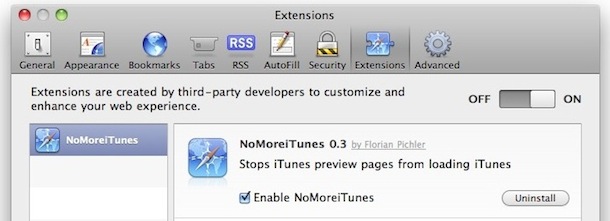
Hate it when you click on an iTunes link or an App Store link and the iTunes application launches, forcing you out of your browser and into the cludgy music / everything media app? You’re not alone! Fortunately with a little free extension, you can completely stop iTunes and App Store links from opening iTunes entirely.
And yes, this completely stops iTunes launching when an iTunes link is clicked from the Safari browser. Read more »
Spotlight is amazing at finding files buried deep within your Mac, but what if you found the file you wanted, and you don’t know what folder it’s contained within on the Mac, or if it’s buried deep somewhere in Mac OS X?
The answer is as easy as a keystroke, because with a simple key modifier you can quickly launch the containing parent folder of any item found in Spotlight on Mac OS.
Ok so anyone that uses Google has probably noticed by now that you can change the background image of Google.com and set it to something you’d like. Today though people are finding a surprise; whether they set an image or not the Google background picture has changed!
The wait is over, Team Fortress 2 has been released for Mac OS X. Often called TF2, Team Fortress 2 is a fun multiplayer first person shooter that has cartoony graphics and fast paced gameplay.
TF2 System Requirements
The system requirements to run Team Fortress 2 are similar to other Steam games; Intel processors only, newer versions of Mac OS X, and a decent video card. Obviously the better your Mac the better the game will run. Read on for some tips you can use to improve the performance of TF2 in Mac OS X (the tips work for Windows versions too btw).
TF2 Performance Tips & Tweaks for Mac
If Team Fortress 2 performance is a little slow on your Mac (either lagging graphics or low FPS rating), give these tips a try:
Turn off Anti-Aliasing (AA) support – this typically gives the biggest frame rate boost
Disable HDR (high dynamic range) in graphics options
Change graphics settings to Low or Off
Lower the game resolution to a setting below your displays capability
Update to the most recent version/patches
Restart Team Fortress 2
Performance reviews of Team Fortress 2 on a Mac have been mixed so far, while some gamers say the app runs great, other users are reporting choppiness, general bugs, lagged network play, and lower frame rates than they’d expect. Much of these problems are likely the result of growing pains, as this is the first version of TF2 to show up on the Mac platform. It’s safe to assume that most of these complaints will be ironed out in update patches released over the coming weeks as Valve refines the Mac user experience, so hang in there if you’re experiencing anything unusual!
Release announcement
Valve was a day late on the release (not that they ever set a definitive date for TF2 for Mac), the protocol had been that every Wednesday a new Steam game is available for Mac gamers to download. I don’t hear anyone complaining though, everyone is just excited to get their hands on the fun filled FPS.
The announcement came on June 9 in a peculiar manner from Valve’s TF2 blog:
Big things are happening RIGHT NOW at Valve. Things involving cultivated tree-fruit. BIG things. Things that rhyme with “grapple.” Things that rhyme with “Speem Gortress zmavailable on the Babac.”
Not today. But tomorrow. BIG THINGS. Stay tuned…
Obviously cultivated tree fruit rhyming with ‘grapple’ is Apple, and this is indeed pretty big news for Mac gamers. TF2 has been a big hit in the Windows world, and now Mac users will get to join in the multiplayer fun. So when you launch Steam you’ll be able to download the Mac TF2 client, awesome huh?
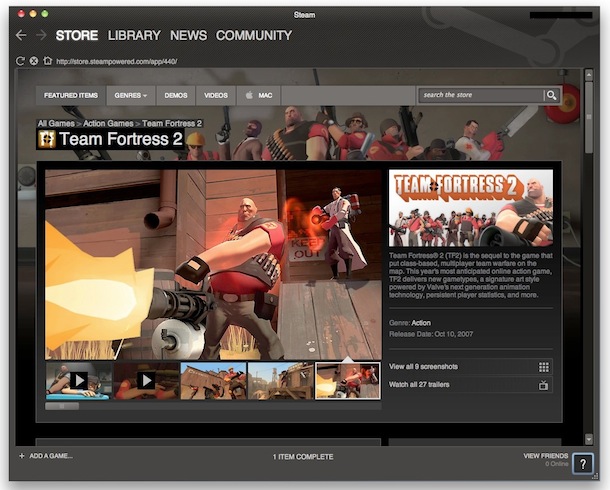
Here’s a screenshot of Team Fortress 2 in the Mac section of Steam:
For a limited time the price is $9.99, or you can get it as part of the larger Orange Box for $29.99. The game was actually free to play until June 14th, and you’ll get a free set of in-game earbuds as well (not sure how that works exactly).
So WWDC charged full steam ahead this year with news about iOS 4 with a noticeable absence of things related to Mac and Mac OS X.
This is pretty much what many developers had feared when WWDC 2010 was first announced as being App Store centric.
So what gives?
We at iOS Daily suggest it’s about the inevitable splitting of computer uses:
…the future of computing is already branching into two groups of computer users: the average person, and the creators…
Basically, the average person doesn’t need a Mac, they can get by fine with an iPhone and iPad. Meanwhile, creators and developers will still need a Mac so that they can create content for the average person. Interesting theory, and I think there is a lot of truth to it.
You can read more at our new sister publication “iOS Daily: Does iOS signal the death of the Mac?”.
Slightly off topic, It’s worth mentioning that iOS Daily is brand new, so don’t be surprised if some things aren’t working 100% quite yet.
Maybe I am an Apple nerd, but the first thing that I thought was: this will make an awesome iPad background picture!
Click through the image or on the Flickr link to get the full size version, it’s rather large at 1267×1900, but it does indeed make an awesome iPad background pic.
If you want some other really cool pics, check out Eric’s photostream on Flickr, it’s full of amazing photography.
iPad friendly resolutions: we have received a few requests to provide the image at a more iPad friendly 1024×1024 resolution, so we cropped the picture into two variations. Click through the images below for them:
I use screenshots constantly to share bits of information with people, and they can be really helpful when troubleshooting as well.
Here’s all you’ll need to know about taking screenshots in Mac OS X, from capturing the screen in Mac OS X Finder and within applications, to changing the default screenshot file type, to taking screenshots from the command line.
Capturing screenshots in Mac OS X
You can use any of these commands to take screenshots directly in Mac OS X Finder or any running applications:
Command+Shift+3: takes a screenshot of the full screen (or screens if multiple monitors), and save it as a file to the desktop
Command+Shift+4: brings up a selection box so you can specify an area to take a screenshot of, then save it as a file to the desktop
Command+Shift+4, then spacebar, then click a window: takes a screenshot of a window only and saves it as a file to the desktop
Command+Control+Shift+3: take a screenshot of the entire screen (screens if multiple monitors), and saves it to the clipboard for pasting elsewhere
Command+Control+Shift+4, then select an area: takes a screenshot of selection and saves it to the clipboard for pasting elsewhere
Command+Control+Shift+4, then space, then click a window: takes a screenshot of a window and saves it to the clipboard for pasting
You can change the default file type for screen captures by using a terminal command. Most major image formats are supported including PNG, PDF, GIF, TIFF, and JPG, we’ll go with JPG since that is a common type of web graphic: defaults write com.apple.screencapture type jpg
Then you must kill the SystemUIServer for changes to take effect: killall SystemUIServer
Take a screenshot from the command line
You can take screenshots from the command line by using the screencapture utility: screencapture test.jpg The screen capture will then appear in the directory that the command was executed.
If you want to open the screencapture in Preview immediately after being taken, type: screencapture -P test.jpg
You can also take screenshots silently, without the sound playing with -x: screencapture -x silentscreenshot.jpg
If you would like to have a delay added to when the screenshot is taken use -T followed by a number of seconds: screencapture -T 3 delayedpic.jpg
Specifying a file type is easy with the -t flag: screencapture -t pdf pdfshot.pdf
Naturally you can combine them all together: screencapture -xt pdf -T 4 pic.jpg
You can get a full list of screencapture flags by typing: screencapture -h

 You can easily stop the “Sent from my iPhone” text from appearing on your outbound iPhone emails, or change it to be something else. Removing or customizing the signature applies to emails that are sent as replies or as new messages from the iPhone, and you can set it to whatever you want, or to absolutely nothing, by modifying the iOS signature settings. It only takes a moment, and here is exactly how to do that on an iPhone or iPad.
 I recently added an
  After Apple released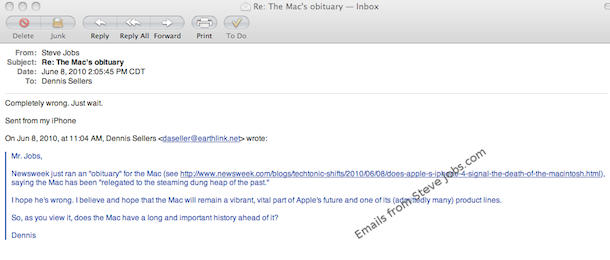


 One of the Mac Mail apps many talents is the ability to automatically detect when a flight number is present in an email, and then give you the option to view the flights status by using the flight tracking Dashboard widget in OS X.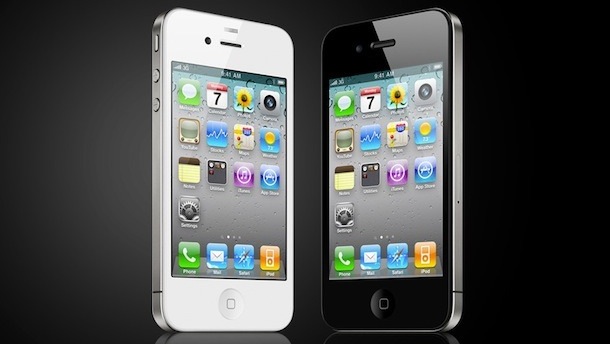

 As many loyal Safari users already know, the dedicated “refresh” button was removed from the browser’s toolbar starting with the release of Safari 4. It seems that Apple decided it would be better placed at the end of the location bar. The “new” format also includes a much smaller button which quite frankly is much harder to get to and easier to miss.
  We have discussed in the past, some of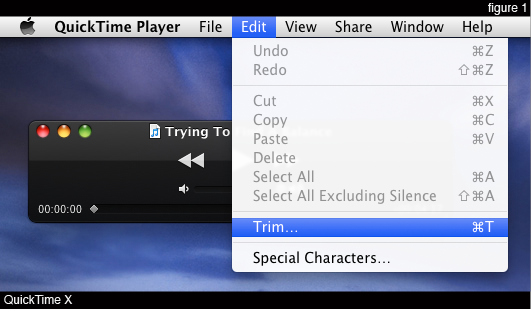
 Spotlight is amazing at finding files buried deep within your Mac, but what if you found the file you wanted, and you don’t know what folder it’s contained within on the Mac, or if it’s buried deep somewhere in Mac OS X?


 So WWDC charged full steam ahead this year with news about


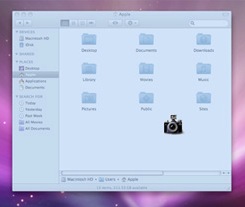 I use screenshots constantly to share bits of information with people, and they can be really helpful when troubleshooting as well.



