85% of Mac owners also have a PC, 63% own an iPod, and more interesting Mac user facts
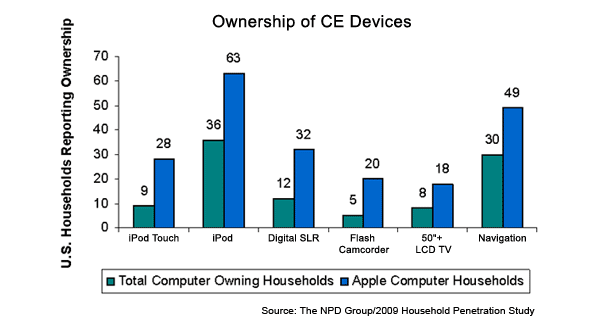
A study from NPD tells us some interesting facts about Mac owners in the USA, highlights include:
* 85% of Mac owners also own a PC
* 72% of Mac owners use a notebook / laptop
* 66% of Mac owners own three or more computers
* 63% of Mac owners own an iPod
* 49% of Mac owners own a navigation device (GPS, but is iPhone included?)
* 36% of Mac owning households report incomes over $100,000
* 32% of Mac owners have a Digital SLR camera
* 28% of Mac owners have an iPod Touch
* 20% of Mac owners have a Flash-Memory Camcorder
* 18% of Mac owners have a 50″ or greater LCD TV
* Average Mac owners have 48 consumer electronic devices, vs 24 for the average Windows PC user
* Mac ownership/marketshare is up to 12% in the USA, from 8% last year
NPD goes on to surmise that the purchasing decisions of Apple / Mac owners are a significant indicator of trending popular products and adoption trends.
NPD via TheAppleBlog.com

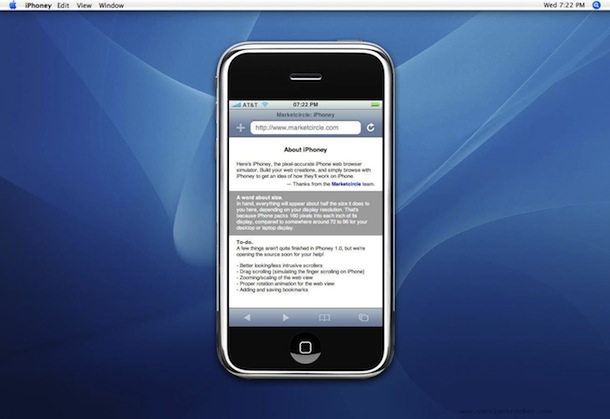
 Safari is really settling it’s spot as my preferred web browser. Sure, I miss the plugins in Firefox, but it just can’t beat the speed of Safari. You can make your Safari web browsing experience even better by using Command-Option-F to jump to the Search box, nice!
  There are several different ways to rip dvd’s on your Mac, we’ll cover ripping DVD’s with HandBrake and with VLC here.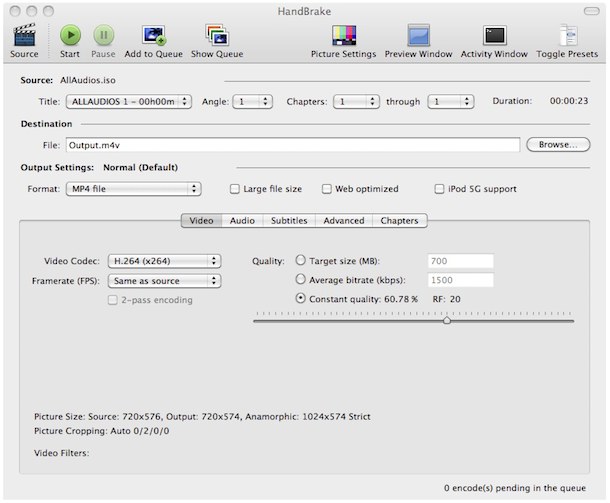

 DeSmuME is the best Nintendo DS Emulator for Mac OS X that I have found, it’s pretty full featured with save states, touchscreen emulation, movie creation, and more. My only complaint is the layout of the emulator being vertical, which is true to the DS, but it makes playing games sort of obnoxious particularly when you increase the screen size. If they enabled side-by-side screens for this DS emulator so I could play it fullscreen, I’d be even more enthralled with an already good app. If you’re looking for a Nintendo DS Emulator for your Mac, look no further.
 Finally, a Facebook Notifier for Mac! I have long been a fan of