
PDF Editor for Mac OS X – What’s the best way to edit a PDF on your Mac?
 Need a PDF Editor for Mac? I did too, and this is what I learned. Adobe Acrobat Pro
 is great software with some killer features, but it’s expensive. Acrobat is hard to beat in it’s functionality, but if all you’re looking to do is make small changes and edits to PDF files, spending $350 for a PDF Editor might be a bit overkill. So what are some other options for a Mac PDF Editor?
Best Free PDF editor for Mac
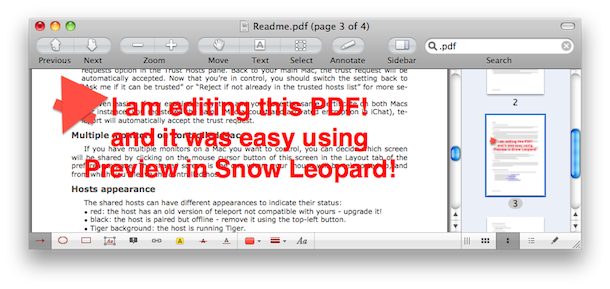
Preview – FREE – included in every Mac OS X install, the most recent version of Preview in Snow Leopard lets you make all sorts of annotations to PDF documents. In the Snow Leopard version, you can draw shapes onto PDF’s, and write text directly to PDF files for things like a digital signature. It’s basically a limited PDF editor, for free, and there’s no download required! If you’re looking for a free PDF editor solution, I highly recommend just using Preview.app that is already included in Snow Leopard!
Other Free PDF Editors for Mac
Skim – FREE – we’ve written about Skim before, and it works pretty well for making quick notes to PDF documents.
Scribus – FREE – an open source desktop publishing app that has limited PDF editing abilities, and the ability to create your own PDF’s
Best Paid Solution for Editing a PDF on Mac
I say this is a tie because PDFPen is great but a lot more limited than Acrobat, but if you’re just looking to make simple changes, save yourself $300 and buy PDFPen. If you’re a professional and you are going for advanced PDF editing and production features, get Acrobat, it’s expensive but there’s a reason: it’s extremely powerful.
PDFPen -$49.95 – a whole lot cheaper than Adobe Acrobat, with much of the same functionality in terms of making quick text edits to PDF files and the ability to edit faxes, OCR files, and more.
Adobe Acrobat Professional 9 – $350 – the grand daddy of all PDF editors, you’ll pay a fortune for it, but if you’re really serious about creating, editing, and modifying PDF’s this is the best way to go. There is an upcoming version X (10) too that will have even more powerful features.

 The new version of the
  iTunesHelper or iTunes Helper, is a program from Apple that runs in the background and monitors for the connection of any iPod or iPhone to the computer, if an iPod or iPhone is detected it will automatically launch the iTunes application. The functionality is the same on both Mac OS X and Windows PC’s, and there is no serious ramification to disabling it (other than that iTunes will no longer auto-launch upon connecting your iPhone or iPod).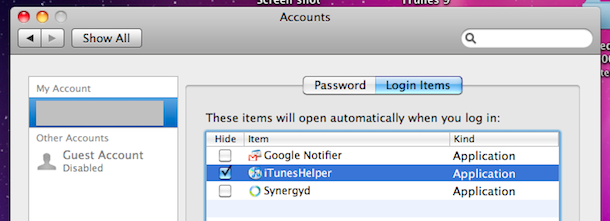

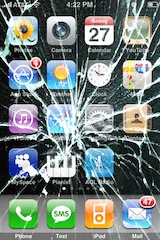 Do you need iPhone Insurance? For such an expensive phone, I think the answer is yes. iPhone Insurance is not really something I thought of, and I’m guessing something that most users don’t think of until it’s too late and you actually need it. After several of my friends accidentally broke, lost, or otherwise rendered their iPhone’s unusable, I got a bit more curious about iPhone specific insurance options. This list is by no means complete but it’s just what I discovered in my research for insuring the device.
 Readers Suggestions – I have no experience with SquareTrade but apparently they offer iPhone Insurance too, please do your own due diligence to determine if the iPhone plans they offer are right for you. Additionally, Best Buy offers iPhone Insurance through their Geek Squad service (thanks reader Mike!) but apparently they are expensive.
 Last week we wrote that some people thought of
 In case you somehow missed the news today, Apple has released iTunes 9 available immediately for download, and iPhone OS 3.1 for the iPhone and iPod Touch, also available now. Both updates seem worthwhile and right in line with what the Apple Rumor Mill has been suspecting, although they don’t add anything jaw-dropping in terms of new functionality or features, there’s a bunch of bug fixes and small feature additions and improvements. iTunes 9 wasn’t showing up under Software Update for me so I just downloaded it manually from
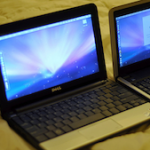 So you want a small lightweight portable Mac OS X machine, the closest thing Apple has in this area is the MacBook Air which is $1600 or more. No doubt about it, the MacBook Air is a great machine but I don’t want to spend anywhere near $1600 for another laptop when I already have a MacBook Pro. I’m thinking a small budget, like really small by Mac standards, how about $250 or less? Impossible you say? Wrong! It’s possible and I did it! Here’s how you can too. Be warned, this is not sanctioned by Apple, and it’s breaking the Mac OS X EULA agreement.
  Apple certainly means well with the Software Updates, but sometimes I get update notifications I just don’t care about, or just don’t want to install for whatever reason. If you’re in this situation and you have a version of OS X before the App Store that ran exclusively in a native Software Update window, like Snow Leopard and prior, you can easily ignore those software update packages to stop having them show up. (Yes you can
  Ever wanted to know if your Mac is using a 32-bit or 64-bit kernel? It may seem geeky and in the weeds, but it’s now relevant. Snow Leopard 10.6 is the first Mac OS X version to ship with a 64 bit kernel, and obviously your Mac has to have a 64 bit processor to utilize that kernel, but some 64 bit Mac’s are not defaulting to the 64 bit kernel.
 My one and only email client is the web based Gmail, and for years I’ve been using

 If you’re an iPhone 3G or iPhone 3GS owner and you’re on the AT&T network, you’ll be pleased to hear that AT&T is finally stepping out of the cellular stone ages and on September 25, 2009 will FINALLY enable MMS on the iPhone! It’s kind of amusing to be excited to get a 7 year old technology onto the otherwise wildly modern iPhone, but AT&T has been disappointingly slow with enabling the MMS service for iPhone users. Currently if you’re an AT&T subscriber and someone sends you an MMS message, you might get an annoying text message with a URL to a shoddy webpage and login/password to access a super reduced quality image of the original sent. I say *might* get the annoying message because on average I receive about 30% of incoming MMS’s this way, the remaining 70% get lost in the mystery AT&T MMS abyss and I don’t get any notification at all. Hooray AT&T! Welcome to 2002! err 2009!



