
Remove Duplicate Songs from iTunes
If you have a large iTunes library it’s really easy to inadvertently gather duplicate songs, thankfully cleaning up and removing the duplicates from the iTunes song library is really easy.
Both iTunes for Mac and iTunes for Windows support an ability to easily remove duplicate songs, here’s how to do it:
How to Remove Duplicate Songs from iTunes
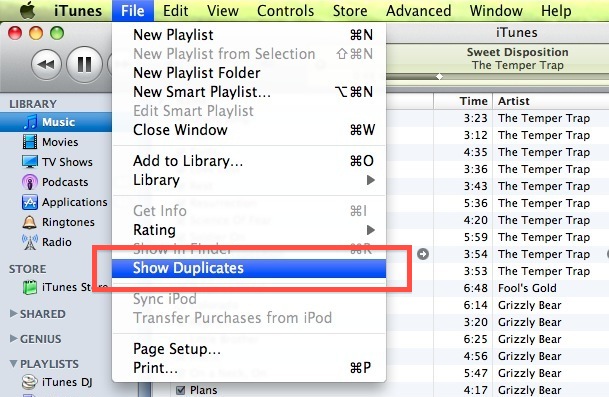
- Within iTunes, open the ‘File’ menu
- From iTunes 12 onward, go to “Library” submenu under File
- From iTunes 11, this will be in the “View” menu instead
- Navigate down to ‘Show Duplicates’ (see below screenshot)
- iTunes will now show what it thinks are duplicates
- Select a song and hit the “Delete” key to remove it from the iTunes library after you have confirmed it as duplicate
- Repeat with additional duplicates to remove them
This method does not always work though to find true duplicates of songs and will sometimes give you songs that are just very similar in name or artist, so you may want to try this instead:
How to Remove Exact Duplicates from iTunes Song Library
- Hold down the Option / ALT key
- Navigate to “File” menu
- Click on ‘Show Exact Duplicates’
- Now iTunes will display ONLY the exact duplicates (see screenshot)
- Confirm a song is a duplicate, then select that song and hit the “Delete” key to remove it from the iTunes library
- Repeat with other duplicate songs in iTunes
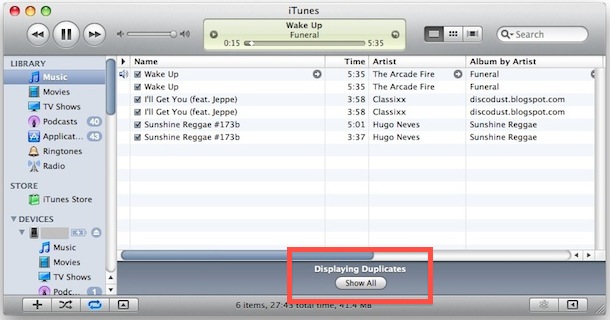
This list shows you the songs that iTunes thinks are duplicates, so do not delete everything in the list or else you may delete the original song that you want to keep.
iTunes isn’t perfect in detecting duplicates either, it looks like it bases most of the detection on song, artist, and album names, so if you have two songs named the exact same thing but they are different iTunes will likely think it is a duplicate.
After you have cleaned up your duplicate songs, you can get the iTunes library looking like normal again by clicking the ‘Show All’ button that is highlighted in the above screenshot, or simply navigate back to the ‘File’ menu and click on ‘Show All’ where “Show Duplicates” once was.
Note this feature was briefly removed and re-added to iTunes 11.0.1 and beyond. It’s now under the “View” menu of iTunes 11, and works with other media libraries beyond music as well. From iTunes 12 and later, it’s under the “File” > Library menu.






[…] at the time will depend on the media library selected. Most people use this feature to find and remove duplicate songs rather than movies or podcasts though, so that shouldn’t be an issue. […]
“Display Duplicates” is greyed out. Your tip doesn’t say how to enable it.
iTunes shouldn’t create duplicates to begin with. I hate iTunes for it’s constant maintenance requirement. The duplicate finder stinks. There needs to be stability in iTunes to guard against duplicates or moving libraries without my permission. There needs to be a duplicate remover that does not require manual selection of each duplicate file. iTunes, you are ridiculous for not responding to a BIG BUG and major complaint of many users. This is what happens when there is no competition — arrogance.
The duplicates finder is useless. It may find the duplicates but does not discriminate about quality, nor does it allow you to delete the duplicates without identifying each and every tune you want to delete.
I recently transferred my music and was left with over 3000 duplicates….. To identify these items entails many hours of work and there is no guarantee that adding more songs will not undo the work
My iTunes library is of considerable size and the only Duplicate function in iTunes is useful for is for identifying duplicates.
Getting rid of them, however is another thing! I have spent a month deleting each of my 8,000 + files (one by one) identified by iTunes as duplicates and am still not even half-way through. I need a better way to do that.
I tried fdupes without success, but it seems to be only for Mac. Any suggestions for Windows (preferably free)?
use fdupes first. It will check using md5 hash for exact duplicates.
Hi,
I use windows xp (not that it shuld make a difference) but no matter what I am trying, I juat cant highlight the display duplicates tab from the file menu.
Help please? I am sure its a simple solution.
I don’t think any of the iTunes cleanup apps, or iTunes, does a good job of cleaning up duplicates.
I think it’s doable, but I think most of them take the wrong approach. The most simple attribute of a duplicate that will allways be there is the track length. That will give you the first cut at finding duplicates. The next thing it to loook at similarities in track, album, artist label fields. Third way is to look at what it matches in GraceNote. Fourth is to look at the apps that will identify a song by listening to it.
I find simply looking at the track length works as well as many of the complex apps. I wish there was an app that included this criteria in it’s algorithm.
Then there is the question of what is a dupe. Is two tracks that differ only in the sample bps a dupe? I would say yes, and keep the one closest to a target bps. Are two tracks that essentially differ only in one being a few seconds longer a dupe? Yes. Are two tracks that are from different albums but are essentially the same a dupe? Maybe… I would say yes, and would like to only store one copy with pointers to/from both albums so there is a record that the song is one both albums. I like to keep complete discographies, but hate keeping dupes.
Then there are the songs libs you get from friends that either have most of the track, album, artist info missing, or have all the info crammed into the track title, or God Forbid, into the file name!!! Most or these are from Windoze systems… need we say more?
Jim.
I followed the instructions mentioned above, i had previously tried deleting one by one, which turned out to be a nightmare. ( “so these duplicates also take up space on the hard drive?”) If they do, im glad to get rid of the because i had up to five duplicates in some cases. Works great I dont care if I had to sacrifice some songs compared to my library.
Well I tried Dupin, mentioned above, and it worked fabulously.
I have moved a hard drive from a network connection to my MacBook and everything that was on the original network connection is “dead”. Am i going to have to go song by song to delete these? I have thousands.
Ive got 200 songs duplicated…ive really got to sit there deleting EVERY SINGLE ONE???
What’s even more annoying is that itunes USED TO have this function, but for whatever reason, Apple decided to remove it.
This works in windows as well.
Ctrl+Shift then File..
how to remove duplicate songs from iphone it self.
AFAIK, this command also cares nothing about what’s been added to what playlists, or whether artwork, comments or lyrics have been attached. No attempt is made to reconcile all this when you delete a “duplicate” in this manner.
The above tip is helpful, but you still have to examine every track to determine whether you want to keep or delete the tracks it finds and Smart Playlists aren’t perfect either.
I suggest you go read Doug’s Applescript solution to this.
http://dougscripts.com/itunes/itinfo/dupin.php
Write your successes (or failures) back here!
/shawn
Great, so we know how to find the duplicates and delete them individually. How do we delete multiples? 100s of them, maybe 1000s of them at one time?
AFAIK, this command also cares nothing about what’s been added to what playlists, or whether artwork, comments or lyrics have been attached. No attempt is made to reconcile all this when you delete a “duplicate” in this manner.
@johnnycourage,
looks like the list shows both original and duplicate, so don’t delete everything or you may delete songs you want
@Jared Flannagan
The real point is not what itunes can do, but how it tells you it can do it. I appreciate extra options being hidden to prevent long lists and clutter. I don’t think this hidden option is the reason other software is created either.
Several things: 1) It shows all songs that are the same name and artist so don’t select all and remove.
They use exact loosely. This just does a string compare on titile, artist. That’s IT! They may different times, off different albums, etc. So exact is not really exact. You really have to play or know each entry to decide if you want to remove one or the other.
can i select all and delete or does the list show the original and the duplicates?
it cracks me up that there are a bunch of software products that charge money to do this, it is free to remove your iTunes duplicates, but because Apple made it so hard to find (as the other commenters mentioned!) companies were able to create a product that just basically presses the option key for you LOL!
Sororo is totally right, this is a really useful feature but it’s stupid to have to dig around with another key held down to find these options. I didn’t know about this and I use iTunes all the time, so thanks for the nice tip
Cool tip, but, is it just me, or is this the type of thing that should have its own menu item? Or should I go through all menus holding down ALT when I need a function that might exist?