
Easily Boot from Mac to Windows from the Menu Bar with QuickBoot
 Need to quickly boot from Mac OS X to Windows? Don’t want to fiddle around in System Preferences or hold down the Option key during the Mac restart to access the Boot Loader? QuickBoot to the rescue!
QuickBoot is a great little tool that sits in your menubar and lets you easily select boot volumes from Mac OS X to Windows and vice versa. Simply click the menu, select the volume, reboot your Mac, and you’ll be in Windows.
Want to exit out of Windows? Easy, just reboot again and you’re back to Mac OS X (or rather, you’re back into whatever your default boot OS has been set to by way of Boot Camp or your boot loader of choice). Sound good? Check out the utility, it’s free:
• Check out the QuickBoot developer home to find the utility
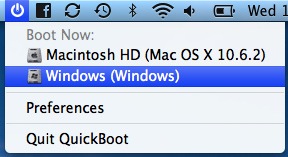
QuickBoot isn’t perfect though, as the developer points out that QuickBoot won’t work with MacBook Airs or Unibody MacBooks too well, and that operating systems outside of Windows and Mac OS are usually unrecognized too. So, not necessarily an ideal solution, but for a quick fix it can do the job for many Mac users who require a quickly switchable dualboot OS X / Windows environment. Is it that hard to just reboot and hold down the Option key? Generally no, but since it does require manual intervention upon restart it’s not always the most practical or convenient for everyone. The other option, as always, is to go through the System Preference panel for Startup Disk, but that’s also kind of a pain every time you want to reboot your Mac into Windows.
Remember this is a Mac only app, so basically you can quickly reboot into Windows but you’ll need to still use your own method of rebooting back into OS X for when you want to return to the Mac side of things.
This nice little find comes from the way of LifeHacker, cheers to them!






[…] Visto en OSXDaily […]
[…] celebration of the mass here: Easily foot from Mac to Windows