
Disable the Apple Remote Control
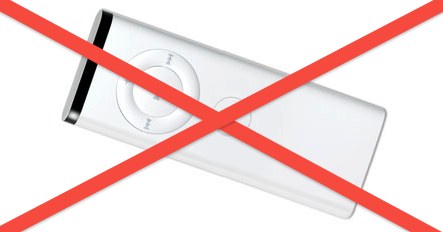
The Apple Remote Control used to be bundled with all new Macs, but unless the remote is paired specifically to your Mac a single remote can control multiple Macs at the same time. This is annoying if you’re trying to control a single Mac with the remote and suddenly FrontRow is activated on all other infrared capable Mac OS X machines in the room.
There’s two solutions to this problem, one is to pair the remote to a machine, and the other is to disable the Apple Remote Control from activating a Mac completely.
Turn Off the Mac Remote Control
This will disable any remote control from working in Mac OS X:
- Launch System Preferences
- Click on the “Security” control panel
- Click on the lock icon in the lower left corner and enter your Admin password
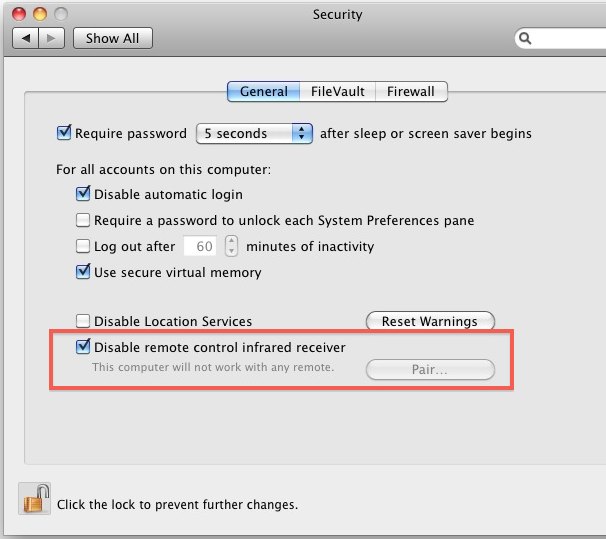
- Select the checkbox next to “Disable remote control infrared receiver”
- Close System Preferences
As you can see in the screenshot below, you can also select to “Pair” the remote which will cause only the paired remote to work with its paired Mac, but I think it’s easier to just disable the IR receiver on Macs where you don’t use the remote. I get the feeling not many Mac users use the remote controls anyway, which is probably why Apple stopped bundling them with new Mac purchases.
Check out some more Mac tips and tricks too.






On newer iMac and MacBook, the receiver is not built-in anymore. To continue to have Apple Remote functionality you can use a SmartGUS.
Hi ..i have two imacs , the one mid 2011 ,the option as in the screenshot appears but what ever you do when you check the “com.apple.driver.AppleIRController.plist” file
is always enabled.
And in my other 2014 imac the option is completely missing (i did everything to make it appear but no luck)at system security prefs at general tab and also the same plist file is always enabled too…
The kext is loaded and even if unloaded is still enabled.
this looks like a bug…or maybe needs a bluetooth keyboard to work…
THANK YOU! I, like Mike A. have Apple T.V. with a remote and a Macbook Air/Macbook Pro. I always have one of my Macs in my living room with me and all of a sudden when I’m watching Apple T.V. iTunes turned on whenever I used my remote. I could not find a single way to stop this short of turning off my Macbooks altogether which was not a happy option. Other websites/forums had “solutions” that didn’t work at all. Yours worked! I will add though that I had to take an extra step on my configuration and go into “Advanced” under the General tab. That was where I was able to uncheck “disable remote…” Regardless, I never would have found it without this article. I too was going out of my mind! Thank you so much I was honestly going to replace Apple T.V. with a Roku! Now it can stay as it is!
THANK YOU! We have a remote for our Apple HiFi, best sound system ever that they no longer make :(, and since my new laptop and iMac, the dang thing kept turning on my iTunes anytime my husband hit the button. It has been driving us both crazy and I couldn’t figure out how to disable the damn thing.
Thanks to your post, I can refrain from taking a hammer to his remote.
In Lion 10.7.x you have to click the “Advanced” button at the bottom of the Security prefpanel.
And how you unpair it in Lion, i’d updated to 10.7 and that check box isn’t there :S
What i do not understood is if truth be told how you are not really a lot more smartly-preferred than you may be now. You’re very intelligent. You realize therefore considerably on the subject of this topic, made me for my part believe it from numerous numerous angles. Its like men and women don’t seem to be fascinated unless itˇs something to do with Lady gaga! Your own stuffs nice. Always take care of it up!
[…] recently published a guide on how to disable the Apple Remote Control, and one of our readers wrote in with a good prank that demonstrates why you’d want to turn […]
Why would I want to disable this? Any advantage?
The remotes are actually a potential security risk, I’m in IT and we disable this on every new Mac that comes through the door. Anything that can launch programs without strict user approval needs to be turned off, period.
@Chuck – other than playing media at home I don’t see a purpose for the remotes at all.
I think I seriously have about 10 of these remotes laying around. I’ve never found a good use for them but for years Apple would include one with a system so they just kept piling up with each new hardware upgrade.
Any ideas on putting them to use would be appreciated.