
Create a New Folder Containing Selected Items in Mac OS X

You can now select any number of files from the Mac OS X desktop or a folder and create a new folder containing those selected items.
This is a wildly useful Finder trick for file management and organization, since you can quickly group a collection of files by selecting however many you want to within Finder, then quickly create a folder containing only those selected files or folders.
Making new directories of chosen files is super easy on the Mac, we’ll show you three different methods to create new folders containing selected files (or folders) within Finder on Mac OS.
How to Create a New Folder of Selected Files on Mac
- Go to the Finder in Mac OS if you have not done so already, then navigate to the files you want to create a new folder containing
- Select files you want to create a new folder containing
- Right-click (or control+click) on one of the selected files and choose “New Folder with Selection (x items)”
You can select multiple files or a single file to create a new folder with, but obviously this feature is most powerful with a selection of multiple files chosen.
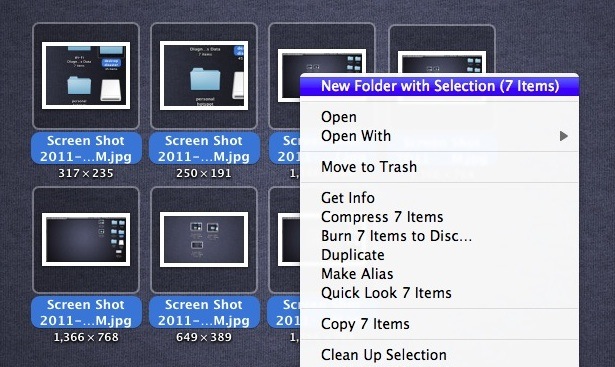
That’s it, super easy, very fast, and makes organization of files quicker than ever on the Mac!
Creating New Folders of Selected Files from File Menu on a Mac
You can also select the items as usual in the Finder, and then go from the “File” menu in the Finder to the same “New Folder with Selection” option, but right-clicking is quicker.
There’s also a keyboard shortcut to do this too: Control + Command + N
The keystroke for creating new files with a selection doesn’t seem to work for every Mac user however, but give it a try and maybe it will work for you.
The “new folder with selected items” feature in Finder, alongside the ability to cut and paste files finally in Mac OS X, are two of the more subtle but useful enhancements to the file system that arrived in more recent versions of Mac OS X. You will find these great features in all somewhat modern versions of Mac OS system software, from Lion to Mavericks, High Sierra, and onward. Try it out, It’s a great feature!






This is a dangerous feature to use with network resources (like a samba share). If you do not have permission to create a new directory on the network drive, your selections may be deleted instead of moved into a new folder.
The feature should check for permission to create a new folder first.
Let me gave you A.K.A OS amazing thanks for tips
Hi,
Same problem here with Olga! All my files on my mac (in documents, photos, etc) is now in a folder named “New Folder with Items”. I have searched for it and I learned about this function. Apparently I have selected all my files and used this function by mistake. Now even I put my files to their proper places manaully, all are automatically goes back to this “New Folder with Items”. How can I undo this process? Please help. Thank you.
Hey guys! While this is a new function I learned it hard way. I selected some files and right clicked on them. For some reason computer paused and I wasn’t aware that I was pressing New Folder containing selected items. Next thing I know, a bunch of files in my dropbox, documents, images, music, movies were gone. I found them all in one folder (still dont know how that happened because i was only selecting some images in a specific folder in dropbox). Now the problem is how to move all these files back to corresponding folders?
Please help!
It works, on my MBP 2012 retina
I had it works earlier, 15 minutes ago, but not anymore. All the files I was working on were stored on an external hard drive. I was able to create ‘new folder with selected files’ feature. But now, that feature is disable when I work on another set of files. why?
[…] OSXDaily Tags: 用所选项目新建文件夹 Comments RSS […]
Works too well. Did it without askin anything like where or if.
Indeed, I bookmarked your site as well. Keep up the good work!
Sweet! This is becoming one of my favourite sites. Great tips and tricks. Control+Command+n worked for me just great. (MBA 13″ 2010 pre-Lion) Thanks and Cheers!
Control+Command+N worked for me. great advice, thanks!
Control+Command+N worked for me. It created a folder named “New Folder With Items.”
Command+Z put everything back with no changes.
Nice tip, thanks.
For those who can’t get the shortcut to work:
When it didn’t work for me I found that the shortcut was occupied by Evernote. I uninstalled Evernote (as I didn’t used it anyway) and the shortcut worked right away.
So, if it’s not working, it’s probably because some other program has overruled the shortcut.
Thanks for the tip!