
Search the Web from Mac OS X Finder, TextEdit, and Preview
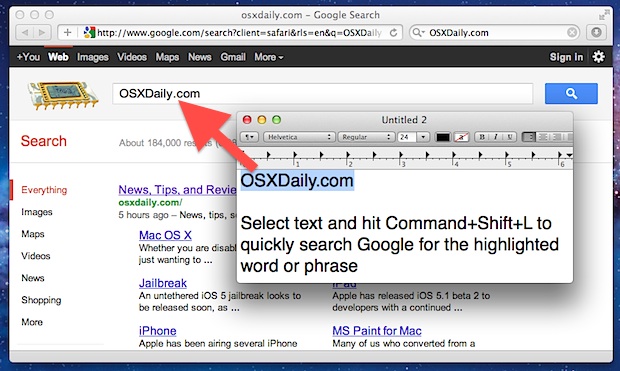
Mac OS X and many default apps have a built-in ability to quickly search the web.
To quickly search the web, just highlight any text in the Finder, Preview, or TextEdit, and then hit Command+Shift+L to launch Safari with a Google search for the highlighted text selection.
The web browser will be set to Safari regardless of your default browser settings and doesn’t appear to be customizable.
You can also access the “Search for” option from right-click menus throughout OS X.
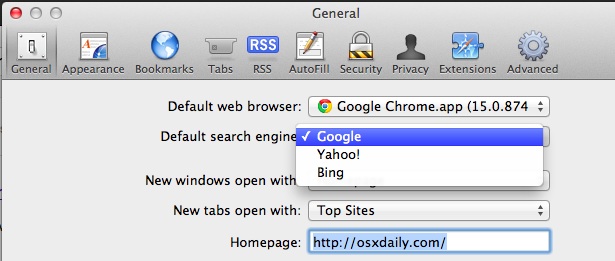
Additionally, if you feel like changing the search engine used, you can select either Google, Bing, or Yahoo as the default search engine for that quick search keyboard shortcut by going into Safari’s Preferences:
Other apps beyond the three mentioned likely have the same ability, but the Command+Shift+L keyboard shortcut in Safari opens Reading List rather than searching the web.






Oh yeah?… How do you use a non-Apple provided search engine, one that doesn’t track you? Like duckduckgo.com ixqucksearch.com
@Tom, your tip is appreciated, but the info on that page in your posted link doesn’t seem to work.
[…] Via | OSX Daily […]
thanx
its very useful
Very handy hotkey combo ✨❕
For those who have done their best to move away from Safari should check out this post. This will use your default browser.
http://rentzsch.tumblr.com/post/5794765921/search-with-google-using-chrome