
Take an iPhone Photo Remotely Using the Earbuds
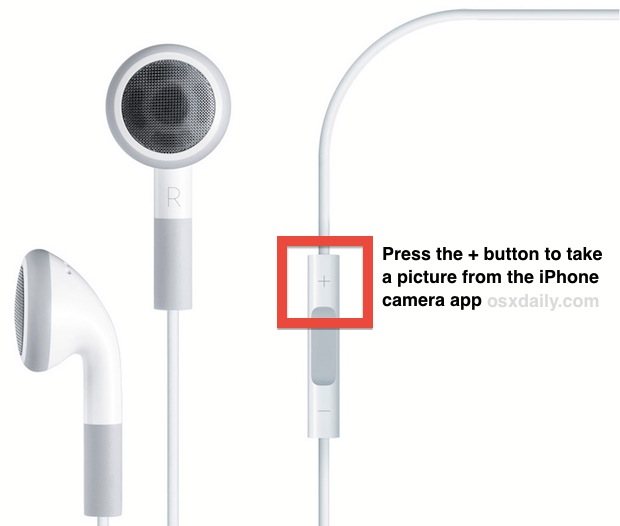
Did you know those white Apple earphones that come bundled with an iPhone can double as a remote shutter button for the iPhone camera?
With the additional length of the earbud cable, you can end up taking better group pictures, better selfies, and even better low-light photos because it can dramatically reduce camera shake. There are all sorts of fun uses for taking pictures from iPhone or iPad with the earbuds.
Give it a try yourself, this tutorial will show you how it works.
How to Take Photos with iPhone Remotely Using Earbuds
You can take photos using Earbuds connected to any iPhone or iPad, we’re focusing on iPhone here however, but the steps are the same for iPad too:
- With the earbud headphones connected to the iPhone, launch Camera app
- Click the + plus (volume up) button on the earphone controls to snap a picture
Obviously this isn’t the same as a complete remote control for taking a photo, but it’s about as remote as you can get without the help of a third party app, or without using the camera count-down.
Remote shutter releases are generally best used with a tripod or stand, two popular and highly portable stands for the iPhone is the Joby Gorillamobile which includes a phone case to attach the iPhone to the stand, and the iStabilizer
 which uses a clamp to hold onto a variety of different smartphones.
Don’t miss some of our other iPhone photography tips, including how to lock exposure and focus, zoom in and out, take better pictures by using the grid and rule of thirds, and even how to make an instant macro lens using nothing but a tiny drop of water on the iPhone camera.
Do you have any other interesting tricks for earbuds and iPhones, or iPhone photography? Let us know in the comments!






oh useful tip. it’s reason why i’m a fan of Apple. Thank for sharing
You forgot to mention Tiltpod, the keychain stand.
What’s a good time-lapse video app for iOS devices?
this is awesome! thanks for this tip.
wow, like this tip, thanks
Apple thinks of everything, who would ever think of this?
The phone’s volume up button already takes a picture, though. It is perhaps not surprising the volume up on the headphones would do the same thing.