This will add more fuel to the burning Verizon iPhone rumor fire, Apple has posted several job openings that require knowledge of CDMA technology. In case you didn’t know, CDMA is the cellular network that Verizon uses.
The full listing is repeated below in case it gets pulled: Read more »
A series of pictures alleging to be silicon iPad 2 cases have appeared on a third party dropship site, and they give us a good look at what to expect from iPad 2 (this of course assumes they are based on iPad 2). I went ahead and attached labels (rather poorly) onto the picture from Alibaba so you can see what the openings on the case are likely for.
Looking at this alleged iPad 2 case, we can assume determine the following about ports and features:
Camera port – This looks obvious. I don’t know what else this could possibly be but a camera, it’s in the exact same spot as a camera on the iPod touch 4G and iPhones
Mystery port, is it Mini-USB? – the size of the mystery port at the very top center of the case looks precisely like the size of a mini-USB port. Various rumors have suggested a mini-USB port would come to the next iPad revision. If it’s not that, who knows, but there is a port opening at the top
No landscape mode docking – you’ll notice there are no dock connector ports on the side, which contradicts many rumors that the iPad 2 would be able to dock in landscape mode
Larger speaker port – also aims slightly to the back which may help acoustics and sound projection
Mute, headphone, vertical dock connector – all in the same places as usual, no change here
It’s important to note that these iPad 2 cases come from a manufacturer in Shenzen, which, conveniently, is also where Foxconn is located (Foxconn manufacturers the iPad, iPod, and iPhone for Apple). The Shenzen connection suggest that some schematics of the new iPad 2 have been leaked to various manufacturers in the region, which seems to have happened a few times in the past with the iPod touch. Leaks from Shenzen plants are also thought to be the source of the white iPhone 4’s that are widely available for sale in China.
Engadget also found the following video of more alleged iPad 2 cases, and they show the exact same port configuration as the silicone case above, here’s that video: Read more »
Apple has revealed the most popular iPhone/iPod touch and iPad app downloads of 2010, and one thing that really jumps out is the shear number of games appearing in the top 10 lists. Here are they are, directly from iTunes: Read more »
You can set Safari in Mac OS X or Windows to always open new windows into new tabs instead. In fact, new versions of Safari default to a variation of this behavior, but older versions need Safari to manually be set to open new windows as tabs, but with a little adjustment you can make Safari open all windows always into tabs, even those tiny pop-ups you may encounter on some websites. Yes really, ALL windows in Safari.
You can download any iOS software updates for iPad, iPhone, and iPod touch without using iTunes. There are actually two ways to do this, the first is using the iOS device itself but there are caveats and limitations with that, and then there is the traditional method of downloading the update files directly from Apple without iTunes, which is particularly helpful for those who rely on download managers or who are just encountering trouble with iTunes automatic updates.
We will cover both methods of obtaining iOS software without using iTunes to download it, we’ll start with the easiest method of using the device itself to get the iOS update. This applies to all modern versions of iOS.
The iPad is basically never on sale, but right now Apple is offering the best prices seen yet on refurbished iPad models. The iPad Wi-Fi models are especially cheap at up to $100 off.
Now here’s why this is an extra great deal; the refurbished iPad models all include brand new batteries and brand new outer shells, plus they include the same 1 year warranty that new Apple products get and are still eligible for AppleCare Protection Plans for iPad.
The prices are as follows:
Refurbished iPad Sale Prices
Directly from Apple, the Wi-Fi models are more deeply discounted than the 3G models:
iPad 16GB Wi-Fi: $429 – $70 off
iPad 32GB Wi-Fi: $499 – $100 off
iPad 64GB Wi-Fi: $599 – $100 off
The refurb iPad 3G models are are all just $50 off, making the WiFi model a particularly strong deal. Grab one of the refurbished models at a deep discount and then grab an iPad AppleCare Protection Plan for just $75 ($25 off) and you’ll basically have a new iPad with a full 3 year warranty! I like AppleCare extended warranties in general but I think it’s particularly wise to get the extended warranty when buying refurbs.
You can check out the refurb iPad sale on Apple’s website, supply is limited and I bet these will sell out quick at these prices.
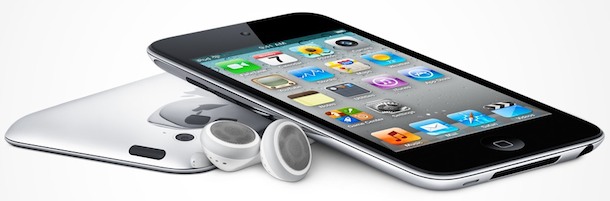
The iPod touch is one of the most wished for items this holiday season, and they rarely go on sale. Amazon is offering a nice deal though on the latest iPod touch 8GB model, combining a nice $15 discount with a free $15 Amazon gift card with purchase.
In order to get the free $15 Amazon Gift card, you must add the iPod touch plus the Amazon.com $15 Gift Card to your shopping cart at the same time, when you go to checkout you won’t be charged for the gift card. This offer is valid until December 11, 2010, so you’ll want to move quick to seal the deal.
The dreaded desktop icon clutter, if you’re working like crazy, downloading and saving a lot of files, it’s pretty easy to flip to your Mac desktop to discover it just littered with icons. Taking the time to tidy up all the files on your desktop can distract you from your workflow and, well, it’s just not that fun.
What can you do to relieve the clutter? Wouldn’t it be nice to hit a keystroke that would hide and show all of the desktop icons and files? Read more »
Anytime you update your iPhone, iPod touch, or iPad, via a Mac or PC and using Finder or iTunes, you will get a new IPSW file that is downloaded to an iOS or iPadOS updates folder. Knowing where these IPSW firmware files are located can be helpful when troubleshooting, and when accessing an IPSW for manual updating, a downgrade, or even for jailbreak purposes.
You can access IPSW files directly at the following locations on Mac and Windows computers:
If you have updated iTunes or moved your iTunes music library you may find that your song playlists seem to have disappeared. The good news is they aren’t actually missing, iTunes just isn’t finding them. There is no bad news, because you can recover the playlists rather easily, here’s how:
Recover missing iTunes playlists
This will work to rebuild missing iTunes playlists in Mac OS X and Windows.
Quit iTunes
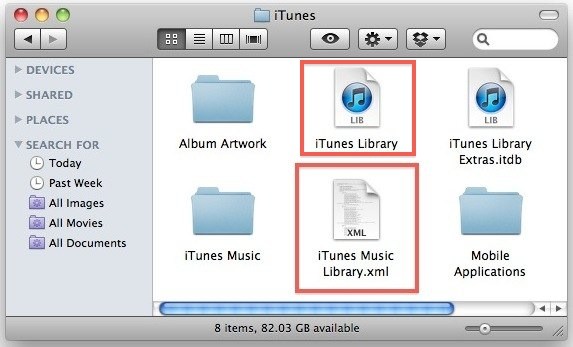
Open the iTunes Music folder, on a Mac this is by default in ~/Music/ and in Windows it’s in \My Documents\My Music\iTunes\ or \Username\My Music\
Drag the file labeled “iTunes Music Library.xml” to your desktop
Drag the “iTunes Library” file to the desktop as well (make sure this is no longer in your iTunes folder at all)
Now relaunch iTunes
Before doing anything else, go to File -> Library -> Import Playlist
Now navigate to your desktop to the “iTunes Music Library.xml” file that you placed there earlier and select it
iTunes will recreate your playlists, and any iOS devices you have synced with iTunes will resync their playlists as well
The reason we are ensuring these files are on the desktop is to have a backup in the odd case that the rebuild doesn’t work. You’ll notice after you have reimported the playlists that the ‘iTunes Music Library.xml’ file will be rebuilt in your iTunes Music directory, once everything is functioning you can safely delete those files from the desktop.
I’m not really sure why the iTunes playlists disappear during some transfers and updates, but it seems to happen randomly. The last time I ran into this I was moving iTunes music from a PC to a new Mac which worked wonderfully until I discovered none of the playlists were there. Just moving the file and then reimporting it did the trick though.
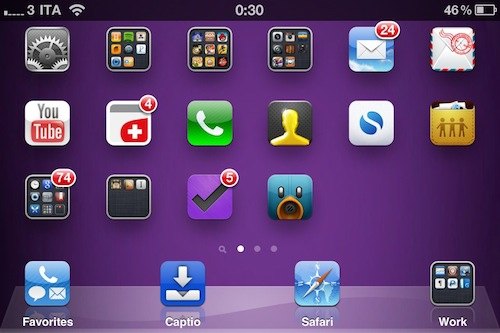
You can use your iPhone in landscape mode thanks to a third party tool that is available on the Cydia store. The app is called SBRotator, costs $1.99 and requires a jailbreak to install. Once activated, it will adjust the iOS icons to fit into the horizontal iPad-style layout by adding an additional row of icons, or you can set it to scale the icons to size automatically. You can also have it hide the icon names like in the image above.
What I think is most interesting about SBRotator is just how much it makes the iPhone (or iPod touch) look and behave like a miniature iPad. Once the iPhone has been placed into landscape mode, it really starts to look more like a tiny tablet than a phone.
Like I said, the app requires a jailbreak to work because it’s installed through Cydia. You can download redsn0w 0.9.6b6 if you need it, but be aware that newer iOS devices require a tethered jailbreak at this point.
Jailbreak or not, this is definitely a cool app. Thanks to MacStories for finding it a few days ago (screenshot is from there too).
You don’t need to use iTunes to play music on your Mac, particularly if you just want to play an audio document. Mac OS X comes with an included command line audio player that you can use to play most audio files with.
In this example we’re going to use an MP3 file as the audio, but you can also play AIFF, WAV, m4a, and many more audio formats through afplay or open commands.
If you want to get your hands on an white iPhone 4 right now, you can actually walk right into a market and buy one… if you’re in China that is. Much to Apple’s displeasure, the white iPhone 4 is openly for sale on various Chinese websites, and it’s widely available at popular electronics markets in Guangzhou, Beijing, Shanghai, Hong Kong, and Shenzen. Exactly how these iPhones were obtained for resale is sort of a mystery, but one thing you can be sure of is that the phones are not sanctioned for sale by Apple.
You’ll find that the white iPhone 4’s come in original Apple packaging, which suggests that a substantial amount of the white models were created and ready for shipment before being canceled at the last minute. I am guessing that it is these limited production models that are popping up in the Chinese grey markets.
Read on for a bunch of pictures and more information… Read more »
Error 3194 in iTunes will usually prevent an iPhone, iPad, or iPod from being able to successfully restore. Typically Error 3194 will show up when iTunes is not able to communicate with Apple servers.
If you run into Error 3194 in iTunes when trying to restore your iPhone, iPad, or iPod touch, you might be able to fix it by addressing some connectivity issues. There are also some unique situations where Error 3194 seems to be triggered when unsigned or expired firmware is used, often during an iOS downgrade or upgrade, jailbreak attempt, or even during some restores.
If you experience the error on your iOS device, read on for some troubleshooting advice so that iTunes will function with the restore or iOS update as intended. This applies to all versions of iTunes on both Mac and Windows PC, and we’ll cover a variety of troubleshooting tricks aimed at fixing this issue.
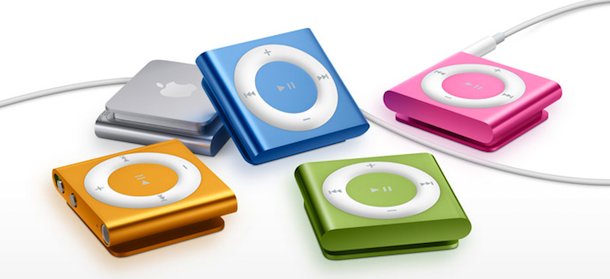
Amazon has a sale on all of the newest iPod Shuffle 4th Gen models, all colors of the popular tiny MP3 player are 16% off retail at $41 and they include free shipping. The newest model includes 2GB of storage capacity and is exceptionally small, at just a little over 1″ square and 0.3 inches in depth. This is the cheapest price we’ve seen on the newest iPod Shuffle model, and these make great gifts:
Last week I posted that the release date of the Mac App Store was imminent, based on Mac OS X 10.6.6 becoming GM and including Mac App Store support. Today there are further claims to support the idea of an early Mac App Store release, although it should be noted that these are unsubstantiated rumors.
According to AppleInsider, a source informed another Apple site, AppleTell, that Steve Jobs is pushing for an early launch date for the Mac App Store. The claim states that Steve Jobs originally wanted a December 6 release, but that has apparently been pushed to Monday, December 13. The push to launch the Mac App Store early is apparently in an effort to catch some of the holiday shopping buzz, and gift certificates to the store would be made available in a similar manner to the iTunes Store. There is no word yet on if gift cards from the iTunes Store would be compatible with the Mac App Store and vice versa, but we hope they will be able to mingle.
The Mac App Store was originally announced during the Mac OS X 10.7 preview, but Steve Jobs quickly pointed out that the release of the app store would be coming “within 90 days” to Mac OS X 10.6 Snow Leopard.
On a somewhat related note, I just realized that the Mac App Store icon looks to be following the lead of the controversial iTunes 10 icon, with it’s HAL-esque glowing blue orb design. I wonder if there will be a backlash against this icon too?
Graviboard is a hysterical app that is available from the Cydia App Store that causes your iOS icons to become gravity and touch sensitive. Tilt the iPad and watch as your iOS desktop icons tumble and fall in the direction that your iPad is pointing. Grab an icon and toss it into others to cause a virtual trainwreck as the icons collide and scatter, bouncing off one another in a calamitous icon crash.
Is it useful? Nah, of course not, but not every app needs to be useful to be fun. Graviboard works on the iPad, iPod touch, and iPhone, and can be bought for $2.99 from the Cydia Store, and yes, that means you have to jailbreak your iOS device in order to access Cydia.
Watch the video, it’s pretty amusing and by using the same song in the iPad commercial you get a nice parody effect which is good for some laughs too. This would make a fantastic app to prank someone with,
You can change the carrier name on your iPhone using a free tool called “Fake Operator” that is available through the Cydia store. Installing the tool requires a jailbreak, and then the carrier name is adjusted through the Settings app.
If you want the app, after you have jailbroken your phone (you can download redsn0w 0.9.6b6 if you need the latest jb app), just search the Cydia store for “Fake Operator” and install it.
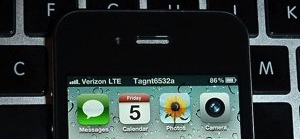
Adjusting the cell operator name is a fun way to customize your iPhone, and many people will set it to their own name or whatever else. This and similar apps are the primary method of creating fake Verizon iPhone pictures that have become somewhat popular around the web (an example of an alleged Verizon iPhone with the carrier name set), as you can see in the image below:
Because it is so easy to change the iPhone carrier name, don’t take these pictures as any particular evidence of an iPhone moving onto a new network.

 This will add more fuel to the burning Verizon iPhone rumor fire, Apple has posted several job openings that require knowledge of CDMA technology. In case you didn’t know, CDMA is the cellular network that Verizon uses.

 You can set Safari in Mac OS X or Windows to always open new windows into new tabs instead. In fact, new versions of Safari default to a variation of this behavior, but older versions need Safari to manually be set to open new windows as tabs, but with a little adjustment you can make Safari open all windows always into tabs, even those tiny pop-ups you may encounter on some websites. Yes really, ALL windows in Safari.
 You can download any iOS software updates for iPad, iPhone, and iPod touch without using iTunes. There are actually two ways to do this, the first is using the iOS device itself but there are caveats and limitations with that, and then there is the traditional method of downloading the update files directly from Apple without iTunes, which is particularly helpful for those who rely on download managers or who are just encountering trouble with iTunes automatic updates.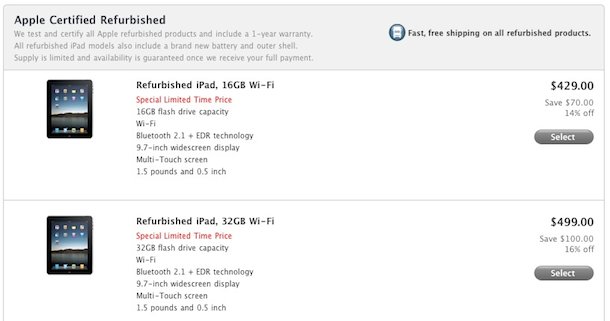
 .
.

 to your shopping cart at the same time, when you go to checkout you won’t be charged for the gift card. This offer is valid until December 11, 2010, so you’ll want to move quick to seal the deal.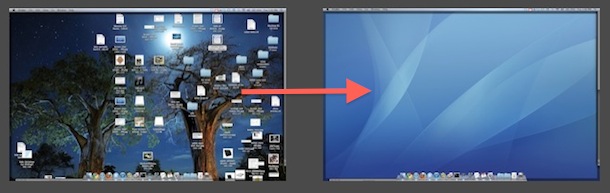
 Anytime you update your
 You don’t need to use iTunes to play music on your Mac, particularly if you just want to play an audio document. Mac OS X comes with an included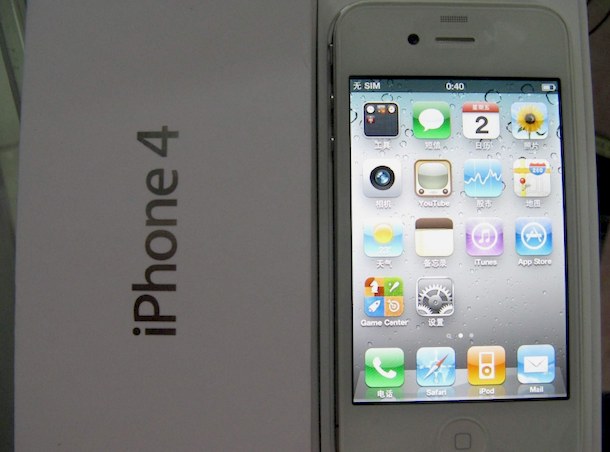


 Last week I posted that the
  You can change the carrier name on your iPhone using a free tool called “Fake Operator” that is available through the Cydia store. Installing the tool requires a