Command Line

Search Command Line

5 Useful Mac OS X Command Line Tips Everyone Should Know

Jun 29, 2008 - 12 Comments
Terminal in macOS

Like many other power users, I’m addicted to the Mac OS X command line, any reason at all for me to launch the terminal I take as an opportunity to learn more about the powerful backend of our favorite operating system. Here I have gathered 5 useful commands that will make your life easier when … Read More

How to Flush DNS Cache in Mac OS X

Mar 21, 2008 - 20 Comments
Terminal in macOS

Whether you’re a systems administrator or a web developer, or anything in between, chances are you’ll have to flush your DNS cache every once in a while to get things straightened out server-side, or even just for testing certain configurations. Flushing your DNS cache in Mac OS X is actually really easy, but there are … Read More

Use Quick Look from the Command line with qlmanage

Dec 24, 2007 - 3 Comments
terminal

Quick Look is a nice feature in Mac OS X for quickly previewing documents, images, and other file data before opening it into a designated application. I use Quick Look often for glancing at the content of various documents and it certainly beats launching an application when you just need to take a quick peak … Read More

Open a Text File to Specific Line Number at Command Line

May 28, 2007 - 4 Comments
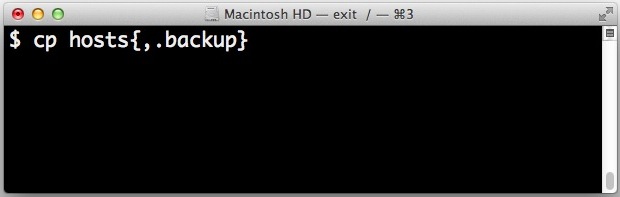
Quickly make a file backup from the command line

Have you ever known that you need to open a specific text file to a specific line number? Perhaps for a code review or adjustment, whatever the reason this is fairly common. Rather than open the text file in nano or vim and then navigate to the line number you want to access, there is … Read More

MacPorts: Easily install open source software on Mac with MacPorts

May 21, 2007 - 10 Comments
Mac Terminal icon

MacPorts, formerly DarwinPorts, is a free open source app that allows Mac users to easily install command line software and x11 software in Mac OS X by using the ‘ports’ command line tool for package management. MacPorts is probably best for more advanced Mac users who have some experience with the command line, because MacPorts … Read More

Quickly Check Mac OS X Virtual Memory Usage

May 16, 2007 - 4 Comments

Virtual memory serves a crucial task in modern operating systems, essentially how it works is that when you run out of real memory (RAM), the slower hard disk will take over as a temporary memory source. The downside is that the hard disk is slower, so running things in virtual memory is not ideal, one … Read More

Download Files from the Web via the Mac OS X Command Line

May 11, 2007 - 12 Comments
terminal

I am frequently developing web pages and often times I find it frustrating when I can not restart my browser because I’m in the middle of a download. So when I need to download a large file and I don’t want to have to worry about whether or not Safari, Chrome, or Firefox continues to … Read More

Quickly Encrypt a File with OpenSSL

May 2, 2007 - 18 Comments
Mac Terminal icon

Want to encrypt a file quickly? You can do so with OpenSSL at the command line. A few months ago a question was posed to our readers about encrypting or password protecting a text file [How can I password protect a file?]. We got several good responses but one in particular has really stuck with … Read More

Change the System Volume from the Command Line in Mac OS X

Apr 28, 2007 - 29 Comments

There are several ways to go about changing the volume on your Mac, but did you know you can use the command line? I’m a big command line junkie so the more things I can do from the Terminal the better. If you want to adjust your system volume level directly from the command line, … Read More

Get System Information from the Command Line in Mac OS X

Apr 23, 2007 - 13 Comments
Mac hardware

Regardless of how many Mac’s you administer, there will surely come a time when you’ll need to retrieve relevant System Information. This can be done from the graphical interface with the Apple System Profiler utility, but often you’ll need to pull system details from the terminal as well. Gathering system information from the command line … Read More

Install Software Updates from the Command Line

Apr 18, 2007 - 4 Comments

We all know the familiar Mac OS X Software Update and App Store Updates panel, it pops up weekly to give us a nice GUI interface to install all the latest updates to our Apple software. But did you know that you can get the same list, query the available updates list, and even install … Read More

Change the Minimize Effect in Mac OS X via Defaults Command

Apr 12, 2007 - 22 Comments
minimize windows in Mac OS X

When you click the yellow minimize button in Mac OS X, the snazzy Genie effect pulls the window into the Dock. Although you can change between the Genie and Scale effect from within the Dock preference pane, there is a third hidden effect that Apple has chosen to keep out of the preference pane. The … Read More

Using Pipes at the Command Line, a Basic Overview

Apr 3, 2007 - 1 Comment

One of the essential functions of the command line of Mac OS X, Linux, or any Unix, is understanding some basics about how to use pipes. Essentially, pipes allow you to direct the output of one command into the input of another command, allowing the following command to manipulate, adjust, or work with the prior … Read More

How to Use Redirection at the Command Line, a Basic Overview

Mar 29, 2007 - 4 Comments

Ever wished you could send the output of a command to a file or append that output to an existing file? That’s what redirects do. To put it simply, command line redirects allow you to take the output of certain commands and create new files or add to existing ones with this data, this is … Read More

How to Convert DMG Images to ISO Easily with hdiutil

Mar 28, 2007 - 21 Comments
ISO

If you have ever wanted to turn a DMG file into an ISO file, look no further than the handy command line utility called hdiutil, which is bundled in all versions of OS X. This can be helpful for many reasons, but one of the primary reasons to convert a DMG to ISO is for … Read More

Quick Tip: Eject Media from Command Line on Mac OS X

Mar 26, 2007 - 10 Comments
A disc

Ever needed to eject a disc, cd, DVD, or media from the command line on a Mac? You can do that from the Terminal, as we’ll show here. To eject a disc or media from the command line on Mac, open up your Terminal and type the following:

Command Line Disk Usage Utilities: df and du

Mar 20, 2007 - 7 Comments

Getting disk usage information on a Mac is often gathered by selecting a file, directory, or hard drive and hitting Command-I for Get Info, then appears a nice GUI interface with extended information about the selected object including disk usage. Command-I isn’t the only way to get disk info however, with the command line there … Read More

pbcopy & pbpaste: Manipulating the Clipboard from the Command Line

Mar 5, 2007 - 10 Comments

Copy and Paste are absolute necessities for virtually all computer users, and if you find yourself working in the command line frequently, you’ll want to know how to manipulate the clipboard of Mac OS X directly from the terminal prompt. That’s what the Mac commands pbcopy and pbpaste are for, and as you may have … Read More

Subscribe to OSXDaily

Subscribe to RSS Subscribe to Twitter Feed Follow on Facebook Subscribe to eMail Updates

Tips & Tricks

News

iPhone / iPad

Mac

Troubleshooting

Shop on Amazon to help support this site