
Clear Cookies in Safari on a Mac
 Knowing how to clear cookies is pretty important for any number of reasons, be it for personal preference or troubleshooting issues with websites. You may be wondering how to remove cookies on a Mac running the Safari web browser, and that is exactly what we’ll show how to do. There are actually a few ways to delete cookies in Safari on Mac OS X, we’ll show you how to delete all cookies from Safari, and how to delete specific site cookies from Safari on Mac too.
Keep in mind the cookie removal process is actually handled slightly different from version to version of Safari, with newer versions of the Mac OS X browser app being a bit easier than old versions. We’ll cover both just to be sure, that way it won’t matter what version of Mac OS X or what version of Safari you’re using, you’ll be able to erase all cookies if you need to. Let’s get started, covering modern versions of Safari first.
How to Clear All Cookies in Safari on Mac OS X
Newer versions of Safari on the latest versions of Mac OS have changed how to remove all cookies from a Mac, but you’ll find the setting in the following location:
- Pull down “Safari” menu and click “Preferences”
- Choose the “Privacy” tab
- Click the “Remove All Website Data” button alongside “Cookies and other website data” and confirm at the popup to delete all cookies
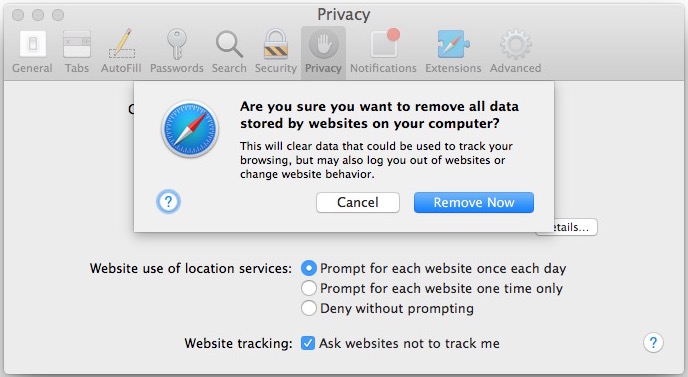
This works in all modern versions of Mac OS X, including MacOS Mojave, High Sierra, OS X El Capitan, Yosemite, Lion, OS X Mountain Lion, Mavericks, running Safari 11, 10, 9, 8, Safari 5, Safari 6, Safari 7, and presumably any future versions as well.
Deleting Specific Cookies in Safari for Mac OS X
If you want to drill down further and delete a specific site cookie or two, you can specify which site cookies to delete as well by clicking on the “Details” button from the Privacy tab:
Mac users can also clear cookies from Safari by pulling down the “Safari” menu and choosing to ‘Clear Website History and Data’, which will also delete browsing history and other data.
Older versions of Safari and older Macs can continue to use the method below, which is slightly different.
Clear Cookies in Older Versions of Safari in Mac OS X
If your Mac is running an older version of Safari with Mac OS X Snow Leopard and before, you can clear the cookies by doing the following:

- From the Safari menu, drop down to ‘Preferences’
- Click the ‘Security’ tab at the top (the lock icon)
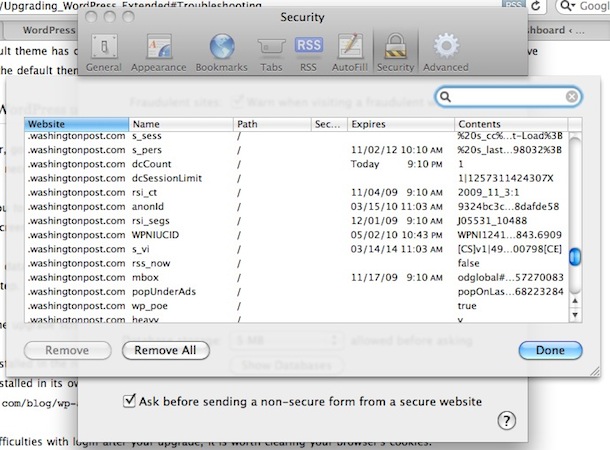
- Click the “Show Cookies” button
- From here you can search for site specific cookies if you only want to remove those, or remove all cookies
- Click ‘Done’
That’s all there is to it, now your cookies are cleared in Safari.
Updated: 9/6/2015






What if I delete accidentally cookies that are useful to me, particularly if I have forgotten the password to the site ?
Cookies do not always have the name of the website from which they come from, hard to decide which ones come from where to delete them.
Thanks.
What i have noticed in researching this problem of cookies that won’t leave is, every site just tells you the regular routine… seems no one knows how to get rid of them.
I delete a cookie and it comes back almost immediately. I set ‘Always Block’, but it doesn’t. I changed the Cookies folder in Library to read only, but that hasn’t worked either. Surely, since this is MY computer, I should be able to say who and what is allowed in? If I want to ban double-click forever from my machine, surely that IS MY RIGHT? Any geniuses out there able to help with that?
I have the same problem. Since I updated to Sierra I cannot stop the tracking cookies. I have two computers (an iMac and a MacBook Pro) and for the MacBook Pro the hard drive was completely cleaned before installing Sierra. Same problem on both. I clear all the cookies, set cookies to accept current website only, open one website and I get a dozen cookies. I think Apple needs to address this problem immediately. Right now I wished that I stayed with OS 10.9. 😡
Use A Tracker-Blocking Browser, Like Brave, Or DuckDuckGo.
One of the things that I have found is if you want to move individual cookies the details button under preferences/privacy is not always there so it is difficult to be precise.
great) thanks a lot!
for some reasons I don’t have an option “show cookies”
http://joxi.ru/file/2f47211418338c34b760fb6a2e7f4a7f/eku0MrKqLgYSSpkpStbFVqZWSpbmppbmILaJlVJJZUEqlJlWmpOjZF0LAA/
can you suggest me what to do?
Look under “Privacy”, it was moved in recent versions of Safari
[…] how to do it in Google Chrome. Microsoft Internet Explorer. Mozilla Firefox. The Opera browser. Safari on your Mac. Safari on your […]
[…] really isn’t much different than doing the same in Safari for Mac OS X, and it’s always good practice when you’re using either Mac, Windows, or iOS devices […]
[…] seem to take effect immediately but you should clear your Safari Cookies first to really see the […]