
How to Make Applications Minimize Into Their Dock Icon in Mac OS X

You can make save a lot of clutter from showing in the Dock of Mac OS X by making applications minimize into their own Dock icon. What this means is that if you minimize an app, rather than having the little thumbnail stay on the right side of the Mac Dock, it will minimize directly into the apps icon instead. Fairly self explanatory and useful, right?
Here’s how to enable this handy little tidy Dock feature, it works in just about every version of Mac OS.
How to Minimize Apps into Their Dock Icons on Mac OS
- Go to the Apple menu and open “System Preferences”
- Click on the “Dock” preference panel icon
- Select the checkbox next to “Minimize windows into application icon” so that is checked and enabled
- Close out of System Preferences and minimize an app to see the difference
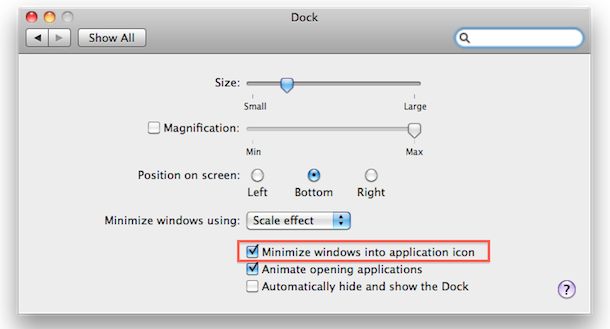
Changes take effect immediately, all apps are now minimized into their Dock icon and can be retrieved by either clicking on the app icon within the Dock or right-clicking the Dock app icon and selecting the window directly. Yes, we have covered this tip before but it was by changing the minimize behavior via the command line, I find it much more simple to do this tricks through the GUI whenever possible.
Note this is a feature that was added in Mac OS X Snow Leopard (10.6) and persists in all future and modern macOS releases like High Sierra, Sierra, El Capitan, Mavericks, etc and thus users that running prior versions of MacOS X must rely on the defaults string method instead.
All new versions of Mac OS X continue to support this easy Dock Preferences approach.






This is impossible to understand.
it doesn’t work on my laptop MacBook Pro with High Sierra 10.13.3
does NOTHING!!!
Sylvie, this is a feature of MacOS, if you follow the instructions is absolutely works to hide applications into their Dock icons. That’s the way it works, the applications will minimize into their appropriate Dock icon if they are minimized with this setting enabled. For a comparison, if you start your car, the car starts. Same thing. If you eat a tomato, you ate a tomato. Have you ever ate a tomato and then declared it didn’t work? That means you didn’t eat the tomato… PEBCAK
This didn’t work for me. Example, Firefox and Itunes don’t minimize into icon, they minimize into their own thing.
Just wondering what I’m missing?
This appears to be a Snow Leapord only feature (im guessing – that checkbox isnt in my dock prefs)