
A Solution for MacBook Pro Booting to a Black Screen

Rarely, a Mac may encounter some peculiar issue during system boot that can cause quite a bit of panic, like booting to a completely black screen. It would be easy to interpret that as a potential hardware problem, and in some particularly rare situations that may be the case, but it’s more often a software issue that can be resolved with some simple troubleshooting steps.
Case in point; one of our readers experience with his MacBook Pro, which out of the blue rebooted to a completely dark screen. Though it’s rare, we figured this would be a good opportunity to share three potential solutions to this problem, and similar issues, should you encounter a dark screen on system start.
First, Reset the System Management Controller to Fix the Black Display on Boot
The first thing you’ll want to do resolve nearly every power related issue on a Mac is to reset the SMC, or System Management Controller. This will dump and reset settings for anything power management related, and is long known to resolve problems with things like fans, heat, sleeping problems, and of course, display issues.
On any modern MacBook Pro or MacBook Air with a built-in battery, which is just a bout all of them nowadays, this is how you do that:
- Shut down the Mac and connect it to your MagSafe adapter and a wall outlet as usual
- Hold down the Shift+Control+Option+Power button at the same time for a few seconds
- Release all keys at the same time, then boot the Mac as usual
Older Macs can find directions here for the same process on their machines, it’s slightly different if you can take out the battery.
When the Mac boots, hopefully the black screen has gone away and you’re back to normal, but if it doesn’t… reader Nathan D. wrote in with the next tip.
Second, Try a Keypress Sequence to Ditch the Black Screen
Regular readers may recall that we covered some OS X keyboard shortcuts for the Shutdown, Sleep, and Restart controls of just about every Mac, and this little key press sequence takes advantage of those. Oddly enough, it seems to work to resolve some of the mystery Mac booting into black screen issues. Here’s the precise sequence to follow:
- Press the Power / OFF button once – this will bring up the dialog box which you can’t see
- Press the “S” button – this is the shortcut to sleep the Mac
- Hold down the Power button until a hard shut down is forced
- Wait about 15 seconds, then hit the Power button again to turn it back on
This key press solution was discovered by reader Nathan D., who found it tucked away on MacRumors Forums, and it has worked for several other commenters there as well. Some other users on the MR forums suggest that resetting PRAM helped them too, but most power issues are resolved by the SMC reset.
Try a PRAM Reset to Resolve the Black Boot Display
If the above two tricks failed, a PRAM reset can often do the trick, as many of the commenters on this article can attest to. As a potential solution to the black screen on boot, this is done upon restarting the Mac similar to an SMC reset:
- Reboot the Mac and as soon as you hear the boot chime, hold down the Command+Option+P+R keys together
- When you hear the boot sound again, the PRAM has been reset so let the Mac boot again as usual
At this point your Mac should boot again as usual and no longer have the black display, loading Mac OS or Mac OS X as usual.
Finally; Enter Password, Hit Return
Some users in our comments report an interesting alternative finding if they hit the black screen on boot; if they enter their regular login password and hit the Enter/Return key, the Mac boots up as usual and they’re good to go. Try this out, it might work for you:
- When the Mac boots into the black screen, enter the password you’d use to login to the Mac as usual
- Hit the Return key
If this works, you’ll know rather quickly because the black screen will give way to the regular Mac OS desktop.
Turn Off Automatic Graphics Switching (for black screens on dual-GPU MacBook Pro only)
Some MacBook Pro models have dual graphics cards that switch automatically. For whatever reason those models can sometimes boot directly to a black screen. Often this can be remedied by simply disabling automatic graphics card (GPU) switching on MacBook Pro as instructed here:
- From the Apple menu choose “System Preferences” then go to “Energy Saver”
- Toggle the switch next to ‘Automatic Graphics Switching’ to turn that off
- Restart the Mac as usual
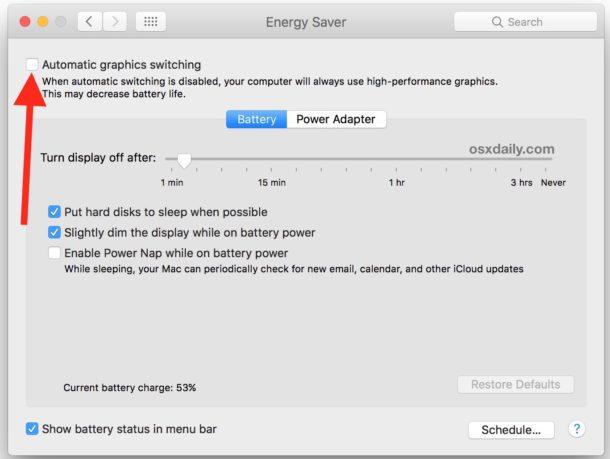
Did one of these solutions work to get past the black screen on Mac boot for you? If you happen to run into this unusual issue with your Mac, let us know how you resolved it by leaving a comment below, and if the above tips worked for resolving the boot to black screen problem on your MacBook, MacBook Pro, MacBook Air, and whichever Pro or Air model it may be. And of course if you have your own solution to the booting to a black screen issue, share that below in the comments as well!






– close cover.
– THEN ONLY OPEN PARTIALLY….like at a low angle.
– after trying ALL the above help many times, I accidentally discovered this so at least I could see my screen on an attached display.
– when I open lid (screen) to normal position, all goes away on laptop and attached screen.
Now I need to find what is causing that….but wanted to share this ASAP
I have the same situation, did you ever figure it out?
I love you man i solve this after i reset everthing on my mac book pro with no anwser and in the black screen i put my password and enter it and is solve !! Have a great day !!
for 1 year I have loved mac book book pro which lights up with a black screen. no external output via hdmi so for me this is not the cause of the graphics cards but a problem of login and especially of the smc chip. Despite the manipulations known as the smc and nvpram reset nothing conclusive. I removed the internal peripherals from the motherboard starting with the battery, and plugged into the mains only once on 5 images but as soon as a restart plus image I tried the same thing without ssd. What was revealing was when I disconnected the trackpad cable suddenly but not permanently, but the keyboard still works. Remove the internal keyboard cable and I plugged in an old g5 power pc keyboard. and the miracle the image came back i was able to reset the ssd via thunderbolt and fire wire from my old g5 erase the ssd in targert mode. reinstall high Sierra and the image and still present, so I reconnected track pad and keyboard then while it was turning the capo open I replanted sofa battery the image of the discharged battery after reset smc and restart the image is fixed finally
Hello!
I have the same problem. After following your advice, I kept my computer on the sun for half an hour and it started working for a short period of time but then it turned off. Did you find a permanent solution?
Thank you so much in advance,
Irene
Have the black screen, no start up sounds, the 3”ram issue” beeps….nothing has worked yet. I’ve tried everything with no luck. It’s very frustrating. It was working fine until I tried upgrading the OS. It froze in the middle of update, I turned it off and it’s never come back since.
I’ve got the same problem you have. I did all that was suggested, got the onboard sound back but still have the black screen. My 2015 MBP works fine with an external monitor. I even opened it up, unplugged items as suggested on a YouTube tutorial, no luck. It appears I have a cable problem which I’ve read is not uncommon on this year MBP. It began as an intermittent problem but is not full-time black. I don’t have dual cards on this one. Mine appears to have been dropped by the previous owner, but it worked great for about a year before the black screen. No OS upgrade, just black out of the blue.
none for me either … but now after 3 days it worked, I just turned it on closed the MacBook so it goes to sleep, then opened the screen very slowly and waited 2 second… now when I open the screen all the way it turns black again
PRAM reset worked, thank you so much Inwas losing hope!
Your solution solved my problem. Thanks.
Y’all are amazing thank you 🙏
Thank you – it worked for me. What would we do if we didnt have these forums to help! Thanks again.
MacBook Pro Retina 13″display Late 2014(A1502) .
So my Mac was working all fine but all at a sudden it didn’t boot up but only fan starts revolving at full speed making lot of noise.
Tried SMS reset, NVRAM reset, unplugged battery and fan cable. None of this solution worked.
What worked was keeping it in sunlight for half an hour.
Keep you Mac in sunlight in so that it becomes warm, the moisture present on logic board will go away.
The back of the laptop should be facing the sun, not the display.
Try to boot now it will boot up.
If no sunlight, then warm it a feet above hot plate, don’t burn it up. Only the back cover part, not the display side. Don’t keep it at one place, keep moving your hand so that heat is distributed evenly. Just warm, don’t use very high temp
This is no joke, tried and tested. It will continue to work when the Mac is warm, you’ll again face the problem after sometime.
Will let you know if its logic board issue or temporary humidity issue.
Most probably its logic board issue
Hello, I recently bought Macbook Pro 2020 13 inch and my screen has gone black twice – both of the times I was on Zoom and I also had an interface connected to the laptop. The screen only came back on when I closed and opened the lid. What sort of of troubleshoot should I do as I do not wish the screen to go black ever again! Please someone advise. Thank you!
please some one help i have an old macbook black edition 2009 maby its boot to a black screen and i have tried all above methods any one have idea to solve it
Hi, a black display occurred to my MacBook Pro (2014) in September 2019. I am not into computers at all but knowing the Macbook had chimed and that by connecting it to the TV set via HDMI cable it was still working, I took it to the nearest Apple store and was told the display was dead, burnt, and that I had two alternatives, either to repair it at the cost of 450 euros or to continue using an external monitor. I chose the second and bought one for 80€ and used it until July 13th, when all of a sudden on switching my MacBook on I had a shock…I could see the bitten apple and then my desktop and it’s been working okay since then and it’s a complete mystery to me! Maybe it depends on the latest version of the system update, maybe I had started using the combination keys to shut it down recently, I have no idea, but it is working. I expect it to go black again but next time I ‘ll try your tips and I’ll see. Thank you.
It happened again, yesterday, on my first DAD (online teaching) day after the latest dpcm, my Macbook went black without any apparent reason. Just three months of normal summer use and when I need it most it deserts me. I have just tried all of your tips and tricks but nothing’s worked. I do believe it’s been scheduled by Apple somehow, no idea how but it is very very annoying…..
My MacBook Air has black screen issue with beeps in the past one month, any tips to boot the system is very very much appreciated
If your Mac gets stuck on a boot after installing a software update, it might be because of incompatible kernel extensions. This is particularly true with older kexts on newer versions of MacOS.
The solution to that problem is to boot into Mac Recovery Mode, then use the Terminal to issue the following commands which move the old kernel extensions into a different folder.
– Reboot the Mac and hold down Command (⌘) and R to boot into Recovery Mode
– At the macOS Screen pull down the menu options at the top and open “Terminal”
– Issue the following commands at the Terminal in recovery mode, each command needs to be entered and then hit the return key to execute each command.
mount -rw /cd /Volumes/Macintosh\ HD/Library/Extensions/
mkdir Unsupported
mv *.kext Unsupported
reboot
This will reboot the Mac with all kext files in the following location:
/Volumes/Macintosh\ HD/Library/Extensions/Unsupported/
You can then go through and see which ones are not up to date and compatible with macOS Big Sur, macOS Catalina, macOS Mojave, Sierra, High Sierra, etc.
This can even apply during some Security Updates for MacOS, not just major macOS updates!
Hope this helps someone.
This worked for me as well after trying all the other solutions up above.
control+N+power button press at the same time work for me!
Control-N+power works!
I tried the SMC, PRAM reset and nothing else did. Why isn’t this in the article??? I have a Macbook Pro Mid-2010
Lifesaver!! PRAM Reset worked for me too when nothing else did! Thank you thank you thank you!!
I also have the same problem of display going black but thank god for ur solution on this site with SMC and PRAM solution.
I notice after 4day not been use it occur again so could be the problem for repeating itself… thank u
My 12″ Macbook went into black screen by idle sleep in battery mode. There was still haptic feedback to touchpad but no keyboard back-lit. When I tried to connect to external monitor, there was no display too. At least, I knew that it won’t be the display panel issue. I tried power on/off several times, no success.
Finally, it’s resolved by resetting SMC.
Thanks.
Pressing the power button repeatedly at the blank screen when it had clearly started brought up the screen
I dont hear a start up sound at all on start up, so I was hitting power then immediately doing the press plz help!!
What kind of macbook are you running?
I have done all three of these, and none get my mac to boot regularly! I can only boot in safe mode to start up. I’m in desperate need of help on this asap please email if you have a real solution I’m running the latest macbook pro 13 inch plz email me
Second option worked for me. Thanks you so much. All the best, all the blessings.
What if you don’t have a sound when the Mac boots
I have a macbook pro mid 2009 model. So the screen just went off like that. I tried SMC reset didn’t work plus others. When I power on my device you hear the clicking sound of the hard drive and the powers off again. What could be the problem?
Thank you so very much! After a full day of rigamarole, booting up an old pc, trying to find my manuscript on my back-up, working in a different version of Word, and the build-up of stress, I searched one more time for something that might restore my mac from the Black Screen of Death. Saw your three steps above, and it booted up perfectly. Can’t thank you enough. Post saved and shared on my personal and business facebook pages. God bless your talents and you for sharing them.
For about two weeks, my 2015 pro would just randomly shut down on me throughout use. Today, I decided to install the new software update -in hopes that it would fix the problem. It would download halfway, then shut down. After retrying 2 times, my screen decided to just go completely black every time I tried to log in. Thank goodness for this article because I seriously thought my mac was done for and I’d have to spend money on either fixing it or replacing it. The PRAM suggestion WORKS!!! Thank you!
Just thought I’d share, I ran into this problem after do an update. Half way through install the screen went black, so I did a restart, did the same thing.
So I followed the steps on this page, got to the “enter your login like normal and hit return” and what do you know it continued the install and works great.
Thanks so much!
2 times cycle of the pram reset worked for me after trying everything.
Held options CMD r p in for 2 full boot cycles
I tried everything…then did the PRAM. It worked. Key is to hit the option, command and PR right when you hear the start up sound, so have your fingers ready. I tried it with delay and no dice.?
I pressed the four keys, then the s then pram. It,s working fine. I waited quite a while for it to start
Thanks so much
Were you able to fix it and if so how?
Closing the lid also worked for me! Thank you!
all good advice but how the hell can you do any of these things when screen is black?????
Why do you need the screen to hold buttons?
I reconnected the screen (hardware) and that fixed the issue for me. I used this video to help me:
https://youtu.be/nZxY-CI1ddQ
The second option worked for my imac.
Hi,
I have the same problem. Service ceter saying i have display problem. But i dnt think so. They ate just making money. My mac is only one year old. How its display goes dark.
First option worked for me… thank you! My head was starting to spin
If these points doesnt help you like they didnt help me just try to start the mac and hold “D”. Thats diagnostic. I dont know why but my Macinthos HD was disconnected and locked. Im reinstalling the system now.
This simple tip solves my problem
Using a mid 2010 MacBook Pro and suddenly MacBook died and was not starting.
Did the above simple steps and bingo! Mac came to life again
I just had this problem on my 2012 MacBook Pro, although pretty old i never have problems with it. i tried all of the recommendations above and none of them seemed to work, after i tried the PRAM reboot, i started looking online for different fixes (on my phone obviously since the laptop wasnt working). while i was searching, my wallpaper came back and the black screen was gone, but the menu bar at the top of my screen along with the folders that are usually on my desktop havent popped up yet.. im hoping giving it some more time will let it fix itself
I had the same issue and solved it and since a week it become reliable again .
For me part of this is a scam from apple to force people either to pay costly repair or buy the latest model and help apple showing top figure for their stockholder . but client are we getting any consideration !
Since this piss me off so bad i had try this simple solution :
Hit CMD and R at the same time and restart the sick mac this will start the full recovery proces of the OS , from there it is very easy First erase disk completely the mac was like new … not yet the assistant will show you also how to install a clean new version of IOS and voila it is done
First it booth normal full screen and after 4 hours of use it start again to get dark no control until it only show part of the control bar on top of screen , So i use the thunderbolt to plug my external monitor to confirm that my hardware was fine .
Then i done the recovery again and once up and running i shut off the auto dimming on the screen and anything related to power saving etc .
The mac had never give me a black screen since then . So apple this problem is recurring since 2014 on macbook pro , this left me with a bad taste about your respect of your customer
The sad part in this is when i read on different forum story of people who have true confidence in apple getting bill for logic board replacement etc .
this is so bad , you are artificially showing groth by keeping software bug and customer who have faith in apple getting with no choice then pay for the repair or told that they better buy a new one !
My Mac book booted up to a black screen a couple of times, but entering password and hitting return resolved the issue. The last time that it booted up to a black screen non of the suggestions above worked and it was booting keeping to boot up to a black screen for almost one month. After trying almost any method, I tried to SSH to my laptop from another computer and the dark screen suddenly gone… the positive point is that after experiencing several boot ups to a black screen I noticed that all of the dark screen incidents happened after my macbook went to the “sleep mode.” After resolving the last balck screen incident I changed the setting such that it never goes to “sleep mode.” Fortunately I have not experienced a black screen anymore at least up to now.
This helped, thanks!
Option 3 worked and I am so thankful for your post!
The third option worked. Good stuff. (I think the last update changed the setting (2019) on my MacBook Pro 2010).
Hello, i have macbook pro 17 late 2011, when i replaced AMD GPU,
its turning on and sound but screen is black, can you help me about this problem
thanks
My Macbook Pro (2011) has had this issue twice in a row now, and both times, resetting the NVRAM solved the problem. I’m wondering, however, why would this same issue occur twice in a row and be solved by resetting the NVRAM both times? How can I avoid this in the future?
I did this but once I unplugged the hdmi my screen still didn’t work but I pulled up on the tv so I’m not sure what to do
I turned off Automatic Graphics Switching and this seemed to work. I had other problems from a recent Mojave update, so I had to go to an earlier backup of my computer and then got this problem. Now it seems I’m running normally again! Thank you!!
Really appreciate the simple and direct write up. Thank you so much for your help!
Out of nowhere I kept booting into a grey screen on my MacBook Pro (mid 2015), tried everything, resetting pram, smc and various keystrokes, draining the battery, anything I could find online. Nothing worked. Then I plugged in the external monitor from my desktop Mac Pro with a hdmi cable to see if I could actually see recovery mode that way and suddenly the MacBook screen came to life!
Too bad I can’t recreate the issue now, I work on location a lot and wonder if just taking a hdmi cable along is enough to do the trick if it happens again.
Thanks tsmit. This did the trick for me as well.
Drain the battery. Hold power button until low battery sign comes on. Keep holding power button and plug in power cord. Will take you to the log in screen.
I had this on my early 2013 MacBook pro retina because of a hardware fault, not exactly sure what’s faulty but I think it’s the graphics chip caused by a faulty screen.
Basically there’s bad connection around the edge of my screen somewhere which makes the graphics all scrambled, putting pressure in different places brings the picture back. I’ve lived with it for years as it doesn’t happen that often. (the scrambled screen would happen while using either the GPU or integrated, I know it’s a fault with the screen, I could also trigger it by turning the brightness down)
One night this happened as I was shutting down the computer, the next morning the screen would not come on.. just black.. and external monitors connected wouldn’t work either, so I think it may have damaged the graphics chip by powering down during the scrambled screen.
This is what I did to get it to work using the integrated graphics..
1. plug in an external monitor while computer on.
2. hold the power button down until it goes to sleep.. i.e. for a couple of seconds.
3. unplug the external monitor.
4. hit the power button.
Doing this switched the screen back on. On start up I was then told the GPU was not found and the machine would use integrated graphics (which is why I think the GPU is faulty)
Every time I booted the machine after this I would get the black screen and would have to use the same method as above to switch it on even though I tried to uninstall all CUDA drivers etc.
My theory was that the GPU was damaged but the computer was still trying to use it which results in a black screen, tricking it to switch it back to integrated graphics fixed it. Maybe there was some code somewhere telling it to use the GPU.
Here’s where things took a turn for the worse though, so if anyone can help with some knowledge or insight it would be great.
Months ago while it was all working I tried to install Mojave on the machine, and after the install it told me that the Nvidia chips were no longer supported and there was no driver installed.. so I reverted back to Sierra.
Now with the current issue and remembering that this was the case I thought to myself that if I was to install Mojave again, then my machine would permanently run with integrated graphics as the driver wasn’t available for the GPU. So I took a chance and installed Mojave.
Unfortunately after the install the screen is now permanently black.. I did manage to get it to come on once.. but don’t know why.. I shut the machine down and closed the lid, left it for about half and hour thinking the computer would never run again.. I opened it up and hit the power button and the screen came on!! After booting Mojave for the first time, I was notified about the absent graphics driver and given the option to download a CUDA driver from the internet, which I did and installed.. hoping that perhaps the problem was just some faulty code on my machine somewhere.. I then plugged an external monitor in hoping the external screen would work, and everything went black again!!! Since then I’ve not been able to get it working, and not sure if I ever will!!
Does anyone know what exactly is happening with this machine? I’m pretty sure the GPU is faulty but don’t know how to bypass it, especially as I can’t ever get the graphics on the machine to display. Machine is booting ok, just the screen not working. Tried all of the above, just waiting for the battery to drain now.
Nothing seemed to work at first. Then I saw the part about draining your battery and restarting. But my battery was at 100% from charging overnight. So then I unplugged the computer and suddenly the screen came on!!!
So none of the methods mentioned above worked for me.
The first method Control+shift+option+power helps me get the Mac on. I know this since caps lock turns on. But the screen is still black. So I typed my password and it logged in and still black. So I tried clicking randomly with the click pad and my older tabs with Netflix started playing. Once the Siri spoke. Still black screen though.
I really need help.
PS: I have MacBook Pro 2016
Turn your display brightness up, use your touch bar to hit the brightness up button
Holding Cmd and eject on my 2010 MacBook Pro while powering on worked for me.
I have two accounts on my macbook, and black screen was affecting just one of them – whether I logged into it from boot or via fast user switching from the other account, both of which obviously require the password. So it would log in and immediately fade to black. Having tried everything else, I tried entering password again (despite having only just used it to log in) and hitting enter – and it worked!
Nothing at all, all tried.
What worked for me was to let drain the battery completely out. Finally a “Low Batt” logo appeared on display and only after I connected the cord and was able to start it normally.
Yes! Resetting the PRAM worked for me. The chime wasn’t sounding so I immediately hit the four keys as soon as I saw the keyboard backlight come back on. Then I let go as soon as I saw the Apple and heard the chime, knowing that was its second boot. Thank you!
I also went into the system preferences and noticed the automatic graphics card switching was on, so I turned it off so this doesn’t happen again.
Nothing worked until I tried to boot the Mac while pressing eject and command. Then it booted normally
hey Emile can you help i have updated seria and all above options didnt work for me
Did you mean escape instead if eject?
The third option (PRAM) worked. Thank you for sharing the solution!!
The third step worked!
I shut down computer with power button 3 times then it booted up with normal screen. Is my hard drive dying?
Final option worked! I am so happy. Thank you!
your last suggestion to connect an external monitor to my MacBook Pro late 2013 2.3gh DG 16MB 2BM works very well although having already replaced the logic card I can stil also ssume that the display I`s also faulty.
Many thanks
The third option of resetting PRAM worked for me after failing once and rest all the other possibilities. Thanks..
Second step try worked for me.
i have a 2014 MacBook Pro, None of the solutions worked for me then, I plugged my Mbp into an external monitor via hdmi and I can access everything. I’m in the process of backing up now….and will begin display troubleshooting once backup is complete.
Thank you, thank you, for the instructions on how to reset the SMC, System Management Controller. Worked like a charm and saved me a panicked drive over to the Apple Store.
Same problem here, occasionally my MBP mid 2010 boots to a black screen. Entering the password solution works for me but that doesn’t fix the cause of the problem. So after some digging, I figured it out. In my case, it’s the automatic graphics switching. Once disabled, no more black sreen boots.
Same problem here, occasionally my MBP mid 2010 boots to a black screen. Entering the password solution works for me but that doesn’t fix the cause of the problem. So after some digging, I figured it out. In my case, it’s the automatic graphics switching. Once disabled, no more black sreen boots.
NATHAN 5 HAIL MARY. NOW WORKING
I tried every recommended solution and unfortunately none of them worked for me🙁.
If no software solution resolves the Black MacBook screen problem, you may have a hardware problem and should take the computer to Apple or an Apple Authorized Repair center to address and diagnose the hardware issue.
Drops, liquid contact, damage, etc, can cause these issues as well.
After trying all 3 including putting in the password anyway it did not work for what seemed like ages but then it randomly turned on. The result may not always be immediate. I have the MacBook Pro (15-inch, Mid 2012).
Awesome! It worked! Thank you! 2012 Macbook pro. Black Screen. Tried all options and then it booted! Yay!
If all the above solutions dont work, a faulty video chip driver, bad nvidia gpu chip or ram can cause these issues, although bad ram normally produces beeps upon startup.
Had this problem after running CleanMyMac3. Ran through all four solutions which did not work. Looked on another forum and found a modification to the fourth solution.
“3. Once you reach the point where your screen goes dark and you see the cursor, type the first letter of the username for your computer, then hit Enter, then type your password, then hit Enter.
4. After a moment, you should see the spinning beach ball”
The blind password solution requires entry of the first letter of your username, then return, then entry of your password. The username step was missing above.
I did not know my username, but I entered each key on the keyboard and the wrong keys gave a beep, when I hit the correct key, there was no noise (autofill). Then I hit return and entered the password.
I am up and running.
Please amend your fourth answer.
In my case, the screen works until after I login, then it turns black. If I hold down option and restart into recovery mode, the screen works fine. I tried the PRAM and the brightness and other things, nothing works.
Interesting. It’s worth trying an SMC reset as well as the PRAM reset.
You might also try booting into Safe Mode, hold down SHIFT key on boot to boot into safe mode.
If that works, then create a new user account from within Safe Mode, and then reboot and log in as normal into that new user account.
If the screen is not black when logged in as the new user, that suggests something is up with the primary user account you are using, in which case you’ll want to investigate the login items, launch agents, etc, for the user account that is turning the screen black. It’s possible some app or process is loading at the user level causing the issue.
Thank you so much! The key press suggestion worked wonders when I really thought my computer was a lost cause :)
Perfect with the 3rd option
Thks
PRAM worked for me. I LOVE u!!!
Before doing SMC or PRAM reset, I tried the last step (entering your password and hitting return) nothing worked unitl
enter the password in the black screen.. then the magical sound!!
Thank you thank you
None of the solutions worked for me but here is my solution.
Turn on the computer and wait couple of minutes, then close the screen lid and wait about 25-30 seconds. Open the lid and the password screen would be right in front of you. This is what I did and it works.
This worked for me! Thank you.
None of the three suggested solutions worked for me. What did work was unplugging my laptop and run down the battery overnight. Next morning I pressed the power button and the battery indication came up on screen. I plugged it, pressed power and voila.
Thnx.
Today when I work up my MacBook pro didn’t start.I was worried and started to search for solution.I have tried to start my MacBook pro with those solution but none of them were working.When I tried your solution my MacBook pro start.
Thanks again Keep it up guys.
Hello, thank you so much for this!!!
I had the black screen happen in the middle of searching the internet. I tried restsrting it a few times, and then I found your article. I tried all three steps and nothing…I had the startup sound and it flashed white a couple o times but even resetting the PRAM didn’t work.
I read through the comments, tried all the suggestions -even hugging my laptop to warm up. Finally I unplugged every cord, even my headphones and reset the PRAM again. When it booted up – the apple logo!!!! I am so relieved!! I am a college student and I can not afford the Mac stores fix prices let alone a new laptop.
Thank you, thank you, thank you!!!!!
Hi I need one help I try to on the MacBook Pro it go on when I put password after few seconds it go black
Before doing SMC or PRAM reset, I tried the last step (entering your password and hitting return) and it worked! Thank you!
The PRAM reset worked!!! THANK YOU!!!
Omg some combo of the above listed solutions just worked for me so thank you, thank you, thank you!!!!!
None of your suggestions worked :/ but then I tapped the esc button while pressing the power button and wala!!!
PRAM reset + password fix worked. Before black screen would come on, it was updating software. Finally finished updating after PRAM reset. Battery charger remained yellow until PRAM too. Can’t blame this one on the cat though he does chew through cords!
Tried all the options and the PW reset worked on my MacBook Pro. Then it finished with an install (15 min) left. I get this black screen issue quite a lot—usually it’s the brightness turned all the way down. Not sure why/how that happens. Thank you for the help, needed my computer this weekend to do my mom’s taxes and for a paper due on Sunday, these solutions saved me much frustration!
I tried all of the solutions above. The final one worked for me.
Mine must have crashed in the middle of an OS Installation. The blind password suggestion worked, after resetting SMC and zapping the PRAM, although I’m not sure which part really was the trick. When it finally turned on it was finishing the install (15 min remaining)
Command, Option, P, R worked for me! Cheers! :D
my 2011 macbook pro was in sleep mode for a week or so. woke to a black screen. rebooted to black screen. tried all these but none worked. found something crazy elsewhere that worked.
on macbook with dual graphic cards. have laptop on and wrap it in blankets. after about 15 minutes. power down and reboot. the heat makes it switch to onboard graphics card. Working fine now for over a week.
Thanks,
For me was “Enter Password, Hit Return”
Again Thanks
Third option worked! Thanks! 💃🏾
My solution was – CHECK ALL SYSTEM UPDATES
I’ve dealt with this all morning – tried all online fixes including wrapping laptop in blanket and singing to it…. I found a video instructing to gently press the black strip at back of laptop when laptop is closed, which DID help enough for the screen to flash on and off, or be fully dimmed but slightly readable (none of this was easy)..
Through all the flashing and dimmness I then managed to get the mouse over to the apple icon (top left of home screen) and saw an update was pending – as soon as the system started to upload the screen came back on 100% perfect – I then followed system required restart and its running like a champ again now…
CHECK ALL SYSTEM UPDATES (as soon as your screen lets you see where your mouse is, or if you have the appropriate cable connect it to another monitor and run all system updates). Cheers for this solution page :)
Thanks so much! I was having a panic attack about my mac possibly dying on me and this worked instantly!
Hi, I wanted to tell HOW I SOLVED THE BLACK SCREEN. None of the previous methods worked for me by its own.
This has already happened to me 2 times so I will tell you what I have done, I do not know what part of the process is what really works but it works.
My symptoms were: I turned on the mac and it sounded but nothing appeared on the screen. When connecting the hdmi, you could see the apple thing but it did not charge beyond 1/4. So:
1. Try the 4 steps given in this forum at the beginning.
2. Go to the safe mode (for this to turn on the mac and then press SHIFT immediately), sign up and try to adjust the brightness manually in settings, also try to change the screen used (tv vs mac) and try again and again to change the colors of the screen and connect and disconnect the HDMI.
3. (I THINK THIS IS WHAT HAPPENS TO ME) I let the battery run out completely on safe mode and then I charge it being off… I wait a little and READY, it is normal again. Maybe it “overloaded” or something.
I hope it helps someone!
I tried all of the above without success for a 17″ MacBook Pro late 2011.
My symptoms
Battery went flat. I connected charge, started charging and pressed power on with charger connected (charging successfully). Black screen for about 10 seconds, then apple logo with progress bar at about 90% flashed up then back to black screen. No matter what I did I was back to same scenario after about 20 varied attempts.
The keyboard was illuminated the first couple of times but then was not after the first few attempts.
I read here that booting may have been completed so on a whim I connected external monitor. Kapowie!! :) The external monitor worked and then the laptop screen sprang back to life briefly afterwards. The resolution was wrong but after disconnecting the external monitor it went back to correct resolution.
No idea what caused this or how it happened but praise be my Mac works again!
Came for more of an explanation of what went on, having already figured out my macbook was on but the display was black. I tried logging in and it worked! Yay! So an upvote for that solution anyway.
I love my Mac… but they’re ******** when they’re angry!
I love forums. I have a 2014 MacBook Air. I recently have been broadcasting it to a 2018 32in Samsung TV (via HDMI converter) to give myself a bigger monitor. Over the past couple days I noticed if I just had my laptop (away and unplugged from the TV) my screen would be almost black. My F2 and F3 buttons would sporadically work. I found this forum and tried the “Try a Keypress Sequence to Ditch the Black Screen”. Bippity Boppity Boo. She is running like a pro again on both screens (I am mirroring them at the moment).
Thanks so much for putting this together! Saved the day!
A big kiss from france since the keypress sequence solved my problem, which was completly unexpected. Had already done NVRAM and SMC, tried turning the mac target mode to access it. Thought screen was dead and/or Partition corrupted. Panicked. honestly thought this keypress was just a desperate hope. Jesus that saved my day :)
won’t play anymore cracked games from TPB… haha
I tried all possible ways and nothing works for my macbook retina display 2012. I’m very disappointed, cos I never had problems with the previous mac computers I had.
What can I do?
Try plugging in an external monitor
Try plugging in an external monitor
I dropped my macbook and then got the black screen problem. These steps didn’t fix it and an external monitor worked, so I figured the drop had jiggled something loose. I closed the laptop, flipped it over, and mashed on the upper right corner. All fixed!
I never usually leave comments of articcles, but this saved my day. This morning I tried to turn on my MacBook but the screen was black. I freaked out and immediately searched online, found this article. Option 1 worked for me, thank you so much!
I had the Black Screen issue then flickering lines. Did all the solutions posted on many sites and none worked. Have got a USB self booting updated to High Sierra and then when loaded tried UNSELECTING Automatic Graphics Switching in System Prefs. My mackbook Pro 2015 is now working again without screen issues. Hope this helps.
Most of the time i encounter this problem i recommend the PRAM Reset to Resolve the Black Boot Display.
Password reset worked for me!
Tomiwa, did u try multiple times? I did and it is working.
none of this worked for me. WHAT DO I DO???????
My MacBook Pro is all black too. I want to try the “tricks” to reset but I am afraid to lose my photos. Did somebody lose theirs? Thank you
Tried Jaimie’s tip after the usual tips did not work and luckily everything is working fine now 😅!
Summary:booted on safe mode using shift key on boot up and connected to an external monitor.
Update available apps including system software (latest OS and security updates) and got rid of old apps that wasn’t being used or hadn’t been updated for awhile.
Hope that helps others!
The PRAM reset worked for me! Thank you!
Thank you so much! Easy to do and worked like a charm! I was freaking out prior to this fix!
My mac book pro was on when I closed the screen and kept it for about a day or two without using it. I opened it and hit the power button. For some reason the screen was dark bluewish and won’t come up. I did a hard shut down and rebooted the system. On pressing the power button, all I could hear is a boot sound and the screen is black with no keyboard light. I tried rebooting it with no success. I connected it to my LG tv using the hdmi cable and found that the system was actually booting successfully but the screen wont display. However, the keyboard light was back. I then try the Pram reset as demonstrated in a video on u-tube by pressing the command, option, R, P and power button together until I heard two boot sounds, then released the buttons at once. I heard a third boot sound as mentioned in the video. It still did not work. I kept the system for about three days trying to figure out what to do. Then just about now I tried the pram reset again as described here. I press the power button and after the booting sound I pressed command, R, option buttons then the screen just resume before I press the P button. I think the Pram reset would have work for me the first time if I had done it as described here. Thanks a lot.
The PRAM reset has worked. Thank you for being a true savior.
This P+R option worked for me. Thank you so much!
Second option worked for me on a 1-month-old MacBook Pro. Thank you!
Great! Worked like a charm…thanks for your great forum and providing great advice!
Went through all three options but no luck.
Then I booted to safe mode (power button + shift) and this solved my blank screen.
I had to reset my FileValut password.
Thank you guys for the effort to list possible solutions!
The last option worked for me….. I just entered my password and it worked
you guys r the best ♥️ i was freaking out!! problem solved with holding the shift, control, option and power keys together. Thank you!!!!
I tried everything and nothing worked. I know there is nothing wrong with the screen since I Frankensteined it with a Mac a year newer and it worked perfectly. Also mine flashed the two times I rebooted it before I got the black screen.
I tried all the different tips but it seems like PRAM worked. I heard the reboot sound twice but the screen was still black. I was pissed off, doing something else and I think I assumed it had gone in sleep mode although I clearly couldn’t see it. So I hit the power button and suddenly light appeared! At this point I was convinced it really was the screen that was broken as the apple logo on the back wasn’t lit either – now it is. I also removed a sticker in front of the webcam because I saw people here wrote about brightness and I wondered if it was unable to adjust properly, so whether it was the sticker or PRAM not sure. But I believe PRAM despite me first thinking it didn’t work, so make sure to try that power button again afterwards! I’m working on my thesis at the moment (had done a back up) so pretty glad it decided to work again as I haven’t the money to go purchase a new one.
Follow worked:
Typed password, hit return.
Slowly the screen showed up way, way dim.
Steered the mouse over to system preferences, looked at displays.
Screen brightness was turned way down. Somehow or other this got screwed up by the reboot.
Anyway, turned the brightness back up.
All is well.
Yay! and thanks!
Update: I just kept typing in my password until this thing popped up that said, “reset your Apple ID password” and I just “reset” it to what my Apple ID password is. Then, my computer rebooted and it worked!
I tried all of these and none of them worked! When I turn on my MacBook Pro I hear the chime noise. The screen turns on but, it’s just black. The lights on the keys don’t work either. I fell asleep while holding my laptop and it was still open. I woke up to it on the floor on it’s side, open. I freaked out. I tried closing it and opening it, no luck. I tried plugging it in and pushing the power button. I heard the chime noise but just a black display. When I look at the Apple logo on the back, it lights up but, just a black screen. Please, please, please help me!!
Same here, I tried all of these solutions but the screen still was black – then we UNPLUGGED the Mac cord and it started rebooting. No idea why or what solution worked; but something did. Thank you.
Thanks. I tried all three solutions and the third worked.
thx very much for the new Mac Book Pro black screen issue!!! The shift+control+ option+power keys then release worked first time. Very relived!
third option worked for me thank you… This is the second mac item I have fixed by myself… First item was my cell phone they wanted almost 300 dollars to take an unbroken screen off to look at my microphone…. I told them no way… I went outside and goggled my possible options and sure enough there was a feature in settings that was off and should have been on and it cost me zero dollars to fix it. Second was this item apple wanted 500 dollars up front to diagnose a problem once again they wanted my money…. I’m now realizing that Apple is a terrible company that is all about the money not about the customer….
Resetting the SMC did the trick for me.
Thank you very much!
RE: I found a similar fix. Had someone call my phone – which is tied to my iCloud account on the laptop. As soon as they hung up, the screen turned back on. This seems like a stretch, but it did really work for me. Thinking it has something to do with iCloud & inability to login to iCloud on restart which was preventing the screen from working. I had tried many other things to no avail…
This worked for us. We laughed at the idea of trying it but thought what the hell and it worked after i then pressed the power button once. Thanks!
The third option worked for me. THANKS!!!!!
Resetting PRAM helped solve my issue.
This is by far the most popular fix for this problem.
Thank you!! The 3rd option worked for me on the second attempt. This has happened once before as well, it seems to happen when I shit down my laptop overnight vs letting it sleep. So grateful, thank you!!
This happened to me as well. Actually, weirdly enough, this happened out of the blue while the mac was *open and *working! It turned into a black screen. I checked the brightness, and it wasn’t related to hitting the brightness button accidentally.
Then I forced a re-boot; still black. So I forced it to reboot a couple times…
Eventually after about 5-6 failed reboots, it worked fine. It’s weird cause the black screen booted after about one third of the loading bar was done?!
My MacBook Pro is a 2011 i7 2,7gig dual-core processor, Inted HD 3000 graphic card, 4gb of RAM, 750gb standard harddisk; loads of plug-ins (667 pro audio plug-ins to be exact), heavy profesionnal applications, gamin clients, etc – but the hardisk is hardly two thirds full!
I was gaming when this happened so I don’t know is this is related.
second methode worked for me! i tried many things, after i reinstall the system i still had this problem! after this simple trick , no blackscreen anymore! saves me alot of money! thx alot!
Another fix is to boot while holding down the option key, those lets you select which drive to boot from. Simply repointing the boot to MacHD caused it to boot properly the next time.
Resetting the system management controller worked for my computer. Thank you!!!
Thanks for the great article! I accidentally let my Macbook Pro 2011 run completely out of power on the battery. I knew my black screen was a software related backlight issue. I made it through step 1 and 2 with no success and then tried shining a flashlight through the Apple logo on the back side of the screen. Sure enough, I saw my user icon, clicked it, entered my password, and everything came back just fine. Sounds like step 3 would have probably worked too…but sometimes a flashlight helps :)
Thanks a mill guys!! PRAM worked for me!!
Okay, here’s one more thing to try because while the solutions published in the article above did not work for me, a different procedure got my wife’s mid-2009 MBP running again.
Symptoms: black display, no startup chime, apple logo on back of display not illuminated, keyboard backlighting not working, and caps lock key not lighting up. Could not reset PRAM, SMC, or do anything else. All keys were unresponsive and I could only hear the HD spinning if the computer was on. So after forcing power off by holding the power butter I tried turning on power and immediately closed the laptop case. After 30 seconds or so the apple logo lit up. I waited a few more seconds, opened the laptop and like magic everything was working again. Was then easily able to reset PRAM and even got the startup chime working again.
Happened to me Easter weekend 2016 – The third worked for me but I did it 2 or 3 times then closed the lid and waited a few minutes.
Nothing has worked for me either…so bummed!someone please help me 😓
Nope. Nothing worked. And it was just fine 2 hours ago.
OMG, THANK YOU for such a thorough list of suggestions for the black screen boot! Was starting to have a mild panic attack, since I could not get the laptop to start in either Safe or Recovery Mode (or, it may have, but the screen was still black, so not the solution, clearly). I had to reset the PRAM twice, to get the screen to come up, but that fixed the issue.
Second option worked for me. I have MacBook Sierra OS. Thanks.
This is what worked for me:
1. Start up the mac (hear the chime)
2. After about 30 seconds you will be at the login screen. You can tell this by pressing backspace a few times and hearing a sound (make sure to turn the sound on and off to make sure you haven’t muted it).
3. Close the laptop lid to put the macbook into stand by mode.
4. After 40 seconds open the lid and force shut down by holding the power button for 10 seconds.
5. Press the power button and the screen should function as normal.
I did it on a Macbook Pro (Late 2012, retina). Hope this helps.
The “Finally; Enter Password, Hit Return”
Worked! Thank you.
namely : with black screen enter your regular login password and hit the Enter/Return key, and the Mac booted up!
Just can’t thank you enough!!!!
Problem: black screen and could when I reset the SMC a screen would come up, but normal boot was a black screen.
Solution: resetting PRAM then hard booting off and back on.
Thanks for this article
The thing that seems to work the quickest, and the most times for me, is a 2nd screen. Use the HDMI port on the side of you mac and plug it into an external monitor. The external monitor will show your macs contents. Log in and wait a few seconds. Once in, just unplug the external from the Mac and your screen and your screen should work again.
This is a software issue and I have ran into it multiple times with different systems. That seems to work. I have never had any of the other options work except the blind log in. That gets tricky if you have more than one user because you do not know which user you are on or you must first click a user.
Good Luck everyone!
I tried every thing, resetting the PRAM, SMC, Safe Mode..etc…nothing worked. Finally, I unplugged the power cord and turned on the the blank screen and let the battery run down completely. I plugged it back in on the power source, and within 1 hours, the computer came on by itself..problem solved. I have seen others with similar experience, so this was not an original idea.
I first tried all the options but none of them worked. I then tried SMC again and held a bit longer this time more like 10 seconds. Then released and same time and pressed power button and bam.
The mac started and it was good to go.
Resetting the PRAM worked like a charm, I appreciate so much taking your time to write this post and sharing your knowledge.
Thank you!
I tried many things and nothing worked, until I simply entered my password and hit enter! I waited for a bit and then the screen turned on! Thanks a ton!
After a lot of trial and error what worked to get rid of the black screen of death on my MacBook Pro 2013 was the following:
Hold power button until you hear the chime…
Immediately plug in the power adapter at the sound of the chime
Do it a few times if it doesn’t work immediately.
Apple Store wanted to charge me 475 for a replacement and this fixed it for free..
question: trying to blindly login, and was wondering if my apple ID password is the same for both computers? I tried both the new password for the new computer and the old password on it. it didn’t work. it keeps saying there’s a problem with my ID. My apple ID is the same for both computers insofar as the email address.
nothing working so far to get the black screen to go away, but resetting the pram did something; it shut up the voiceover. This is the Imac running Sierra, 8 yrs. old. my cat knocked it off the table so I suspect a hardware problem. it starts up in text mode it says. no screen, says it’s running Chrome in the back ground. checking with flashlight I see nothing. I’ve been doing these tricks in case it wasn’t a hardware problem, but it did hit the floor pretty hard on one corner…soo..I bought a new Imac. still I’d like to get the old one working if I can learn how. It also makes funny noises now, so must be hardware.
Nothing helped for me on top. But i solved it differently and i guess it has to do with booting with my usb stick connected in. It somehow stuck and the black scrern never gone away even after all solutions and restarts. So i choose to boot in recovery mide option R. Reinstalled Sierra on top of old System. I rebooted and it worked again. Then i saved all my files. Downloaded fresh new sierra from appstore. Made a new usb stick of it. Then i booted into it and wiped the old system wholy and reinstalled a fresh copy of sierra and all important apps i need mostly for now…
None really worked for me… but just logging in normally finally worked out for me…it made the “you can’t do that sound” and and I and I turned the the brightness the brightness up the brightness up a bit…the brightness up a bit but it was already already at already at half mass…..weird but it works now
Hey there,
I tried all of the above and they didn’t work for me, BUT I got really frustrated and typed in my password, hit enter and voila I was is. I have the new Mac OS on a 2012 MacBook Air, so I am guessing there are some software incompatibility issues that is causing this problem I’ve never seen before.
So…my theory is that the black boot screen is just your password screen and if you treat it as such, you will get in!
Just saw the above commenter did the same, so there you are!
None of these worked for me, but I had a software update dialogue box on the blank screen but couldn’t interact with it. On a whim, I tried just typing in my system password onto the blank screen and it then just came to life. No idea what happened, but very relieved to see the screen light up.
I did the same and that’s what got me back in!
Nothing worked for me…until I removed my Transcend 128Gb JetDrive from the SD-slot. I do not know why and how but my screen is back!
thank you so much! third option (pram reset) worked for me on my 2012 macbook pro. Cheers!
The PRAM Rest worked for me like a charm!
Hey guys.. Thanks for all the tips!
I tried all 3 and none worked. When scrolling through the comments I saw something about trying to log into iCloud. That still wasn’t it. So I clicked around until I saw the blinking type key pop up and I typed in my password. VIOLA! I can see my screen again.
PRAM reset worked. Thanks so much!!!
RESET PASSWORD WORKED FOR ME
This happened after I put my macbook to sleep. Tried first 2 solutions, did not work. All I could see whenever I restart or reboot is the login screen. Before trying PRAM reset, I decided to try a password reset instead.
On login screen > select the little “?” icon next to the field box, which will show the hint to your password > forgot / reset password through itunes.
It opened a new window to login to my itunes account to reset to a new password. When new password is in changed, the screen came back as usual.
I tried all the usual pram smc resets without success. In the end I shined a torch through the apple logo on the lid of my computer. I saw the login box faintly through it and then I logged in as normal and my MBP came alive again and the black screen disappeared
PRAM reset worked for me after I got the black screen following a software update. Thanks a million!!!!
I tries all of the above with no luck. Funnily, what worked was to leave it on while the screen was black, close the lid and then open the lid again. It’s back to normal now.
Thanks for these great tricks. My MacBook Air 2013 wasn’t rebooting when turned on and it kept showing only a black screen. Of course I was feeling bummed and thought about going to the Apple Store but your help allowed me to fix it myself. The first two suggestions did not work but luckily the last one did! Thank you!!!
None if the 3 worked, occasionally my background was popping up, tried the extra screen, kept reading what everyone did, eventually read someone said shift+s I think it was, had to use apple id to get back in, had issue with keychain for a bit, still checking to be sure everything is ok
I repeatedly tried all the options listed above to no avail.
I finally booted in Safe Mode (hold Shift for a few seconds while pressing the Power button just once). In a Guest user session, I performed a quick scan of the system with Disk Utility, and finally I enabled FileVault in Preferences which prompted a reboot that took me back to normal.
After none of the 3 options worked, I turned my MacBook Pro back on and as soon as I got back to having a black screen with just the cursor , I just clicked on the screen (any place should work) then blindly typed in my password and hit enter. This brought me right back to where I was at before the problem and it hasn’t happened since. Hope this helps at least one person.
When my wife’s 2012 macbook pro does this I just plug in an external dvi video adapter and the video comes right back. It’s a whole lot quicker and easier than resetting everybody.
3rd option P-RAM worked great. I just did bootcamp before this happened so i thought i messed up my HD. THX!!!!!
Thank you so much. The last one worked after multiple attempts. As someone else mentioned you need to do it precisely before the screen light comes on right with the second chime.
I called Apple since the above didn’t work. They told me to hit RETURN, my user password, and then RETURN again and my computer came back! It was as if there was something blocking the login screen.
Guys you are awesome. I can’t thank you enough. You have taken a huge weight off on shoulders. The third method worked perfectly on my MacBook Air. The first two didn’t. Thanks agin
I own a late 2013 MBP. My screen was black but I could hear the startup chime. I tried all 3 of your options to no avail. I knew my monitor was not simply too dark because I have it hooked up to an external monitor as well.
The answer was that I had to un-connect my (OEM) Ethernet adapter that connects to the USB. As soon as I unhooked it my screen showed up. I hope this helps someone else. Simply un-connect everything.
My girlfriends 2010 macbook pro had this happen. I could log in but then the screen was black. Checked all the basics, screen brightness etc. Did PRAM, Safe Mode, and SMC. Did not fix. I knew the desktop was running because I got a notification in the top right corner about “No backups for 379 days” on top of the black screen.
After all those I simply plugged the mac into the printer she had been using and the screen came back on.
Not sure exactly the glitch, was trying to find a external monitor chord to try but couldnt find it so tried to USB and hey it worked.
All those 3 options didn’t do anything for me, my screen is still black but the motor is working.
Does anyone know what this could potentially be ?
a mi me paso lo mismo, no me funcionaron las 3 soluciones esas, abre la macbook y desconecte la batería y la volví a conectar y así me volvió a funcionar
en una macbook pro mf840
i can read english fine, but no write
None of these worked for me… Finally got the display back on by simply shutting the lid and reopening it…
Another Solution:
If both resets do not work for you and you’ve been using an external monitor, try resetting the menu bar back to your local device.
Go to: SYSTEM PREFERENCES > DISPLAYS > ARRANGEMENTS > then drag/relocate menu bar.
Worked for me.
I had the problem of my mac starting and the screen being blank but with the longer showing. I could 4 finger scroll and the dock would appear then disappear as soon at I moved the pointer. Simple fix was restart to the black screen and type my password in and hit enter. It worked. It looks like the login screen was there. It not showing.
I did all the three options but to no avail, did not work for my Macbook Air. :(
But when I tried hardrock’s solution of typing your password in the dark screen, IT WORKED! Needed to type my password only ONCE!
Even at the last minute, 2016 still f’ us all. Haha!
Thank you so much. The Pram reset plus typing my password in randomly when the black screen came back, as a comment above suggested worked. It is three days until Christmas and buying a new computer was not in the Christmas budget. I’m thrilled this worked. Thank you so much.
I tried all of these and no immediate luck. I’m using a Mac desktop also, fyi.
After many failed attempts, I turned on the Mac. It loaded and the black screen was still there. I then took a shot in the dark and typed in my password to login. The screen flickered on and then quickly back to black. Then I typed in the password again and the screen came back to life!!!
Maybe the 3 steps did help it? I don’t know. But if all else fails, I recommend doing all three steps and then trying anything you can on the keyboard. Might just get lucky and wake up the sleeping part of the computer that doesn’t want to wake up.
THANKS A TON FOR THIS POST! Best solution online I could find.
A bit of trial and error for me.
SMC and PRAM resets did not work.
Once I got into safe mode for 50% of the login process then the screen went black.
After reading various articles I relaxed a little as it was unlikely to be a hardware problem, and I tried different combinations of connections during startup.
Situation:
– keyboard lights up
– apple logo not lighting up
– OS is loaded as i can press keys and get audio (error) response
What worked for me was:
– Hard shutdown (hold down power for 5 seconds
– disconnect power
– disconnect cinema display
– hit power then quickly close the lid
– wait a couple of mins
– open lid
DISPLAY!!
– once it booted there was a GPUPanic error report.
THANK YOU!!! That thing of closing laptop right after pressing ON button worked! I was getting crazy because none of the others sugestions worked! Thanks!!
I tried the four given solutions multiple times, and I was going to give up until I read this post and thought, what do I have to loose? I turned on the computer, shut the lid quickly, and opened it. Actually, I did this twice. The second time it worked. It’s like a miracle. I did notice that my Macbook pro 2015 decided it was dark enough to turn on the keyboard lights, and my screen – though still black – was brighter. I don’t know if this was part of directing the laptop back to lighting the display correctly. And closing the opening the lid a couple of times. This was a lifesaver, thanks!!!!!
THIS WORKED!!!! Had to go all the way to the third trick, but it worked!!!! Well done and save myself a trip to Genius Bar!!! Thank you
None of this stuff worked for me. So I booted to safe mode. Went in under a guest. Set the login options so that it does not auto-login. Logged out and rebooted. Booted to a nice login screen where I was able to login successfully and use my computer again. Apple is the worst.
PRAM-Reset worked for me and my mac mini 2014. Yes, not just laptops boot into black screens.
The first option worked for me except instead of control I held down Shift + Command + Option + Power button and then boom it came back on and rebooted fine!
I have a late 2011, MacBook Pro. I tried everything and didn’t have any luck until I tried the PRAM reset and bingo! It worked! Thanks for the advice
So lucky I found this thread!
I am working with a MacBook Pro mid- 2012
Yesterday, I booted my Mac to be greeted by this dreadful black screen.
Hurried to the net to find a quick solution and came across this thread.
The first two tricks didn’t work and I was getting worried.
And then I tried the PRAM reset and it worked like a charm!!
Also, I have been greeted by a black screen before only to realize I had turned the brightness all the way down lol!!
Thanks so much for this information!
I tried all the options except the dropping of the device(macbook air). I have dropped iPads before to get the screen working. Anyways, on this Macbook Air which I had connected to an external monitor, I went into displays and opened the arrangement tag and changed the white bar from one monitor to the next to make the external monitor my primary monitor. Suddenly my screen came to life, after sitting here writing this up for a couple of minutes the screen went black again, I thought it may have just gone to sleep, but no…. bugga.
Wonderfully the last PRAM technique worked fine, thanks a lot
What a nightmare with the back screen!!! 1st time it happens in the nearlz 3 years I have the MacBook Pro … scary!! 2 hours trying the 3 options, 2,5 hours shut down, 15 minutes trying again and cha chan! it worked! how???? not sure… it was after a cmd+option+p+r WITHOUT the computer being plug to the electricity !!!!!!!!???????
THANK YOU FOR THE POST you defenetely safe my day and work!
Hi!
I have macbook pro 2010 and PRAM method worked.
Thank you very much!
Michael
Thank you!!!! The last trick worked for me :)
2nd option fixed my 2012 MacBook Pro
Yay! Thank you so much! I tried all three options and they didn’t work. Then, I tried again; this time making sure to unplug at first, then plugging it back in before turning it on. Then I made sure to press all the keys at the same time and it worked :)
none of the above solutions worked, but i fixed it this way: my problem was after the hard reboot i see the login screen for only 3 seconds then goes black, so i rebooted again and this time i kept moving the mouse and clicked on the guest user as fast as i could before the screen goes black, then surprisingly it opened the guest user account normally so everything was load up, and i saw the notice of the updated new OSX which was installed automatically and i think that was the problem. so i clicked on the apple logo and restart. this time everything load up fine and the screen didn’t go black on me on select user page. so logged in to my account normally and everything was fine. i hope this can help other users. cheers
PRAM Reset worked! You are awesome!!!
It has been 1 month or 2 that I have this problem regularly. Sometimes resetting the PRAM works (alt-cmd-P-R at the start of your mac), sometimes it’s resetting the SMC (plug your mac, shift-ctrl-option-power, then only power button).
Today, none of these solutions worked…
What worked: press CMD-S when your mac is booting. You will see code appear (yeah, the screen is still alive!). When all the code is loaded, simply type “reboot” and press enter. It will restart your computer and hopefully bring your screen back to life.
Option 2 worked …Magically the screen came back to life!
I had to hold option + Command + Power for a while.
Chime came back, then I had to do a PRAM Reset.
Took a few goes to figure it all out.
This came about from trying to troubleshoot a FileVault password issue where the keyboard and mouse became unresponsive on boot up while asking for a password. It was here the user held down the power button which caused the black screen problem.
Omg! I was scared that the first two options didn’t work and then the last one didn’t work also but I was doing it wrong. So what I did is first shift, control, option and power then when I pressed the power button immediately did the third step before the usual sound and it worked. Thank you to whoever is credited on this
PRAM Reset Mehthod worked for me :-)
Bundle of Thanks (y)
None of the options worked for me, any advice on what to do, i go so many files and documents i want to access from my mac book pro
Thanks it worked no more black screen. Much appreciated!!!!
PRAM reset worked on my wife’s air. THANKS A MILLION!
Thank you that help me, I was so scared about my computer. 😄
Worked for me also option:-3 thanks a lot
I the first two didn’t work but the PRAM reset worked immediately with my MacBook Air (2015). Thank you! Phew!!
Resetting the PRAM worked perfectly. Thank you so much you saved my life !
The RAM reboot really safe my day on MBA
thank you
MacBook Pro 17, 2010. Black screen on recovery from hibernate mode and from restart after being turned off.
Resetting PRAM did not work.
Resetting the SMC worked.
Many thanks.
Omg!!! Mahdi you saved my life! (I know that sounds a little dramatic. It honest to god I’m so happy I could die) I literally tried the all 3 techniques how it was described and noting worked so I look through all the comments thankfully and came across this one you left
“Mahdi Taghizadeh
June 13, 2015
Thank you Will! Holding Option+Command+P+R and then holding power to boot up worked for me while I didn’t have a boot chime.”
Basically just do it exactly that way option+command+p+r BEFORE holding down the power button and voila!! Omg I tried the initial technique the way it described for hours and it didn’t work but you saved my bacon I guess your steps was more coherent.
Thank you!!!
i use dual display (external and MacBook Pro built in display) and had this issue after using the laptop without the external display. Tried all these options and nothing worked! Turns out somehow the display brightness was just all the way down which keeps the display off!
PRAM option worked for mine!!!! THANKS SO MUCH!!! MacBook Pro13
Wow! I was scared there!!! Pram reset worked!! Thanks to the article writer and everyone on this thread!!!
The first option worked for me! I was going to pay $100s to have it fixed but I couldn’t make my appointment. I rescheduled for another, in the meantime I decided to google the problem. This website was the first option! Thank you so much! I am so excited to see my computer come back to life. Saved me money and time! Yay!!
Third method worked but it took me 5-6 times repeating the procedure. What happened what the second chime did not happen until the very last try. Thank you very much.
Nothing has worked for me!! Someone help!!! Emergancy!! :(
The second option worked. This was after I tried all three options few times. The 3rd option I think set it up as immediately afterwards I tried the 2nd option and it worked!!!!.thanks a lot for posting these solutions!
ATT!
I tried all of the soft reboot solutions and nothing worked.
I dug a little deeper and found information about the display cable and that it can become loose.
I simply tapped on the bottom of my MacBook a few times in the position of the cable and suddenly, there was life!
The third option worked great, thanks all.
Awesome, resetting the PRAM worked to get past the black boit screen. Thanks!
Yay! Thank you! The third option worked for me! I am so happy!
Used the PRAM solution and it worked! Brilliant thank you as I was worried that £1000+ worth of laptop (MacBook Air) hAd conked out and was close to getting very annoyed indeed to put it mildly! (Ps tried the hold down control option etc but that didn’t work so just a note to try several solutions and not give up!!) thanks again to altruistic good internet Samaritan who took time to share this solution!
PRAM reset worked Mid 2010 Macbook pro, thanks for the help!
1st option work for me , (MacBook, 2016) . Thank you so much .
Thank you so much!!
Option 3 PRAM reset was a lifesaver!! Thank you so much!!!
zapping the pram worked for me.
None of the options work for me :/ any ideas what else to try? Any help would be appreciated. Thanks
So grateful for this post. I was panicking. The 1st solution worked for me. (Pressing shift, control, option, and power button at same time for a few seconds. Then, turning comp back on.) Everything is back to normal. 😊😊👍🏼👍🏼✌🏼️👋🏼
I got the dreaded black screen on my MacBook Pro purchased 2011. None of 3 solutions worked for me after several attempts and reading suggestions provided. I contacted Apple Support who for the most part had me do the same things but none worked. I was desperate since I hadn’t backed up to the external drive for 6 months. The Support Tech was kind enough to help me schedule an appointment at my local Apple Store and got me in the same day. Again no luck at the store but my screen was beginning to get more white screen when rebooted to the point of a scrambled like screen this was about 6 hours after getting nothing but black. (Prior I would get a white screen for a second at reboot and the it went black where it stayed.) the support at the store told me I would need a part (sorry I can’t remember what it was). The part was going cost at a flat rate $283. Being an older laptop I have been already having problems with it. My main concern was my photos and videos which he was able to show me that they were still there by connecting to another Mac laptop. His suggestion was transferring my files to another Mac device which I do not have and would need to purchase. I thought my Mac was done but after waiting 24 hours (100%charge and left unplugged for the night) I tried rebooting it again and screen came back. It seems to be working fine but believe me the first thing I did was run backup! I don’t trust it. Someone mentioned they drop theirs and it worked and another recommended letting cool down… mine wasn’t overheated when I had plugged it in and got the black screen. It did have a 0% charge when I plugged in and immediately turned it on… Apple support online/phone is free and the in store support is free until they begin doing work on your device. Just be aware you do want an appointment if you go to store…they are known to be booked up to 2 weeks at my location. Hope this helps.
2013 MacBook Pro, last few weeks black screen after chime.
I’ve tried all the combinations. Sometimes it works and I use my MacBook with no immediate problems and then it just goes back to black screen again. This is so frustrating. I should have kept my old non-apple laptop.
I called Apple Support. They got me loading OSX Yosemite or something. The loading bar says it would take 1 hr and 40 mins but suddenly I heard a chime. Guess what? Black screen again with my MacBook running. The Apple Support person closed for the day while I was still loading the software.
I need my MacBook. Can anyone help please?
The third, PRAM worked for me 💪🏽
Third option OMG thank you!!!
In a past PRAM work but not this time, none of the suggestions worked. I thought all is lost as I recall my daugter dropping my MBP last week. But….. I unscrewed the back and diconnected battery from 30 seconds and once I reconnected and powered it on, I saw the screen light up and all was saved!!! Hope this can help someone, who tried all suggestions above and below. MBPr2014
Third option worked!!!! Thank you!!!!!!
Had blank black screen, then flashing folder, PRAM reset worked for me, thanx
Believe it or not, dropping it from an inch above the desk solved it for me. None of the resets did.
Not sure if the problem first arose because my laptop bag with the computer took a spill. Two wrongs might make a right.
After reading someone else’s solution, I just decided to drop my MacBook Pro a few inches onto the floor. It worked.
I love u
Its my work Laptop and we use macs because things like that are unheard from unless you experience it.
Third way worked for me !!
I have had the black screen twice now and as someone who’s lost three MacBooks to fried logic boards, I panicked each time.
This time I tried option 1 and it didn’t work. I tried turning it on again and waiting for the invisible dialogue box like option 2 said, and tried turning my volume up to see if I could get any noise. The black screen disappeared and the normal boot-up screen returned. I have NO idea why this worked and I have no idea if it can be replicated, but it worked for me!
The last option worked!
The PRAM reset worked for me, thanks !
I was in panic mode for greater than a day because my MacBookPro screen was black upon rebooting the computer. Thanks so much for the great suggestion above about turning off and again rebooting…fixed the problem. I can not thank you enough. TH
Tried these reset methods number of times… There was some improvement, like the Apple logo at the back switching on. But the screen was still black.
Another improvement was that I was able to use the mac by connecting an external monitor via HDMI. But the mac screen was still black.
Decided to ‘accidentally’ drop the mac on my carpet a couple of times (after reading one of the comments about someone dropping theirs accidentally), and… voila!!!
Listen heh, you guys f***ing Rock! Number 3 did the trick for me. So thank you so so much!
I’ve tried all of these, and it still doesn’t seem to turn on?
PRAM reset did the trick – thanks!
The PRAM reset worked for me. Thanks!
Thanks! The 3th option did it
And Tanj’s solution worked for me with the password screen popping up!
SMC worked!! Thank you!!
hi, i tried 3 of them but i still got black screen but i shine a flash light on my window is shadowed.
what else could i do the brightness is on high already.
hope you can help bring my mac book pro to life.
I had also the same problem, I could´t use my mac many months, I did all resets pram smc many times, and I tried many other solutions. Then I read on some forum, that a problem sometimes is graphic card. So I opened my mac, and graphic card was so dirt, from the heat dust was like a chewing cum. I cleaned slowely, now its working as a new :)
PRAM
Worked once, then the screen died five minutes later.
If your Mac continues to boot to a black screen after resetting PRAM and SMC, your computer may have a hardware problem. You should take it to a Genius Bar or certified Apple support center to get it looked at. Hopefully no water was spilled on the MacBook, that damages a computer. Best of luck, update back when you have a resolution!
Thank you for your suggestion! No water damage. I’ll just take it into the Genius Bar and see what they suggest. All the best!
Tried all of it for few hours and non worked :( Still showed a grey screen.
Only difference is when I tried connecting the macbook pro with an extended display, the apple logo and progressing bar showed up. But after reaching around 40% the apple logo disappears and the bar is stuck at 40%.
And the laptop is able to start in safe mode / recovery mode when connected to an extended display.
Anyone might know whats the problem or have any solutions? :c
The PRAM reset worked for me. Thank you soooo much.
Life saver.
Tom
Turned on my Mac, black screen of confusion ensued. Found this website, tried all three to no avail. Then freaked out a little bit, moved the computer to where it’s plug was and TADA!!! The first step worked. I guess I should have started with it plugged in like the directions said. Thanks for the help!!
I have a mid ’09 Macbook Pro 13-inch and the screen is black. you can tell it’s on because there is a light in the screen and the power light comes on. There is no chime, no picture on the screen, its just black, it runs OS X El Capitan. Pls help!!! I need it for work!!! Help me pls!!!
The PRAM resetting method solved the issues on a 2015 Macbook Air. Thanks a lot
Many thanks :) :) :) :) it worked for me
Option+command+PR worked here. Thank you! That was a very scary ten minutes
Update: got the second boot chime through the PRAM reset, but it still has the illuminated black screen. The apple and keyboard light up as well, but the screen doesn’t show anything.
I tried the PRAM reset and the second boot chime never happens. Instead there’s a male voice that says “to use English as the main language, press the return key.” I do but nothing happens. The screen is completely black but it still is illuminated and the brightness keys work for it. This happened after waking from sleep mode to a frozen screen, which just went dark when I rebooted it. Help?????
Reboot the computer, and turn up your screen brightness
PRAM reset has nothing to do with language selection, you may have pressed the wrong keys
You can try rebooting it into Recovery Mode with a reboot and holding down Command + OPTION/ALT + R keys together, see if the screen shows up.
The “to use English as the main language, press the return key” voice dialog on boot startup is unusual, that should not happen out of nowhere.
Another option would be attempt to use an external screen, like a TV or a monitor, if you have the cable to connect it to another display. Sometimes that works.
May be a trip to the Apple Store to have them run a diagnostics test on it, there is a small chance of GPU failure or hard drive going bad.
macbook pro has something wired problem. When I turn it on, it’s boot up with blank screen and also no light show on back side apple logo.
when I pass Capslock key the LED light turn on and off, it mains machine is on then I put display down after sometime (2 Mins) open display again, it comes up and ask for login. Same happens after shutting down.
I have tried SMC and PRAM. these did’t work.
Please help me..
thanks
The first 2 options didn’t work and I don’t know how to get the 3 option to work since I keep my volume on mute when I’m in school. When I came home after school this black screen happened. Every once and a while I on the bottom of the screen I get a little white line flashing. Is there another way? I can’t get my volume working?
I tried the three options and it didn’t work. When using an external display via the the Thunder cable, I was able to see the login options, my account and guest account. When I typed in my password it started to load. The bar came up and then at 40% of the load, it glitches and goes dark even on the external. I tried logging into the guest account and it was the same thing. I was using the computer yesterday, opened it today and black screen of death. Any suggestions?
Option #3 worked like a charm. Thanks!
THANK YOU!!! The PRAM option worked for me. You are a star!
I had reoccurring issues every couple of weeks with these symptoms and related startup issues. Since disabling Filevault on my Mid 2012 Macbook Pro I’ve not had these issues.
The 3rd option worked thank you so much for these tips it was a life saver!
PRAM worked, but now I’m in a death loop where the whole system needs to reset, and it’s making me reset my password — but there’s no wifi . . . so stuck
Workaround involved lying and pretending my keyboard didn’t work, and it let me reboot in unencrypted mode — bypassing password. So now I’m in, and it’s all working. Thanks for the help — this was awesome
PLEASE HELP!!!!!
I have tried every single thing known to man and still have the same issue. I have a 13′ mid 2009 MBP and have tried everything on here and just replaced the whole top assembly. No apple lit up and screens not coming on…. It’s not my graphics card cause I can still run it through my tv and everything else runs fine
PRAM worked
Thank you thank you thank you!!! I reset the SMC – the first option and all is well again. Much appreciated. Hopefully it doesn’t happen again.
The PRAM reset worked for my Macbook Pro!!
PRAM Reset did the trick, thank you!
My wife’s mid-2014 rMBP had a similar problem. The display didn’t come on after waking, and still didn’t come on after rebooting. I tried multiple times resetting the SMC, resetting the NVRAM, booting in safe mode, single user mode. None of these seemed to help. When I connected an external monitor to the hdmi port (with the MBP already booted up) nothing changed. But when booted with the external monitor already on and connected, the external display worked perfectly. But System preferences/Displays didn’t show the LCD display at all. Also in System Information it seemed that the LCD wasn’t recognized at all. We were resigned to an expensive trip to Apple Store but for some reason I tried booting with the external monitor turned OFF but connected to the MBP by hdmi cable and surprise, surprise the LCD display turned on. Maybe this was just a coincidence but I thought I would mention it in case it might help someone else.
PRAM reset worked for me AFTEr I adjusted the brightness.
I also changed the setting for the screensaver to run continuuously.
I think for my particular MAC it actually got too hot which began this prob.
I unplugged it from the power source, let it cool down for a day and then tried the various solutions listed here.
The Power button plus the S key helped shut it all the way down. I waited at least 15 seconds for it to be totally off then hit the power source and waited for the start up chime. I then hit the PRCommand/option and brightness buttons. I held these down through three or for blackouts the computer whent through.
Then it finally rebooted correctly
so I released all the buttons and let it finish rebooting properly.
PRAM reset worked for me! Thanks so much!
I’ve had black screen issues before on my current and an older macbookpro and had to have repairs done due to graphics card overworked. Interestingly 2 days before this occurence happened I switched my desktop and screen saver to be from an album of extremely hi-res photos. Wonder if this is possibly linked?
thank gawwwwwwd! i was freaking out and thought i would have to sent my mac book pro back to apple for a 2nd time. The PRAM resolved my issue.
Thank You very much Guys!!! It worked in the last try, the PRAM stuff! God bless you!! lol
My MacBook Pro after a shut down came back up with a black screen… Turned back off I would see a flicker of white and then shut down. I noticed that the panel did not have the lights on the keys and it was getting very hot real fast while in the black screen mode. I tried the first solution, hold down the shift, control, option and power for a few seconds then release. I did that and my Mac is back to normal again. THANK YOU!!! I’m going to print out these instructions for any future problems. Can’t thank you enough…saved me time, money and lots of heartache!!! :-)
The Power button-S button-hold the power button thingy worked for me!! Basically I had gone full screen on YouTube and then it had these flashy blurred screen and then a blackout….Cool…thanks…
APRAM reset worked for me! Thank you!!!
Thanks! the PRAM RESET really worked for me too! You are my savior!
First time, nothing worked.
Back to PRAM, with patience it worked a treat!
Many Thanks for sharing.
Third option worked for me ☺️
Thank you so much!
Last one worked!!!! Thanks so much. Such relief !
Thanks a million this absolutely saved me! The third option took a 2 min but if your patient it will come back.
I went straight to the 2nd option because I was worried I wouldn’t do the first one correctly hehe and it worked!!!! Thank you so much I was about to cry because this happened to me a few months ago and I panicked and went to the apple store and payed around 600$ to get it fixed :(
Thanks so much for this post, the PRAM reset worked for me.
I have a 2008 MacBook Pro (with removable battery) and the first step worked for me. Thanks!
Did all 3… Still black. Then did step 2 and back to normal. Thank you
I like Mac OS and Windows machines alike, find them to be so similar I could care less which operating system I’m using. Low-end windows machines are garbage. Macs and regular to high-end windows machines are great… but could we just stop pretending Mac’s “just work” already? The ridiculously careful wording to pretend that all these issues are extremely rare drives me nuts. In the first two paragraphs, the author mentions that it’s issues are rare THREE TIMES probably out of fear that an army of fan boys will start screaming ‘Macs just work!” at the author. You know what? They don’t. Mac OS gets viruses. Mac OS needs to be reinstalled. Mac OS crashes. Mac Apps crash. Macs get error 36 interacting with any non-mac computer. Macs need plist files remove to fix software issues. Macs need to be restarted to solve issues. Accept it! It’s ok. Computers are complicated. It would be a huge step forward for all Mac users as forums could stop being filled with fanboys demanding a problem doesn’t exist and instead would just focus on solving problems for the user.
Finally the third option, resetting the PRAM, is what worked for me.
Thanks.
@bob Haha, pretty funny, got the EXACT same error today…
same MacBook Pro (14 months old), same behavior at booting up, same suspicion about the closed lid… It happened when I was 5 minutes away and my Mac was in Closed-Lid-Standby. Haven’t got it to work yet, but i would suggest connecting a external monitor to sort out a broken display. And try to boot into Target-Disk Mode to get your data from your drive (https://support.apple.com/en-us/HT201462).
I’ll reply if i get it to work.
LG me
13 month old macbook pro retina display. Black screen but managed to get it working with PRAM reset for 2 days. Now black again and no amount of suggested solutions work. Apple support not at all helpful, suggesting graphics card needs replacing but not offering to do so. Not convinced and I still think it’s a software issue associated with the sleep function when the lid closes. Unfortunately can’t get into recovery or safe mode.
PRAM worked for me on a MacBook Air, tried the first two solutions which you offered they didn’t work. Thank you for the PRAM solution.
Looking at all the comments on here this isn’t a rarity as the article states. I have tried everything and no success even tried apple support. Top of the range mid 2015Mac book Pro and its dead. Going back to the shop tomorrow hopefully this is an easy fix our I’m going to lose it.
My 2013 MBPR 15 screen goes blank when running imovie. After this I hard shut it down. Sometimes it will come back and others it boots to a blank screen.
Another oddity is the boot chime does not come on even when it boots properly.
I have tried resetting the SMC and PRAM and it seems to be more stable but Imovie always crashes it.
I also Ran AHT (extensive test) and found no hardware problems.
Any advice??
PRAM reset worked – the other two didn’t. Thanks for the article!
This worked a treat!! Used the PRAM method. Sorted it immediately. Cheers guys.
Thanks a lot guys. Third solution worked for me also.
Forced a shut-down with the power button as suggested and on restart it all came back. Apple error warning said failure to waken properly from sleep.
Unfortunately it has come back. I think the system is not shutting down when the lid closes and this is something to do with low battery.
After upgrading hard drive on 2012 rMBP problem appeared, pram reset worked a treat, thanks.
Third option worked for me thanks!!
I have a MacBook pro and having tried and cried several combinations of short cut keys, stumbled across this website and the PRAM reset worked for me. You are life savers and uni dissertation savers having written 1300 words and I was going to give up and take it to Apple shop after four days of black screen!!!!
None of these options worked for me and now when i connect to an external monitor the macbook wont boot. Wtf
thank you! i’ve been turning on/off my mac the whole morning and the display just won’t show. the PRAM reset nailed it!! im so happy thank you!
The PRAM worked a treat thank you
It worked- number 3. Took a couple of goes, I must have been a millisecond too slow a couple times. I had just done the update to the newest iOS and it must have played it up.
Very much appreciated.
The PRAM solution was the only one that worked for the MacBook Air which is little more than a year old. Thanks for the advice!
PRAM worked for me – key is to wait till it starts to boot then boom! it worked.
Thanks for everyones comments
I have a mid-2010 macbook pro and I almost sold my computer as broken until I found this fix. I could hear the ding for booting, but no display. I even tried an external display and it didn’t work. It ended up being the PRAM reset that fixed the problem for me. However, it took some patience because the computer booted halfway before the screen came back on.
Had the black screen issue with my 18 month old MacBook Air. Tried all the suggested keyboard sequences unsuccessfully and was about to give up. Then tried the final suggested one which was the PRAM one….
1. Pressed on
2. As soon as I heard the chime I pressed command+alt+R+P
It then shut down automatically and restarted a couple of seconds later without any problem.
Thanks for making me feel like a tech genius.
My macbook pro 13inch retina (2 years old come march) has been playing up for last 6 months. Keep getting the screen going black, I have done all the above fixes (worked for a bit) other times it doesnt fix it all. if leave laptop for a few days go back to it it might work for hour sometime longer sometimes only 5 mins till screen goes black again.
It works fine when connect it to my tv via HDMI (screen still black on laptop) but can at least use it.
I think mine is more hardware focussed, so I be interested in finding out if anyone has actually had to get the screen replaced or taken to apple repair centre and had an idea around actual costings?
Am debating just buying a new one and keeping this as a spare (hook it up to a separate monitor) use as a steaming device instead.
PRAM worked for me. I have a MBP Retina 15″ Mid-2014 running OS-X 10.11.12 – 2.8 GHz processor
Thank you so much ! That happened to me during exams time, you just saved my life ! (the first two didn’t work but the last one did)
The third solution worked like a charm! Thank you SO MUCH!
PRAM reset solved it for me. Macbook Pro Late 2012 on El Capitan.
I have literally tried everything mentioned here. PRAM/NVRAM reset, SMC, shift on reboot, CMD+S and terminal input…you name it… STILL doing the same thing! I even restored the dang thing….NOTHING. I guess I’ll be on the phone with Apple tomorrow.
Like everyone is saying, the PRAM works like magic. 🙏🏿💯
AHHHH!!! THANK, YOU THANK, YOU THANK YOU!!!!
PRAM reset worked. You are AWESOME This just made my whole month!
Thank you – PRAM Reset worked for us to fix the black screen.
Thank you so much!! PRAM is awesome and thank you for taking the time out to help others!
My MacBook Pro booted to a black screen after upgrading to the El Captain operating system leaving me concerned. I went into the Internet to learn from those who have had similar experience, thankfully the PRAM reset option restored my MacBook to its normal booting screen.
Thanks for sharing these solutions.
Early 2011 MB Pro Mavericks. Option 1 worked perfectly.
Thank you
PRAM worked for me too.
Thank you very much!!
Great article
I have a 2014 Macbook Pro and I tried all 3 options, but non of them seem to be working. Ive tried the PRAM reset, but it only makes the booting sound 3 times. Nothing actually happens. Help!!!!!
I tried all options but the only one which worked for me was to leave my Mac on till’ it ran out of battery; since, apparently, the issue has to do with the way the machine manages power, everything works fine when you turn it on again when almost no battery is over
Third option worked the pram worked first time trying it thanks so much. The wife was freaking out good thing this worked.
I had this issue come up today on a used MacbookPro 15″ (2012) that’s been working well for me. I first tried the SMC reset, without result. I then tried the Keypress Sequence, and the screen came on but with the black-flash problem, so I repeated it, and voila, problem fixed! Thanks a million.
These tips didn’t work for me.
I did two things at the same time, so I’m not sure which did the trick…
1. Booted into safe mode by holding shift after pressing the power button (I’m not sure if this ever made it to desktop)
2. Booted and held option down.
This brought up the boot picker and finally brought some light to the dormant screen.
Phew!
The PRAM restart worked for me only after having removed the power cable. (MacBook Pro Retina 2014 OS X) Thanks!
Tnx for the post the third option do the work for me : ” A PRAM Reset to Resolve the Black Boot Display”
The third option worked for me and I was so excited to think I’d fixed the problem…until this morning when I had the black screen all over again. I repeated the third option and it worked again, but am worried this is going to become the norm. Anyone else with a similar situation? Suggestions for a more permanent fix?
Oh and it was the 3rd option for us- after a sinking heart twice before!
THANK You- all panic ensued after allowing my 8 year old on my Mac- I totally thought she dropped it and that is why the black screen- you saved us today with this great knowledge- thanks for publishing this freely!
THANK YOU soooo much!! 3rd option worked for me!! Was in a panic because nothing else was working!!
The PRAM worked for me. Then it prompted for some password reset screen, clicked on the option for the keyboard not working, and then it allowed me to reset my password and unlock ‘filevault’. Reset the computer and everything is back to normal.
The last one worked for me I have a MacBook Air. Thanks
The pram reset worked on my macbook pro.
I don’t know which model year it is but it’s running an Intel i5 with boot camp and windows 10 64bit.
Thank God I found this post on my smart phone!!!!!
Great info guys!
PR reset worked!
thank jesus!
and this website!
WOOH!
Tried all 3… first 2 didn’t work at all and then the 3rd tip did the trick! Thanks!
Thanks so much for the tips. Holding control+option+shift+power brought my Mac back to life.
Perennial problem with Mac Book Pro retina running Yosemite 10.10.5 I try never to turn the computer off as I get a black screen on start up. Tried using PRAM and SMC – still black screen. Best solution after reboot with PRAM or SMC and on encountering a black screen is to close the lid down and make yourself a tea or coffee. When you come back an open the lid the login screen is visible – mostly. Coffee tends to work better than tea.
PRAM finally worked for me. Is it not a bit troubling that there are so many people with this issue?!
PRAM reset worked after trying it all.
Thanks for the help! The PRAM reboot did the trick on my 3013 MacBook Pro iOS 10.10.5
3013 MacBook Pro? Amazing, what’s it like living a thousand years in the future? Pretty cool that Apple is still making MacBook Pro that far in the future! Amazing! Even cooler the PRAM reset trick fixed the future MBP!!! Wow!
3rd solution worked for me.
Thanks
PRAM worked! MacBook Pro 2014
Looking at the comments, this seems to have the most success- why not make this the first option?
Number three pram reset worked. Thank goodness. I had the same issue a couple months ago and had t replace the logic board.
I had this problem and tried everything here… it did not boot. I picked up the machine and sort of patted down the back, to try to seat any loose chips or connectors. It started up fine.
I think the problem was either a loose connector, or possibly since the macbook was near the window it may have been too cold until I picked it up, then it warmed up and started again. If you have the problem, try hugging your mac.
Glad I didn’t throw it away.
Unexpectedly, this one worked for me. I tried the 3 solutions above for hours (I do not give up easily). Then I read this post and applied the same process. I patted the back of my mac book pro, squeezed it lightly, and pressed the power on. Seems to work now :-)
OMG after 2 days of trying all the key options I read this and picked up the laptop and patted the back opened the lid hit power and it worked, no idea why but very happy
The first option worked for me! Thanks so much I’m so happy this worked!! Very helpful
PRAM did not for me (Macbook Pro Retina display). I finally connect my Macbook Pro to my TV via the HDMI and this display began working.
Thank you so much the PRAM solution helped. I already had a appointment at Apple. I will be cancelling it right now. So happy:)
my MacBook is only 4mths old and only the PRAM reset worked for me. I had to try it twice though. Thank you!!!!
PRAM worked for me on my new macbook pro 15 2015 model, thanks a million for posting.
The PRAM was the ticket. Had to do it a few times. Saved my life…. 😊
Thank God for this post the 3rd option works. Life saver as I had a presentation today, with 5 mins to spare my screens back. Option 3 worked brilliantly the others did nothing unfortunately.
Thank you.. I tried the first two options 3 times each and they did not work.This was after i had tried an external monitor as well as the brightness key. The third method worked the second time. Please edit the description and specify that the keys must be pressed IMMEDIATELY the system makes the boot sound otherwoise it may seem not to work.
Thanks so much! After trying the first two options with no results, the PRAM reset worked like a charm! My blood pressure can go back to normal now!
The PRAM option worked for me thank you so much!!!
After a few hours my Mac turned on normally…. PRAM reset method worked for me…. Thank you so much man.
Option/Comd P R worked for me this time but before I had to have the screen replaced. What is the actual reason for having to do this reset in the first place other than the obvious that it is dark.
The PRAM reset worked for me. The other two methods had no response.
Hello.
We have a problem with Office 14.2.5 on a MacBook Pro running El Capitan.
My question is: can we repair the instalation on this product? the problem started about a week ago when it’s user reported Outlook 2011 crashing but we tryed reconstructing the database to no effect.
All the folders are there but we can’t get Outlook to work again.
Any help will be appreciated very much.
PRAM reset worked for me.
Thanks for the tip
The last one worked! Uff… Tks a lot!!
Thank you. You saved me.
MacBook Air.
PRAM reset fixed it.
MaxBook Pro
PRAM
Thank you!!!
Brilliant – tried loads of tricks but the PRAM one worked first time- many thanks!! This was my first problem ever on a fairly new MacBook Air – am so relieved!
Pram worked mac book pro 2015
PRAM RESET totally work, but you have to be VERY precise when holding down the keys….thank you so much!
The pram reset worked for me. Thanks for the tips
ok look i done the boot camp thing and it required restart and then it just went black issues (I Have A TV Toshiba as Monitor , a wireless Microsoft keyboard ) So I Think I Am really >>> :3 !!!!! Any Help
I try to all steps but the third one is work, its very helpful for us..I reset the PRAM then i got my screen back…..
Saved by the pram! Thank you !
SMC reset worked for me on second try. Made no difference the first time around, so I went to method 2 and 3 without success. Then I tried method 1 again and all is well. Thanks!
PRAM reset worked perfectly, thanks a lot!
None of these worked for me until I saw a similar solution on another forum. Do step 1, then immediately boot using step 3. Worked like a charm, and I was really surprised because they didn’t work for me separately!
I had to reset my PRAM twice before it worked, as did another person who had the same problem.
This happened to me out of the blue.
Option 3 : PRAM reset worked for me.
Thank you so much!
Guys, thank you so much, third option worked!
Option #2: The key press sequence worked for me! Thanks!
3rd option (PRAM) worked.
Nothing has worked! But thanks for the help. Mysteriously when I try to Boot up, the computer cuts on, automatically cuts off, then automatically cuts itself back on to a Black screen with no sound that anything is happening in back ground.
Thank you. PRAM reset worked for me.
Btw my fault happend after downloading an update
Same here. Updated to OS X El Capitan and on reboot I got the blank screen. PRAM reset worked for me.
Thanks just thanks,took the 3rd option that you advised to sort out my Mac air,after the first 2 failed I thaught was gonna be an expensive apple fix,once again thank
I had this issue after turning the display brightness all the way off earlier in the day. Spent an hour panicking & reading various forums trying to figure out what was wrong & how to get the computer back on before I stumbled on this one. PRAM reset didn’t help, until I unplugged from an external power source. Then it did the trick. Who’da thought. Thank you, Marten Otten, for mentioning that in your comment!!!!
i m trying to install mac os 10.10 yosemite on my windows pc.. i have downloaded the os and transferred to my flash drive using transmac but when i m booting my system for installation the screen is going black..pleasse help me
My screen was black and i didnt hear anything, just the apple sign was showing me that i had a power supply!
The third step helped to solve the problem! Thank u guys ;)
Thanks for this! The final solution, the PRAM, worked for me! So relieved :-)
thanks, it does work :]
none of the options have worked for me, Help
none of the options have worked for me, Help!!
PRAM reset worked. Thanks. I have a Mac Book Pro. The black screen occurred on update to OS X El Capitan.
Great article. My MacBook Air (early 2014 model) locked up after trying to install El Capitan. It would turn on, chime, then the screen would go grey. That’s as far as it would boot. Nothing worked until I tried the tip about holding down control-command-p-r. worked like a charm. Thank you!
Thanks God worked! Tried all three and the pram was the one that fixed!! Thanks!
PRAM worked with me.. Thank you so much
PRAM Reset tip worked perfectly. Can’t thank you enough. Saved me a trip to the Apple Genius Bar!
Thank you so much!! I was really worried for a second. I tried all your options and it is working properly again now. Though, I’m not sure what one did the trick. Anyway thankyou!!
I used the final option and my computer rebooted with a normal screen. Thank you
PRAM reset fixes this for me. This issue appear to happen every six months or so.
Tried everything on my 2011 macbook pro, but nothing worked until I followed the suggestion to hold down the Shift key on the reboot. This finally brought up a login screen in Safe mode. I logged in twice to reach an OS update screen. After updating, the macbook works again!
Thanks PRAM worked with me
Thank you very much.. it worked big time and thanks for saving before I hit the panic button… great going
yay! omg thank you thank you. the PRAM option worked. the first time i tried that option i dont think i was quick enough to the chime but the second one worked perfectly. had to hold for a little over 10 seconds though. i have a 2014 macbook air 11. thank you so much
Number three worked for me as well. Thanks for the tips!
Thanks a million! PRAM worked like a charm
3 red option worked on MacBook Pro 2014 OS X Yosemite,thanks all
The PRAM reset worked! anyone knows why this issue happen?
The first option worked for me after having water damage in my mac book air , I tipped it upside down and let it dry for about 5 days , turned it back on and my screen was blank bt the power up sound chimed. I tried option 1 and I can’t thank you enough, my MacBook is alive!!!
MAc air 2011 11″. Mac was booting but just a grey screen displayed. Went through all your steps and the last one fixed it. PRAM reset. Life saver! Thanks so much.
Well the Command+Option+R+P worked for me but only if I held those keys while rebooting.
THANK YOU PRAM!!! thank you so much!
It worked. I tried all three buh i think its the third one that worked.
I am using a Macbook Pro OS X 10.7.5 from 2011.
I tried all of the options and then tried it all again and all sounded positive on the third option until nothing else happened!
Then I attached it to an external screen and tried it all again, still nothing.
Was getting very scared and then sent the laptop to sleep and then force restart (had to guess because obviously the screen was all black) and then it worked!!! Seriously after 30 mins I was so panicked.
Sleep –> Force Restart –> Fingers crossed it works as normal.
PRAM reset is what finally did the trick
THANK YOU !
Talk about panic..
The third option worked for me
This happened after I tried to download the new OS X El Capitan. PRAM was the only thing that worked for me.
lol really Mac never ceases to amaze me
I tried all 3, the PRAM worked but then after I logged in it all went black again and keeps doing it 😥 Anyone any ideas?
The PRAM reset worked! Thanks! Can anyone tell me what I did to cause my Mac Air to not turn on and need a PRAM reset?
I tried all three solutions but none of them worked for me….
Hi, I have the same issue. None of the above said methods worked.
Hope you have resolved it. If so could you pls tell me how to beak this black screen curse?
FINALLLYYYY!!!!! It worked. I tried the first and the third method. I dont know which one worked. Fingers crossed i dont run into the Black Screen Curse again!!!!
The last option worked for me!!!
Almost everytime I shut down my MBP, I need to do the SMC-reset before I can boot. I replaced the harddrive and the battery, I tried the PRAM reset, still this keeps on occurring. Any ideas?
Option three worked for me. Thanks guys
MacBook Pro 15 inch retina late 2013
The last option worked for me. Thanks
Thanks! it worked!
Third option did the trick for me. Thanks
Thank you so much!!! third step PRAM works for me but I get to precisely hold the keys (tried for a couple of times though).
Black screen issue I believe it was caused by out of battery.
Thanks again!
Thank you its works… only the last trick 3rd one thank a lot
Tried all three but didn’t work
Then I forced the Mac off and unplug the power source . then plugged the source back and tried the first step And thanks to GOD it worked
PRAM worked for me
The PRAM reset worked for me! Thank you so much!
The PRAM reset worked for me thanks buddy …..as its my office lappy
The PRAM reset worked for my MacBook Pro (Retina, 13-inch, Mid 2014). Thank you!
This should not happen on a machine that costs so much. :(
The 3rd option solved it for me.
Thanks. The PRAM reset worket for me. Thanks a ton again.
PRAM reset helped ! Thanks !
Only the last one, the PRAM reset worked. It happened, btw, after I had been using it with HDMI. Don’t know if any connection, but while watching movies on TV I would dim the screen to black. But it stayed black this time. Now fine! Thank you so much!!! Magic!
Tried everything…finally came across your article and the PRAM reset worked! My wallet and I thank you so much!
I did not read all the comments. However I tried a number of procedures to no avail.
But starting with the “r” key depressed led to a “hardware test” and thence to a solution. This has worked for me before, as well, and I’m puzzled that it doesn’t appear in sources such as David Pogue’s $25 “MissingManual.”
Good luck all!
I tried everything. Was getting a black screen (nothing with flashlight…dead dead dead screen) with no lid light when shut. I depressed the “r” during startup, got a white screen with apple logo (first sign of life after trying all of the above). It must’ve done the diagnostic, re-started and then I got the dead black screen again. I kept restarting and depressing the “r” key and after about the third or fourth iteration, finally got a desktop screen. Hopefully it is more than a temporary thing. Thanks a bunch!!
PRAM reset worked for me.. thanks
Third option worked. Thank you.
I’m not sure what single thing or combination of things I did worked but I finally got it working. My problem began when my battery ran out. I plugged it in and rebooted to a black screen. I tried the three suggestions above several times and when it seemed like it was working, I kept getting the password reset window. After I reset the password I had to restart (not other option it seems) which then brought me back to the black screen, trying one of the tips, then reset password and repeat. Out of desperation, I selected an option (in the password reset) that my keyboard wasn’t working. The next screen asked me to disable the FileVault. I did then it restarted and voila! I don’t know how, what, nor why but something seems to have worked. Maybe someone can clue me in. :)
For the record, new iTunes recently installed. After the above fix, Aux monitor went black, macboMA stayed on, forced quit iTunes and everything returned to normal – just saying
Suddenly, without warning my screen went black. I rebooted and was presented with the same issue only every fine I rebooted it went black and then rebooted itself / maddening / tried all the options, the servings and rid PRAM rest finally did the trick, took 3/4 tried / thanks for the solution, I was thinking I was screwed.
PRAM reset worked on late 2010 Air running Mavericks, BUT ONLY after I did another hard reset with the power button. (I was beginning to panic when none of the options had appeared to work.) Agree with the others that you have to be precise–hit all 4 buttons at the same time as soon as you hear the reboot sound. THANK YOU!
Óption 3!! Thun you!!!!!
PRAM worked. Thank you so much. Have to be precise and very quick on the fingers to make it work.
Thx again
M
Nothing worked. Even multiple attempts at PRAM reset, starting in recovery mode, above tips.
I couldn’t see anything, but just entered my sign in password as if I could.
Several moments went by.
Then it woke up, screen and everything!
Weird.
Thank you sooooo much! The PRAM reset worked. I have a lot of scripts and projects on my mac. You are a life saver!
Glad to hear you have your Mac working fine again, the black screen on boot can be pretty frightening until it gets sorted out.
About your files and projects; It’s always a good idea to complete full and regular back ups of your Mac if you don’t already do so, setting up Time Machine is an easy solution bundled with OS X, you just need an external drive to select as the backup destination, you can find more details here:
https://osxdaily.com/2015/07/12/set-up-time-machine-backups-mac-os-x/
I have an asus router that you can plug an external hard drive into and use time machine.
Thanks!
Works perfectly!thank you so much!
Cmd+option+p+r worked
Macbook pro 11,2
Yosemite
I plugged my MacBook into a projector. The image showed up on both screens then I unplugged the projector and now it works great.
The first option worked for me! Yea!! Thank you so much! I was freaked out! I have an older MacBook Pro, 2009 and as soon as I did this it booted right up! I’m on vacation and really needed my computer! 🙏🏽
PRAM solution was sleek and fast, thank you
Thank you!! The SMC reboot worked like a charm! Whew!
I was freaking out when I turned my Mac on and had a black screen as I had a document for a client I need to send out tonight. I went through all the recommendations and the PRAM worked. Thank God!
Yay thank you!!!!!! The first 2 ways did nothing for me…the PRAM reset finally worked! I have a MacBook Air :) randomly it turned on to a black screen, but the pram reset got it back to normal!
This happened to me out of the blue, my computer had been connected to power and shut/asleep for days. The first option worked, but it took a while for the screen to light up, since I heard it thinking I gave it time while I read the next options. Then it came on! But when it did, it was at a password reset promot. I had no options but to give it a reason I needed to reset my password. I hit the back arrow and it froze. I rebooted and the screen took a while on black so I googled thr password reset prompt and read about a backlight issue, where you can see that the screen has content if you shine a light through thr Apple logo. It said at the password prompt to move mouse to top of screen to get the menu and pick restart. Then, shine the light through the back to pick thr user to log in as and type the password. Did so, my account needed an update so it loaded a while, then I was back in business. What a weird combo of problems. I assume all related, but still perplexing!
Thank you. I’m far away in Africa. Was thinking of how to DHL my mac back to apple in Chicago and i came across your post. The PRAM worked for me. You saved me a whole great deal. God bless you so much.
YES! Option three worked for me as well. Thanks :-)
The PRAM trick worked for my pro retina although the startup chime didn’t sound again as described, it just booted to the Mac utilities. My mac stated up fine after that.
Option 3 was amazing. Thanks!!!
Thank you! The PRAM reset worked! (MacBook Pro, Retina, 15in, Mid 2015 OS X Yosemite).
I’ve only used the MacBook for about two weeks of school. It seems placing it in my backpack and allowing it to heat was the catalyst for this issue (I’m studying enzyme kinetics right now and couldn’t resist the pun). The PRAM reset worked on the third attempt.
macbook air 2015. PRAM = LIFESAVER. Nervous moments. Thank you.
Hi guys
Suddenly I have faced the problem in my Macbook Pro Retina 15”, OS X Yosemite.
I used the PRAM reset, with the following way:
having the laptop shut down (I did a hard shutdown), then keep pressed simultaneously Option + Command + P + R, then pressed the Power On button.
Logon screen came up and everything seems to be OK, so far; I cannot understand why this issue came up!
Thanks
–Tasos
My boss’ Macbook Air was booting a black screen, and PRAM Reset solved! Thank you.
OMG!! Thank you so much, i like just bought my Mac 2 months ago and I was scared it was damaged.
The PRAM option worked out for me.
😘
PRAM option did the trick. Thanks
Found another fix.
I tried all the tricks in the article, didn’t work. All they did was make the keyboard lights not work anymore.
Then I turned the computer on (wait for the chord) and plugged in an external monitor, and just like that everything is fixed! Yaaaay! That is, until next time I suppose…
The PRAM reset worked for me. My MacBook started normally for a few days and again had a black screen start up. The PrAM reset worked again. Do you think I should take it in to have it checked out? Aaagggghhhhhh my life!
PRAM Reset Did the trick !!!!! Had to repeat this process a few times before I could see MacBook’s screen back up during boot. YOu have to be Patient before you can actually see the bootscreen for Mac to load back normally !!! Cheers
I was able to solve my boot-to-black problem, but only by deviating from your instructions. Pressing the reset-SMC key combo before booting, as per your instructions, did not work. Pressing the same key combo when the computer was already on, but with black screen, worked.
Thanks for your post nonetheless: it helped get me on track.
I tried all three solutions and brightness as well but none worked for me. Kindly help me if anyone has got other solutions. Thanks.
Just like to say a very Big thank you for the help that I saw on the blank screen for MacBook Air it did the trick with pressing the shift control command power button it now works
Thank very much
Jason see
I tried the first soultion, it worked. However, after around 20 seconds it went black again. i tried the second solution this time and the same thing happened again, after few moments the screen shutdown again 😔. What should I do now?
… items from startup items folder. Also removed items from root library startup items, and user startup items. Basically a bunch of third party software extras. Then we restarted normally and everything was back to normal. Thanks to person above who suggested contacting Apple support. There was no charge either!
Since none of the above suggestions fixed the black screen for me, I thought I’d share what did. With the help of Apple Support, restarted in Safe Mode (hold Shift key while starting up until Apple icon appears). This starts your computer without 3rd party startup items. We then went into library folder and removed some items
PRAM worked for me. Macbook Air
The third time I tried option 3 it worked! Make sure to try each step again if they don’t work the first time.
The 3rd option worked!!! Thanks!!!
pram
macbook pro mid 2015
thanx
ty man its work for me 2
Thank you very much! I was pulling my hair out until I found this! I work on both Macbooks and PC laptops and this was the first problem I’ve ever encountered on the Mac and I was about ready to profane at Steve Jobs…
The second, “Try a Keypress Sequence to Ditch the Black Screen” worked for me, but I did try the PRAM reset first seeing the comments.
PRAM Reset did the trick. Late 2013 Macbook Pro
PRAM reset worked for me. Not sure about this, but am suspicious. The problem happened when I ran the battery down the first time after I installed VMFusion ware and Windows 8 on my MBA 6,2.
Thank you!!
I love you!!! =P
Reset pram was the solution for me.
thank you, reset pram worked very good!!
my macbook pro is not displayin after trying to reset it
Well I tried all three and got nothing! Everything did work to knowledge as for the resetting but could not get the black screen go away. I did manage to fix the problem and I wanted to add one more thing to the list, the password reset at the login screen after reboot, hard shut down and press the power button twice it takes you to a safe reset that allows you to turn the file vault off because you haven’t forgotten your password but your keyboard would let you type (my keyboard worked just fine but willing to try anything) typed the password and it turned file vault off and restart, back to reboot screen and no black screen… go back turn filevault back on and everything is back to normal.. really weird 1st time ever havin this issue but I wanted to share just in case those three do not work to get the screen back!!! Thanks guys!
This worked for as well, thanks a bunch for posting this!
TP – turning off FileVault was how I was able to get a normal boot. First time for me and my MacBook Pro was bought in 2009. Thanks for typing it all out
The scm reset worked for me, BUT IT
TOOK longer than I thought it would. I was on my phone searching for the next thing to try when the apple icon screen popped up. So be patient!
Thank you, the PRAM do save me :)
I never had this issue with my Macbook Pro 8GB that I bought September 2013. My first Macbook after running from Windows 8. I bought my wife the same Macbook Pro 8GB in December 2014. 7 months and it happened to her 2 times, today was the 2nd time. She is not technical, so I have to handle it. Had to use Google to find this webpage, again. Both times it was the PRAM reset that resolved the issue. It would be nice to know exactly what causes this issue.
OKAY. WE GET IT.
THE PRAM METHOD WORKED FOR ALMOST ALL OF YOU. GREAT. I’M VERY HAPPY FOR YOU ALL.
Can people PLEASE stop posting about it, now?
Some of us have much more pressing issues that are causing the same problem and those of us that do are obviously unable to fix it using the same method. I’ve been on the hunt for a fix for literally weeks now and tonight I’ve had to spend over an hour scrolling through all of the comments praising the PRAM method.
Good gosh.
Post something new or don’t post at all, please. We get it. Congratulations, you fixed your computer but those of us that can’t don’t want to read literally hundreds of duplicate comments.
The third solution worked for me, PRAM reset! Thank you! I’ve had this black screen issue for a few months and now my MacBook is booting up fast like new!
And to add to my previous post, my MacBook Pro (2014) now boots up so much quicker than before…..absolute result!
Tried the first two options and was beginning to lose hope but the third one worked a treat….thank you so much.
So much love for this forum. Option+command+P+R in that order worked for me.
OMG. 3 one worked for me. Sorta. In a diff sequence. I shut my mac down. I was pressing the keyboard sequence and then pressed the power button. Worked amazeballs. The chime came and then the screen went completely black (looked like it was turned off) and then a louder chime followed with apple logo then the log on page. :D
Thank you so much for this post… I had the same issue with my MacBook Pro running OSX 10.10.4.
I tried your sequence of steps 1, 2, 3 and then again 1, when my Mac finally booted up with display!! Thank you!!
The Pram option just worked for me too!!! Thanks so much!!!
No one is asking this question!
Why is Apple not fixing this problem? (they want to sell you a new one!)
Thanks.. The third option worked for me..
Cheers !!
Nothing worked for me….pls suggest what shall I do :-(
None of the solutions worked. Just had my mac book pro fry itself less than 2 months ago, had the flashing “?” In a folder appear, had it repaired, now this. Not good enough, complete waste of my time. Heard good things about Apple so I bought one but will never again after all this rubbish. Cheap laptop that looks good
This is what worked for me.
From https://discussions.apple.com/thread/5994694
Third option worked. Thank you so much! You save me a two hour trip to an authorized dealer
The third one work for me! Thank you so much!!
PRAM reset worked for me on a MacBook Pro with OSX 10 after it crashed into a black screen. Thanks!
Thanks a lot!!!, the provided solution worked well for my MAC and now MAC is working fine without any Black screen issues.
Tried the first two without luck, but the third did the trick!! Thanks for the help.
The Third option worked for me! Thanks!
option 3 worked but I had to do it twice before it worked.
Thanks a lot ! :)
Core i7″ 2.0 15″ Late 2013 (IG) Specs (Retina Late 2013 15″, ME293LL/A, MacBookPro11,2, A1398
For me it was option 4 that worked.
I must say, after a weekend of camping, coming home and totally crashing in the bed and waking up 12 hours later at 4 a.m. to this black screen of death was not my ideal way of either finishing off the camping trip (did I get water on it?) or starting my Monday (I have to do my work).
The most fear for me was I was exactly three weeks over my 1 year Apple warranty, but I do have a SquareTrade policy; I just didn’t want to have to use it, of course.
The PRAM option worked on my Macbook Air (2014) which I thought was done (my first mac in the transition). Miraculous and thank you!
PRAM worked for me on my MacBook Pro. And I am very grateful to you!!
OH MY GOODNESS!
THANK YOU SO SO SO INCREDIBLY MUCH!
My computer has been sitting for literally YEARS because I thought- even after bringing it to a Mac expert friend- that the screen was dead forever.
I wanted to try one last time to connect it to an alternate screen and when that failed, I googled black screen and found your page.
IT JUST WORKED! I used the key code (s)! Opening this computer is like a time capsule! It’s been dead to me since 2011!!!!!
THANK YOU SO SO MUCH!!
Kitty
The 3rd option worked! Thanks guys!!!
I had the blank screen after leaving the MBPR in a 100 deg. car a few hours. When I opened it again, I found it hat shut itself down. Bootup made sounds, and the keyboard worked, but the screen wouldn’t show. I tried all the methods here several times without luck. – However, forced sleep didn’t seem to work.
Here’s what did:
After leaving the laptop unplugged, open and on (but with a blank screen) for a few hours, I closed it. When I opened it again, the login screen was displaying again. The battery had decreased to 24% by that time.
My guess is that it was a battery controller issue that shutdown the machine Monday evening at due to high heat or low power (running fan?), but failed to reset correctly on boot the next day. Leaving it on for a few hours put it to sleep, and then the close/open wakeup fixed the issue.
Thank you u so much for this article – solution #3 did the trick in my case! Would have had to cancel my holiday/work-trip to Barcelona otherwise! ;) Cheers
In my case, none of the 3 solutions worked, and I was afraid my mac was dead, completely. Few hours later I tried again- 99% sure it wouldn’t do the trick, but bling! my mac was functioning.
Here’s a nice tip:
During my 1st attempts, I had numerous external cables connected to my mac, like headphones, keyboards, mouses, etc.
Try it without them if these steps don’t work out.
I WAS DYING, I found the link for this site on a youtube comment and it saved me. I had tried the first two previously but not the last ugh I’m so relieved it worked. Thank you so much
Thankyou so very much . Option 3 worked eventually ! So very grateful
Hey guys. I just encountered this problem with my 2009 MacBook Air. I have tried the P-Ram reset and the SMC and it just doesn’t work. I used it last night and closed the screen just fine. When I tried booting it in the morning it booted to a black screen. The keypad switches on and it makes sounds which is why i think it’s a display problem. Please please please help me.
On my Macbook Air 11 also option 3 worked.
Thanks so much- options 1 and 2 didn’t work but the PRAM worked straight away
PRAM reset worked for me. I have a new MacBook Pro. I am so glad I found your tips. Thanks so much.
Nope nothing worked for me and I am super fed up…
s
None worked for my 2007 MacBook Pro either. I might try the window toss recommended below.
been having black screen problem for going on 3 weeks now. when i’ve been able to start mac, i’ve left it on for days so as not to have to deal with the issue yet again. various tips have worked after multiple attempts. today i used the touch power button, press S, hard shutdown count 15 and voila it worked. but then it couldn’t find the keyboard or the mouse. shut it down again and since, it will start but black screen is back and as it couldn’t discover the keyboard before, the perfect S trick won’t work. i’m considering throwing the machine out the window, even with all my music and getting rid of every mac i have.
Hold down Shift+Control+Option+Power button at the same time for a few seconds.
This finally worked – but not the first time I tried it. Phew. None of the other options worked.
I have a late 2007 MacBook (one of the white ones). My issue is that the screen goes black pretty such straight away on booting:there’s a very quick flash but nothing more – its not the “black screen with a white pointer” issue – it’s backlight off that’s the issue. I’ve tried all three solutions and none of them work for me.
I’ve rescued all my valued data from the hard drive to a windows pc in order to allow me to attempt a reinstallation of the OS from CD. In my case, its Snow Leopard. If I reboot with the installation CD in the laptop, the backlight works!! However, partway through the install the backlight goes out and the problem is returned.
This does tell me one thing: that I have a working inverter. It the inverter wasn’t working: the laptop would be destined to be recycled.
One interesting aspect about the installation process is that my username/password is prompted for at the start. This seems to indicate that, if my credentials aren’t effectively blanked and started with again, the setting that’s probably somewhere on disk that tells the display to be switched off is surviving as well. I think that the next thing for me to try is installing to a new or zeroed-out hard drive.
I was wondering whether anyone can add anything to this.?
Anyway, I will update this reply with progress updates for the community.
Gys neither of the above solutions helped me. I use both windows 8.1 os and mac os. I’m getting this black screen only with windows. But I can see the cursor moving over there. No problem with Mac OS. Can you just help me out gys ..!!!
If Mac works but Windows doesn’t on the same Mac computer, then your Windows installation is obviously broken, these troubleshooting steps are for Mac hardware and Mac OS X, you would probably need to re-install Windows, can’t help there.
Thank you thank you… New to MacBook Pro, only had it a week, black screen prior to urgent work commitment this morning and thought what on earth have I done… Tried all three suggestions twice, second time around PRAM reset fixed it…. Saved your file and hope it is not needed again any time soon.
I have a MacBook Air and the PRAM reset worked for me. Thanks. I’m no longer stressed out
1 and 2 did not work. But third solution worked out right away.Thanks a lot.
Third solution worked a treat! Thanks a bunch. Any idea why it happened?
Tried all three methods and the third way (the PRAM reset) worked like a charm! Thank you :)
Like Joe (near the top) said, none of these worked for me either. However when I plug mac into another monitor it’s still black. Any other suggestions?
As is mentioned in the article, if you have tried all of these solutions and the Mac screen is still black, it boots to black, and the screen and external displays are always black, you may have a hardware problem or a bigger issue with the MacBook, iMac, MacBook Pro, MacBook Air, or Mac Mini. In that case, you should take the device to a repair center and have them determine if there is hardware failure. Any Apple Store can diagnose hardware problems for you. Best of luck!
PRAM worked for me. thanks for the help!!!!
I had this on moving my MacBook Pro and was a bit panicked – working down the list with no change I was really worried – fortunately the PRAM reset listed as the final option worked! Great stuff and thanks for this :)
The third option worked for me. What causes this?
There can be a variety of causes for the black screen on boot, it varies per situation, but fortunately it’s usually an easy fix. If the above tricks don’t work, often the Mac is in need of some type of repair, perhaps due to hardware failure or software failure.
Unfortunately the resets are not working for me, I will contact Apple to solve it at the hardware level as mentioned here before, but in the meantime I can get my internal screen back this way:
1. Start up and wait a bit until it’s (probably) at the now black login screen
2. Close the lid of your computer
3. Open it again
4. Plug a display adapter in the mini-port, wait for a couple of seconds
5. Unplug it again
OMG this worked for me!!! I’ve been trying all the solutions posted here to no avail for the last few days. Then I remembered that I had unplugged my external monitor and closed my laptop just before this black screen issue started, so I figured maybe this would work and it did:
1. Did the full PRAM reset and let the MBP boot with black screen until the keyboard was lit up.
2. Closed lid of MBP.
3. Plugged in my external monitor using mini-display port cable.
3. Open lid and see that keyboard is lit up. Screen is still black with no change.
4. Then unplugged (pulled out mini-display port from MBP) and to my complete surprise my login screen popped up!
THANK YOU!!!!!!!!!!
I just resolved my issue with the PRAM reset. Thanks for the info!
My macbook pro retina model boots up to a black screen. I tried everything here and thought it was a logic board failure. But, a trip to the genius bar fixed the problem in five minutes. It was some sort of connection issue between battery and display. He unscrewed the battery secured the connection and boom everything is solved!!
this happen after i replace another hdd to my laptop.Mabook pro 17-2011
start normally but blackscreen issue exist.
Not one above solution worked for me.Does anyone know another solution
I had the same issue with black display after boot. I could only hear the chime sound and everything went black.
After failing the first two options, reset of PRAM worked for me.
PRAM solution worked on my MacBook Pro retina the second time I tried it. You have to do it hockey and precisely. Thanks for your help guys 👍
Mischa, who posted February 11, 2015. Do you mind to contact me via email? (adilahazirah@gmail.com) I think my MBP has the same problem as you. I dont really understand the instructions you give in ur comment. I hope you can give me step-by-step instructions on how to do the coding. thank you so much.
Greetings to Everyone,
I have a late 2007 17″ macbook pro laptop that just died.
Well, it didn’t die yet, but the screen is completely black when booting up. I can hear the hardrive spining and the power light is on but nothing on the screen.
Another observation is that the back light on the Apple Logo also does not turn on.
Does anyone know what the problem might be. Is it the screen or the graphics chip. How do I find out.
The three solutions did not work for me. But closing the laptop while on, waiting about a minute and then opening solved the issue.
Tried all three tips to no avail. Finally tried disconnecting the power cord. Then held the power button down for a few seconds again and … Shazam! the monitor lit up and an extra long boot up commenced, culminating on a message saying it had been improperly shut down etc.
Hi! Thank u so much! The third option worked for my MacBook Air!
Thank you Thank you Thank You! For this article! The PRAM method did the trick! Awesome!
I tried all of these fixes (mid 2012 Mbp retina) but it still was black screening. I took it in and they ran diagnostic tools on it that revealed the logic board (MLB) needed to be replaced ($550). It was out of warranty, but somehow Apple covered it. Sounds like an internal known-issue.
Thx for the trouble shooting solutions. The 3rd option is just a right medicine for my my coma air book. Just woke up. Thx for ur research. It save time and money both.
The PRAM reset worked! Thank you so much for the great information you offer!
Finally after many many times resetting the pram worked. Did some shaking a jolting too 🙈 it took a couple hours working at it to get the screen back up.
Thank you so much for this post! Fixed me right up and was probably the quickest computer problem fix I’ve ever had! :-)
The PRAM option worked for me thank god
The PRAM reset option fixed it for me. Thank you!!!
Just got my new macbook pro for less than two days and had everything updated. Then it booted into black screen with a chime after did a migration through firewire. I tried every combination of keypress after power on, no luck. Finally, the PRAM reset solved my problem. Big thanks.
The third option worked for me………a lifesaver!
Nothing worked for me. Afraid of it now :-(
Please suggest any option. MacBook pro 13.3′
THANKYOU SO SO SO MUCH!! third option did the trick for my Mac air :)
What a relief!
I’ve tried everything but nothing works! after i enter my password the white loading bar fills up maybe a quarter then the screen goes black. Please help!
Option #3 worked for us. Thank you.
hi, thanks for the tips
my macbook pro retina 15″ has this issue after latest update.
Pitch black when booting, and PRAM reset worked! Thanks mate.
Thanks so much for this …I was in a rel panic when I opened my MacBook to find a black screen!!! For no known reason I might add.
Anyway tried all three and the PRAM reset worked! Cheers!!
Thankyou lifesavers….had a full on panic going on until I found your post.
PRAM option worked a treat for me.
MacBook Pro Retina 13″ Late 2013
Ok….3 option = lifesaver!!!!!!
The third option worked for me. Thank you so much!!!!
Had this problem today and luckily this site PRAM reset worked for me. Thanks a bunch!
Third option worked for me on my MacBook Air (mid 2013 model), I cannot thank you enough for saving me!
None of them worked for me. I got the Macbook Pro to Apple store today. Genius guy checks for failures. And told me there is a problem with motherboard. And it is must be changing. They will change it for free because it is an factory production problem. Sorry for bad english.
Last option*
Last too worked for me, pretty unimpressed that it happened though, only had it two months!
After attempting the first 2 solutions, the 3rd one worked for me.
Thanks!
macbook air (11 inch, Early 2014)
OS X Yosemite V 10.10.3
1.4GHz Intel Core i5
4GB 1600 MHz DDR3
Intel HD Graphics 5000 1536 MB
The PRAM option worked!
PRAM reset worked!! You need to make sure you hold down the keys all at the same time and right after you hear the boot chime. Thanks so much I was freaking out
PRAM reset worked for me. MBP 13″ Retina Mid 2014
Re: MBP 17″ (purchased 2011)
By using a combination of the suggested fixes I was able to get my MBP up and running for a couple of weeks to a couple of minutes.
While searching for another possible fix I came across:
https://www.apple.com/support/macbookpro-videoissues/
Apple has determined that a small percentage of MacBook Pro systems may exhibit distorted video, no video, or unexpected system restarts. These MacBook Pro systems were sold between February 2011 and December 2013.
The program covers affected MacBook Pro models until February 27, 2016 or three years from its original date of sale, whichever provides longer coverage for you.
=======
I brought the laptop to an authorized Apple repair center yesterday. The replacement part (he called it a logic board) arrived this morning, and I picked up my computer this afternoon.
Problem (seems to be) solved. No charge.
PRAM reset worked for my 2014 MacBook Pro 15″ too!
The PRAM reset helped my MacBook pro 15” 2014 😊
First suggestion worked on my (spare) six year-old Macbook Pro. You guys are genius…
Thanks!
only the good ol’ PRAM reset fixed this issue for me.
The last solution worked for me, was a bit scare. Thank you!
Thank you, thank you, thank you! I tried the first two tips (as well as another I found on a different site) with no success. Then the PRAM reset worked!! Just got my MacBook Air a couple of months ago, but was starting to think it was already busted. Thanks so much!
PRAM reset.
When I tried to update some apps in my pc my mac screen went black, I solved my issue restarting the pram, (command+shift+p+r), my pc was a macbook air 2014 model brand new
PRAM reset worked great! Thanks for the article!!
I have a mid year 2014 Mac Book Pro with Retina display and recently encountered this same problem one day with a “black screen boot.” I originally thought this was due to a Yosemite update and thought this was normal. I have friend with the same Mac Book Pro and when he updated his OS X and wasn’t having the same problem, I realized that the black screen boot was affecting my computer only.
This tip on osxdaily.com helped solve the problem. I tried the first couple of suggestions with no result, but when I tried the PRAM reset, worked like a charm! No more black screen boot!
Thank you!
PRAM reset worked for me :)
Guys i found a really easy fix for my screen going black. I was using a foam case which had a magnetic clip. i was resting my macbook pro on this case. This was then causing my macbook to think the lid was closed and the screen would then go black. even mashing the buttons and clicking the mouse would not bring the screen back on.
i then removed the case and magnetic field which solved my problem !!
Thanks guys…. Third solution worked!!
Pram solution worked out, many thanks. Saved my day
Pram solution worked for me…
I tried all three solutions and none of them worked… I was really, really sad. Then I tried to connect it to a TV via HDMI and the moment I turned my MacBook Pro Retina on both the TV and my MacBooks screen turned on!! …. Wow… I’m soooo happy ;-P
The third option worked for me on the second try. Thanks, I was really starting to panic
The third option worked for me. Lifesavers you guys are. Thanks!!!!!
The third option worked for me. Thanks Mac heads. Stoked.
PRAM reset worked perfectly! Thank you!
This happen to me and the Pram restart worked… Thank you!
I was updating when it went black.
PRAM option worked. Hallelujah – work laptop and thought i was in trouble. Thanks!
The Pram solution worked for the mac mid 2014 with yosemite, many thanks.
The problem occured after Yosemite 10.10.3 Supplemental update. The first two solutions did not work, but the PRAM Reset worked fine. Hope problem will not occure again.
thanks
Wills solution worked fot me. Thanx alot!
Hi, thanks so much. I had to try l three solutions and the third one worked, thank goodness.
Thx for me worked 3rd method really thx
Had this issue on my MacBook Pro. After numerous reboots using the shift key, nothing worked. Found this site and tried option 1 and 2 to no avail. Option 3 the PRAM reset worked finally worked. A big thank you as I was ready to throw my computer across the room. My PC dies a few weeks ago so I am relying on my MacBook to job hunt!!! I’m going to back up everything today just in case something like this happens in the future.
The third step fixed my MacBook, thank you for the good advice! I tied the first two with no luck but the PRAM thing worked like a charm
The third option worked for me as well thanks bro I had my heart in my mouth but u saved me
Third option worked for me.. Thanks :-)
my MacBook pro 2015 has turned into a black dead screen after updating the software. I tried every effort but no way, that was very frustrating to me. next morning I took it to apple care agent (tradeline) in Cairo, the expert there have tried to solve it but at the end he told me unfortunately this is a hardware problem (screen defect) and I have to go to another branch of their agency after two days to fix this problem which will take time.
I went home started looking through the net, fortunately, I have tried your solutions. “THE THIRD OPTION WORKED PERFECTLY”, THANKS A LOT TO ALL THE CONTRIBUTERS IN THIS WEB SITE, I have subscribed to and I hope to get newsletters about the tips and trics in MAC OS. THANKS AGAIN.
Thank you so much!!! I was definitely in panic but third one helped me! Thank you soooo!!! Russian webs knew nothing but repair store😂
I have a Mac Book Pro Retina with Yosemite OS and the third option (PRAM) worked for me, I also tried the previous ones but they failed.
Thanks!
The third option worked for me on my MacBook Pro 2011 refurbished. I followed the steps and then turned it off and on again once more. Now I can see my screen. Big thanks to the author!!!
Pram reset works for me, but problem keeps coming up again and again on MBP RET 15 MID2012. Never had that before Yosemite 10.10.3 ! This sucks so much – I can hardly work !!!
You are describing an issue with some OS X 10.10.3 Macs, You need to hold down the SHIFT key on boot and go to the Mac App Store, download the OS X 10.10.3 Supplemental Update and install it.
https://osxdaily.com/2015/04/16/supplemental-update-os-x-yosemite-10-10-3-released/
The third aolution worked… I was teady yo try a hammer, thank you so much! A suggestion, the “option” key was the “alt” key in my mac book pro
PRAM worked for me…thanks!
The first one worked for me, thank you so much!!!!!!!!!!!!!!!
The third PRAM option worked for my MacBook Air! Thank you!
Thank you! PRAM reset worked.
Thought I was going to lose everything as I haven’t backed up computer — doing that today!
Had the black/blank screen at boot on a mid 2013 11″ MBA after using Migration Assistant from a 2010 Mac mini with Ethernet cables.
PRAM reset fixed it – thought Migration Assistant bricked the MBA, so thanks very much for the help!
I’ve tried Everything on here to no avail. I have a mbp retina display I think it’s a 2013 model.
I’ve tried everything all the resets and PRAM and all that. None of these have worked. I’ve been trying for a week now. I connected it to the TV with an HDMI cord and everything was perfectly normal. I disconnected it hoping it would be okay and it’s still black.
Please Helpppp!
Seems like you’ve got your brightness set all the way down on the laptop’s monitor. Try to turn up the brightness.
Have a similar problem, tried all the tricks mentioned above but screen remained black, then finally tried plugging in a TV scree on HDMI and voila. Managed to get the machine started and copied all important files… but laptop screen still black. Macbook Pro with retina or El Capitan.
None of these worked for me. So I tried plugging it into external monitor and still no picture even on the external monitor, so when I unplugged the hdmi the screen popped back on. That makes zero sense but okay!
The PRAM reset worked, thank you! I tried each one on the list got nervous as each one failed. I held my breath at the PRAM reset and was thrilled that it worked.
A very helpful solution. The first two did not work, but the 3rd one (PRAM Reset) work perfectly. Thank you so much for the very effective solution.
I had this problem, I tried the first two tricks they didn’t work. The last one did luckily thank you so much I was so worried.
Option 3 worked great… THANK YOU VERY VERY MUCH 😊
PRAM worked for me – interesting that son also playing with brightness the night before this happened.
Command+Option+P+R keys together worked for me like a charm :) thanks
The PRAM step worked for me. But I still don’t get why it happened in the first place. Can anyone help?
Thank you so much. PRAM worked for me. 2010 model MacBook Pro
I had this problem and PRAM reset worked for my macbook.. Great! thanks so much for your tips!
Tried all the above and the only way i’ve got it working at the moment is to let the battery die and then, put it on charge as normal. For some bizarre reason the screen works fine after this, but if i do a restart i’m back to square one!
Absolutely bonkers.
I followed the comment from Will (January 15, 2015) and it worked! Thanks!
Thank you so much, my Mac rebooted on the PRAM technique
The PRAM reset option worked for me.
Thanks for the post.
PRAM Reset did the trick !!!
Thank you
PRAM rest option worked for me but you have to press the keys at the same time accurately. Thanks for the post
MacBook Pro retina bought new in September 2014.
Nothing works and I tried everything that was suggested. The display part seems to be dead.
I used my notebook then left the table closing it. Came back an hour later and the screen is dead.
I made an appointment with Apple but the earliest one available is on Tuesday. Apple sucks.
PRAM reset worked for my Mac!!!
Only the PRAM reset (3rd option) worked for me. Thank you so much.
PRAM route worked for me, been at this for an hour or so finally got it to boot again, now to try to if the illustrator cs4 & yosemiti issue I think this one may take a bit longer.
3rd option (pram) worked…. Thanks!!!
Hey guys,
I simply placed my mac in safe mode (holding down the shift key once you’ve heard the chime) until a loading bar appears at the bottom.
Wait until desktop loaded then restart! Worked a treat! 😁
MacBook Pro repair extension program for video issues
https://www.apple.com/au/support/macbookpro-videoissues/
Also could try disabling the video card,
Search gfxCardStatus
I tried PRAM and it worked..
The PRAM reset worked for me! Thank you so much!:))
Nothing worked but —-key command for switching to video mirroring
Fn-F7 :)
On new MacBook you can try..
Command-F1 (or try Fn-Command-F1).
The pram reset worked for me. Tried the others, was getting super worried because none of those suggestions were working & then I tried the last one! Very helpful so thank you. I have the MacBook pro retina, 13 in, mid 2014 model. So many thanks. Now off to watch some Netflix lol.
The pram reset work for me, yippeeeeee! Ta very much :o)
MacBook Pro (retina, 15 in, Mid 2014)
What a nightmare, pain in the boot. Not sure I agree the black screen is a rare problem, since if you are unfortunate enough to have it happen and search for a solution it seems MANY people have had the same issue.
Rebooting the Pram was the fix.
Thank you for your help.
Thank you!
The PRAM reset worked for my Macbook Air
after a few tries , PRAM worked for me. THANK YOU.
The third option worked. Thank you!!!!!
OMG THANKYOU thankyou thankyou!!!!! Totally freaked out when I had this problem and your second solution did the trick!!!!
Thank you!!!!!!!!!!
The third option worked for me. Had to do it twice though. Thanks so much. A mild panic had set when I couldn’t see my year’s worth is research on my only computer.
Phew!
Command option p r worked on my black screen. I have a macbook pro mid 2014 retina. 11,1 OSX Yosemite 10.10.2. The other options did not work at all.
After dying on a ppt presentation, the machine kept booting till the black screen, only to re-start booting endlessly. PRAM reset worked for me (see detailed instructions here https://support.apple.com/kb/PH14222?locale=en_US&viewlocale=en_US). After clearing the PRAM memory I could complete the boot, backup the system and go back to work. However, apps became really slow, so I had to re-install the OSX Yosemite (easy with the command R boot). Now I am back to normal.
Same as above. Tried all 3 and the first two didn’t work but the third one did luckily. I have a MacBook Pro retina 13″ mid 2014 refurb that I’ve only had for a little over a month. I’m also a brand new Mac user so this was super scary for me not knowing what to do. Thanks for the helpful tips!
Tried all three. The first two didn’t work but resetting the PRAM did, thanks!
The PRAM worked for me. 😃 there are not enough thankyous in the world!
Nothing mentioned here worked but i tried my luck and here is what worked for me. All i did was remove the battery the. Put it in again. Hope it helps someone
The 3rd one worked for me thanks
I’ve tried it twice, nothing happened. Can anyone help me? Thank you!
Take it back to Apple, they will fix it.
Hi, I tried all of the options but it didn’t work. I can open my Mac but right after I entered my password it goes black after. I don’t know how to fix this, and I just bought it. Can anyone help me. Please? Thank you so much!
Eureka! Option 2 worked for me.
Thanks a lot man..i got my mac on by PRAM reset
The pram worked for me!!! Thanks so much
The PRAM reset, whatever that is, worked. Thanks so much for posting this fix, it saved my butt.
Mark
The last, the PRAM reset worked for me. I just got this computer in January, and am a little upset. This is my 5th Mac and the first time I have ever had any problem.
The PRAM reset worked a charm on my 2013 MB Pro retina running OSX Yosemite. Tried the other options with no luck but PRAM reset worked first try.
Found this blackout after performing a regular system update released by Apple.
The 1st one worked. You saved me a trip to the Apple Store. Thanks!
I used the third option and it worked. Thank you for relieving the panic.
The PRAM option worked for me. THANKS!
3rd option finally worked. Black screen appeared after downloading the latest update. I noticed when I picked up my laptop the bottom of the case was hot. Don’t like this and hope it doesn’t happen again.
The first option you guys had with the shift control option power button hold worked for me!!! Thank you!!!
2nd option for me, MacBook pro 17 inch 2011
PRAM reset worked ….
The third option worked just fine.
PRAM worked on the first try, thanks!
Option+Cmnd+P+R worked eventually … Took a couple of goes though, so was thinking that timing ie pretty much immediately the chime starts is essential. I think I was a bit slow off the mark the first time I tried it. The other options were tried with no success. Thanks for the help.
PRAM to the rescue (on an MBA with only five uses…)
The PRAM Reset worked for me! Thanks!! you save me!
Option 3 worked for me. Just keep in mind, it may take a little while to hear that second home. Try and be patient. It worked!
Thanks a lot, first solution worked for me :)
If you haven’t tried it yet:
https://www.apple.com/support/macbookpro-videoissues/
Thankyou so much! Was getting pretty worried, I’ve only purchased my mac recently
I arrived home tonight after seeing a movie and OMG I had THE BLACK SCREEN! I thought about all the documents I just saved and how much time it was going to take to re-write them. Hmmm…I should have at least printed them. A big lesson! I tried everything holding all kinds of combinations of letters with all my fingers twisted but nothing worked until I did the PRAM Reset exactly as said. I’m surprised all of you did not hear me screaming from happiness. My husband put his finger over his mouth….in other words….SHUSH. Thanks so much whoever from genius bar posted all the solutions. I’m so grateful.
Thank you, thank you, thank you!!!
The first 2 suggestions did not work for me but the second one did. This happened to me once before and the genius bar fixed in in 10 minutes but this time I am in Vanuatu where there is no genius bar. The third suggestion worked like a charm :-)
Thank you again
THANK YOU!
I had to try all 3, and finally the PRAM reset worked for me.
Thanks!!
Thank you so much for this article, third option worked perfectly!! Was having a mild panic as Mac exactly 1 year old today so warranty typically just finished. Thanks for the fix, very grateful.
Thank a lot. The third one worked for me
Second method worked for me, thanks!
I tried the first trouble shooting option and I heard the noise it makes and the fan start up then the screen flickered and it shut off. Now it wont turn back on. I do not know what to do at this point.
it happened to me and all i did was wait, i turned it on and waited about 5 mins and screen came on by it self, dont know why or how but just be patient and wait a few minutes without pressing anything and see if it works
It just happen to me on my macbookpro 2009 and your solution “fix the black display on boot” fixed it!
Yeah you guys rock (had a fright at first ) 😜👍❤️
I have a 2014 pro that this happened to today. This morning I tried all of the different solutions posted here and elsewhere, including the pram reset a number of times without success. But after leaving it for a few hours and then guessing when to hit pram as I wasnt getting chimes, it has eventually worked. Many thanks
This is the second MacBook Pro Retina to do this to me. I bought my first one in December 2014, it did this within a month. I took it back to Best Buy since it wouldn’t come on they just replaced it. That was about a month and a half ago and it just did it again. I tried all three of the above solutions and was so happy when the PRAM reset worked! Thanks!!
I’ve tried everyone of these suggestions, none of them have worked for me.
Option & cmd & p & r worked for me too. Thanks so much for the tip – saved my weeks outlook!
The third option worked for me (pr) phew! Just got this MacBook Air
The PRAM reset worked on my MacBook Pro with retina display. That black screen scared me as I just got my MacBook 2 months ago!
I have read all of the comments here and attempted all the solutions and nothing works. My screen is black. And when I mean black; the screen appears “off”. However, the white light comes on in the front when the power button is pressed on.
So when everyone is describing a black screen and then describing one of the solutions, are you describing a screen that is actually clicking ON but has only a black background or a black screen that appears to be off?
Again, I have attempted every solution described above and nothing seems to work.
None if the three worked for me. My screen went black after I had the Mac book pro standing on edge and it fell over (only a few inches to laying flat). When I reboot I get a lighter but still black screen. Did I frie some kind of screen connection?
When using the PRAM reset on my MacBook air, I was told NOT TO power on first and then press the other keys, I was told to press the PRAM keys and power key all at the same time, listen for first chime, keeping keys depressed until second chime sound, which took a bit longer. Thank goodness this worked.
After trying everything mention above , still got black screen on my MacBook pro.
Then i attached with second monitor
Screen And tried these steps and it started working
Step1- switch off Mac while it’s connected with another screen
Step2- press the power button and as it’s sounding immediately press these keys option command P and R together for few seconds untill it sounds again .
It worked and I got my MacBook screen again and got relief :-)
Booting to safe directory mode and moving the loginwindow plist file solution worked for me.
The exact issue I was experiencing was that my machine would boot to a black screen (no Apple logo) and not display the login screen until I slept the computer and woke it back up.
I’ve tried it all, with varying degrees of success. Sometimes the SMC worked, sometimes the PRAM zap worked, but mostly the old unplug the machine from power, close the lid and wait a few minutes was the key for me. The other problem was that I also was unable to connect an external monitor, so when the screen is black I’m SOL. When I booted into safe mode I was able to backup the drive and use a second monitor for a number of hours, so Apple support walked me through trashing a slew of preference files and while they were watching my screen it happened again- black screen at startup. So they recommended I reinstall the OS. I went for a really clean install and erased my (already backed up drive) and started the 2 hour Yosemite reinstall. I must have missed a crucial step because when the machine restarted I saw a folder with a question mark, and when I tried to restart into recovery mode all I get is the chime and a black screen. I can’t get anything to show up on the screen now, I can’t use an external monitor, and I am royally hosed.
After many attempts I was able to finally get the internet recovery mode to work and did a clean install of Snow Leopard (It’s what came pre-installed) but still had the black screen occur, machine on just no display, built in or external and random shut downs. I made the trip to my nearest Apple Store and was told about the video card replacement program. It started a few days later here in Japan, so I was told to call Apple on the start day and report my problem. The next day (Sat.) a courier came to my office, picked up my machine and it was returned yesterday (Mon.) with the logic board replaced. I am happy to say my external monitor once again works, and I have had no re-boots or black screens (knock on wood!) in the past 24 hours.
Thank you Apple (better late than never!)
Tried ”everything”, been researching all the forums and applied all including opening the dam thing and having a look at the video cards,nothing nada hopeless. The only solution that worked was to use time machine, had a backup on a hard disk.
First I saved the image of the HD on the same hard disk in a different partition so I still have all the pictures and documents, rest was details so they don’t matter.
Wish you success.
PRAM worked after 4 tries
Thank you.
First two didn’t work but the third one did on my sons week old MacBook Air.
Phew, happy son and even happier father!!
:-)
Holy crap.. THANK YOU SO MUCH FOR THIS.
The first two options didn’t work. The last PRAM reset worked like a charm and booted my mac to life! saved a trip to the apple store.
Thank you again.
This is the second time it happened on startup. Don’t remember what I did the first time but probably the same as I did today and the last one did the trick command-option-R-P!
I’m having this problem as I write this. I’ve tried all solutions written above and in the comments. The one that seemed to work so far is a hybrid of two.
Hook up ur Mac to another monitor, I hooked it up to a TV screen using HDMI. I booted the Mac into safe mode (hold shift) as the Option + Command + P+R resulted in an apple logo with a never ending bar.
In safe mode the bar finished loading and I logged in, retarded and the Mac asked me to install a software update, I did.
The Mac has restarted but is stuck at almost 50% of the white loading bar. I’m going to leave it there for a while and force shut down if it doesn’t work.
Thank you!! The hold down the Shift+Control+Option+Power button at the same time for a few seconds worked instantly! You’re the lifesaver!
OMG your third option “reset PRAM” worked. Since I could not be sure the MacBook pro shut down since the screen is black I (1) pressed shift+control+option+power keys, (2) press power button to reboot, (3) and when I heard the chime, immediately pressed command+option+P+R keys. It worked. Interestingly when the screen was happily visible and I could log on a critical is update was ready. thanks!!!
I tried all three options a couple of times without luck. Then I unplugged my MacBook Pro for a few seconds, plugged it back in then did the
Shift+control+option+power buttons with success.
After attempting ALL of the suggested fixes multiple time I finally called tech support. Ellen had me hit the power button and then hit the shift key which started the computer in Safe Mode. It brought up the login dialog box and once I entered my password the computer brought up my regular startup screen. I clicked on the apple in the top left corner of the screen and then hit restart. It brought up the login screen again and once I logged in everything was back to normal – running real slow after loading Yosemite.
At least now I can do my taxes :-(-:
MAGNETS!!
I had the problem described above but none of the solutions worked, and then when I moved the MacBook to connect an external monitor the problem disappeared.
DOH!!
Now I know my circumstances are very rare. I’m the family “IT Fixit guy” and so I had 2 Macbooks at the same time. I had stacked the one I was fixing on top of the other one (with the lid closed). What I didn’t realised was that the magnets in the bottom MacBook were confusing the top MacBook. So the top MacBook thought the screen was closed (and so, turned it off). Lift the top MacBook off the bottom one and the problem goes away.
Like I said, I doubt anyone else has this problem, but I thought I’d add it here for completeness.
So, if you’re MacBook screen is going blank, make sure it’s not sitting on top of some magnets that might make it think that you’ve closed the screen.
Keep smiling!
YOU SIR ARE A GENTLEMAN AND A SCHOLAR!!!!!!!!! Thank you! This was driving me crazy!!! At one point, I plugged in a USB drive and the screen flicked on, but I have no idea why that would’ve fixed the magnet thing (unless I moved the other computer in the process and didn’t realize that was the key step). I have a work MBP and a personal MBP, and often put my personal MBP on top of my work MBP. I read this and was like “no way is it something this stupid”, but sure enough, picked up my computer and blink blink bam screen came on. Thank you!
Scott, you saved me and my macbook :-)
Similar Situation here (family IT Guy) and was on another macbook… Stacked it beneath mine to charge it on my MacBooks Power Connector and my macbook wouldn’t “turn on”. Tried everything and was just about to give in for the night and read your comment…
Thanks very much!
Ok, so as I said, non of the 7 solutions above worked for me, here is what did:
What caused the problem apparently in my case was an update that which got stuck somehow and I couldn’t get passed my log in. I found this solution on another troubleshooting forum which dealt with the same problem.
Here are the steps that brought me back everything exactly how I left it:
1. Turn off your Mac by pressing the power button until your Mac shuts down.
2. Turn your Mac back on and hold the shift button. You will see a loading bar fill up and then your screen will go back to black with your cursor visible.
3. Enter the first letter of your user name and hit enter
4. Enter your password and hit enter
5. The beach all will start turning. If your Mac goes to sleep mode wake it back up as usual.
6. An install window will pop up, for an update. Follow the steps to set up the installation.
7. You end up back at your home screen as you left it.
I hope it helps!
Good luck and hang in there!
I had the same thing happen and tried all the steps,
1.reboot
2. When the black screen came back up, power butten, “s” key, power off, restart…still nothing.
3. Restart with shift+control+option+command+power button. Still, black screen.
4. Restart,upon the chime, press option+command+p+r until the chime comes again. Black screen.
5. Boot up into recovery mode (command+r on boot) and verify and repair the disk. Nothing. Still the black screen.
6. Boot up into save mode (command+s on boot) and gave the “fsck -fy” command. Still black screen.
7. Back to recovery mode, reinstalled mavericks. Still, no success.
In conclusion, I have tried everything but the apple service, the black screen arrived out of nothing and remains here, tormenting me. I’m really running out of options, so I’ll probably have to contact the customer service In the end, unless someone has another idea?
Thank you so very much I went through all three of the props that was display and the last one worked appreciate you a great deal.
The PRAM reboot worked for me. THANK YOU!!!
Hi, my MacBook Pro (retina, 13 inch late 2013) just did the black screen on boot after having been left in car while it was 25F out (not sure if that’s what caused it). After fiddling with brightness (had that issue before) I found this article and tried 3 solutions one after the other. First 2 didn’t work but third one sorted it – made a couple of louder than usual chimes and then apple logo appeared and log in screen as normal. Thanks!
The three fixes above didn’t help.
I fixed it by using a second monitor, holding Command + R, to get to the system restore point, then selected shutdown in the menu.
Booted without issues.
PRAM reboot worked for my MacBook pro!! Thanks!!
I tried the methods described with no luck. What WORKED FOR ME was calling Apple Support(very quick response) and being transferred to a supervisor. He had me:
COMMAND S on startup to get into a safe directory mode
Then he had me type the following hitting ENTER after each line. Note the line with ” .old “at the end. In the box I typed in it became two lines…I don’t know how it will show when posted. It is ONE line with a space between loginwindow.plist and com.apple.loginwindow.plist.old
mount -uw /
cd /Library/Preferences
mv com.apple.loginwindow.plist
com.apple.loginwindow.plist.old (THIS IS ONE LINE)
reboot
This worked for me and got me to the login page.
The tech said the code just sets your computer to find the last working startup. Hopefully it will continue to work:)
Good Luck!
Be sure to TYPE “reboot” at the end of the code, not power down!
Mischa,
Thank you so much! Your code here just got me my computer back!!! I had a black screen and could see pointer, but that was it.
I followed your instructions and bam, the login screen came up!!!
So excited!!
Jonathan
The above method worked for me. I had tried everything including PRAM reset and command+option+P+R. Nothing worked. I even reinstalled Yosemite from the recovery option twice and nothing. But this last option worked. Thank you a million.
I had this problem crop up after I restored my system from a Time Machine backup. The above was the fix! Thanks!
Thanks Mischa! You are genius.
I tried several times all 3 solutions: SMC reset, key press solution & PRAM Reset, but nothing worked.
Finally, I found your post and your code did the trick.
Thank you for sharing.
WoW. Mischa. Thanks so much. Worked great. Nothing had worked and was loosing hope until I found your post. Thanks a ton.
PRAM reset – yay!
PRAM reboot worked for my MacBook Air
PRAM reboot worked with my MacBook Air! Thank you! This black screen was driving me nuts!
I hae a 2013 Macbook Pro. The PRAM method worked for me.
So it seems anything will work at some time or other I think CloudyZack has it nailed these get too HOT wait till it cools down then try any of the methods listed I am going to drill some holes in mine just under the fans better ventilation is sure to help
PRAM method worked after trying the previous two. Macbook Pro Retina 15″ is less than a month old but we were migrating data – who knows, just glad it is working again with a really quick fix. Thank you.
Rebooting the PRAM worked for me! Thanks guys! I was wondering what happened to my Macbook Pro is only 15 days old!! Thanks again!
Rebooting the PRAM worked for me! Thanks guys! I was wondering what the heck as my Macbook Air is only two days old!! Thanks again!
The Shift+Control+Option+Power button solution described above worked for me. Whew. Thanks.
Option+Command+P+R worked for me
Reply for Will:
YOU ARE THE MAN!!!! Option+Command+P+R worked perfectly!!
Neither of the 2 published methods worked for me, but this one DID:
Try booting while holding Option+Command+P+R
Worked for me. Very useful!
WORKED INSTANTLY! many thanks
Option+command+P+R worked for me when everything else failed. Thanks for the tips.
My MacBook pro is behaving funny… I fear something is wrong with video, the screen has gone bezerk a few time, but a restart ‘fixed’ it. Lately it just kills itself to black. The latest restart didn’t work and the black screen really scared me… Tried your first solution and it worked. Many thanks, especially as am about to go on a work trip and need my computer! Many thanks!
I want to say option command r p power saved my life !! Thank you !!
It worked!!! I refer to the original suggestion of control option shift power button, followed by normal press of power button. This may be the first time something I’ve found like this actually did something!
Worked for me.
Had to get a torch to shine it at the screen though to get through the secure login! What is previously black becomes just about visible. Can’t see the curser so use tab to move from line to line in security.
Will’s suggestion worked amazingly! The first options were a no-go.
Option+command+P+R
Thanks!!
Option+command+P+R worked for me. Thanks!!!
Thank you Jeszica!! I tried all suggestions and nothing worked until I pressed power and then held option, command, P,R until the power sound came on about 3 times and then finally the screen restored
Shift, ctrl, cmd & power finally worked for me. Unusual to have problems with Mac!! Obviously a fault with the Apple software!!
Tried all of these multiple times and nothing worked.
Option, Command, P & R worked for me too
Omg thank you so much Jessica it finally worked for me! I was totally freaking out couldn’t sleep last night because none of the other suggestions worked!! So thank you so much again 😁
Hi- have tried all and this is not working for me. My MacBook pro was purchased in 2007 so very old. It starts but black screen. I have tried all suggestions above. Any one have anything else to suggest?
Hello Lisa.
I am having the same problem. I’ve tried so many things including remove the battery but no luck.
By looking at the date you wrote this post, I believe the problem is already resolved.
Any advise on this?
Option, command p & r worked for me-thanks!!!
just wanted to thank will again
(press option/command/P/Z at the same time)
IT WORKED!!!
I tried rebooting with option command p r and it made the chime. I turned it off and on again and now it is saying to press the return key If I want the main language as English, but it’s still a blue screen. Any suggestions?
Will you’re a star!! Thank you! Option+command+p+r worked!
The ‘s’ key option worked for me. Saved my life ! Pheww :)
I did Option+command+p+r and it worked after all the other previous options had not.
On Yosemite, Macbook pro 15″ retina.
Happened to me after migrating data from old macbook pro.
Same thing happened to me and the the 3rd option worked after doing the Option+Command+p+r I had to do a second force quit then bam there it was display in all its glory
Yayy!! Thanks for all the great helps guys! Using option+command+P+R+Power worked
Thanks Will it worked for me too! Held down option+command+p+r…boom!!! Cheers man
Command + option + p+ r worked like a charm
none of these work 2012 rmbp .. black screen, computer off, but keyboard illuminated .. arrrrgh !!
Same issue, took me a few days to resolve. Try this sequence, stopping whenever you get the white screen and chime to display upon boot up.
1) use (shift+option+command+power)
2) if you hear the chime but don’t get the grey screen do this:
3) hold down command option P and R keys at the same time until you hear another chime (about 5-10 seconds)
4) At this point, if you’re still booting into black screen you’ve got to do a hard restart by holding down the power key
5) Give it five seconds and then reboot. If there’s no grey screen, retry sequence until it gets ya to grey screen (stick with it).
UPON REACHING GREY SCREEN:
https://osxdaily.com/2013/08/07/how-to-repair-a-mac-disk-with-fsck-from-single-user-mode/
if that does not work, you’ve still got one more shot. Get it back to grey screen and follow these instructions:
http://support.apple.com/en-us/HT203176
(skip down to REPAIR WITH DISK UTILITY)
Repair until you get the OK, then go back into disk utility apps repair and run it in there a few times. It worked for me, I doubted it but it did.
(Worked, but my lappy is still all jacked up and I’m coming to terms with stripping it to the studs and reinstalling everything to see if it helps alleviate the issue. Once i just smashed my keyboard after a few hours and that somehow worked too…) do not suggest that last one.
Remember, this is a last ditch effort/desperation move. this is NOT good for your data or computer. Upon getting it to load, have a hard drive ready and start grabbing the important stuff. After that I’d suggest moving it all over, erasing and repairing everything, and putting everything back on there. Best of luck.
SUPER THANKS YOUR SEQUENCE WORKED FOR ME!!!!! U SAVED ME DUDE!!
The second sequence worked for me. Thank you very much for the the. I love it when you people upload solutions to the internet, and feel obligated to post a “thank you”. So here it is, and from the bottom of my heart :-)
This happened to me today. The posted methods did not work, however, rebooting and pressing Option + Command + P + R did.
Thanks!
This happened to me today. I went to the Apple store and they had a two hour wait. I was so tempted to just toss the computer in the trash. I got on my iPhone and found this solution. Works fine now. I hope I don’t get this problem again.
Hi All,
I am so glad I came across this article in the midst of panicking over my computer’s black screen. Thanks OSXDaily!
My MacBook Pro (Late 2012 Unibody 15″) running Mac OS X 10.9.5 just fixed itself.
I’d like to share something else about this problem for the sake of the poor souls frantically trying to search for a solution in the future. It’s an add-on to the above solutions, and I hope I will be able to help.
There are a few factors to the problem listed above, and the solutions for each of those should definitely be tried at least three times. I’m not sure how the intricacies of the resetting of SMC and NVRAM works, but you are sure as heck not going to get anything up or running with a Mac-stove.
Apparently what happened to my MacBook was that it shut down with a VGA Cable attached to it via Thunderbolt-VGA adapter. The cable didn’t do anything. The software didn’t do anything. It started up again, but only on the external monitor, and with ABSOLUTELY no tracking of the internal display whatsoever.
I was panicking when none of the solutions worked, and then I realized my MacBook was severely overheated. Nearly scalded my hands holding it. I started it up, removed all peripherals, put it to sleep (clamshell mode) and left it on the floor for 5 minutes cos all the cool air-conditioning made the floor really cold. Then when I picked it up again after it was all cooled, the screen just… worked. No flaws.
So, just in case all those solutions don’t work, don’t pull your hair out just yet.
Here are some points to consider:
1) Try touching the bottom of your MacBook. Chill. If it can fry an egg, PLEASE let it chill.
Even if it can’t fry an egg, let it chill just as much. Turn it off, or turn it on and put it to sleep.
Apply something cold (not ice please, more like blow at it with a fan or something) to the bottom of the MacBook.
2) I personally tried SMC reset immediately followed by NVRAM reset on startup, then immediately safe mode. I tried it while my Mac was heated up, so they didn’t work. Again, check your MacBook and take care of it. Try all of these at once when your MacBook is at optimal working temperature.
3) If it helps, try plugging your MacBook into an external screen and use it from there if you have urgent work to finish. Then schedule a day to bring it to an authorized Apple Service Provider.
4) Try it in this sequence: Step 1, 2, then 3 if all else fails.
—
I don’t know what could be causing these MacBooks to fail so much. Personally this MacBook of mine has died 30+ times to count, and I have over 10+ slips of repair invoices and even had all my receipts and numbers digitized for “easy paperwork” when required. Yes, it got that bad…
But I learnt to understand and fix this MacBook on my own.
Surely, prevention is better than cure.
Learn how to use your MacBook properly, and take good care of it by putting it on even places so it doesn’t fall, cleaning your keyboard, screen and trackpad regularly, and make sure it doesn’t overheat. DON’T USE A KEYBOARD COVER. This aluminium unibody does a horrible job at ventilation. So the air comes out from the keyboard, apart from the exhaust in the joint. Keyboard covers are the one-way ticket to suffocating your Mac.
Way to go Apple, sacrificing so much for aesthetics.
At least, you know you’ve done your best in keeping the Mac in tip-top shape, so you can roughly guess and zoom in on a software problem/ hard disk corruption if anything happens.
Learn your Mac’s working temperaments well, and I’m pretty sure all of us will have a much better experience in using our Macs :)
Thank you, this was so helpful! My mac book pro is working again! And no expensive repair bill!
OK Sportsfans
Just had a customer who had this issue, turned on the MBP 10.10.1 Yosemite with the black screen after startup chime and then into reset your password screen minutes later.
The flashlight on the screen in a dark room reveled the login page as others sites have stated, once I entered the new password I created on other attempts to fix the issue I was directed to the Keychain page where I entered the orignal password in the update Keychain password supplied by the customer and viola, straight back in and restarting as per normal.
I believe this to be a software issue that does not light up the backlight on occasion, sorry I can’t tell you more on the actual sysptoms that caused the problem, but i’m pretty sure it was when coming out of sleep mode.
This worked for me. Great tip about the flashlight in a dark room. Can’t believe it.
I’ve had a dark screen issue on my late 2009 macbook since installing Yosemite as well, can see desktop with a flashlight and works fine in clamshell and attached to an external monitor. No other issues and the laptop screen lights up as usual on startup and sometime when taken out of sleep mode but goes dark again within minutes. Tried all of the resets, no go. Any other suggestions out there?!
Thanks Jeszica!! You Rock! After trying all other suggestions as they come, yours work like a charm. 👍👍👍
Thanks Jeszica, your advice worked for me!
Wow jeszica!!! You are my life savor
!! The only result that worked for me after searching all thru YouTube and Google for help! Thank you so much!
I think the second tip is working for me! My computer is still turning back on. Do you think this problem might have been caused by recently installing fluux (that program that dims the blue light on your computer at night)?
Jezsica!! Yippeee OMG you saved my life!
Fingers crossed it will be ok now for ever!☺☺
Mega thanks!
YES!!! Thank you!! Worked first try. Saved my day! Will never panic again when I see the black screen and hear the fan working so hard. Thanks again !!!
SMC Reset Method Seemed to work
Shift+Option+Control and power button for several seconds.
Looking into a deeper cause. Considering the system unstable for now though.
jeszica you’re a life saver. Many thanks. Anyone discovered the cause?
Resetting the NVRAM (we used to call it PRAM) did the job for me on a 2014 MacBook Pro.
Yeah! this one works! whew, saved me the holidays)
Had this issue but called apple support to fix it in 2 steps.
Steps to solve issue
(MacBook turns on makes the sound but no display or cursor, just a dark screen)
1) turn off system
2) push power button then immediately hold the command, option, and P and R keys and don’t release until you hear a second turning on noise
3) jump for joy, or call apple support if problem persists
Hope this helps :)
Jeszica, this worked for me!! Thank you so much!!
Thanks, me and the oldest boy rolled thru all other suggestions, until finally this one worked. Thank you, thank you!!!!!!!!!!!!!!!!!!!
Thanks a lot!! This worked, after the second noise the screen was still black then I forced it to shut down, turned it back on and the problem was solved!
Thanks for sharing your solution, after trying several methods this was the definitive solution to my case! :)
THanks! this worked for me finally!
Thank you so much! I thought I was either gonna have to pay a TON of money to fix my computer, or throw it away!
Thanks a lot. your solution worked for me. You save my friend.
Worked like charm! Thanks
Jesika this worked thanks a lot you saved my semester God bless you
This worked for me! I had three noises though before it loaded with the white Apple logo, still, at least it’s okay!
This one worked! Happened to me just after using the migration assistant. Guessing it could be related to dual monitors on the old Mac Pro, but not sure. Thank you!
My MBA mid 2013 OS X Mavericks was totally locked with the black screen ana a movable cursor. I have tried all suggested tricks but without success and HW diagnostics don’t show any errors or warnings.
I decided to do a new clean installation of Yosemite and then restore my userdata.
Everything went fine and I was happy with my newly installed MBA until a couple of days ago. Again I got the black screen after waking up from sleep :-( It has happened a few times
So far has the black screen disappeared after a while without any intervention.
Anyone have an idea what the issue can be?
I just used this for my Mac and it worked great. Thanks for the tips!
Thanks for the suggestions, but none of these methods have helped. Gotta go see a genius I guess.
This is now a frequent problem for users of Mavericks and Yosemite, I tried everything with my Macbook Pro but nothing worked. Even reloading Yosemite using one of the recovery tricks. Finally I decided to Pay for Apple Support and was pleasantly surprised to find that there is no charge for help with this problem on these two operating systems. The first technician took me through all the things I had done, trying to boot into Safe Mode, trying to boot into Recovery Mode even getting to the failure point and entering my password in case it was just hidden. He then got a senior tech on the line and she said she could fix this in 10 mins as it was a known issue. She had me power on and hold down the command and S keys. Keep holding the keys until the screen fills with a lot of Dos like code. At this point she dictated 3 lines of text with things like plst and library etc, sorry I cannot remember much of it. Then we powered on and off and again the screen went black but she told me to just keep hitting a few random keys and lo and behold the system came back up and is now OK.The problem as I understand it is a corruption in some plist logon type files which she had me delete and on the next boot the Mac rebuilds them correctly. So folks, if you haven’t managed to fix it, call Apple and tell them about this. Good Hunting!
I am reading through my error logs, and I am seeing this same plist error. I just do not know how to fix it. Guess I will call Apple and hope that somebody there gives 2 chits enough to help me fix it properly this time! Thanks for the post!
By mistake on installing. Win7 on parallele something went wrong. And now have black screen. When push power button. I hear fun noise. Mac is run. But black screen. I try. Both solution mentioned nothing help I try other. Solution from web same. BLACK BLACK. …… EVEN when connect to hdmi cable to tv is black. Any help will be appreciated Thx
Since the upgrade to YOSe and second ed, nothing bad has happened apart from the odd sudden shutdown during web surf … otherwise stable during heavy editing on iMovie (brilliant new version for me… always found FCP a tad OTP for my professional needs) and chuffed with all other apps in use… well done guys for the constant upgrades and as usual user friendly improvements …… Maje
Always thought that the BLACK SCREEN on my MacBookProRet during the boot was standard until I saw the WIDGET update suggesting that this could be a prob….. NOW SHOULD I BE WORRIED is something wrong with the machine that does everything I need it to do as a movie editor et al ??
I installed Yosemite to a USB stick to see how Yosemite would behave on my MacBook Pro. I got the black screen but it booted normally otherwise. Black screen, white progress bar. I actually thought i looked cooler than the normal boot. If it works, leave it alone.
I am not sure if this is connected but prior to my initial upgrade the boot up to the log on screen took 25 seconds or so, with the password entered the main screen was a further 3 seconds. After the upgrade it seemed to work the other war around, the log on screen was there in seconds, enter the password and it took 20 seconds to get to the home page, following the recent upgrade it has changed again, a black screen with the progress bar taking 15 to 20 seconds to get to the log on page, the password is entered and the home page is 2 seconds away. I will try the suggestions posted above.
Try booting with an external display connected. Your inbuilt display may actually have failed. I had this issue with a white iBook a while back…
None of these worked for me at all:(. Any last suggestions? (Actually, I don’t know what the pen drive means) We are on vacation and I need to login for work!
None of these. Worked for me at all:(. Any last suggestions? We are on vacation and I need to login for work!
Thanks! Second method worked like a charm :)
Neither of these solutions worked for me. I would like to know if anyone has a another solution that has worked.
Hi,
Maybe you can check if booting an OSX installation pendrive, to see if the graphics start to work.
You can do like you´re going to do a fresh install, and reboot the mac when you see the options to do so. This issue never happened with me so I´m just guessing and trying to help.
The display works just fine until the OS starts to boot then it goes to black with a white cursor immediately.
Did you ever find a solution? my Mac is doing the exact same thing, and I have assignments due which is proper stressing me. balls.
Try booting while holding Option+Command+P+R
Just want to say that Will’s solution (Option+Command+P+R) worked for me! Thanks Will!
thanks Max. kudos to you. you saved my day. and provably my mac.
I installed Yosemite weeks ago on Macbook Pro and Macbook Air. Not sure if this caused the problem I had on the Macbook Pro but what worked like a charm was the first solution in this article
1 Shut down mac. Connect to power outlet.
2 Hold down Shift+Control+Option+Power button at the same time for a few seconds.
The computer chimed and when it booted WaHoo, the screen was back. I did this connected to a secondary monitor so I could see what was happening. The laptop screen booted first, as usual.
My first try using: Option+Command+P+R, didn’t resolve the black screen for me.
Thanks for the help osxdaily
Thank you Will! Holding Option+Command+P+R and then holding power to boot up worked for me while I didn’t have a boot chime.
Tried all three, the PRAM fix was the only one that resolved issue/ THANK YOU
OSX 10.10.3 Mac Aire 13″ Mid 2013
Happened to me before on Yosemite with my Mac mini. Apparently I too, as a way of troubleshooting,opted to sleep the Mac followed by a forced shutdown and voila, back to business. Who would’ve known that actually worked for others in the same predicament.
I had this happen to me once because my cat walked on the keyboard and turned the brightness all the way down
So turn up your brightness too. It can be the simplest things some times.
And cats like macs by the way
None of the three solutions worked for me, but I found a solution for my case. I tried hooking up an external monitor and Windows 7 worked fine on the external monitor but still would not come up on the Macbook Air screen (the screen also worked fine when running the Mac OS). Using the external monitor, I searched around the control panel for the brightness control, and it was set all the way to the left. I moved it toward the middle and it worked. Note that you have to do this separately for both plugged in and not plugged in options.
That solved the issue, but the brightness and volume keys still did not work. I went to the Bootcamp Control panel (accessed by clicking the grey diamond Bootcamp icon in the pop up arrow on the bottom task bar), clicked through to get to the keyboard tab, and there was a box that was checked stating, “Use all F1, F2, etc. keys as standard function keys.” I unchecked the box, and the keyboard controls returned to normal.
Not sure exactly how this happened, although my son turned the brightness way, way down using the keys in order to listen to something on my computer overnight, and this happened the next day. May or may not be related, but I would guess yes.
Hope this helps someone as I did not see this solution anywhere else and it took me several days of experimenting to find it.
The third option for the black screen worked. Thank you so much for your assistance. I was in desperate need of the machine this weekend, and I had no time to return to an Apple Store. Thanks again.
Third option worked for me too. Thanks to whoever the credit is due!!!
Command,Option,P,R worked for me. thanks!
Command, OPtio, P,R worked. Wow-thanks so much!
Thanks so much – third option finally worked on second try. Thankyou Thankyou Thankyou!!!
Yes, the 3rd one worked for me, too. Twice now it has worked. Thanks for this great trick as it saved me money to send the Mac Pro back to Apple for no idea how long.
Yes pram was the problem on my 2010 MacBook Pro thanks guys.
Holding Command+Option+P+R after hearing the Chime worked on my MacBook Pro Retina Late 2013. Thank you very much.
Interestingly, the Technician of the Premium Apple Reseller in Zug (CH) must have not known this “trick”. They wanted to replace the display. Now, I am pretty lucky that I refused it but the proposal costed me 168 CHF. :(
The third (PRAM) option worked for my new MacBook Air.
Thank you so much!
The brightness thing worked! You saved me!!! Halleluya!
The PRAM reset did the trick!! It is a MacBook Pro 2014 with OS X Yosemite
PRAM it was – what at easy and brilliant solution! 2014 MacBook Air – El Captain
PRAM Reset worked for me, too. Thanks a heap!
Did all of your hard drive get wiped?
The three options did not work for me because that wasn’t the problem. i repeatedly did the above options, finally the screen remained black but option for me to sign into icloud showed and the computer asked why wasn’t my password working, followed by a password reset – saying No Internet…
1) I MOVED MOUSE TO TOP OF SCREEN THE MENU SHOWED, I TURNED ON MY WIFI (re entered password)…
2) MOVED TO LEFT SIDE AND PRESSED THE APPLE SYMBOL, WHERE IT GAVE ME 3 OPTIONS,
3) I OPENED “DISC” CLICKED ON MY MACBOOK DRIVE, SIGNED IN and BOOM!!!! THE COMPUTER RESTARTED AND EVERYTHING WAS FINE.
essentially it was working but there was “no drive booting because it wasn’t selected”, how this happened I have NO CLUE. but It’s working and I’m happy !
Life saver! I tried all the other suggestions and the password reset kept popping up. Thank you, This totally worked!
Thank you! I tried all three … Resetting the PRAM worked, but I still had to follow the resetting the password directions. Thank heavens for generous people who share the solutions they find!!!
I found a similar fix. Had someone call my phone – which is tied to my iCloud account on the laptop. As soon as they hung up, the screen turned back on. This seems like a stretch, but it did really work for me. Thinking it has something to do with iCloud & inability to login to iCloud on restart which was preventing the screen from working. I had tried many other things to no avail…
I had a black screen, but keyboard lit, caps lock light came on when pressed, and chimes.I tried everything PRam, reset, tapping spacebar etc.etc. Then I reset the Apple password on another computer while looking for a solution. I then wrapped the computer in a blanket (like a baby) for about 5 minutes while it was on. (saw this on youtube, apparently it boots in a different mode if it is warm). I opened the laptop, and was looking for another solution when suddenly it flickered and came on!
First thing it asked me was to log in to the cloud.
The thing is last year work gave my husband an Iphone, which he logged into the icloud. They then took it back 2 months later. and a few months back they were asking for the password because they couldn’t use the phone.
My thinking is that the old phone somehow has been hacked off the that account, although I still can’t see why that would black screen my computer on this end.
Anyway the inability to log into the cloud was the trigger to start up a screen.
YAY!
A big THANKS! I tried all three suggested solutions, but the password reset kept popping up. I connected to WIFI and tried to click on the “disc”, but nothing happened.
I then clicked the shut down button, waited 15sec and rebooted the MacBook…
It restarted as if nothing ever happened! :-)
Thanks again, you made my week!!!
MacBook Pro Mid 2012 – El Capitan version 10.11.4
This worked for me and saved me hours of frustration. Thank you!
OMG thank you so much!!!! I tried all of their suggestions and none worked but this totally did!! Thank you Thank youThankyou!!!
PRAM reset worked on my wife’s Mac Book Pro. She thinks I’m a stud for finding this fix for her. Many thanks.
The PRAM test worked!
Joe, I’m not at all surprised that the sleep button didn’t help YOUR WINDOWS SYSTEM!!!! Often folks using Windows see a blinking cursor on black screen, or they fail to notice the cursor and simply complain of a “totally black screen”… but THIS IS NOT A WINDOWS QUESTION.
None of this work for me and when I brought it to Apple, they said I need to replace the whole panel which would cost 1200 (T _ T ) Though finally I just brought it back and hook it up with external screen to use. Probably will purchase the panel from ifixit to replace it myself. :(
The third (PRAM) option worked for my MacBook Pro.
Thank you!
RE: That solved the issue, but the brightness and volume keys still did not work. I went to the Bootcamp Control panel (accessed by clicking the grey diamond Bootcamp icon in the pop up arrow on the bottom task bar), clicked through to get to the keyboard tab, and there was a box that was checked stating, “Use all F1, F2, etc. keys as standard function keys.” I unchecked the box, and the keyboard controls returned to normal.”
>I can’t find this ‘bootcamp icon’ thing on my black MacBook but this could be my problem…which ‘task bar’? can u post a screenshot pls?
Thank you so much for the resolutions. I was desperate and just knew I’d have to send it to the pros or make a 75 mile drive to an Apple Store. The first option, reset the SMC, did the trick. Immediately it booted to a lighted screen. Thank you, thank you!!
none of the above solutions worked, but i fixed it this way: my problem was after the hard reboot i see the login screen for only 3 seconds then goes black, so i rebooted again and this time i kept moving the mouse and clicked on the guest user as fast as i could before the screen goes black, then surprisingly it opened the guest user account normally so everything was load up, and i saw the notice of the updated new OSX which was installed automatically and i think that was the problem. so i clicked on the apple logo and restart. this time everything load up fine and the screen didn’t go black on me on select user page. so logged in to my account normally and everything was fine. i hope this can help other users. cheers
F2 worked Thanks so much!
Third option worked! Thanks for the advice!
I have an old 2010 15″ 1286 Macbook pro. The screen seems to be functional, but the backlight on the display is not lighting up. I can see that the computer is fully functional when I put a flashlight up to the display screen there is a fully operation LCD with no backlight. I have attached a peripheral display as a temporary fix and it works fine. I sent it out to the shop today with horror estimates that the entire display may need changing, or If I am lucky it may be a connector, a fuse, a capacitor, or a resistor that has gone bad or come loose on the logic board.
I did not read this article until I had already sent it out to the shop, but I called the tech and told him to hold off on working on the problem until I can retrieve it and try these solutions..
My question to you is, do these resets commonly work when it is the backlight on the display that is not working, but the LCD is still functional except for the backlighting, and when plugged in, the peripheral display is fully operative?
The first option worked for me. Thanks. Great advice.
PRAM reset worked for my MacBook Pro with OS X Yosemite. But I had to touch keys precisely. Many thanks!
Same here. I was getting a little scared that none of the other options worked.
Same here, but I have a Macbook Air 2014
Yes, I helped hundreds of folks with PRAM reset when I worked for Apple. The trick is to use both hands, left for command option, right thumb and “pinky” for P R.
We tried all 3 options and others with no success even hooked up an external monitor. We were just ready to give up after a couple of days of trying. All of the sudden, without touching the keys, we looked over and the screen was working. Not sure why, but perhaps it had something to do with allowing it sit with no screen for several days. Not sure. Has anyone else had this happen?
Hi! Same problem here none of the above worked even the external monitor I’m gonna let it sit for a couple of days hoping for the best! Did you let it run or did you shut it down ?
try closing the lid and leaving it there for about 1 to 2 minutes then open it
may turn on …
Step 3 – PRAM Reset worked great for me. After the second boot chime my mac brought up the white screen and password box. It then went to a loading screen and then into a black screen with my cursor for a while. After that it required me to log in again which brought up all my screens where I left them. Thanks for the help, you’ve saved me a lot of time!
Hey, I am a freshman in highschool and I have the most trouble with computers. I got sooo scared when the screen went black because the computer wasn’t even mine. I thought I was going to have to buy her a new laptop. But I tried the first step and Ta Da! It worked! You guys are a life saver.
Thank you soooo much.
-R
THANK YOU THANK YOU THANK YOU THANK YOU!!!!!!!! 😙😘😙😘😙😘😙😘😙 THANK YOU THANK YOU THANK YOU THANK YOU!!!!!!!! I don’t have a cat so I don’t know how turned my brightness down. Best guess: I have been using the number keys quite alot so I guess I was also hitting the brightness key accidentally and repeatedly until I hit one too many times without realizing it and turned the screen completely black. I have my room light on so I guess I didn’t notice the screen getting dimmer and dimmer. THANK YOU THANK YOU THANK YOU THANK YOU!!!!!!!! 😙😘😙😘😙😘😙😘😙 THANK YOU THANK YOU THANK YOU THANK YOU!!!!!!! Again. I wasn’t even going to read the comments but thank goodness I did. You saved me alot of money (we know Mac repairs aren’t cheep) and feeling like a big idiot if I had taken it in for repair tomorrow, only to discover the solution was so easy and obvious.
PRAM worked for me!! Thank you so much, I have an exam in two days and all my notes had been on there
None of the options worked for me although I did hear the right sounds when I tried the PRAM option. Of course we’re on holiday with no access to an external monitor. Any others ideas?
Third PRAM Reset solved the issue.
Macbook Pro Retina, 15-inch, Mid 2014, with OS X 10.9.5
Thank you, thank you! PRAM worked for me, it keeped resetting for a few mins and it turned on out of nowhere. I had tried so many different websites and i was about to give up!
I was transferring my data from my 2009 macbook pro using migration assistant to my newer macbook pro Retina 13 inch late 2013, once the migration was complete which took several hours byt he way,i found that my newer mac was powering on with screen black, I’ve literally just tried all of the above 3 options and thankfully the PRAM reset worked perfectly! thank you for the tip!
The black screen happend 2 me 2.
At first I tried all the above tricks to no avail.
Then I decided to UNPLUG ALL CONNECTIONS of my IMac and all of a sudden the mayhem was over!
I advise in case of the frightening BLACK SCREEN to first unplug all extern connections and than follow the (very good!) tricks above.
Keep courage, it is frightening indeed!
Me also love cats. In my case the PRAM reset worked (after I bought a new MacBook btw…)
I have had my Macbook Pro for a few years now. This is the second time in the past few weeks that I have had this black screen issue. The first time the SMC reset worked perfectly. The last time my screen went black, I had to try all three solutions several times, and finally the SMC reset worked. This makes me feel that there is something wrong with my Mac that needs repaired. I have never had this issue before a few weeks ago, and never on my previous Mac. The article says that this is rare, but it has happened twice now recently. Would upgrading to El Capitan help?
The Option Command PR worked for me, it restarted twice after I pressed it, but I think it’s because I was only suppose to hold those keys down together for 4 seconds. I held it down 8 seconds, and it should be done before seeing any light source in the display. I’m hoping that the problem doesn’t persist, as this info was found in an apple discussion. I’ve had macs imacs, older models and this has never happened to me before, as this is a new MBP 2015, only less than 2 months that I’ve had it. So hopefully no more issues! It’s a bummer since I expected newer models to be much more advanced and have less issues. I’m use to my apple products to be working well 24/7.
did all as advised inc removing battery etc on black MacBook and each time it boots the black screen momentarily flashes white then goes black again. if this is a hardware issue is it a DYI fixable one? how? thanks
Hello.
Did you fix this issue? If so how?
Please!
Hi,
I encountered this problem with my son’s MacBook and ultimately I found that I had to remove the battery and run the MacBook on the power adaptor. Maybe a DC board problem? I don’t know but for now we’ll run it as it is.
i just dropped mine on the floor accidentally and that fixed the problem
third one worked thanks!
I had the same issue. I have multiple workstations that each have 2+ monitors. I carry my laptop to and from each and connect via the display ports. One day, i walked away from workstation for an hour or so, came back and saw my laptop screen was black. I figured it went to sleep, so i just closed the lid, packed it up and went home. When I got home, I opened up my laptop and did not get an image, just a black screen. I figured it got confused so ttied doing the PRAM, and SMC resets. After about an hour, of troubleshooting and reading forums (Including this one), I figured the GPU died.
The next morning, I went to my other workstation (not the last one I left it at), and connected the same brand/model display ports and monitors, and nothing on the retina display, just the monitors. I figured it was surely dead now.
I got a hunch to reconnect it at my 2nd workstation, the one I had left it the night before, and bam. Picture came up on the retina! It was scrambled, very bad picture, but at least it was a start. I disconnected and reconnected the display ports, but no luck. With the connections in, I closed the lid and reopened, but still no luck.
The fix I did was, with the connections still in place, I did a SMC restart (SHIFT+CTRL+OPT+POWER, then Power on) and the Start up Apple logo came up! I immediately disconnected the display ports, and the screen is working nicely.
Something with using the exact same Display port adapters is the weird part, but it worked. :)
This worked for me, SMC reset and black screen on Mac is fixed. Thanks.
You rock Michael. I was about to smash my laptop then I tried your fix and Im back in business SMC fix for the win.
never had these issues on my pc….. just saying
Hey! I had this problem and it was still being black after trying all kinds of tricks and methods but i got it running from a different display. Im not sure if it’s gonna start normally again but i can still move important files and stuff for a while. also the keyboard lights came up witch means i think the problem is over. Something to do with the component that keeps the lisghts and adjusts the screen. All the best and hope you find your solution!
PRAM reset worked for me. Thanks so much!!! Saved me the trouble of having to pay to fix it!
I was watching Netflix on my Macbook when the screen went black. Upon doing a hard reset (Holding down the power button fro 5 seconds), the Mac grey screen would show up but then it would go black. I plugged it into a HDMI cable which was hooked up to my TV and did another hard reset. That did the trick and the screen came back on. Another option for people with this problem.
Tried all three suggestions and none worked. Restarted in Safe Mode (press and hold Shift key while reboot computer until you get to Login screen) and had my laptop connected to our TV using an HDMI cable so I could at least see if the computer was working, which it was, but just not my laptop display. In the Mac Help they suggested checking for any uninstalled updates, so I went to Apple>App Store>Updates and found that there was a Security Update 2017-003 (Version 10.11.6) that needed to be installed. So I installed the update, restarted computer, and voila! It worked! Try this out as an option before taking it into an Apple Store.
Hi thanks for this!
The last option worked for my daughter (after trying all the preceding solutions). she has a macbook pro and this has been driving her nuts. just entered password and hit enter on the black screen and magic!!!