Use your iPhone in landscape mode turning it into a mini-iPad

You can use your iPhone in landscape mode thanks to a third party tool that is available on the Cydia store. The app is called SBRotator, costs $1.99 and requires a jailbreak to install. Once activated, it will adjust the iOS icons to fit into the horizontal iPad-style layout by adding an additional row of icons, or you can set it to scale the icons to size automatically. You can also have it hide the icon names like in the image above.
What I think is most interesting about SBRotator is just how much it makes the iPhone (or iPod touch) look and behave like a miniature iPad. Once the iPhone has been placed into landscape mode, it really starts to look more like a tiny tablet than a phone.
Like I said, the app requires a jailbreak to work because it’s installed through Cydia. You can download redsn0w 0.9.6b6 if you need it, but be aware that newer iOS devices require a tethered jailbreak at this point.
Jailbreak or not, this is definitely a cool app. Thanks to MacStories for finding it a few days ago (screenshot is from there too).
 You don’t need to use iTunes to play music on your Mac, particularly if you just want to play an audio document. Mac OS X comes with an included


 Last week I posted that the
 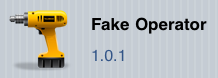 You can change the carrier name on your iPhone using a free tool called “Fake Operator” that is available through the Cydia store. Installing the tool requires a
 There are a few ways to properly eject a disk on a Mac, the first and perhaps the easiest method is to use the Disk Eject Key which is located in the upper right hand corner of a Mac keyboard (it looks like the image to the right). The disc eject key applies to all Macs with built-in disk drives and all Apple Wireless keyboards, but of course not all Macs these days do have SuperDrives, and these newer machines will want to use a different ejection method. If the Mac does not have a disc eject key, then you can use one of the following tips to eject the disk (or disc) from the Mac instead.
 with a shock frame.