So let’s pretend that maybe you want an iPad or a bigger screen iPhone, but you don’t want to pay pay for one. Hmmm, but you already have an iPhone? Well then, have we got a solution for you!
Making your Mac desktop background look attractive goes beyond just eye candy, it can help to improve your focus or give some inspiration. We’re going to show you how you can easily change the wallpaper on your Mac, and you can set the desktop background to any picture you want.
Whether you’re a minimalist and just like simple solid color or gradients wallpapers, or you want a great looking sunset, or maybe just a family picture as the background, it’s all a piece of cake to set and customize the wallpaper to your preferences.
This applies to all versions of Mac OS X system software, so it doesn’t matter what version of Mac OS X is running on the Mac, you can customize the background pictures the same way using any method. We’re going to focus on the three primary methods of changing the Mac desktops background wallpaper in Mac OS . First, from an image file on the Mac desktop or elsewhere in the Finder, second will cover changing to a default or other option from System Preferences, and finally, using Safari with an image you found on the web to set as the Macs wallpaper.
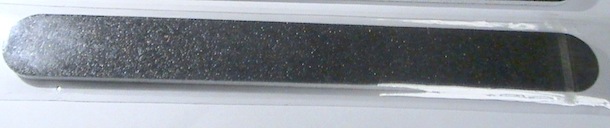
The MacBook can have some pretty sharp edges near the wristpads, and some people find this uncomfortable if they’re resting their hands on their laptop for extended periods of time. The solution to your MacBook’s sharp edges: use a nail file. Yes, just a generic nail file.
Basically you’ll just want to treat the sharp plastic edge of the MacBook as a giant nail, and just gently file it down a tiny amount so that it smooths the corner edges a bit. Really you can use anything that is abrasive and harder than the plastic: nail files, fine grain sand paper (watch for scratching elsewhere!), a knife sharpener, a friend of mine even used a dull butter knife by sliding it back and forth. You aren’t trying to file the thing down to oblivion, just a few quick light rubs and the sharp edges will be gone, creating very little plastic dust and leaving behind a nice smooth edge.
Not all MacBook’s have the really sharp edges, it seems to be a random quirk that occurs in the case molding process. Obviously if yours isn’t bothering you, don’t mess with it.
What about the sharp edges on a unibody MacBook Pro?
You can do the same thing you’ll just need a tougher file (like a metal file) since you will be filing down aluminum instead of plastic. If you need assistance or a guide, there’s even a video of a guy filing the edges on his unibody MacBook Pro. I have no direct experience doing this with the MacBook Pro since the edges on mine don’t bother me.
Obvious disclaimer: We aren’t responsible for you damaging your MacBook. If your MacBook or MacBook Pro has extremely sharp edges that are seriously disrupting your computers usability, a visit to the Apple Store is probably wise.
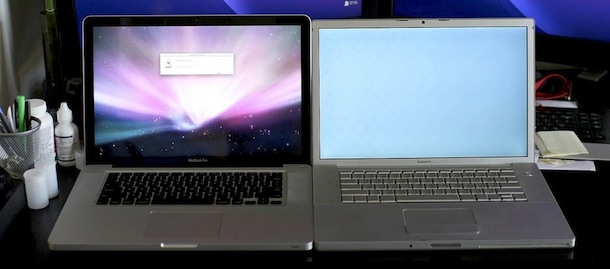
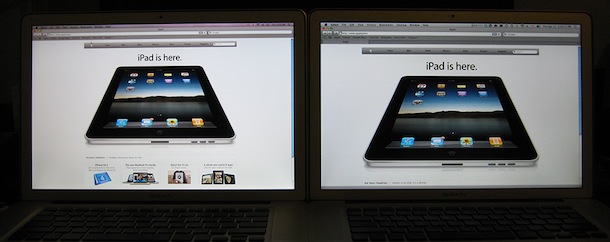
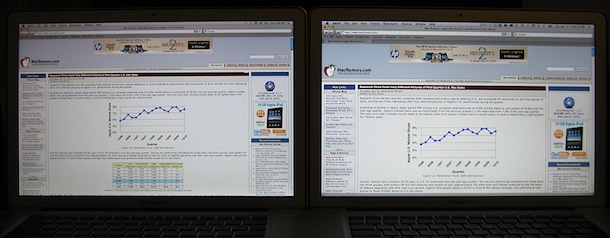
Here’s a good side-by-side comparison showing the viewable difference between the new MacBook Pro hi-res screen option and the standard display. The new 2010 MacBook Pro 15″ model with optional high-resolution screen running at 1680×1050 sits on the left, alongside an older MacBook Pro with the standard 15″ display running at 1440×900 on the right. Note the additional visible images and information on the high resolution screens display.
Thank you Andrew for pointing us to the pictures over at MacRumors forums, check out the thread if you want to see the full resolution shots. The original poster has this to say about the screens:
1) The difference in resolution is very noticeable; especially websites with a lot of text or images; if the site has a lot of white space and they are not coded to stay together, then there is even more white space.
2) The color is alright, but the brightness seems a bit dimmer than the older anti glare; I have both set to the same brightness and both have been calibrated with a Huey Pro.
3) The vertical viewing angles still sucks; it’s a TN panel, so I’m not surprised; look like the older one. I tried taking a picture of this, but my P&S is also a POS.
4) Horizontal angles are also like the older one. I took a picture, but I don’t if you can tell, but the high-resolution one looks a bit yellow from the right
It’s worth mentioning that both of the MacBook Pro’s featured in the pictures are also the antiglare screen model, which is why the black bezel and glass isn’t seen. In fact, you can’t get a new MacBook Pro 15″ with an antiglare screen unless you also get the hi-res screen upgrade. The classic glass & black bezel screen is available at both standard resolution and HD models though.
Update: also from MacRumors, here’s a picture of the new MacBook Pro 15″ high-res anti-glare matte screen version vs the new MacBook Pro standard res glossy version.
PeerGuardian is a free open source tool that allows you to easily block large numbers of IP addresses in Mac OS X. It automatically maintains an internal IP blacklist to block IP’s deemed unsafe or dubious in nature, and also allows for multiple IP lists with the ability to block entire protocols. Other features include logging and maintenance tools to see what exactly is being blocked. Many people use PeerGuardian in conjunction with an extensive external IP blacklist when using P2P file sharing applications and networks to better maintain their security and privacy.
Many Mac users are surprised to note that Apple.com is a blocked IP in the PeerGuardian IP list, but HTTP and FTP traffic from Apple.com will flow through fine (ie: websites, Software Update, Apple web services, iCal, etc). This can lead to some problems with other Apple accessed servers though, like .Mac mail, some iChat traffic, and the Network Time Protocol. Of course you can manually edit the IP block list and remove Apple entirely if this is too restrictive for your needs.
If you’re a heavy P2P user, you’d likely benefit from downloading and installing PeerGuardian.
Mac usage has long been popular in higher education, and speaking from experience Mac use is really common around my school, with Apple hardware appearing just about everywhere. Seemingly everyone has an iPod or iPhone, a Mac, there’s a lot of MacBook’s, even a few iPad’s floating around… but even on a techy campus, I have seen nothing quite like this picture that was apparently taken at the Missouri School of Journalism.
Get a load of that!
Wow, that is quite a classroom. Just a sea of Apple logos glowing back at the professor.
I’m sure all the students are really paying attention to class, they’re all taking notes and aren’t goofing off. Of course, right?
Thank you Sean for sending in the picture! If you know of the original source link (aside from the Missouri School of Journalism) then share it with us in the comments!
Statistically this may not be too unusual, as some recent data shows that up to 70% of college freshmen are using Macs which should be a good indicator of a healthy Apple interest by the nations youth. It will be interesting to see how that usage changes over time… will the Mac continue to be popular in higher ed, or will something else take over? I’m sure it largely depends on how Apple handles the Mac in the coming years, and how students and consumers respond.
Anyway, I thought this was an interesting find that was worth sharing.
So you called Apple’s main number at 1-800-692-7753 (1-800-MY-APPLE) and you’re getting lost in a maze of automated menus with a robot who attempts to direct your call, sometimes successfully and sometimes not. Wouldn’t it be nice to talk to a real human being who can help, rather than a phone robot?
If you’re frustrated and trying to talk to a real life living breathing person at Apple’s number, we’ve got four specific tricks to try when you encounter the automated voice robot answering service that should connect you to a human with a pulse working for Apple.
Updated 11/27/2018: You can easily use the MacBook, MacBook Air, or MacBook Pro in what’s commonly called clamshell mode. Clamshell mode is when the laptop lid is closed but the machine is hooked up to an external monitor, keyboard, and mouse, effectively turning your portable Mac into a desktop.
Doing this is easy, we’ll cover two different ways for how to get a Mac laptop into clamshell mode, one on system boot, and the other when waking from sleep.
All good things must come to an end, and the favored Hackintosh netbook, the Mini 10v, has been discontinued. TUAW reports that they spoke with a Dell representative who told them the Dell Mini 10v reached the end of its product life and a replacement model will be out soon.
The Dell Mini 10v has long been a favorite in the Hackintosh community for it’s ease of installation, full compatibility, solid performance, and it’s vaguely MacBook Pro-ish appearance.
So the Hackintosh communities question is, will the new model be as Hackintosh friendly? Let’s hope so.
You can really clean up your Mac Desktop by hiding all the hard disk and drive icons that appear by default on it. This is a settings choice that makes it so when you connect a new drive to the Mac, it won’t show up on the desktop, but it will be visible from a Finder window and accessible from the Finder or any application.
Not much is known about Mac OS X 10.7, and many in the Mac community have been operating under the assumption that we’d all get a glimpse into the future of Mac OS at Apple’s Worldwide Developer Conference in June. But that may not be so this time around, at least according to the always interesting John Gruber. Posted to DaringFireball, Gruber made a rather interesting note on Mac OS X 10.7:
A few months ago, I heard suggestions that Apple had tentative plans to release a developer beta of Mac OS X 10.7 at WWDC this June. That is no longer the case. Mac OS X 10.7 development continues, but with a reduced team and an unknown schedule. It’s my educated guess that there will be no 10.7 news at WWDC this year, and probably none until WWDC 2011.
Apple’s company-wide focus has since been focused intensely on one thing: iPhone OS 4.1 The number one priority at Apple is to grow mobile market share faster than Android. Anything that is not directly competitive with Android is on the back burner.
While somewhat disappointing, I wouldn’t be terribly surprised by this. The potential of dominating the mobile market share with iPhone OS powered devices and the iPad is probably a far greater opportunity for Apple than expanding the relatively small Mac desktop computing market share, especially when more and more computing is done on the go. Combine that with all the excitement surrounding iPhone OS 4 and I think it makes sense that WWDC 2010 is going to be an iPhone OS centric event as Apple is heavily focused on their mobile platform.
Does that mean we definitely won’t see anything of Mac OS X 10.7 at WWDC? No, certainly not, at this point this is a prediction at best and a rumor at worst. John Gruber is often right with his predictions, but everything with Apple is always a mystery until the last minute. Even if Apple has paired back focus on Mac OS development for the time being, keep in mind Apple is a large company with plenty of resources. They have roughly 35,000 employees, so what exactly a “reduced team” means in that context is anyone’s guess. Regardless, I’m sure Mac OS X has many exciting things in store for it’s future, whether it has been delayed by the iPhone OS or not.
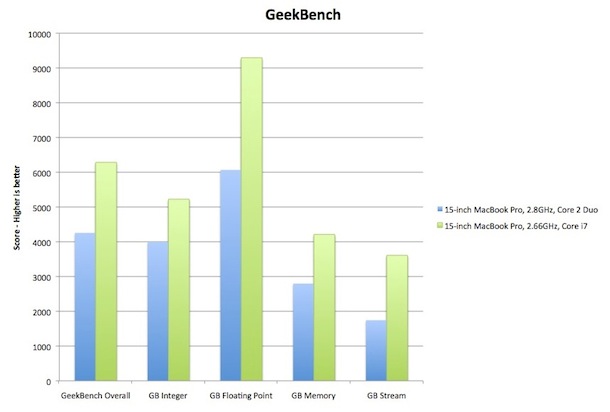
The new MacBook Pro’s have barely been out a few hours and Gizmodo has already benchmarked the top of the line 15″ model that features a Core i7 processor running at 2.66Ghz, check out the graph above for the gains against the previous top-end model, the Core 2 Duo at 2.8Ghz. Even ripping a DVD with Handbrake took almost 40% less time on the new Core i7 chip. Some of the performance gain is undoubtedly the result of Turbo Boost, a feature of the Core i5 and i7 processors which take the 2.6Ghz MacBook Pro to 3.3Ghz in times of intense CPU usage. So the new Core i5/i7 MacBook Pro’s are confirmed to be blazing fast, pardon me while I mop up my drool.
After seeing these huge increases in performance, I’m a little confused as to why Apple didn’t put a Core i5 into my personal favorite MacBook Pro, the 13″ model. TechCrunch speculates that Apple chose to forgo haw computing power in favor of the extended battery life, but that seems like an odd compromise for a Pro machine. Apparently I’m not the only one who wonders about the use of an older CPU in the 13″ model, according to MacRumors, someone emailed Steve Jobs asking about it and received this response:
“We chose killer graphics plus 10 hour battery life over a very small CPU speed increase. Users will see far more performance boost from the speedy graphics.”
If the above benchmarks are any indicator of general speed increases when moving from a Core 2 Duo to the new Intel Core i5/i7 chips, I’m not so sure I agree with that statement, but I imagine some real world benchmarks on the 13″ will soon appear and we’ll have an answer. So while the 13″ models minor update has raised a few curious eyebrows, the specs of the new MacBook Pro 15″ and 17″ model are undoubtedly very powerful and quite enticing.
Anyone have an extra $2300 laying around? That MacBook Pro 15″ with a Core i7 chip and high-res screen is looking like a Mac lovers dream.
LSO’s are pesky Flash cookies that can potentially track your activity on the web long after you’ve left the site that set the cookie, and unfortunately there’s no easy way to tell what cookies track where. If you are concerned about this, your best bet is to just delete them completely.
We’ve discussed ways to manually delete flash cookies in Mac OS X before, but now there’s a little app called Kill Flash Cookies that does it for you, easily, with the most flawlessly simple GUI ever. Launch the app, press Go, and watch as it tallies up the Flash cookies that have been deleted.
Kill Flash Cookies is also cross platform compatible, so whether you’re running Mac OS X, Windows, or Linux, you’ll be able to clear the Flash cookies.
“I just got a brand new MacBook, what should I do with my old Mac?”
This is a very common question I get, and I typically give one of four answers depending on who’s asking the question. I’ll go through each choice and hopefully they’ll give you some ideas:
1) Setup the old Mac next to your new one and use mouse and keyboard sharing
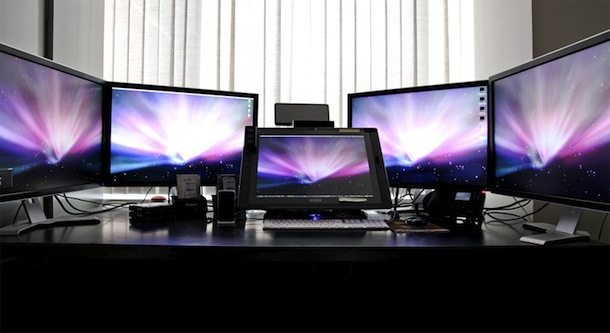
For power users and professionals, this is nearly always my first suggestion. Using something like Synergy or Teleport, you can share a single mouse and keyboard across multiple Macs, effectively giving you not just two screens, but two displays with full computing power behind them. Having dual displays dramatically increases productivity and with the extra processing power having two computers is kind of the best of this world. Use your older less powerful Mac for things that are not so processor intensive and more mundane, like email, web browsing, instant messaging, etc, and use your new more powerful Mac as the primary machine for your more complex tasks, be it developing, video editing, photo manipulation, whatever. Try this out, you can thank me later.
2) Repurpose the older Mac as a media center or file server
This is a bit more complex, but if you’ve got some time on your hands it can be very rewarding to setup a file server using file sharing or a media center using something like Boxee or Plex/XBMC. If you’re setting up a media center, just remember the types of content you can playback are dependent on the Mac’s hardware capabilities, be sure to check if your Mac can play HD video if you’re looking to play high quality video files. Ready to jump in? Check out how to setup a Mac Mini as a media center.
3) Give the older Mac to a friend or family member
Maybe your kid would like a Mac in their own room, or maybe your Mom is battling viruses and malware on her clunker of a Windows PC. Fixing up a Mac and giving it to someone else is not only a nice gesture but because of their stability and ease of use, it just may reduce those family tech support calls you inevitably get because you’re the computer guy in the household.
4) Sell your old Mac
If all else fails, or you just want to recoup some of the costs of your new purchase, sell the old Mac. Mac’s retain their resale value amazingly well, far more than any other PC. Craigslist is a great way to sell just about anything you have laying around and Mac’s are no exception, but if you live in a smaller community you might not have much luck. EBay is the other option since you can ship to buyers globally, and while they take a commission of the sale, I’ve generally found that used Mac’s sell for more on eBay than they do on Craigslist. Just do a quick scan of ads on both sites to see the price you can expect to get for your used Mac.
If your Mac has a SuperDrive or Disc drive, you can boot the Mac from any bootable DVD or CD by using a special keyboard shortcut. The bootable disc can be an OS X system restore disc, an OS X installation disc, or even a third party OS disc like Linux.
You can precisely adjust the volume levels on a Mac by holding down the Shift+Option keys while pressing the Volume Up / Down keys. This lets you adjust the sound level by 1/4 of each notch (as opposed to a full notch), offering precise incremental control to how loud or soft output is from the speakers.
This is perfect if you like to precisely adjust the audio level of speakers, though it’s maybe used best with external speakers which tend to play either too soft or too loud. It works on the Mac internal speakers too, and headphones as well. Easily the best way to find the best volume for you, try it out and find something that sounds good for your speakers and your ears.
You’ll find this great little trick works in all versions of Mac OS X, from the earliest versions onward through Mavericks and Yosemite. Note that newest versions of OS X require a slightly different modifier of the Option key and the appropriate function keys,.


 Making your Mac desktop background look attractive goes beyond just eye candy, it can help to improve your focus or give some inspiration. We’re going to show you how you can easily change the wallpaper on your Mac, and you can set the desktop background to any picture you want.
 depending on the model, with free shipping included.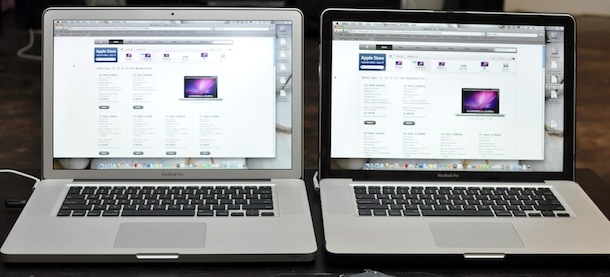
 PeerGuardian is a free open source tool that allows you to easily block large numbers of IP addresses in Mac OS X. It automatically maintains an internal IP blacklist to block IP’s deemed unsafe or dubious in nature, and also allows for multiple IP lists with the ability to block entire protocols. Other features include logging and maintenance tools to see what exactly is being blocked. Many people use PeerGuardian in conjunction with an extensive external IP blacklist when using P2P file sharing applications and networks to better maintain their security and privacy.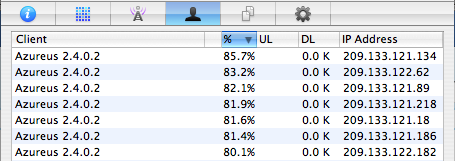


 All good things must come to an end, and the favored
 LSO’s are pesky Flash cookies that can potentially track your activity on the web long after you’ve left the site that set the cookie, and unfortunately there’s no easy way to tell what cookies track where. If you are concerned about this, your best bet is to just delete them completely.