
Mac Error 10810

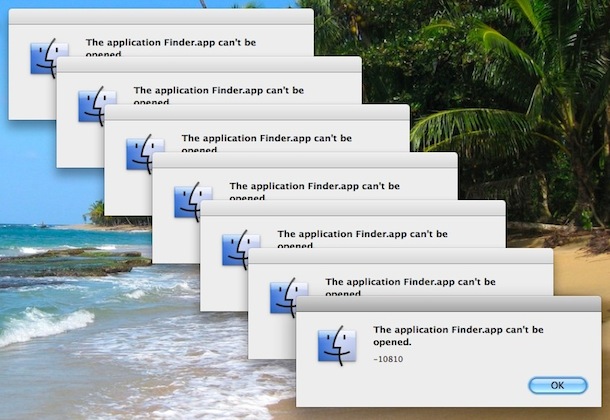
The application Finder.app can’t be opened. -10810
I ran into the unpleasant 10810 error code recently and couldn’t find any workaround without a reboot. From what I’ve gathered by searching around on the web, Error 10810 occurs when the Launch Services framework has some sort of meltdown, causing the Mac OS X Kernel to run out of available threads for anymore processes to launch. In the event that some process has got errant and is in some infinite loop of launching and hoarding threads, this will cause a rather lovely barrage of error dialog boxes (see screenshot below).
If you start getting Error 10810 in OS X, you likely won’t be able to launch any other application (Finder included) and so the best thing you can do is to reboot your Mac. Yes, rebooting the Mac will fix the error – kind of lame, but it works.
If you are continuously plagued by this error, then you may be using some buggy software that is launching itself into a gazillion threads causing Mac OS X to freak out.
If anyone has additional information or troubleshooting tips regarding this error, feel free to chime in.
For what it’s worth, simply killing and restarting the Finder was not sufficient in my experience to resolve the error, which is why a complete reboot of the Mac was necessary.






Im running Yosemite my error 10810 will not let me launch any adobe prigrams. But are able to launch some other minor programs.
Rebooting does not work in this case
It may be a permissions problem, see chmod.
Hey guys,
I dont know why nobody got this solved, 10 Minutes and it was gone.
Just start the secured mode (Hold Shift at Startup), clean the autostart, restart, finish. If this you should think about, if you installed or updated some new software, one of this did this loop at this user i helped.
In secured mode you should can open the apps again.
Hole Apple World dont got this to run, and the windows admin takes this in a few moments ;)
Am havng the same problem and nothing seems to work. Help, got an exam tomorrow.
problem started when I tried to download pictures from my camera.
im stuck with my macbook that my dad bought as THE computer and this just happened to me ill try stuff and say what works
Had the same issue for a few days. I’ve seen on another forum someone had this issue when the battery of his wireless mouse were almost empty. Changing the battery of my mouse seems to have fixed the problem, without rebooting.
Hope this help.
wow my english is godawful in the early morning..
oh, for those who might wonder, you have to omit the ‘$’ at the beginning of my lines, they’re only there by custom to show a shell command line as a normal user (root would be ‘#’).
also, the process id is the second column from the left, right after the process owner (your username or root most of the time).
hope this helps.
i don’t know if you guys are still looking for the solution, but i think this has to do with the finder becoming a zombie process. you can get around this by opening a terminal (use spotlight), and type
$ ps aux | grep Finder
note the process id (PID) number, then type
$ sudo kill -9 $PID
where $PID=your Finder process id. after this, the finder should restart. if it doesn’t, just click its icon in the dock.
good ol’ unix.. ;)
Hi, I am going crazy with this error, but I do not know very much how to use the terminal. I actually copied and pasted your $ ps aux etc and the terminal says command not found.
I have leopeard version 10.6.7 and am talking to someone in APPLE all they tell me is that I have to wait for an update.
I`ve had this problem since March 15th when I downloaded the safari update. Can you help?
This problem with error 10810 began after I installed Dropbox. I removed the Dropbox application, and so far, I am not getting this error.
It started when I plugged WD Passport. And now the error shows on random actions
It just happened to me yesterday. I have had a WD Passport plugged in off and on for weeks. I was using Photoshop (CS5). I finished and tried to shut down and got the – 10810 message. I was able to use Finder again by going thru Terminal and typing in a code found on another site. Finder works unless I close Terminal.
This has been happening to me fairly often. Usually I reboot, but I just found another solution that seems to work, here:
http://utvv.blogspot.com/2010/01/how-to-fix-application-finder-cant-be.html
Simply go to terminal (I keep its icon in the dock) and type:
/System/Library/CoreServices/Finder.app/Contents/MacOS/Finder &
Works great ! Thanks!
Started seeing this after installing handbrake
started seeing this after installing cleanmymac.
I’m having the same issue. My iMac is only a few months old and started doing it about a month after I got it. I have to press the power button and shut down once or twice a day. Is Apple aware of this problem and does anyone know if Apple intends to address the problem in an update? Right now I’m running 10.6.4. The suggested fixes I see online (e.g. Cnet) are just too technical for me.
Oh, I forgot, I too have this damned Finder crash issue and the -10810 error-message.
For me, the Spotlight tip doesn’t help, although I can at least access files again that way. The Finder won’t come up again this way, though.
Now, with the most important program unstable on an OS, I might as well switch back to Windows 2000 or XP. I get way faster machines for less money.
I am sooo disappointed with Snow Leopard, I cannot tell you!
I’ve upgraded from my iBook G4 with Tiger because I needed a faster computer that can handle my DNG photo files. So I bought a Mac Mini with SL.
(Boy, I’m disappointed also by the performance of the Mini. My 5 year old PC can handle large photos better than the brand new Mac Mini. I know that the Mini has mobile parts “only”, but my Mini has 1.5 GB more RAM than the PC and the same amount of graphic memory (256 MB, although shared). I thought Apple was the favored tool among creative people and photographers. Screw that!)
The Tiger OS on my iBook — my first experience with Apple — had several things I didn’t like and which I missed coming from Windows. (Being able to choose the programs from a pop up menue rather than having to search for them in the Finder, for example. This has finally been fixed in SL. Although not very elegantly, imo. ) But I managed to work around these things and after a while had a very safe and stable system. Perhaps ten or twenty total hang-up’s within five years with the computer running many hours a day, and hardly ever rebooting. (Once a month, perhaps.)
But since I’ve tried Snow Leopard now for a month, I want my iBook back — if it weren’t so darned slow. (Can’t even watch John Stewart or Colbert Nation videos in the browser anymore. With 1.5 GB of RAM. Sheeesh!)
To me, SL is a step back. Shame on you, Apple.
I tried the rebuild a few weeks ago, plus I downloaded Onyx and ran that. Everything was great until a few weeks later (today). I looked at my syslog, and the thing that is causing problems seems to be:
com.apple.coreservices.uiagent or com.apple.launchd.peruser.501 whatever that means. I don’t know tech language, but am generally good with computers.
What does this mean that is launching? I also use Microsoft Intellipoint but don’t see that being mentioned in my syslog. I guess I am not sure what line to look at to see what is causing the problem. I don’t see any identifiable programs.
You can rebuild the launch services database with Cocktail, Onyx, or other utilities. Alternatively, here’s an AppleScript that can be saved as a script and launched from the Script menu, or saved as an application and launched from anywhere.
(*
rebuildLaunchServicesDB.scpt
Locates the lsregister command regardless of OS version, then tells it to rebuild the Launch Services Database for all applications in the canonical Applications folder
Paul Henegan
bleulyon@mac.com
20.Aug.2008
*)
set theCommand to (do shell script “locate lsregister”)
set theArguments to ” -kill -r -f -domain local -domain system -domain user”
set thePath to ” /Applications”–edit this as needed
set theScript to theCommand & theArguments & thePath
do shell script theScript
I had the same Problem besause I pasted the finder on my desktop. I brought it back with Path Finder and then I repairt everysthink with the disk-utility.
My system started showing this behaviour after installing Forklift… I have had other Finder instability issues with older versions of Forklift. It is the last time that I will use such an application on OS X…
My recommendation, do not install any applications that “replaces” 0r “augments” the Finder…or Finder functionality.
Time for a clean wipe and install…
If you use Springy, try removing it from the auto-start list.
Coincidence! This happened to me tonight, first time … I’ll try logging out/in, better than reboot (plus it didn’t shut down, I had to force off/on).
Seemed to be LogMeIn that took it down, so Safari. Odd.
Logging out and back in again works for me.
I run into this every so often in Snow Leopard, to the point where I have to perform a hard restart. I noticed, on accident, yesterday that if I kick off Spotlight via Command+Space, and click on Show All, it will sometimes kick the Finder back into motion and restore my desktop icons, etc.
Thanks a lot! really helpful patrick!