
Show File & Folder Info Directly in Finder & Folders of Mac OS X

You can set Mac OS X to automatically display file and folder information directly within the Finder windows of the file system, much like the desktop of OS X.
How to Show File & Folder Info in Finder Folder Windows of Mac OS X
Enabling extra item information displays:
- Get to the Mac OS X Finder / Desktop and open a finder window
- Open the ‘View’ menu
- Scroll down to ‘Show View Options’ (or hit Command+J)
- Click the check boxes next to ‘Show item info’ and ‘Show item preview’
The effect is immediate, with the icons in the folder in icon view showing information underneath them.
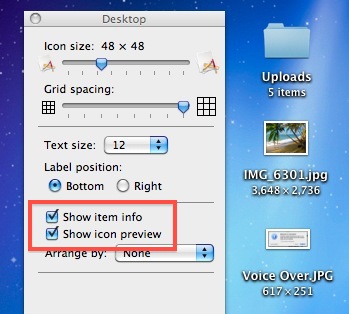
Extended item info and previews will now be included on items displayed in the Icon view. The info does not display in list view or other Finder window views, however.
Enabling this feature shows things like the item count of a Folder when in icon view.
My personal favorite part of this ‘show item info’ feature is the ability for picture files to show their dimensions directly under the file name, this is so incredibly useful for anyone frequently working with images and manipulating pictures.
This is available in all versions of Mac OS X, from the earliest releases to the most modern versions out there.
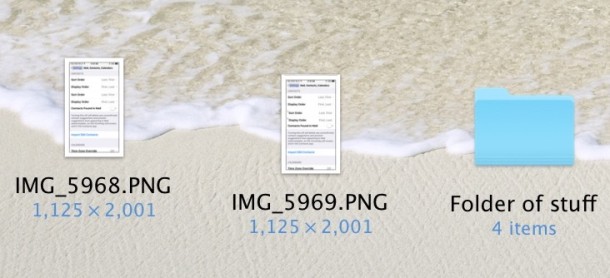
You will find that if you show item info, folder storage consumption is not shown in this view. Instead, to show folder sizes on Mac you must view the directories within list view and enable a separate settings option.






One of the view option boxes in finder is file size. But on my computer it is not highlighted, so I cannot EVER check it. How do I activate the size box?? Very frustrating.