
How to Turn Bluetooth On or Off with the iPhone or iPad
 Bluetooth is great since it allows for anyone to wirelessly sync hardware together. It’s typically turned off by default in iOS, so you’ll want to turn it on first if you intend to use the Bluetooth connectivity options.
On the other hand, if you don’t use bluetooth on your iPhone or iPad there’s little reason to keep it turned on, because having it on and discoverable can needlessly reduce your iPhone battery life while it searches out for bluetooth devices that don’t exist or that you just don’t want to connect to at all. In that case, save your battery life and disable it when not in use.
Disable or Enable Bluetooth in iOS for iPhone, iPad, or iPod touch via Settings
The settings will remain the same across all iOS devices:
- Tap on Settings
- Select “General”
- Tap on “Bluetooth”
- Flip the On/Off button to toggle Bluetooth on or off
- Close out of Settings and you’re on your way
How to Toggle Bluetooth On / Off on iPhone and iPad
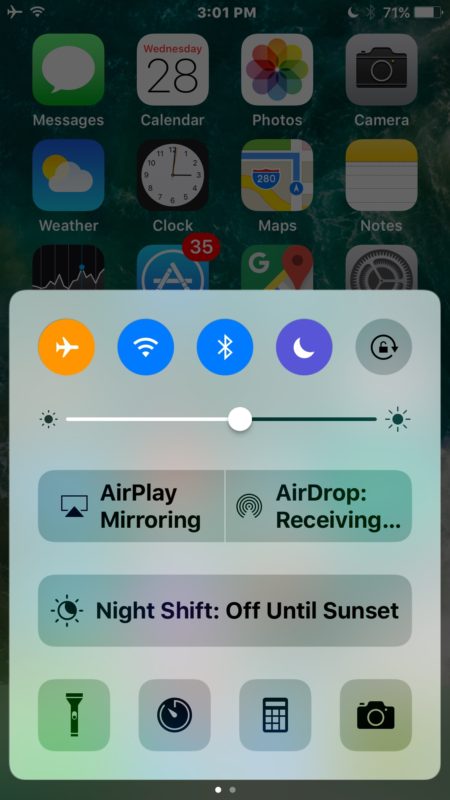
A faster way to quickly switch Bluetooth off or on is through Control Center, this works in all modern iOS versions:
- Swipe up from the bottom of the screen to activate Control Center
- Tap the Bluetooth icon to turn it off or on, if it is lit up it is on, if it is not it is off
Keep in mind that after Bluetooth is enabled you will need to pair the intended device, computer, or accessory with the iOS device, that is done just by tapping on it in the devices list that will appear after it has been turned on. If there is nothing showing up in that list, the other accessory may not be turned on, could have low batteries, or Bluetooth may not be enabled on it.
If you’re unfamiliar, there are tons of purposes for Bluetooth. From wireless hands-free headsets that let you talk without having phone up to your ear, to use a Bluetooth keyboard with the iPad, which in my view is better than the iPad dock keyboard since it’s wireless, or even connecting a wireless keyboard to an iPhone or iPod touch and setting up the worlds tiniest workstation, there are no shortage of devices that use Bluetooth. Even some newer car stereos use the protocol to allow wireless configuration and streaming of things like an iTunes library and Pandora between the iPhone in your pocket and the console controller or steering wheel controls while driving.






My wife and I both have iPhone 6
Both Bluetooth are turned on
On scan on both phones they don’t recognize each other and give the message –
No devices discoverable, make sure SYNC is turned on.
What am I not doing ?
[…] this one isn’t buried to deep so it’s not much of a nuisance to toggle it on and off when needed, and for many of us, just keeping it off all the time is hardly a […]
[…] the iPad, tap on Settings > General > Bluetooth (make sure Bluetooth is enabled here too or else this will not […]
How to turn off iphone 4 bluetooth visibility ? I do not want to turn off the bluetooth, I just want to hide visibility?
thanks for the tips, lol
Agreed with Murphy, add in a button to toggle WiFi on/off and id be a happy camper
I’d be pretty happy if the orientation lock that’s about to become a mute switch on the iPad could be configured as a Bluetooth toggle. My iPad moves constantly from a bt keyboard to various places in the house. The bt keyboard has remarkable range and the iPad seems to see it all over the house.
Turning of BT now is too many steps.
I saw a noticeable improvement in battery life by disabling Bluetooth, I don’t use it so why let it drain?