
Change Spotlight Search Priority in iOS
 The iOS Spotlight Search feature defaults to showing Contacts from a devices address book as the top search results, which may be helpful, but that same feature already exists when searching through Contacts anyway. What if you want to show matching apps first instead? Or maybe you want to list emails or messages as the first search results? No sweat, you can customize what appears first in iOS Search really easy.
To get the most out of Spotlight in iOS, you may want to take the time to change the search priority of results so that what you are most likely to look for appears on top. This is a great way to make the search feature in iOS more suitable to your needs, depending on how you use your iPhone, iPad, or iPod touch.
Here’s how to change the Spotlight search result priority in iOS:
- Open Settings then tap “General”
- Tap on “Spotlight Search” and then drag the categories to their desired search position
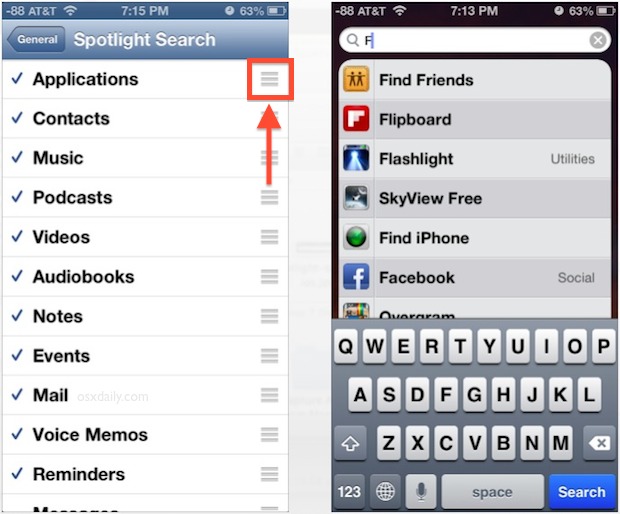
For the example shown in the screen shot, Applications were moved on top, leaving Spotlight to first show any matching apps above anything else (this is a neat feature to combine with the installed app listing trick). Arrange the categories according to your preference, and if you don’t want anything from a particular category showing up in the results tap on the checkmark to exclude it.
This feature exists in all modern versions of iOS, regardless of the version or device it’s running on.
The same procedure can be done in OS X, which is arguably even more useful since Spotlight on the Mac is accessible from anywhere with a keyboard shortcut.






This doesn’t work any more. iOS has taken away this feature and we are struggling searching within the spotlight search results. It was a very useful feature.
Is this still available in iOS9? I tried but no luck. Any help will be very much appreciated.
I have tried everything and my spotlight search on my iPhone 5s does not work. I changed priorities and sent myself emails as suggested. Any other ideas?
The same can be done in OS X.
System Preferences > Spotlight