How to Configure & Use Aliases in ZSH

May 13, 2023 - Leave a Comment
Mac Terminal icon

Command line aliases are very useful, allowing you to have command shortcuts for lengthier commands, and you can use them to replace one command with another as well. With zsh becoming the default shell in Terminal for MacOS, and a widely used shell in general thanks to Oh-My-Zsh, you may be wondering how to configure … Read More

Get Indoor Temperature & Humidity Readings from Siri & HomePod

May 12, 2023 - Leave a Comment
Get indoor humidity and temperature from Siri and Homepod

You may already know that you can get indoor temperature and humidity levels with HomePod Mini and the new HomePod using the Home app, but what you may not know is that you can also get this information from Siri.

RC of iOS 16.5, iPadOS 16.5, MacOS Ventura 13.4 Available for Testing

May 9, 2023 - Leave a Comment
new beta versions of system software

Apple has issued the release candidate builds of iOS 16.5, iPadOS 16.5, and MacOS Ventura 13.4. The RC builds are available to download now for developer beta and public beta users. The final versions of iOS 16.5, iPadOS 16.5, and MacOS Ventura 13.4 will be released to the general public next week, according to Apple. … Read More

How to Access Emoji on Mac by Hotkey

May 9, 2023 - 2 Comments
Emoji picker on Mac

If you’re a Mac user running the latest versions of macOS system software, from Monterey 12, Ventura 13, or later, you can enable an optional Emoji quick-access feature that allows you to summon the Emoji picker instantly with the press of a single key on your Mac keyboard.

How to Dim Flashing Lights in Videos on Mac

May 5, 2023 - 1 Comment
Automatically dim flashing lights and strobe effects on Mac

It’s not terribly uncommon to encounter flashing lights and strobing effects in videos, and while they can be annoying for most people, flashing light can be particularly problematic for people with epilepsy. Fortunately, the latest versions of MacOS offer a feature that will detect flashing lights and strobing lights in videos, and automatically dim them. … Read More

Beta 4 of iOS 16.5, iPadOS 16.5, MacOS Ventura 13.4, Available for Testing

May 2, 2023 - Leave a Comment
new beta versions of system software

The fourth beta versions of iOS 16.5, iPadOS 16.5, and MacOS Ventura 13.4 are now available to users participating in the beta system software programs. No significant features or changes are expected in MacOS Ventura 13.4, iOS 16.5, or iPadOS 16.5, and instead it’s likely the updates will focus on security enhancements, bug fixes, and … Read More

How to Install GCC on Mac

May 2, 2023 - 3 Comments
Installing GCC on a Mac

Some Mac users may wish to install GCC onto their MacOS computers. GCC, which stands for Gnu Compiler Collection, is a commonly used compiler with support for C, C++, Objective C, Go, Fortran, Ada, and more languages, and is frequently used for compiling command line programs, writing software, and more, whether for computer science classes … Read More

Security Response Updates for MacOS 13.3.1, iOS 16.4.1, iPadOS 16.4.1 Released

May 1, 2023 - 7 Comments
Security Response Updates for iOS, iPadOS, MacOS

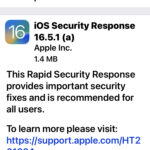
Apple has released the first rapid security response updates for MacOS Ventura 13.3.1, iOS 16.4.1, and iPadOS 16.4.1. The security updates are said to include important security fixes and are therefore recommended for all eligible users to download and install onto their Mac, iPhone, or iPad. The purpose of Rapid Security Response updates are to … Read More

How to Stop Getting Nextdoor Emails

Apr 29, 2023 - 13 Comments
How to stop getting emails from Nextdoor

NextDoor is a popular neighborhood ‘hyperlocal social network’ app that is mostly gossip, rants, and occasional local news, that is well known for sending a constant barrage of emails and email post updates to any users who signed up for the app at some point in history. If you’re like many NextDoor users, you have … Read More

Third Betas of iOS 16.5, iPadOS 16.5, MacOS Ventura 13.4, Available for Testing

Apr 25, 2023 - Leave a Comment
new beta versions of system software

Apple has released new beta versions of system software to users enrolled in the beta testing programs. iOS 16.5 beta 3, iPadOS 16.5 beta 3, and MacOS Ventura 13.4 beta 3 are available now to users who are beta test participants. No major features are expected in iOS 16.5, iPadOS 16.5, or MacOS Ventura 13.4, … Read More

How to Stop Spotify Opening on Mac Automatically

Apr 23, 2023 - 4 Comments
How to stop Spotify from opening automatically on Mac boot, restart, or login

The Spotify app for Mac defaults to opening itself automatically every time the Mac restarts, boots, or a user logs in to the Mac. If you do not want Spotify to open automatically on the Mac, and you’re running MacOS Ventura or newer, read along to prevent this behavior and stop Spotify from opening itself.

How to Use PS5 DualSense Edge Controller with Apple TV

Apr 21, 2023 - 1 Comment
How to pair and use a PS5 DualSense Edge Controller on Mac

Gaming on Apple TV can be made even better by using a dedicated controller, and the PS5 Dualsense Edge controller is one of several great controller options out there, especially if you already have a Playstation 5. Read along to learn how to pair and connect a Playstation 5 controller with the Apple TV.

How to Add a Mac to Universal Control in macOS Sequoia, Sonoma, Ventura System Settings

Apr 20, 2023 - Leave a Comment
Add a Mac to Universal Control in System Settings

Wondering how you can add another Mac to Universal Control in macOS Sequoia, Sonoma, or Ventura System Settings? It’s pretty easy, but enabling the feature and connecting a new Mac is a bit different than what you may have been accustomed to in prior MacOS versions. Universal Control is the incredible feature in MacOS that … Read More

Fix “brew command not found” on Mac with zsh

Apr 19, 2023 - 13 Comments
Homebrew for Mac

If you’re a Homebrew user who is now experiencing a “zsh: command not found: brew” error message in zsh shell, you’re probably perplexed as to why the brew command line line tool is no longer working. The reason you may be experiencing the command not found error for brew is because the zsh shell is … Read More

Convert HEIC to JPG on Mac with Quick Actions

Apr 19, 2023 - 4 Comments
Converted HEIC file to JPEG in the Mac Finder

While there are various ways you can convert an HEIC file to JPG on a Mac, including using Preview or third party tools, by far the simplest way is available directly in the Finder for all modern MacOS users, and that’s thanks to a Quick Action.

How to Connect PS5 DualSense Edge Controller to iPhone or iPad

Apr 14, 2023 - Leave a Comment
Use PS5 Controller on iPhone or iPad

The Playstation 5 DualSense Edge controller is a popular game controller that is obviously used for the PS5, but you can also use the PS5 DualSense Edge controller for gaming with an iPhone or iPad if you’d like to. Gaming in iOS or iPadOS with a game controller can really improve the playing experience for … Read More

How to Change Calendar Event to iCloud on iPhone & iPad

Apr 13, 2023 - 1 Comment
Change an event from local to iCloud Calendar on iPhone or iPad

Sometimes when adding an event to Calendar on iPhone or iPad, you may unintentionally add the event to the calendar on your local device, rather than to iCloud. This is often why a calendar event appears to not sync with other Apple devices, because if the event is stored in a calendar set to “On … Read More

How to Use Intercom on HomePod Mini from iPhone or iPad

Apr 12, 2023 - Leave a Comment
Use Intercom with HomePod

Did you know the HomePod Mini and HomePod can double as an intercom for your household? You can use the intercom feature to speak and the message will be broadcast to the HomePod from any iPhone, iPad, or Mac.

Subscribe to OSXDaily

Subscribe to RSS Subscribe to Twitter Feed Follow on Facebook Subscribe to eMail Updates

Tips & Tricks

News

iPhone / iPad

Mac

Troubleshooting

Shop on Amazon to help support this site