
Mac Setup: Dual Display MacBook Pro Retina with Custom LED Backlighting
May 31, 2014 - 5 Comments
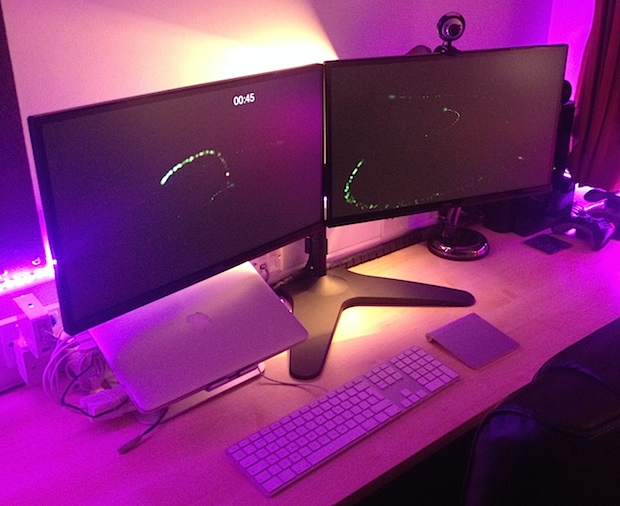
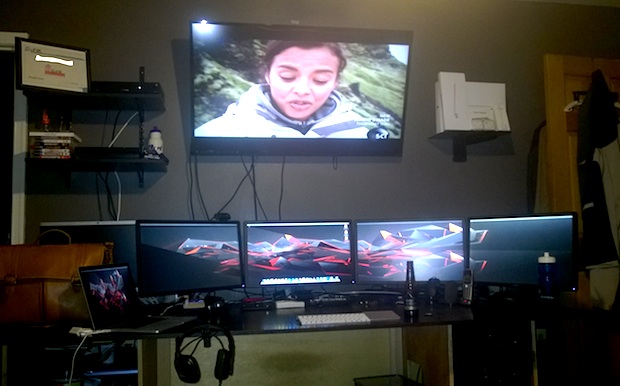
It’s time for another featured Mac setup! Let’s visit the excellent Mac workstation of Paavan G., a student designer who has a great dual-display desk with some really fancy customizable lighting to add some flair. Let’s jump in and learn a bit more about this setup:
By OSXDaily - Mac Setups - 5 Comments
 Many Mac users choose to put their computers to sleep when they’re not in use, and unless Macs are
  Animated GIFs are little moving images and they can be a lot of fun, particularly since they can be
  Safari Reader mode simplifies the appearance of web pages by attempting to render only a pages primary article text into a minimalistic focused view. This can be helpful when reading much of whats found on the web on any iOS device, but it’s particularly useful on the iPhone since many websites don’t have an optimized mobile reading experience appropriate for small screens.
 Many Mac users rely on iPhoto for their image management and to pull pictures from a digital camera, an
  Creating a series of nested directories within one another can be done instantly through the command line. This makes it very easy to immediately and recursively create a complex directory structure of folders within subfolders of subfolders, without having to navigate manually into each directory to create a new directory, then navigate again to that subdirectory to create yet another directory, and so on. Instead, a command line trick will create the complete intermediate directory path in one fell swoop.


 The next time you’re at the command line and need to eject every single mounted volume, hard drive, disk, disk image, and/or external drive attached to a Mac, you can instantly eject them all in one fell swoop with a handy osascript command string. This is great if you work frequently in the Terminal and you’re wanting to quickly pack up a workstation and head out, but it’s also very useful for remotely managing Macs through an ssh connection, or adding to a shell script, amongst other potential uses.
  iMessage sends text messages, pictures, and movies over cellular data rather than through the traditional SMS and MMS protocols, but have you ever wondered just how much of an iPhone data plan all your iMessage use is consuming? It turns out that you can find this information through a somewhat buried location in iOS Settings, and if you’re on a bandwidth capped data plan it may offer some actionable data to work with if you regularly find yourself hitting the limits of your cellular plan.
 The iPhone and iPad Calendar app defaults to starting a week on Sunday, which is the generally accepted standard of most US calendars. Meanwhile, some other nations start the calendar week on Monday, and some users just prefer to start the week on the first weekday of Monday rather than the weekend of Sunday anyway. Whatever your choice, you can customize the way the iOS Calendar displays so that the week starts on a day of your choice.



