
Get All DHCP Info with ipconfig Quickly
 If you’ve ever needed to troubleshoot a network or internet connection, you know how frustrating it can be (particularly when you’re on techsupport with various broadband providers). This quick tip can make the job a little easier on yourself by retrieving all relevant DHCP information, like DHCP server IP, client, subnet mask, router, DNS servers, everything – directly from the command line.
How to Get DHCP Info with ipconfig from the Command Line
To get started, launch Terminal and use the command line ipconfig utility.
Whether your Mac uses en0 or en1 depends on the model, but there is no harm in attempting to retrieve the DHCP info from both of them, as only one will return the proper results.
The command for a wi-fi only mac, or a wired network on a multi-networked mac using ethernet is usually:
ipconfig getpacket en0
The command usage for a Mac using Wi-Fi on a dual-network Mac is usually as follows:
ipconfig getpacket en1
Again, your Mac may be using en1 or en0, query both if one is coming back as blank or empty. If both come back as empty or blank, that suggests the Mac has no DHCP information and needs to renew a lease from the DHCP provider (typically the router the Mac is connected to).
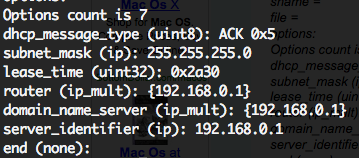
You’ll be presented with a bunch of information, but the most useful of which is usually the DHCP data at the end as seen in the screenshot. An example of the meaningful part of the output is:
$ ipconfig getpacket en0

dhcp_message_type (uint8): ACK 0x5

server_identifier (ip): 192.168.0.1

lease_time (uint32): 0xf20

subnet_mask (ip): 255.255.255.0

router (ip_mult): {192.168.0.1}

domain_name_server (ip_mult): {116.1.12.4, 116.1.12.5}

end (none):
Above that you will see ip address information and MAC address as well, but for our purposes here, we’re looking exclusively for DHCP details.
Now you should know whether dhcp details are accurate, the DHCP lease needs to be renewed, or for relaying to another source for further information. The ipconfig command can also renew a DHCP lease if necessary.
To be clear, ipconfig exists in both the Mac OS X and the Linux world, but for the purposes here we’re working with the Mac obviously. And yes, ipconfig is different from ifconfig!
I hope this helps you as much as it helped me!






Hi!
There is a nice script that shows how to parse the the output of ipconfig using regular expressions:
https://gist.github.com/1825733#file_getnet.sh
@bison: If you don’t get a response the respective interface (en0 or en1) is down / has not received a DHCP configuration.
in my case, I get no result entering this command.
what’s wrong?
Mac OS X 10.6.4 (Mac Pro)
[…] OS-X Daily You can also find your router address ipconfig getoption en0 […]