Mac OS

Mac OS, Mac OS X, or macOS, is the operating system that resides on Apple’s desktop and portable computer lineup. Built upon a Unix core, it is easy to use yet highly advanced, extremely stable, and an excellent OS for productivity and creation. Browse through our articles or use the search feature to look for something specific that is pertinent to the Mac operating system.

Search Mac OS

Mac Theme for Windows 7

Aug 22, 2010 - 162 Comments

If you’re using a Windows 7 machine, why not make it look like Mac OS X? This task is made very easy with a theme/skin set called the Snow Transformation Pack, it turns your Windows 7 theme into a very convincing near complete Mac OS X interface including icons, wallpapers, the Dock, sounds, dialogue boxes, … Read More

Install Watch Command on Mac OS X

Aug 22, 2010 - 17 Comments

If there was one command I would really complain about not being on Mac OS X, it would be “watch”. Watch is one of those great pieces of software that is tiny and completely out of the way, but when needed it will be a life saver. We’re going to show you three different ways … Read More

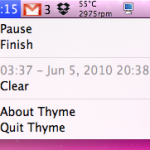
Simple Stopwatch & Timer for Mac OS X Menu Bar: Thyme

Aug 19, 2010 - 7 Comments

If you’re looking for a simple stopwatch menubar timer for Mac OS X, look no further than a little utility called Thyme. No, not the herb, Thyme is a very simple Mac app that sits in your menubar and allows you to quickly start and stop a timer. Wondering how long it takes you to … Read More

Launch Mac VNC Screen Sharing Client from Safari or Finder

Aug 18, 2010 - 3 Comments

Did you know that that Mac OS X includes a bundled VNC app? It’s called Screen Sharing, and you can quickly launch the bundled VNC client from either the OS X Finder, Safari by typing an address into the URL bar, or directly from the app itself.

Download Snow Leopard Graphics Update

Aug 17, 2010 - 5 Comments

Apple has released a Graphics Update for Snow Leopard, and this is particularly good news to Mac gamers. Remember those pesky Starcraft 2 crashes I wrote about two weeks ago? This update specifically addresses some of the problems with Starcraft 2 for Mac as well as other issues with Team Fortress 2, Portal, and Aperture … Read More

iTunes Won’t Play a Song or Add MP3? Here’s a Simple Fix

Aug 17, 2010 - 27 Comments

I recently encountered a strange bug where iTunes refused to add a song to it’s playlist and wouldn’t play the original source MP3 file either. Interestingly enough, the mp3 file played fine with Quick Look and even was able to play within the Finder preview, but no matter what I did I could not add … Read More

Drag or Paste Link in Safari Downloads Window to Download on Mac Immediately

Aug 17, 2010 - 2 Comments

Did you know you can download a file instead of opening it in Safari on the Mac, simply by dragging a link to the Downloads window of Safari? And did you know you can also start a download in Safari on Mac by pasting a copied download URL into the Safari downloads window? This combo … Read More

Change the Screen Shot File Format in Mac OS X

Aug 16, 2010 - 19 Comments
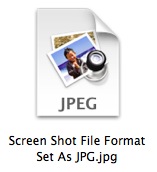
Change the screenshot file format in Mac OS X

All versions of Mac OS X default to saving captured screen shot files to PNG format, but if you’d rather have screenshots save as another file type, it’s actually quite easy to modify the file format and change the default to something new. Whether the desired format output is JPG, TIFF, PDF, GIF, or back … Read More

The Mac Task Manager

Aug 15, 2010 - 47 Comments

Many new Mac users are coming from the Windows world where they would access the Task Manager to end tasks and stop errant processes. The Mac has it’s own Task Manager but it goes by another name: Activity Monitor. Activity Monitor functions in a very similar way to how Task Manager does in Windows, letting … Read More

Convert to EPUB – How to convert PDF, HTML, Word DOC, and more to EPUB format

Aug 12, 2010 - 34 Comments

EPUB stands for ‘electronic publication’ and it’s the accepted standard format for digital book publishing. If you want to make an ebook that can be read on a digital device, you’ll need it in this EPUB format. You can convert virtually any text containing document to EPUB format, which is the preferred format for reading … Read More

How to Merge Directories in Mac OS X with ditto

Aug 12, 2010 - 6 Comments
Terminal in macOS

If you have two directories you need joined together, you can either drag and drop everything together, use the ‘mv’ command to move files manually, or, as we’ll show here, you can quickly merge any two directories within Mac OS X by using the command line tool ditto or ‘cp’. The command line is generally … Read More

How to Lock Files and Folders in Mac OS X

Aug 11, 2010 - 8 Comments

You can easily prevent changes being made on any files or folders in Mac OS X by locking the file or folder in question. This locking capability will also prevent the file or directory from being deleted, since the Trash will not empty while a file is in a locked state. Locking files and folders … Read More

Forgot Mac Password? How to Reset Your Mac Password (with or without CD)

Aug 10, 2010 - 508 Comments

So you forgot your Mac password… uh oh. Don’t worry, it happens and you aren’t out of luck. You’ll need to reset the forgotten password and there’s several ways to do this, we’ll focus on the three best methods; the first is dirt simple and will utilize the Apple ID (yes, the same on you … Read More

Select Sections of Non-Contiguous Text in Mac OS X with the Command key

Aug 9, 2010 - 8 Comments

If you’ve ever needed to select and copy portions of a text document that are non-contiguous, in other words, sentences or words that are not right next to one another and do not touch, you can do so with a little-known text selection shortcut trick in Mac OS X.

Get your LAN IP Address in Mac OS X

Aug 8, 2010 - 7 Comments

Anytime you are connected to a local area network (LAN) you’ll be assigned an IP address for that network, and often it’s important to know what this IP address is. There are two quick ways to get your LAN IP address in Mac OS X, one is more user friendly using the GUI, and the … Read More

mds – what MDS process is and why it uses CPU on the Mac

Aug 5, 2010 - 47 Comments

If your Mac is suddenly running sluggish and you launched Activity Monitor, you may notice a process named ‘mds’ cranking away at 30% and even up to 90% CPU utilization. If you see this, don’t worry, it’s not abnormal behavior and your Mac isn’t crashing, it’s just indexing it’s built in search engine. What is … Read More

IPFW GUI front end for Mac OS X: WaterRoof

Aug 4, 2010 - 1 Comment

The Mac firewall has long been based on IPFW, a robust and strong software firewall that comes form the unix world. But managing IPFW usually requires digging around in the command line, so as I was recently looking around for a Mac OS X GUI to IPFW, I came across WaterRoof. If you’re looking for … Read More

List All Third Party Kernel Extensions in Mac OS X

Aug 3, 2010 - 7 Comments
Terminal

If you’re troubleshooting a Mac machine with some particularly odd issues that routine measures don’t seem to be resolving, it can be helpful to list what kernel extensions are activated, particularly third party kexts loaded in OS X. Determining what kernel extensions are loaded and running in Mac OS X is rather easy, and using … Read More

Subscribe to OSXDaily

Subscribe to RSS Subscribe to Twitter Feed Follow on Facebook Subscribe to eMail Updates

Tips & Tricks

News

iPhone / iPad

Mac

Troubleshooting

Shop on Amazon to help support this site