
Change the Default Web Browser in Mac OS X
 Updated: 11/27/2021 Ever wondered how to change the default web browser app on your Mac? Maybe you prefer Chrome to Safari, or maybe you want to use Firefox instead of Safari, or vice versa? Whatever your choice, it’s easy to do in macOS Monterey, macOS Big Sur, macOS Catalina, macOS Mojave, High Sierra, Sierra, OS X Yosemite and new versions, and older versions of Mac OS X too. This is not an unusual question, in fact, one of our readers Sarah R. writes in wondering about her Macs default web browser set in Mac OS:
“I downloaded Firefox and accidentally clicked the button for it to be set as my default web browser. Now every time I open a link it goes into Firefox instead of Safari. How do I get back to Safari as my default? Help!”
Don’t worry Sarah (and everyone else!), this isn’t the first time we’ve been asked about changing the default web browser on the Mac, so allow us to explain the remarkably simple answer – you’ll be changed back to whatever web browser you want in no time at all, whether it’s Chrome, Firefox, Safari, or any other.
Do note that making this change will impact all links opened throughout apps in Mac OS, as all will be redirected to whatever browsing app is set as the default.
Changing the Default Web Browser in MacOS Monterey, Big Sur, Catalina, Mojave, High Sierra, Sierra, El Capitan, Yosemite or Later
Apple moved the default web browser setting in macOS Monterey 12, macOS Big Sur 11, macOS Catalina 10.15, macOS Mojave 10.14, macOS High Sierra 10.13, MacOS Sierra 10.12, El Capitan 10.11, or OS X Yosemite 10.10 onward to the System Preferences:
- Open the Apple menu and choose ‘System Preferences’, then go to ‘General’
- Click the menu next to “Default web browser” and set your choice from the list (note that you must have at least one other third party web browser downloaded in order to see more than a single option in this list. Chrome, Safari, Firefox, etc, will all show up here)
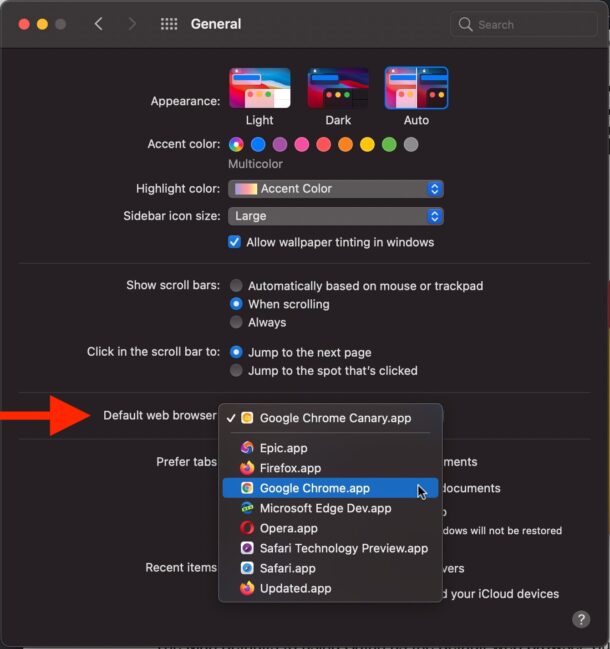
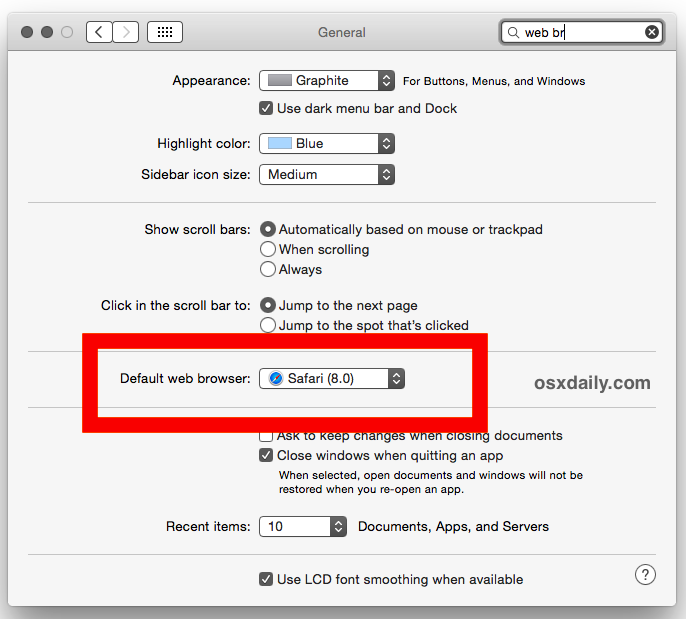
How to Change the Default Web Browser in Mac OS X
Changing the default web browser in prior versions of Mac OS X is also very easy, but regardless of what browser you want to use as default, you adjust the setting through Apple’s web browser, Safari. This is true for OS X Mavericks 10.9, Mountain Lion 10.8, Lion, Mac OS X Snow Leopard, and earlier. Here’s the steps:
- Open Safari (yes, open Safari even if you want to use another app as your default browser)
- Pull down the ‘Safari’ menu and choose to open ‘Preferences’ (or just hit command-,)
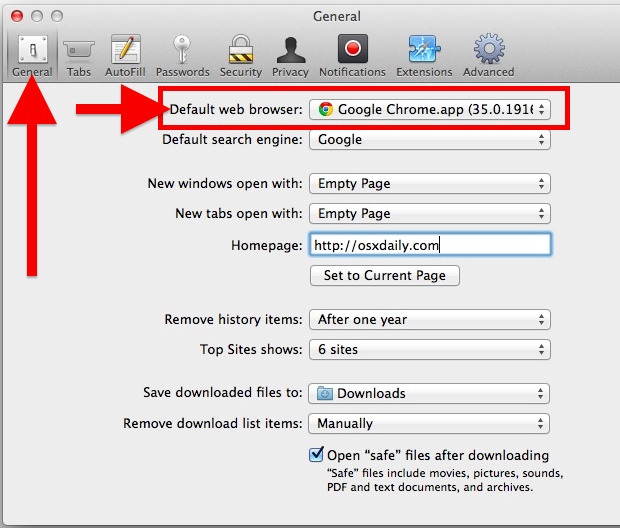
- Click the ‘General’ tab
- Choose the default web browser you would prefer to use
- Quit Safari, and you’re done.
This is what the Preference for default web browser selection looks like on all modern versions of the Mac, just pull down that menu to choose your browser to set as the default:
Here’s what the setting looks like in older versions of Mac OS X:
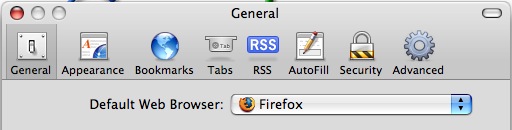
Yes, you use Safari to change the default browser, even if you have no intention on using Safari as the default and instead want to switch the default to Chrome, Firefox, or whatever else.
This process is identical and works for setting the default to Chrome, Firefox, Chromium, Opera, Safari, and just about any other native browser in Mac OS X. Another thing to keep in mind is that most browsers will ask you, often repeatedly on each launch, if you want to set them as the default for the web. Choosing those options within those apps will make the modification for you automatically, though to change it manually at any point you would need to return back to Safari’s Preferences.
Setting the Default Browser via the Browsing Apps
 Another option is to go through the browser that you want to set as the default. This is possible because most third party web browsers apps also have an option within themselves to set their own app as the new default across Mac OS X, Chrome has this and it will ask usually upon launching the app if you want to set it as the default. Firefox and Opera usually will ask the user the same question too, so it’s really easy no matter where you start. Generally speaking, the option is always within the individual browser apps “Settings” or “Preferences” and it’s made very obvious once you’re in that panel. Again, this will impact how all links open on the Mac, so expect new links to open in whatever is set as the default.
Do you have a preference for a particular default browser for your Mac? Any thoughts or experiences on changing the browser? Let us know in the comments.






After I click the “General” i do not see “Default browser”. I have downloaded Catalina two weeks ago.
The window “Safari wants to sign using key” open. I cannot shut it down. How do I close the window.
p.s.
I mainly don’t like using Safari because it doesn’t have the option of printing to pdf a SELECTION of text.
Good day stephanieh;
I am not sure what you are referring to. Are you referring to just a section of text of a document in a Website page? If so there is a more complex method you can do then what I will explain below, which you may already know how to do.
After clicking the “command” key press “p”. This brings up the print window. Look at the lower left corner of the window. The selection button should have “PDF”. Click on the up/down arrows/”v,^”. There should be a selection to choose from. Select “Save as PDF”. Hopefully the rest is straight forward for you. I hope the above helps.
Have a GREAT day.
Hi,
I had set this for Epic to be my default browser, yet when I add a website shortcut to my desktop and right click it to select Open With… it says Safari (default). I am using MacOS Sierra.
How can I make Epic my default here?
For each and every website shortcut I add, I have to individually right click and choose Other… find Epic.app in my apps window, and check the box for Always Open With.
But it still will always say Safari (default)
Thank you for any information you can offer!
If it not let you switch it, close both browsers and try again.
1. Open system preferences
2. Click on General (top left)
3. Go down to “Default web browser:” (Make sure whichever browser you want to make your default is installed), select it.
4. You’re done!
My system is 10.6.8 which has neither a “General” option nor a “Default Web Browser” option in the System Preferences. I think these come on later versions. I am stuck on so many levels with this version that I think I may have to buy a new computer.
If Safari is already the default browser then the option to change the default browser at the top of General Prefs will not appear.
Any Idea what to do in 10.11.5 if there is no option to choose the browser?
https://www.dropbox.com/s/890xh5l8i6i0ieq/Screenshot%202016-05-24%2009.30.00.png?dl=0
in Terminal use
`open -a “Google Chrome” –args –make-default-browser`
Interesting, that must be a problem with a preference file or something. If you can track down the prefs file it should resolve that and let you change the browser (not sure which prefs file to target though, it will be a plist file somewhere).
Another option is to set the browser from the web browser app itself. Chrome and others offer this when you launch the app, what browser are you trying to set as the default?
I have a Mac OS Version 10.5.8 and need another browser. I have tried to install Firefox and Chrome but my computer is not compatable. Any ideas? Really like Safari but cannot open sites I need.
I recently downloaded a “mod installer” for minecraft, and it changed my default web browser to bing. Every time i go to change it back to google it says it has changed, but it STILL USES BING! Does anyone know how to fix this??
[…] even more exaggerated since every browser wants to set itself as the default, and then, to go about changing the default web browser after the fact, you have to open Safari and dig around in it’s preferences even if you […]
[…] will cause Gmail to launch in your default web browser, and it carries addresses and subjects forward from email links to the browser just like it would […]
i know how to do this, but no other defaults come up?, do i have to download other browsers or are pre set on to the mac?
It seems that OmniWeb has the same facility.
[…] showing up, and it can also slow down Safari on older computers. For those that use Safari as their default browser, speed it up and avoid any potential embarrassment by disabling “Top Sites” from […]
[…] you use Safari as your default web browser, don’t miss it. stLight.options({ […]
I appreciate the person who asked the question as simple as it may seem to cyber tech folks. The only dumb question is the question not asked and then it’s stupid. One of the things that I do appreciate is the ‘Launch Pad’ on Lion – I have three browsers and have them for specific reasons. All them are very, very different and when Firefox throws that wrench when opening their browser, I just have remember that the cleaver Fox is attempting to break again. Just say NO.
I’ll suggest another way with a free preference pane called RCDefaultApp 2.1 http://www.rubicode.com/Software/RCDefaultApp/
Thanks, I’ve just spent half an hour looking through all the settings and options in firefox! Seems like a bit of a daft place to put this setting.
[…] You can click and drag any URL in Twitter for Mac to another application, this is particularly helpful if you want to open a URL in a different browser rather than the default. […]
[…] browser to whatever you want via the apps preferences, but if all else fails, you can always just set the default web browser in Mac OS X through Safari (yes, you use Safari to set the default even if you choose not to use Safari as the […]
Same here. Everytime I restart, the setting reverts back to Safari as being default.
I downloaded Firefox and I’ve made it my default browser but every time that I restart my mac this setting automatically change to safari.
Why do you want to go back to Safari anyways…???
maybe she’s never touched a mac before? Also we are here to help remember
well this is a no brainer
And what then when safari do not work any more ? Pretty flipping hard to open safari to pick any other browser . And when i say not working safari its really non working at all it stops after 1 sec with lot of lines with kill command in it . Also updates that are “FREE” need credit card info to Apple … so next OP for me is likely to be something else than this stupid apple