
Type Accented Letters with Accent Codes in Mac OS X
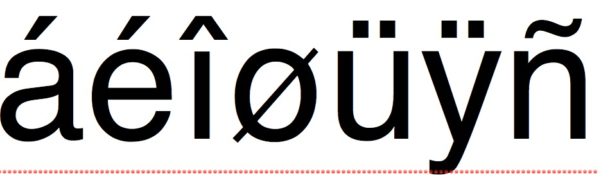
Grave, tilde, acute, circumflex, umlaut… all the fun accent codes that you might need to use. So if you need to type an accented letter in Mac OS X, we’ll show you how to quickly type them using the special option key based keystroke modifiers.
These accent code keystrokes are available on all versions of Mac OS. Remember, the Option key is also the ALT key on a Mac keyboard, you will be using that to place the accent over a letter.
How to Type Accented Letters on Mac using Accent Codes
To get this type of accent over a letter, type this command followed by the letter you want accented:
- à – option+`
- â – option+i
- á – option+e
- ä – option+u
- ã – option+n
For example, if you want to type ö you would hit the OPTION and “u” key, then press the “o” key.
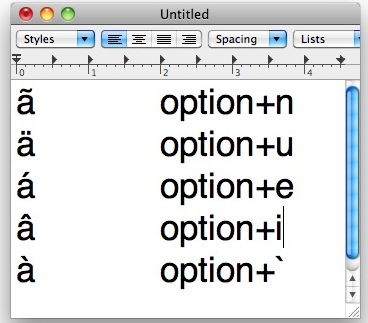
This is one of those tricks that you should really try out on your own to understand how it works, and once you get the hang of it you’ll see it’s not too difficult.
On modern Macs, you can also use a key holding trick to type letter accents too, which is even easier.
I just used the letter A as an example but you can insert accents over letter. Now my sister in Spanish class can stop pulling her hair out. Buena suérte!
Do you have any other tips for typing accent letters? Share with us in the comments!






hi i have a problem my mac password was in spanish contraseña but my sister changed my keyboard back to english but i try to put the option n + n but it still doesnt work
Just be sure to enter the proper password and not a double-n, paste it in if you want to try then re-do the password. If all failed, reset the password, or temporarily change to the spanish keyboard then reset the password.
This totally works, but needs clarification: you have to press the option button and the letter in the list at the same time, then lift both your fingers off the keyboard and hit the letter you wish to accent. EXAMPLE: to make á …. hit OPTION and E at the same time and then you will see the accent mark with an underscore. lift your fingers, and hit the letter ‘a’ and it will be inserted under the accent mark. I am on a MacBook Pro.
Doesn’t work.
I tried to do an accent grave on mine, with the “hold option then press plus” and it didn’t work. Instead, it made an equals sign with a dash through it… Actually, none of these worked.. And yes, I DO have a Mac. A macbook air
The above code does not work for a capital letter? Please advise.
Thanks,
Ron
You don’t (generally) use these accents with capital letters.
Yes, you do. Capitalized letters also have accents in spanish! Don’t give the wrong information please.
thank you admin really nice …
by yenisarki
[…] installed. This is a lot easier than trying to memorize some of the more obscure key commands for typing accented letters and the Apple logo […]
Thanks you admin.
Thank you admin, My Beatiful web site.
it is a perfect style
There an extensive list of other language specific characters that you can directly type with a key combination on Mac OS X.
Here a list: http://tlt.its.psu.edu/suggestions/international/accents/codemac.html
Matteo