
Re-Open Closed Browser Windows in Safari for iPad
Oct 28, 2011 - 4 Comments
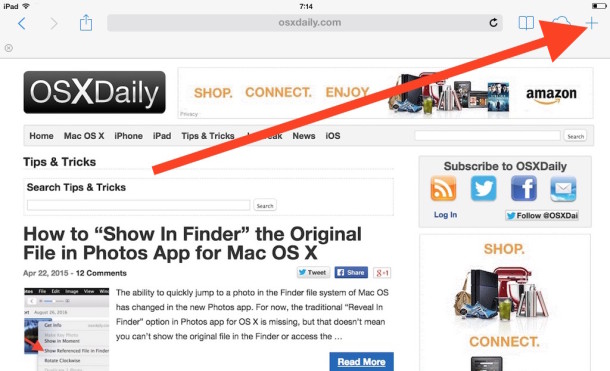
You can easily re-open closed web browser windows in Safari for iOS on the iPad. This works in all iPad models with iOS, and it’s really easy to do at any time in Safari browser on the device:
- From the Safari app, just tap and hold the + button that usually opens new tabs
- After holding the Plus button for a second you will see a pop-up menu that shows recently closed tabs for quick recovery and access
- Select your tab(s) to open and restore to re-open those sessions in Safari
If you don’t want the recently closed tabs to show any history, you can either clear mobile Safari history and cache or just use the new Private Browsing mode to prevent them from accumulating in the first place.
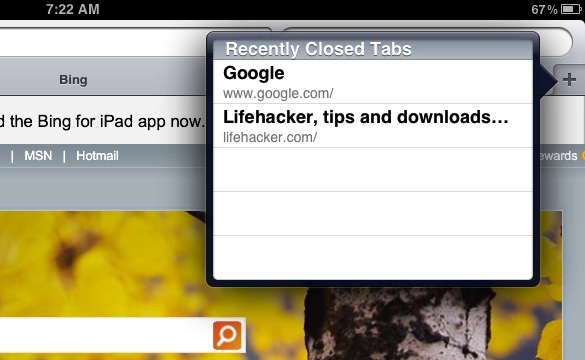
Yes, this feature works in all vaguely modern versions of iOS for iPad, just look for the Recently Closed Tabs section.
This helpful little tip comes to us from Lifehacker, and should improve your iPad web browsing experience a bit.






[…] [via | OsXDaily] […]
[…] Re-Open Closed Browser Windows in Safari for iPad Re-Open Closed Browser Windows in Safari for iPad… Source: osxdaily.com […]
Nice article, but you say that this was Lifehacker’s idea. In fact, they got it from Right Now In Tech, which is my blog.
works for windows too